🚀 Elevate your craft with laser precision and vibrant color—don’t just create, captivate!
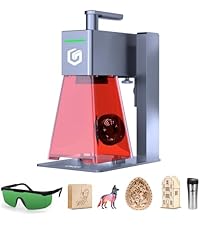
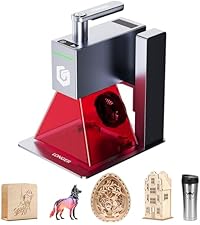
The LONGER RAY5 Laser Engraver packs a powerful 20000mW laser capable of cutting through wood, steel, and acrylic with ultra-fine 0.01mm precision. Featuring a 256-color palette for vivid engraving, a spacious 400x400mm work area, and a responsive 3.5-inch touchscreen with multiple connectivity options, it’s designed for professional-grade DIY projects. Enhanced by a 240MHz multi-core chipset for multi-machine control and comprehensive safety features, this machine delivers high efficiency, versatility, and reliability for creators who demand excellence.


| Best Sellers Rank | #6,269 in Arts, Crafts & Sewing ( See Top 100 in Arts, Crafts & Sewing ) #12 in Jewelry Making Engraving Machines & Tools |
| Customer Reviews | 4.2 out of 5 stars 806 Reviews |
K**I
Very impressive, excellent piece of equipment!
Longer ray5 5W laser engraver I’ve been using the Longer Ray5 5W laser engraver for several weeks and overall, I’m super excited about the new addition to my art studio! The price point on this is why I didn’t buy the 10w model. My plans consist of engraving, various materials, but not necessarily needing to do any cutting. Now that I’m learning more and it was not super hard to get the hang of, I sometimes wonder if I should have gotten a larger laser, but knowing it’s 3x the price, I don’t know that a few cuts is really worth that for me right now. I’ve been watching YouTube videos to learn the software and I say that is a must! If you have any experience using Cricut Deaign Studio, or using a 3-d printer, you will see the similarities here. I have been nothing but impressed with the high-quality burn-ins that this laser does! I have little design & computer + machine experience, but there are tons of intricacies that I have yet to uncover. The work area is pretty big at 400mm x 400mm & is perfect for a range of projects. Better yet, the quality of the engraving is IMPRESSIVE, especially for its price point! Assembly and setup are straightforward. Before running the laser, unless you are familiar with diode lasers and how they operate, I highly suggest searching for YouTube videos with step-by-step guides on software configuration & use, homing the laser, and pre-setting your bed size to match the workspace. It produces some very fine detail & if you enter the right power % and mm/minute ratios, you won’t have any burning, just extremely professional engraving results. I was extra excited to find that by adjusting the speed & power % I could get blue, gold, and a brownish hue on stainless steel engraving! That in particular was my favorite surprise with this!! I just expected to have some letters or designs without accents like color, so you can imagine all the pieces of metal I used this on 😀 If you get stuck or the laser doesn’t respond, just restart the device. If you’re running computer software & the machine freezes, just restart the laser machine & the software program. One more thing that is super useful is that it connects to the internet through wi-fi. Having this as an option means that I can drop files directly to the memory card while it is inside the machine, vs loading to the card, then carrying the card to my laser, and the back and forth. In addition, you can use the touch screen on the machine to open files and print directly from the touch screen without using a computer to speak to it. Best Advice I Have: Make sure that you to a laser burn test for every new type of material you want to introduce into your repertoire. That’s how I learned about the colors that can be achieved with engraving stainless steel. ***Do NOT forget your safety glasses 🥽‼️ This is great & I have no regrets …. I’m going to add a small air pump to help keep the heat and smoke from damaging the work surfaces on more intricate designs. Again, just hop on google and look for add-ons! I hope this helps you if you were on the fence.
A**C
Well-packaged, lots of accessories, totally worth it
I bought this as a gift for my brother who’s a designer, and he’s obsessed with it. The packaging was super secure, everything came in perfect condition, and there are way more accessories than I expected. My brother was so excited when he opened it—he said the machine feels really solid and well-built, not cheap at all. The instructions are pretty clear, and it didn’t take long to put it together and start using it. He tried it out a few times already and kept saying the results are better than expected. The engravings are sharp and detailed, and it works great on wood, glass, and even metal. The rotary kit is awesome too—it lets him engrave on mugs, bottles, and other round objects, which makes it super versatile. Honestly, this turned out to be the perfect gift. He loves it, I’m happy with the purchase, and for the price it feels like a really good deal. Highly recommend for anyone who likes design, DIY, or just making cool custom stuff.
B**C
DIY engraving made less intimidating
This engraver brings accuracy and ease together—clean cuts, reliable performance, and a touchscreen that makes setup less of a guessing game. The 5W power is enough for wood, leather, and acrylic projects, giving crisp results without scorching. I used it for a DYI snowflakes, and the detail came out sharper than expected. It’s not the fastest machine, but for DIY work it balances precision and usability nicely.
R**Y
LONGER Laser Engraver Ray5: A Game-Changer for DIY Enthusiasts and Crafters
As someone who's always tinkering with DIY projects, from custom wooden signs to personalized gifts, I was on the hunt for an affordable yet reliable laser engraver to take my hobbies to the next level. After reading countless reviews and comparing options, I decided to pull the trigger on the LONGER Ray5 laser engraver. Let me tell you, it has exceeded every expectation I had. I've been using it for a couple of months now, and it's become an indispensable tool in my workshop. If you're a beginner dipping your toes into laser engraving or an experienced maker looking for something straightforward and powerful, this machine is a fantastic choice. Here's my in-depth take on why I highly recommend the LONGER Ray5. Unboxing and Initial Setup: Surprisingly Simple One of the biggest hurdles with new tech gadgets is the setup process, but the Ray5 made it a breeze. The package arrived well-packaged with everything I needed right out of the box: the engraver itself, a sturdy frame, protective eyewear, an air assist pump (which is a nice bonus for cleaner cuts), and all the necessary cables. Assembly took me less than 30 minutes—mostly just attaching the laser module to the frame and connecting the wires. The instructions are clear, with both written guides and QR codes linking to video tutorials on the LONGER website. No need for fancy tools; a basic screwdriver does the trick. What really impressed me was how beginner-friendly the whole process felt. I'm not a tech wizard, but I had it up and running on my laptop within an hour. The software download was seamless, and it supports multiple operating systems like Windows, macOS, and even some mobile integration. If you're worried about compatibility issues, don't be—the Ray5 plays nice with popular design software like LightBurn and LaserGRBL, which are free to try. Overall, the ease of setup alone makes this a standout for newcomers who might be intimidated by more complex machines. The App and Software: Intuitive and User-Friendly The heart of the Ray5's appeal is its companion app and software ecosystem. LONGER provides their own app, which is incredibly intuitive. It's got a clean interface where you can import designs, adjust settings like power, speed, and passes with sliders, and even preview the engraving path before committing. I love the mobile app version too—it lets me control the engraver from my phone, which is perfect for quick adjustments while I'm in the middle of a project in the garage. For beginners, the app includes preset modes for different materials (wood, leather, acrylic, etc.), so you don't have to guess at settings. As someone who's graduated from beginner to more experimental projects, I've appreciated the advanced features like multi-layer engraving and custom focus adjustments. The software is responsive, with minimal lag even on my mid-range laptop. One small nitpick: while it's great for 2D designs, if you're into super intricate 3D modeling, you might need to pair it with more robust software like Adobe Illustrator for prep work. But for 90% of what I do, the built-in tools are more than sufficient. It's this thoughtful software that bridges the gap between novice and pro users seamlessly. Performance and Engraving Quality: Exceptional Results on Wood and Beyond Now, onto the fun part—the actual engraving. The Ray5 is a diode laser with a 5W output, which might not sound like much compared to industrial beasts, but for hobbyists, it's plenty powerful. On wood, it delivers stunning results. I've engraved everything from plywood coasters to oak plaques, and the lines are crisp, with deep burns that look professional. The engraving speed is adjustable up to 600mm/s, so I can knock out a simple design in minutes or take my time for finer details without sacrificing quality. What surprised me most is its versatility across materials. Wood is its sweet spot—I've done beautiful etchings on basswood, pine, and even reclaimed barn wood with no issues. But it handles other stuff brilliantly too: leather for custom wallets, acrylic for clear awards, and even anodized aluminum for metal tags. The engraving effect is consistent, with minimal charring thanks to the optional air assist, which blows away smoke and debris for cleaner edges. I've experimented with coloring agents on wood to enhance contrast, and the Ray5 picks it up flawlessly. Safety-wise, it's solid. The enclosed design and included goggles keep things secure, and the emergency stop button is easily accessible. I've run it in my home workshop without any ventilation headaches, though I do recommend a small fan for longer sessions. Power consumption is low, so it doesn't spike my electricity bill, and it's quiet enough that I can use it while watching TV. Build Quality, Portability, and Daily Use The Ray5's build is robust for its price point. The aluminum frame is stable, reducing vibrations that could blur engravings, and the working area (130x130mm) is generous for most personal projects—big enough for phone cases or small signs but compact for desktop use. At around 5kg, it's portable; I can easily move it from my desk to the patio for outdoor projects. The laser module is modular, so if you want to upgrade power later (LONGER offers higher-wattage options), it's straightforward. In terms of durability, it's held up great. I've put in dozens of hours without any wear, and the customer support from LONGER has been responsive via email when I had a minor software query. Firmware updates are pushed through the app, keeping it current. If I had to point out any drawbacks, it's that the stock lens can get dusty after heavy use (easy fix with the cleaning kit they include), and for very thick materials over 10mm, you might need multiple passes. But these are minor compared to the overall value. Who Is This For? My Final Recommendation The LONGER Ray5 is perfect for beginners who want to start engraving without a steep learning curve or massive investment—with around $300 in many places, which is a steal for the quality. Experts will appreciate the expandability and reliable performance for prototyping or small-batch production. Whether you're making holiday gifts, Etsy items, or just personalizing your gadgets, this engraver sparks creativity without frustration. In a sea of laser engravers, the Ray5 stands out for its balance of ease, power, and affordability. It transformed my hobby from sketches on paper to tangible, impressive creations. If you're on the fence, go for it—you won't regret it. Five stars all the way! If LONGER keeps innovating like this, they'll have a loyal customer in me for life.
M**G
Absolutely Amazing Engraving Machine!
I’m beyond impressed with this engraving machine! Setup was straightforward, and the instructions were clear even for a beginner like me. Within 30 minutes, I was already engraving wood and acrylic with beautiful precision. The machine runs smoothly, the build quality feels solid, and the laser power is more than enough for hobby projects and small business use. I’ve tested it on wood, leather, and even coated metal — all turned out perfect. What I love most is how accurate and consistent the results are. It’s quiet, fast, and the software is user-friendly. If you’re thinking about starting a craft business or just want a reliable engraver at home, this is the one. Definitely worth the investment!
L**.
Very impressed
A few years ago I actually made my own mini laser engraver using recycled DVD. At that time commercial laser engravers cost >$1000. I can't believe that now I can get a desktop laser engraver for ~$100. I have been using the engraver for 5 days now and I am impressed by how easy to use it and how reliable it works. The engraver is surprisingly lightweight and can be easily carried around with one hand. It is not big (see the photos) but have a decent working area. It is so lightweight so that I can direct put it on top of the working material and move it around instead of moving the material around. The 2.5W laser, tho not the most powerful one, but I can engrave a 1mm groove at 50% power and 500mm/s speed on plywood board, or engrave a 2in by 2in image on card board at 80% power and 2000mm/s speed and finish it in 10 min. I think running it even slower and so multiple pass I might be able to cut through 6mm plywood boards. The engrave quality is awesome (accurate, uniform, consistent). Another surprise is the app support. I was afraid that I needed to keep a laptop connected to the engraver to have it work. I was happy to find out that the engraver has a pretty convenient phone app that can be downloaded in play store. I can connect to the engraver wirelessly via wifi via the app, create patterns, specify laser power and speed, send the G code to the engraver, start/pause the engraving remotely on the phone. The engraver doesn't come with any case, I think this makes the engraver very flexible to use. However I highly recommend to get a case with vent. There are burning fume which can be a little unpleasant. I plan to build one using acrylic sheet and aluminum extrusions. The best $100 I recently spent!
S**N
Pretty happy with the machine
So far a great little laser I did go back and purchase the air assist kit for it I’m only giving 4 stars because sometimes the lines won’t meet up for a engraving and one of the axis makes a strange noise but still an awesome little machine
E**Y
Works Great for Beginners – Great Quality and Easy to Learn!
I bought the LONGER 5W laser engraver a few weeks ago as a total beginner to laser engraving, and I’ve already completed several small projects that turned out better than I expected. This machine has been an amazing introduction to the hobby — it works well for beginners but still has enough features to grow with you as you learn more. 📦 Packaging & Delivery: The machine arrived on time and very securely packaged. All the parts were protected, nothing was missing, and the included tools made assembly easy. It even came with sample materials to practice with, which I appreciated as a first-timer. 🛠️ Assembly & Setup: Assembly took about 50 minutes. The instructions were clear, and there are helpful video tutorials online. Everything fit together perfectly and felt sturdy once assembled. I used the MKSLaser app on my phone for the first few test engravings, and it was incredibly easy to use. I later installed LaserBurn on my laptop for more control and customization. Both apps work smoothly with the LONGER engraver, and it’s great to have the option to start simple and move up to more advanced features. ⚙️ Performance: I’ve engraved wood, leather, cardboard, and black acrylic so far — and the results have been great across the board. The detail on text and images is crisp, and with a little trial and error on speed and power settings, you can get very professional-looking results. The laser can cut thin wood (around 2–3mm) in a few passes, and it handles engraving with no issues. 💻 Software Experience: • MKSLaser: Simple and mobile-friendly — perfect for quick, easy jobs. • LaserBurn: More advanced with tons of options for layers, speeds, and design work. Both are compatible and responsive, and they make the learning process a lot easier. 🔒 Safety: Safety goggles are included, and there’s a protective shield around the laser head. I still recommend using it in a well-ventilated space or building a small enclosure — especially when engraving materials like acrylic or leather that release fumes. ✅ Pros: • Works well for beginners, but still powerful enough for advanced use • High-quality engraving on multiple materials • Easy assembly and straightforward setup • Compatible with both beginner-friendly (MKSLaser) and advanced (LaserBurn) software • Great for hobby projects, gifts, and DIY work ❌ Cons: • No built-in enclosure or air assist • Slight learning curve on settings (expected) • Can get a bit noisy during longer jobs 💬 Final Thoughts: If you’re new to laser engraving like I was, the LONGER laser engraver is a perfect starting point. It’s affordable, reliable, and versatile. I’ve already made custom coasters, keychains, and even some engraved gifts for friends — all from my home setup. Whether you’re looking to explore a new hobby or just make cool things for yourself and others, this machine delivers. Highly recommended for beginners and casual makers!
Trustpilot
1 month ago
1 week ago