Desert Online General Trading LLC
Dubai, United Arab Emirates
Desert Online General Trading LLC
Dubai, United Arab Emirates


🔗 Connect with Confidence!
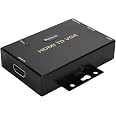
The JideTech HDMI to VGA Converter is a high-performance device that allows seamless audio and video transmission from HDMI-compatible devices to VGA displays. With support for resolutions up to 1080p and a robust build quality, this converter ensures a stable connection for all your presentation and display needs.


| Unit Count | 1.0 Count |
| Number of Items | 1 |
| Item Weight | 0.26 Kilograms |
| Package Quantity | 1 |
| Finish Types | Hdmi,Projector |
| Color | HDMI to VGA |
| Warranty Type | Limited |
| Input Voltage | 5 Volts |
| Current Rating | 0.5 Amps |
| Power Plug | No Plug |
| Connector Type Used on Cable | HDMI |
| Number of Ports | 2 |
| Compatible Devices | Projector, Monitor, PC |
| Specific Uses For Product | Monitor,Projector |
E**E
Works great for Dreamcast VGA to HDMI
It works well for the resolutions it supports, with clean output and no waviness unlike many adapters I've tried in the past. I initially planned to use this on an old PC with DOS/Windows 98, however it did not support the text modes necessary for the DOS boot menu I'd set up or the BIOS configuration on the old PC. It worked if I put a GBS-Control box between the PC and this box's input, but the output then became a mess with waviness and crushed colors.It did however work flawlessly with my Dreamcast VGA box, which was using an OSSC to connect to my television up until now; I put the OSSC on the PC, where that works with the weird text video modes this fails to display, and used this with the Dreamcast VGA box where it works without any issues since the Dreamcast just needs 480p. I'm happy with it as a Dreamcast VGA to HDMI solution, even if this isn't the configuration I expected when I bought it.
S**.
CRT COMPATIBLE
I was reluctant to buy most HDMI to VGA adapters because the first adapter I got for my CRT, wasn't working at all for my CRT.It would just go to sleep, and wasn't getting registered by my computer at all, while my LCD displays would work fine.This one worked perfectly, and as I later found out, can run off of JUST HDMI POWER alone, which helps free up space a bit since I don't have to be tethered to an outlet for the adapter.It is a bit bulky, but the screw holes on the side encourage mounting it somewhere.And for those worried about latency?I found out via slow motion video that it was as low as my main monitor!
J**N
Finally the correct adapter
Dont waste your time with those cheap non-powered versions. This is the way to go. Works perfectly!
K**.
No early boot diagnostics from ASRock Rack server board
I bought this active VGA to HDMI converter to use with the VGA output from server motherboards.The good news is that it does show the BIOS / UEFI configuration screens along with the splash screen just before that. From that point on in the boot process, this converter works fine. Other VGA to HDMI will often not show any output until the OS is booted. For this reason, I'm giving it four stars, because it's at least useful for changing BIOS settings.The bad news is that it is not showing the very earliest diagnostic messages from the ASPEED AST2600 BMC. These messages do correctly show up when using an HP LCD monitor with a VGA input. Had this worked, I would have given a five star rating.The unit is solidly constructed with holes for mounting screws. But, since it's made of metal, you could just slap a strong magnet on it, and then stick it on your server rack or chassis. Being made of black-painted metal with prominent white paint declaring what it is, "VGA to HDMI", it has a sort of server class feel to it.If you don't need to see all of the boot diagnostics, this unit should work fine for server management. Otherwise, you need to either use a true VGA monitor or some other solution. I've tried several and, while this one's the best so far, it falls just short of what I want in a VGA to HDMI converter.
J**N
Good product
Worked as advertised
H**8
Works like a charm!
I learned something... Just because you buy a VGA to HDMI cable to use a PC with a flatscreen TV, it doesn't mean it's just going to work like a monitor and a PC. Apparently monitors are designed to work with PCs so buying a two-way cable to adapted video feed works.My Flatscreen TV however, could not find the signal when switching to HDMI 1. That's when I figured I needed some kind of special converter and went browsing on Amazon. The JideTech 1080P VGA to HDMI Converter work great!Easy to setup and use and comes with screw holes so you can mount this to your wall/tv if need be.The only question now is, how long will it last... I guess I'll find out.
A**R
This could not keep up with the data stream from google Chromecast
This could not keep up with the data stream from google Chromecast going to a 15 pin sub-D VGA connector -- RGB into a Pioneer 50 inch plasma screen. It freezes the video stream every few seconds momentarily and the the audio drops out as well.
P**T
Does what it says it does - accurate VGA image.
I have a gajillion monitors scattered over a wide area, using the 1080P format (1920x1080, 30 Hz). I use a lot of KVM over RJ45 extenders (uncompressed), raspberry PI with VGA to receive information over the network, and just old PCs. That is to say, I have a mish-mash of DVI, HDMI, Display Port, and VGA to deal with - while modern inexpensive displays are HDMI, and that's about it. Rather than replace some expensive hardware to mate up with new displays, this is an inexpensive work around that provides excellent results.Most modern displays have at least one USB port as well, so I can use my USB A - to 2.1mm male barrel cables to power this device. The unit uses 5VDC at 500ma, so no need to use the clunky power adapter that comes with it if I have that USB cable (not provided with this device - it is a separate purchase).I looked at units (with male pins) that plug directly into the VGA port on the video device, but male units are more likely to be too bulky to fit behind the device. This connects to the VGA cord, then I just attach this device to the back of the display and use short HDMI and USB cables to finish the install. If I need to extend the distance between the device and the display, this isn't a bad way to go.
Trustpilot
1 month ago
1 week ago