
DOWNLOAD THE APP


Customer Services
Copyright © 2025 Desertcart Holdings Limited
DOWNLOAD THE APP


🎧 Elevate your sound game — pro audio, zero compromise.
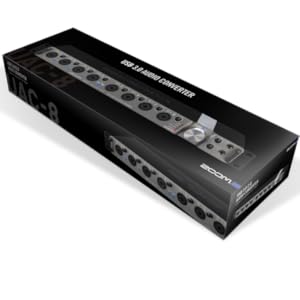
The Zoom UAC-2 is a compact, high-performance 2-in/2-out USB 3.0 audio interface delivering pristine 24-bit/192kHz audio quality. Designed for professionals and content creators, it features low-latency direct monitoring, versatile combo inputs, and a loopback function ideal for streaming and podcasting. Compatible primarily with Windows and macOS, it offers class-compliant mode for Linux users with some limitations, making it a powerful tool for studio and live applications.


| ASIN | B00YEBUMPE |
| Best Sellers Rank | 24,492 in Musical Instruments & DJ ( See Top 100 in Musical Instruments & DJ ) 113 in Computer Audio Interfaces |
| Compatible Devices | Personal Computer |
| Country Produced In | china |
| Customer Reviews | 3.6 3.6 out of 5 stars (13) |
| Date First Available | 28 May 2015 |
| Hardware Interface | USB |
| Item Weight | 1.07 kg |
| Item model number | UAC-2 |
| Operating System | Windows |
| Package Dimensions | 24.1 x 17.2 x 8.1 cm; 1.07 kg |
| Supported Software | All standard DAW applications |
J**E
Can be used on Linux, sort of!
Linux users! This interface works on my Fedora 41 machine, however there are big caveats! There is no native driver or mixer software (MixEfx) available for linux, which means you have to set the interface to class compliant mode (via the switch at the back), and you can't access the settings such as internal routings, the effects, the mixer, or the ADAT functionality (the extra digital inputs). HOWEVER, minus the features that the MixEfx offers, the interface works just fine in class compliant mode. Additionally, there is a workaround for the MixEfx software. If you connect the interface to a Windows or macOS system, such as through a VM (e.g. with quickemu), you can edit the settings from there and the settings *will* persist! Even in class compliant mode. It's a bit of a hassle if you want to adjust things often, and if you're interested in using the effects then maybe look elsewhere. But in my use case it's perfect, as the only thing I need is to monitor two of the inputs at all times, and that's it - any other mixing I do will be in my DAW anyway. I did test the MidiEfx and audio control panel in Wine and they both started up fine, but obviously could not detect the interface so they're useless unless you find a way to get the driver working in wine, and find a way to route the device to the wine instance. Please remember your specific set up and system may give different results, so be prepared for that. I'll try to remember to update this review if I find any other quirks.
J**P
Doesnt work with MPC
Looks amazing but unfortunately the class compliant mode doesnt work with mpc's :( Sad times. It works for a short time then all audio becomes a garbled mess. If your not using it with an mpc its probably great.
P**1
Doesn't work with linux
I bought this to work with linux. I already own a number of Zoom recorders and interfaces, and up to now, it's just been a matter of plugging them in - linux recognises them and away we go. Can't get the UAC-2 to work with linux to save my life (tried both "normal" mode and compatibility mode, also USB2 and USB3. (BTW - if anyone has got this thing to work with linux, I'd be very interested to know how they did it!) [update] It appears that "doesn't work with linux" is too simple (nothing in linuxworld is ever simple :( ) Apologies for linux techie stuff in what follows - if you use linux, you'll probably figure it out (if not, post a comment and I'll try to clarify). It apparently doesn't work with devuan ascii (distro derived from debian stretch, without systemd - kernel 4.9.0-11) However - it apparently ***does*** work with ubuntu 14 (kernel 4.4.0-31) - I just plugged it in, and it detected it and made it available. (This was using compatibiity mode - haven't tried "native" mode as yet.) Why it works with the earlier kernel and doesn't with the later kernel is a mystery at the moment - possibly a driver regression. When I've time, I'll investigate it. (I should add that I've been buying Zoom equipment since Zoom was founded, and this is the first piece of their kit with which I've been anything less than delighted. Come on, Zoom - write a dedicated linux driver for this interface! Can't be beyond human ingenuity.)
M**Y
Well made and presented worth the bit extra for the features should you have a 3.0 motherboard
Excellent Interface Why? Phantom power for condenser mikes. Zero latency for recording vocals. 2 in 2 out Hi z for guitar although can't confirm any plus or minus as use midi interface piano as input device. Separate volume control for headphones. Ok granted a lot of other devices have these features and I was tossing up between the roland quad capture probably a worthy substitute £50 less although I didn't get to hear but I noted no separate headphone volume control. Where as my previous M audio m track plus would drop out if the latency was set below 256 128 64 and lower this does not I can go to 64 or lower great for low latency while playing top melody lines. Round trip of 8 m/s. could go lower but not necessary. USB 3.0 NOTE CHECK YOUR MOTHERBOARD HAS A USB 3.0 port or the USB 3.0 advantage although backwards compatible is IRRELEVANT. However it will still work with USB 2.0 ports as they are backward compatible so if you were planning to upgrade your system/motherboard in the future then a point possibly worth considering. Why buy a 2.0 device if your motherboard has USB 3.0 connections take advantage of the 5G/s theoretically possible transfer rate obviously not achievable but handy to have the capability for the future.. Very impressed with the sound quality of the device 24 bit 192K [stated but not confirmed] through the rokits and sub. Also note I am running an i7 deluxe 3.1 [note the device won't work on the 3.1 ports obviously] intel 5830 hex and 64G of DDR4 so this will possibly have some bearing on latency times. Well written drivers a must point to consider with the purchase of any USB audio device so far I have only had I think two drop outs since purchase it was on for 3 days solid to start with not a glitch doesn't get hot.
A**R
... all you VST instruments and audio units to perform like hardware units on bot mac and pc
This will convert all you VST instruments and audio units to perform like hardware units on bot mac and pc. Latency is ultra low and the driver is rock solid even at lowest latency settings!!!! Clean pre amps very clean sound out put with better audio imagery. All above performance boost I am getting is on a core 2 duo mac-book 2009 with a USB 2 connector. If you have USB 3 then its all a different story !!! you will get a better performance boost. On Logic pro x this unit gives sysex message out. This can be filtered in logic environment page. Make sure your sequencer gets midi from ZOOM UAC-2 MIDI IO only by wiring to it not from the SUM or RESERVED PORT. Problem solved.
M**N
Useless driver.
Buyer beware, the drivers are crap if you're using Windows 10 64 bit. I've had to install ASIO4all because the Zoom driver stopped working and it is far from ideal.
B**S
I bought this about 4 months ago and shortly after I had integrated it into my home studio, I started to get problems in the left speaker of my Genelec studio monitors. The speakers were very old and I assumed they had just worn out, so I bought a brand new, $500 pair of Adam Audio speakers to replace them. After just a couple of weeks, I started to have similar problems with the brand new speakers, which is when I realised that something was causing them to blow a driver. The only logical culprit was the UAC-2. When I sent the new speakers off for repair, I went back to my old Audioengine A2s, only to discover that they, too, got wrecked in the short time I was using them before I got the Adams. I must be a slow learner. Unfortunately, the way Amazon handle returns hasn't allowed me to confirm that it was the UAC-2 causing the problem. They have refunded my money but I still have to worry about what might happen with my next pair of speakers.
Trustpilot
5 days ago
2 weeks ago