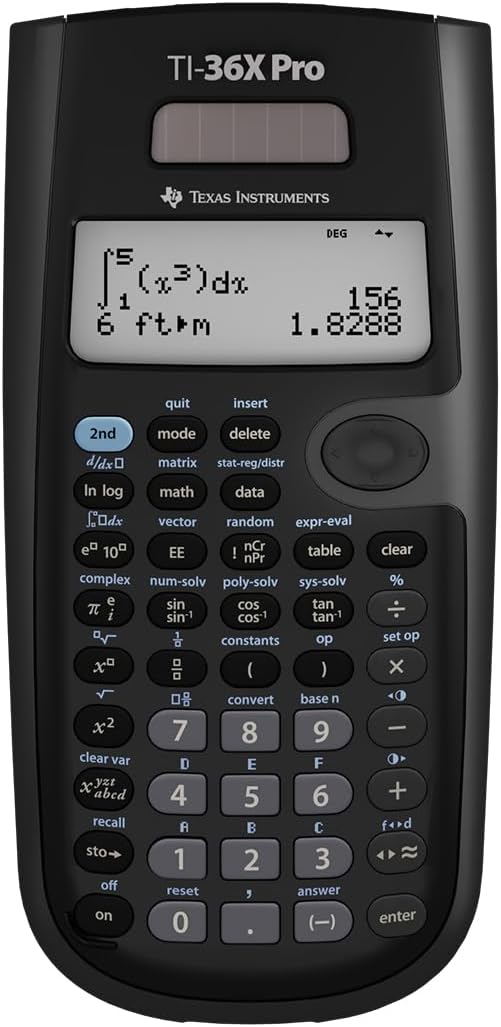



Texas Instruments TI 36 X-PRO
Product ID: 49894585
Details
- BrandTexas
- Calculator Type
- Colourblack
- Compatible devicesTI 36X Pro
- MaterialPlastic
- Model nameTI36XPRO
📊4-line MultiView display
🔋Dual solar & battery power
🧮Advanced multi-solver functions
Desertcart purchases this item on your behalf and handles shipping, customs, and support to Argentina.
🧠 Elevate your calculations — the TI 36 X-PRO means business.
The Texas Instruments TI 36 X-PRO is a professional-grade scientific calculator featuring a 4-line MultiView display, advanced solvers for equations and systems, and dual solar/battery power. Designed for engineers, scientists, and students, it supports textbook-style input and offers a durable build with a protective cover, making it an essential tool for precise, efficient calculations anytime, anywhere.

| ASIN | B004NBZB2Y |
| Best Sellers Rank | 140,683 in Stationery & Office Supplies ( See Top 100 in Stationery & Office Supplies ) 170 in Scientific Calculators |
| Brand | Texas Instruments |
| Brand Name | Texas Instruments |
| Calculator Type | Engineering/Scientific |
| Colour | black |
| Compatible Devices | TI 36X Pro |
| Customer Reviews | 4.7 out of 5 stars 22,162 Reviews |
| Display Type | LCD |
| Enclosure Material | Plastic |
| Global Trade Identification Number | 03243480104739, 00033317029860, 03243480103572 |
| Item Dimensions L x W | 24.6L x 24.6W centimetres |
| Item Weight | 145 g |
| Manufacturer | Texas Instruments |
| Manufacturer Part Number | 36PRO/TBL/1L1 |
| Model Name | TI36XPRO |
| Model Number | 36PRO/TBL/1L1 |
| Number of Batteries | 1 Lithium Metal batteries required. (included) |
| Number of batteries | 1 Lithium Metal batteries required. (included) |
| Power Source | Solar and battery operated |
| Power source | Solar and battery operated |
| Product Warranty | statutory |
| Screen Size | 2.62 Inches |
| Screen size | 2.62 Inches |
| UPC | 197274678803 012303264850 527645823516 763615999007 778888085951 999997114824 791583761272 033317203666 734911329478 666672977165 640206706346 803982780126 806293526162 033317070251 872182668381 080175314317 033317029860 641438187811 523160308910 809302183899 999997491543 172302617702 012951710266 168141372360 067224971325 809385664070 702658636043 801593400624 638458801209 809186269108 1631207457… |
| Unit Count | 1.0 count |
A**R
Excellent calculator for the price, good build quality and very easy to use.
I think this has to be the best calculator I have ever owned. It displays you working and the results in an easy to read layouts. It has all the modes I wil need for my work. It feels much more solid than my casio calculators and the button have a nice action that has a quality feel to them. This calculator is often show with the clip on case attached to the back of the calculator, giving it a odd look with the tab stuck out at the top. This is part of the covr that you cann clip onto the back or front when not using the device to protect it, the pictuee here does not show it.
R**1
Excellent for Maths and Physics students
Need the read the manual as this calculator has so many functions, recommended for any science nerd like me!
T**R
Came with manual in French. Very slow processor.
French instructions. Fortunately English manual is online. Like most TI calculators complex calculations take a very long time compared to equivalent Casio. Try integral of tan(x) from 0 to 1.57079. 23 seconds! My 28 year old TI 83 takes 20 seconds , so the processor in the TI 36X pro is a quarter of a century behind the times. The case back is clip on instead of slide on and takes a while to find the best way to attach it – very clunky indeed. 5* because fewer stars do not get read. TI make improvements to the exterior of their calculators but inside is running on valves. I also have the equivalent Casio fx 991 CW. The integral took 6s. The Numworks graphical calculator took less than 1s.
J**S
Hidden Jewelry.
I don't even know why do they allow this calculator bein used in exams. its so powerful! by the way, the product was delivered in good condition, well packaged and ready to run. If you look for a good calculator for your engineering course, go for it! this an amazing calculator. it does conversions, shows the history on the screen and the way that it works with complex numbers is mindblowing.
A**O
A well thought out calculator – better than a Casio?
I was slightly put off this calculator when it arrived because it felt like it wasn't brand new. There was a 'low battery' message on the screen when I switched it on, and what looked like the remains of a previous calculation in the memory. This sours the experience. But leaving that aside, this is a pretty good calculator, even though it's been around for years virtually unchanged. I've always used Casio in the past, but I can see how this has some advantages. It feels simpler to use than the Casio fx-991EX for instance. Not much, but things like the multi-press buttons are a clever way to avoid menus and always having to use the 2nd function key. You'll have to study the specs in detail to find out where the two models really differ, but I don't think the Casio can solve equations as directly as this. But then the Casio has the super clever QR-code generator that puts your results in a web page you can access with your phone and copy/paste into documents. Swings and roundabouts. Both have more features than most humans will ever comprehend. I also think the Casio looks more stylish (this TI is borderline ugly to my eyes) and Casio's slide-on case feels faster and sturdier than the annoying and rattly clip-on case the TI comes with. On the other hand, on the TI, both the case and the calculator have non-slip rubber feet which makes it better to use on a desk. The Casio has a faster keyboard that I find hard to fault, but some may prefer the slightly more positive action of this TI. Their displays are about the same, which is to say not all that good because of the solar power. The Casio's might have more dots. Both have battery backup, but the Casio's battery is easy to get at in its own little compartment whereas you have to screw off the whole back cover to get at the one in the Texas. The point is that both this TI-36X Pro and the equivalent Casio are very highly developed and capable calculators that are as advanced as you'll probably be allowed to take into an exam and only one step below a graphing model. If you're using it in class, you might want to see what everyone else is using so you're not the odd-one-out when the tutor explains something that needs a calculator. Schools might even recommend one over the other. But a big part of the decision might be the price. The TI-36X Pro was much cheaper than the Casio when I bought it. If they were the same price, I would buy the Casio. But I'd be happy with either.
N**E
Nice Powerful Calculator
I normally use an HP calculator with RPN but I kept baffling my children with it when helping them with their maths homework so I wanted a powerful calculator that they could use too. I am really pleased with the TI 36x Pro. It is very simple to learn to use and has a lot of excellent features. It does numeric integration, matrix algebra (limited to 3x3 though), complex numbers and can solve cubic and quadratic equations plus all the other stuff that you'd expect from a scientific calculator. It's not programmable but there's a useful tabular function that lets you create a mini spreadsheet on the fly that I use a lot. I've found that using this covers 90% of the situations where I'd use the programming capabilites of another calculator If you don't need a graphing calculator you'd be hard pressed to find a better scientific calculator than this. If it wasn't for my personal preference for RPN, I'd use it all the time.
H**Y
Really good calculator
Such a good calculator purchased for my finals in physics and the numerical solve function was very useful. The list of constants is very good and very time efficient. For physics calculations (once you know your way around it) is much more efficient than Casio equivalents. Highly recommend!
E**A
Great!
Really glad I bought this. Get a lot of comments from friends saying it looks "complicated", and it is a little weird at first if you've been using another brand for a long time, but it's actually pretty simple to use. The fact you can differentiate/ integrate is really useful, you can set up tables and it will find out a number of things about the data for you (such as the regression coefficient), you can write very complicated sums in a well formatted way... it's very powerful, I think. My personal favourite thing is you can cycle back through old answers and pluck them out to put in your current calculation, which saves a lot of time. Only downside is, because it's outside of the mainstream brands some examiners don't allow it. While I was allowed to use this at A level, at my university only Casio's are allowed, which is a pain. Also, my instructions were in French for some reason. A friend of mine bought the exact same calculator from here, and his were in English, so I don't know what happened there. The instructions can be found online, however.
K**S
Better than the most advanced Casio or Sharp Scientific Calculators and has replaced my graphing calculator for many situations!
I am a 3rd-year Engineering student, and this calculator has become my goto calculator for exams. I own at least 7 or 8 scientific calculators (lost count now), and 3 graphing calculators: these include the HP 50G Graphing calculator, the Sharp EL-516 and I have also used the Casio 115/991ES in the past (same calculator, just different branding between the US and Canada). The Sharp and Casio calculators are the most direct comparisons, while graphing calculators are obviously usually seen in a separate league. I won't compare this to TI's other scientific calculators, because this is simply the most powerful scientific calculator that TI makes. PROS compared to Sharp/Casio's most advanced scientific calculators: 1) Multiline display, and the interface actually uses the multi-lines. If you look at the Casios and Sharps, they use the mult-lines for displaying fractions and the last answer, but never display more than the last answer. In comparison, this TI-36X Pro uses all four lines, so that the last three answers/equations can all be displayed. It's much more like a graphing calculator in this respect. 2) One single mode for all functions; no need to switch between complex mode, normal mode, polynomial mode etc., like the Sharp and Casios do. It's merely for historic reasons that the Casios and Sharps still do this, and it makes so much more sense to have everything done in one mode (like a graphing calculator). 3) Solid, tactile buttons that have a slight "click" when you push them. I really like this, because I don't even need to be looking at the keys to know whether my keypress has registered or not. I find with the Casios and Sharps (particularly the Sharps) that they have keys that are really easily depressed, and don't give you great feedback on whether they've been clicked. 4) Really, really good interface. If you have ever used a graphing calculator from TI, you will feel right at home. The matrix equations, polynomial solver and and linear equation solver all have graphing calculator-like input, which should be both very familiar to many users, as well as intuitive for those new to TI UI design. For example, the polynomial solver is like a computer wizard, taking you through the steps for entering the coefficients of your equation. Really easy to use. 5) Cycling through functions with a single button is pretty innovative, and I think faster than using the 2nd function or (even worse) relying on entering another mode or menu. For example, in order to access ASIN, you just hit the SIN/ASIN button twice to cycle to ASIN. It's really easy and doesn't require you to use two separate buttons. 6) Really good definite integration and derivation. It works really well, and is faster than my Sharp (I performed a side-by-side comparison multiple times for speed). CONS 1) The intuitive interface comes at the expense of a few more button clicks in a few situations. For example, the polynomial solver is dummy-proof for entering your coefficients, but I generally feel that the Casio and Sharp calculators can accomplish the same thing with 1-2 less clicks occasionally. 2) Variables (other than 'x') are difficult to access. The variables are all stored under one button, which you cycle through. 'x' is easy to access since it is the first variable, but to access 'z', you need three button clicks. To access 'b' requires 6 button clicks. I would have preferred an alpha key for access keyboard variables, or a menu with number shortcuts. 3) The silver buttons and silver rocker colour are poor. I know that many other reviews have complained about this too, and it is a bit annoying. It definitely doesn't make the calculator unusable or anything, but they are a bit hard to read, and I personally also feel that they look out-of-place on a calculator that otherwise has rather dull (and more professional) colours. 4) This is a personal pet peeve, but above the "enter" button on the button-right, the TI-36X Pro has a Decimal/Fraction conversion button instead of the "multiplication" operator button; instead, the operator buttons have all been shifted up by one. TI has many other calculators, and most of them have the operator buttons right above the Enter key... which makes sense to me, since they are frequently used. I would have preferred to have the Decimal/Fraction conversion button above the operator keys, to make this keyboard more standard in comparison to other TI and HP calculator layouts. I sometimes hit the conversion key instead of the "addition" operator key as I am used to from other calculators (as a side-note, TI and HP prefer the single-column 1x4 layout of operator keys, whereas Casio and Sharp prefer the 2x2 layout of operator keys. You can easily adjust to either, although I personally prefer the TI/HP layout, as it's easier to access single-handed I think). PROS to graphing calculators What really pushes this calculator over-the-edge for me is that it feels like a graphing calculator in many respects; the interface is intuitive, the line display maximizes all your command history... and it does this while focussing on the main features you might need, such as matrix calculations or solving polynomial expressions. Obviously this can't do graphing, since it isn't a graphing calculator, but it does have a "function table" where you can enter a function and it automatically gives you the y values for an interval of x. That allows you to quickly plot a function's general curve on paper using the provided xy points. Very useful, and for this I have been able to stop needing a graphing calculator. Not only are graphing calculators not allowed on many exams, but some of the more advanced functions on graphing calculators (ie. matrixes) actually require fewer button presses to do on the TI-36X Pro. And I'm tired of changing batteries on a graphing calculator. In other words, I can actually accomplish stuff faster and more reliably on the TI-36X Pro. Honestly, this is a fabulous calculator. The Casio and Sharp calculators have been around far longer, so that's why you may hear some older users advocating for them, but the TI-36X Pro embraces a more intuitive UI with single-mode operation, and packs a few graphing calculator features which cover 99% of everything I do on a calculator in Engineering. I highly recommend this calculator for anyone in need of the most powerful scientific calculator on the market, or a graphing calculator user who finds that they don't need all that functionality and just want something a bit lighter to carry with them.
I**I
Super
Elle fait très bien le boulot
O**Z
Chulada de calculadora
Esta es la primera calculadora de Texas Instruments que pruebo después de toda la vida utilizar Casio y tenía algo de miedo de que no me fuera a acostumbrar a la distribución de las teclas o funciones pero la verdad fue una transición muy sencilla y estoy mucho más a gusto con ella. Este modelo es perfecto desde prepa hasta universidad, resuelve ecuaciones, derivadas, integrales, matrices y cálculos estadísticos, es muy completa, equivalente a una 991 de Casio. Comparación Casio Vs TI Ventajas • Historial, tanto resultados como operaciones que se guarda incluso después de apagarla, esto es la cosa más útil que he visto para problemas en los que tienes que hacer varios pasos, es muy cómodo tenerlos anotados en la misma calcu y volver a escribirlos con una tecla, para mí esto fue lo más decisivo para probarla • Teclas muy intuitivas: la distribución se ve rara al inicio pero sólo es agarrarle, por ejemplo la tecla que tiene Pi le das una vez y poner Pi, otra vez y es e, una vez más y es i, se me hace más rápido y menos complicado que el shift + tecla de las Casio. Contras: • El menos no funciona como signo negativo, son 2 teclas diferentes, al inicio se te puede ir y que no salga una operación por lo mismo • Si quieres notación científica tienes que ponerlo en la configuración, no hay una opción intermedia de que a partir de tantos decimales se ponga en automático, entonces me ha pasado algunas operaciones que el resultado es por ejemplo 1.6393627x10^-8 y si no activo notación científica me lo muestra como 0.000000001, entonces esto es un poquito molesto, pero es rápido cambiar la configuración y ya que la operación se guarda en el historial no es algo tan malo.
E**O
Calcolatrice TOP
La TI 36 X PRO è una calcolatrice di alta gamma. Consente di svolgere tutte le operazioni necessarie di pre Algebra, Algebra e Trigonometria, Statistica e quelle più avanzate di Analisi Matematica. Inoltre ho trovato molto utile la funzione Math Print che consente di visualizzare le principali operazioni e formule così come si presenterebbero scritte. Molto utile anche la possibilità di poter vedere espresso in frazione un risultato in numero decimale, ove possibile. Inoltre la calcolatrice è robusta e resistente. Texas Instruments è sempre una garanzia di qualità. Una cosa che ho apprezzato in un vecchio modello TI degli anni 90 è che a distanza di 30 anni è ancora funzionante e le scritte sui tasti non sono affatto sbiadite ma sembrano appena stampate. Sinonimo di grande qualità.
C**D
The TI-36X Pro churns out exact answers that graphing calculators won't do.
There are some great reviews for this product, but I have seen the lack of mention of one outstanding thing about this calculator. I haven't owned many calculators, but I have used a Ti84 Plus and a Ti84 Plus CE for many years through high-school and college. Albeit this calculator is not a graphing calculator it performs very well and meets my expectations for engineering courses. In fact something stands out. This calculator by default does EXACT math! One thing I have never encountered (and long stopped expecting) was putting the square root of 8 in a calculator and getting back a simplified radical (2) X (the square root of 2). The TI Graphing calculators will always give, an irrational number (2.828427.....) If you want to get a simplified exact answer, you better know how to program or download from the internet an app for it. With the TI-36X Pro, you put it in and it churns out your simplified radical (even rationalizing the denominator of a fraction), every time, not only this, it does the same with pi, opting to display the pi symbol with the most simplified fractional form of your answer. Even if you don't want an exact answer, there is an operator key that will give you the decimal approximation if you desire. This would have been very convenient in classes I took, such as Calculus 2 and 3. Where during a test or on homework, you are often left with very long strings of numbers you have to use add/subtract - multiply/divide. Most teachers want you to give an exact answer so you can't just throw it all into a Graphing calculator, it will give you an approximated number. The TI-36X Pro, will take all of this math and give you a perfectly simplified and exact answer. A $30 dollar calculator capable of something my $150 dollar calculators don't do.
Trustpilot
1 month ago
2 weeks ago