Some deliveries may take a little longer than usual due to regional shipping conditions.

DOWNLOAD THE APP


Customer Services
Copyright © 2025 Desertcart Holdings Limited
DOWNLOAD THE APP


📡 Stay connected, stay ahead — failover that never lets you down!
The Netgear LB2120-100EUS is a compact 4G LTE/3G modem designed for seamless broadband failover with dual Ethernet ports and optional external antennas, ensuring reliable, high-speed connectivity for professional environments.
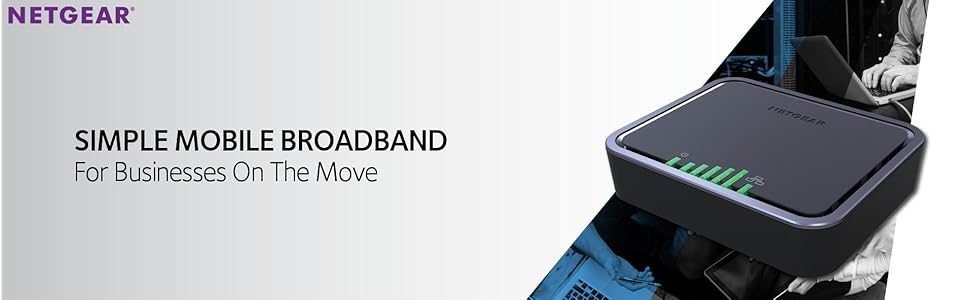


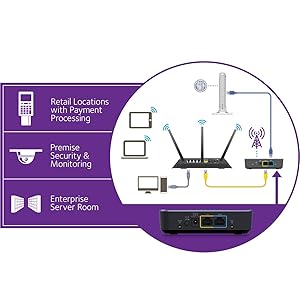
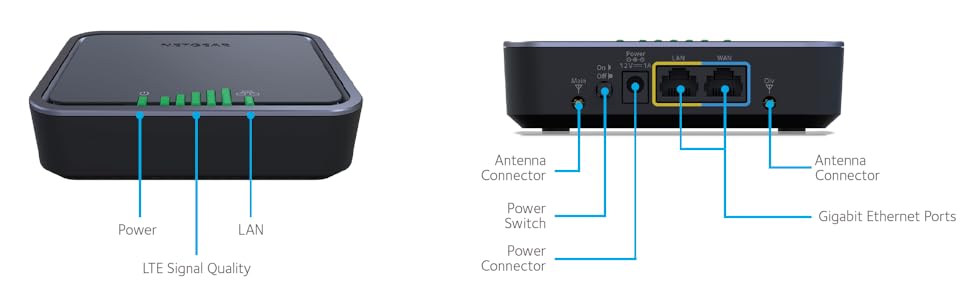
| Brand | NETGEAR |
| Product Dimensions | 9.91 x 11.94 x 3.05 cm; 181 g |
| Item model number | LB2120-100EUS |
| Manufacturer | Netgear |
| Colour | Black |
| Connectivity Type | 3G,LTE |
| Number of Ethernet Ports | 2 |
| Voltage | 12 Volts |
| Operating System | Windows |
| Are Batteries Included | No |
| Item Weight | 181 g |
| Guaranteed software updates until | unknown |
M**G
Device perfect! Just a few pointers to be aware of in the UK 4G world...
Needed one of these as my office was unable to get any broadband installed for a good 6-7 weeks. (A perfect picture of the UKs communication network in 2017)The modem comes unlocked, so threw a 50GB (£30) / month Vodafone 4G Sim card into it and fired it up. We have the modem providing Internet to a LAN of about 15 devices ranging from 3 - 6 computers, and the rest a mobile devices. The LAN is controlled using PfSense (OPNSense) which this is connected to one of the interfaces. Before I did this I had to ensure the device was in Bridge Mode by connecting a computer straight to it and configure it using the web interface. The web interface is easy, literary a few admin pages, nothing too in depth, a good feature it has is the auto fail over from WAN (Broadband connection) to 4G.I did wonder if I would hit the double NAT issue. All UK mobile network operators issue you with a private IP address. Vodafone so far have given us a 192 and a 10 IP addresses so far. Because of this, internally using PfSense I used one of the reserved 172 IP address ranges on the internal LAN which hasn't caused a conflict with a double NAT as yet.A few other points...- You have an option in the web admin to turn off all the lights if you wish.- Gets a little warm but nothing to worry about.- Web admin shows you SMS messages albeit a limit of around 10.- Comes with 1 Cat 5e yellow cable around 1m long.- Shows data usage from a billing date you set- Had to restart it twice in 4 months, not sure why- The 5 signal bars are consistent with a Mobile phone on the same network- Has an option to plug in an external aerial but doesn't come with one- Has a button switch on the side to turn on / off.- If there is no signal lights, your mobile operator has cut you off (not necessary lack of signal)- Has holes underneath so you can wall mount it.One thing to bare in mind (and I learnt the hard way) with Vodafone they allow you by default to go over your monthly allowance and when you do its pants down time. They charge you over £6 / 250Mb. When you approach your monthly limit they do send you SMS messages to the Sim, however only if you monitor the SMS inbox using the web admin pages and ensure its empty (as it only holds around 10 sms messages) you won't know if you have gone over your limit. We racked up around £200 in 3 hours! Make sure with Vodafone or who ever you use, you are aware of this Christmas bonus generator and when you hit your limit it cuts you off rather than get hit with astronomical charges.Would buy again if in the same situation or required a cheap fail over solution. Excellent work around for our situation.
R**I
LB2120 findings
It does were it was designed for. But it laks a) UPNP b) reservered DHCP IP addresses c) USSD messages to update SIM bundles d)It only handles DHCP WAN setup e) Bugs in alert SMS messages f) Does not automatic forwrd WAN adress after failover in bridge mode.The interface is straight forward and easy to use. No difficult settups.
N**S
Five Stars
Took this to remote places in India where there is 4g, and I could connect to bbc.co.uk
J**L
Superb!
This is a fantastic piece of kit!
M**Y
External aerial will not connect well, Netgear have fitted poor non-standard TS9 connectors.
I've used this modem for my home broadband (we're remote) for the last 12 months. It's been reliable EXCEPT the TS9 connectors, which are not to spec and don't fit other TS9 inputs properly. I've bought 3 different TS9 converters to plug in my aerial from various vendors, and they're all seemingly identical, they're just extremely(!) loose in this unit. I can see others have had the same issue elsewhere, and I've had to fit elastic bands around both leads into the back to keep the pressure on.So, beware! Netgear haven't fitted standard TS9 fittings on these units, and I don't know of any external aerial that will actually reliably connect as a result. No support from Netgear themselves, so I'm now having to hunt for an appropriate non-Netgear replacement.
Trustpilot
3 weeks ago
2 days ago