Desert Online General Trading LLC
Dubai, United Arab Emirates
Desert Online General Trading LLC
Dubai, United Arab Emirates


🔑 Unlock the future of home security!
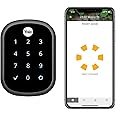
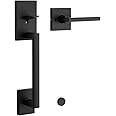
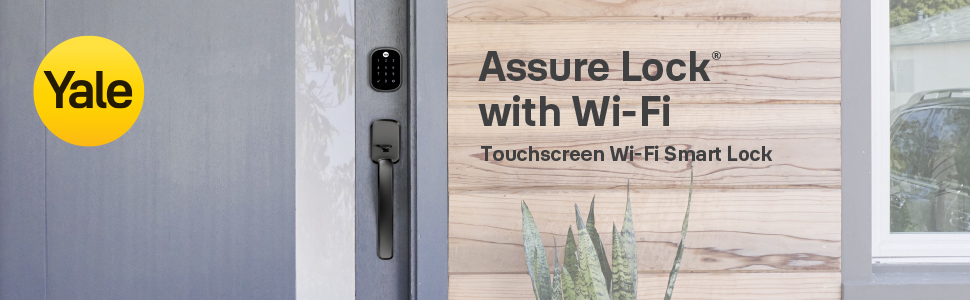
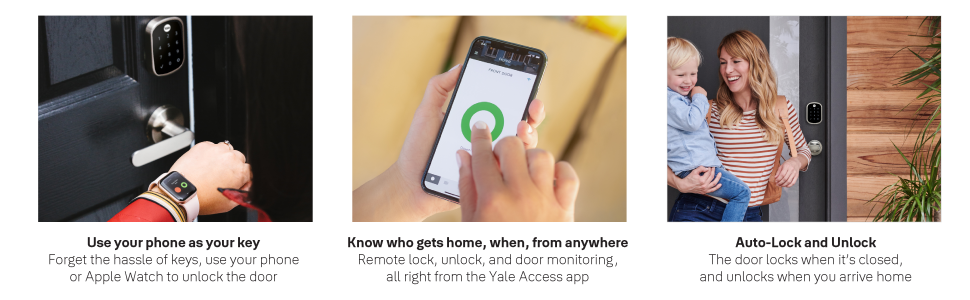
The Yale Assure Lock SL is a cutting-edge, key-free deadbolt that combines sleek design with advanced technology. Compatible with major smart home systems like Alexa, Google Assistant, and HomeKit, it allows for seamless control via the Yale Access App. With features like auto-relock, customizable access codes, and low battery notifications, this lock ensures your home is secure and accessible, all while looking stylish in black suede.


| Brand | Yale |
| Special Feature | Biometric Lock |
| Lock Type | Biometric, Keypad |
| Item Dimensions LxWxH | 18 x 65 x 90 Millimeters |
| Material | Stainless Steel |
| Recommended Uses For Product | Home |
| Style | Lock Only |
| Colour | Black |
| Number of Pieces | 1 |
| Finish Type | Brushed |
| Included Components | Yale Assure Lock SL, Connected by August Module, August Connect Wi-Fi Bridge, August DoorSense, Deadbolt, Strike Plate, Mounting Hardware, Installation Manual |
| Controller Type | Amazon Alexa |
| Shape | Rectangular |
| Control Method | App, Touch |
| Connectivity Protocol | Wi-Fi |
| Department | Hardware |
| Manufacturer | Yale Security Inc. |
| Country of Origin | China |
| Item model number | YRD256-CBA-BSP |
| Product Dimensions | 1.75 x 6.5 x 9.04 cm; 1.73 Kilograms |
| ASIN | B07XHP112C |
J**L
This Yale/August smart lock promises a lot but doesn’t deliver
UPDATE January 1, 2020: I've raised my rating to 2 stars because some of the confusion is due to Amazon's policy of listing multiple versions of the same basic product on one screen and then combining the reviews and questions answered - making it impossible to tell what features or reviews are associated with the item you purchase. This might be OK for socks of various colors but it makes no sense for a lock with different "smart" systems.I purchased the Yale lock Connected by August. A couple of days ago, the features in the August app all started working, both over Bluetooth and over the web. [A quick test of web function is to turn on Airplane Mode, which turns off Bluetooth and Cell coverage, but you can leave your WiFi on.]The app-based features are useful: remote lock, remote unlock, and remotely monitoring if the door is open or closed [if you installed DoorSense]. If you turn on Notifications, you will see onscreen [or on your Apple Watch] when the lock is operated - manually or by software.The AutoUnlock with your phone in your pocket works fairly often, but if there is any interruption in the signal or you shut down the phone. You usually can't figure out what went wrong, but if Notifications is enabled you will at least get a warning that it won't unlock the door so you can put down all your grocery bags. It's faster and easier at that point to manually key in your opening sequence rather than fish out the phone.I did find a partial workaround that allows me to shop nearby and still have AutoUnlock work: I manually moved the "lock radius" setting a few blocks the other direction from where we shop, while still including our home. Once I walk east 1.5 blocks, the Notification tells me that AutoUnlock has been engaged and I can shop, eat, go to the library, etcetera and the door will [usually] AutoUnlock when I return home.I was able to get Apple's "Home" app to work locally using Bluetooth. In typical Apple fashion, it is easy to install, add the lock, and use - and offers multiple ways to control the lock. However, it does NOT show whether or not the door is opened so the Yale deadbolt could be remotely engaged on a wide-open door! Siri also controls the open/close feature. To add remote control over the web, you need a hub. Since I already had a recent iPad, I set it up as a hub and it worked fine.Despite assurances from multiple August support reps and the claims on the Amazon site, Connect with August will NOT WORK WITH A WINK HUB. The app appears to connect to Wink but the functions don't work! Turns out that the Wink hub is only compatible with the Z-wave/ZigBee controller version.ALEXA DOES NOT WORK DIRECTLY WITH CONNECT BY AUGUST, contrary to their claims on Amazon and the advice of multiple August reps. Amazon does sell an Echo Plus that incorporates a hub, but that too is incompatible with Connect by August! THE ECHO PLUS IS A ZIGBEE HUB, ONLY COMPATIBLE WITH THE Z-WAVE/ZIGBEE CONTROLLER VERSION.So, my current suggestion would be to buy the Connect by August version ONLY for use with the August App. To add voice control or other advanced features, you'll need to buy/have the correct hub and it's nearly impossible to determine what will work until you set it up and try it.I'd rate this lock considerably higher if Yale offered clear guidance on how to get it to work with non-August apps before you purchase it. Until then, if your expectations are pretty low, you might be happy with Yale with Connect by August.ORIGINAL REVIEW: I’ve been eagerly waiting a Bluetooth enabled smart deadbolt that would let me walk up to the back door with my hands full of groceries, tools, grandkids or whatever and have the door auto-unlock. My car does this flawlessly.Turns out with the August implementation, you have to go several blocks away from home for this to work, so if I go to the 5 restaurants, 2 grocery stores, 2 drugstores or the local library that are our most common destinations – or just take a walk around the block – the auto-unlocking feature is turned off. There is a manual over-ride option in the August app but it takes 7 taps in 4 different screens to implement; going to the Home screen and taping the red or green circle, takes 3 taps. Hands-free auto-unlocking is one of several promises Yale makes but only partially delivers.That’s a pity because the lock itself is one of the best I’ve ever installed: rugged, clear written instructions, nice drilling templates, all screw options included. The lock installation & setup video within the August app is also quite good. I had no issues with installing the lock itself and it worked smoothly immediately. Programming the Master Code and my Personal Code also went well so I was really pleased with this adventure and felt more comfortable with the premium price for this combo.The nightmare [shared by numerous purchasers according to Amazon reviews] was with installing and using the features of the August Connect that is required for remote control or monitoring After reinstalling the August radio and Connect Wi-Fi bridge three times to make sure I didn’t miss anything in the instructions, I called Support and they were very friendly and talked me step-by-step through multiple installation and troubleshooting tips. Nothing worked so they concluded the bridge was defective and promised to send a replacement “within 7 business days”. They sent an email later that day requesting proof of purchase which I sent. The replacement never shipped.The more time spent with this lock, the more my confidence in August plummeted. I decided to call Support again and spoke with a different rep who had me to do the same troubleshooting done previously and came up with a different explanation: my Wi-Fi signal wasn’t reaching the bridge. He referred me to Apple support to accomplish that and said to email August support and he’d call me back or another rep would. Apple support was fantastic, explained every step of the process with the router, and I soon had cabled the two routers together, logged onto the slow channel with my phone and sent Support an email asking for a call back.When no one had called me back after 45 minutes, I called support again and got a third person. She too was very friendly and walked me through the script redoing the same troubleshooting and installation steps for a third time. Although she could see that the bridge was connected to my new 2.4 GHz channel the install still failed and the August app confirmed that my Wi-Fi and Bluetooth signals were both too weak. That made no sense because both signals were strong on my phone when I stood in front of the lock.This rep put me on hold and came back shortly to tell me there is a glitch in their app and my signals were actually OK! She told me to ignore the error messages, close the app, and just try the Bluetooth features. Locking/unlocking and seeing whether or not the door was closed using the Door Sense feature worked with Bluetooth!Alexa control has never worked with multiple Echo devices. Using Alexa on my phone, I can lock/unlock the deadbolt if I’m standing in front of the door, but August doesn’t work with the Echo, Tap or Dot devices in my home. The August Smart Home app that’s required is rated less than 3 stars with about half the users finding it unusable, as I did. Despite over an hour with Support from Amazon and multiple August support calls, Alexa control remains impossible even though it works flawlessly with multiple other smart devices in my home. August says, “there’s no problem on our side”.Although it’s not consistent, I have sometimes been able to lock/unlock the door when standing in front of it with:• Alexa on my phone• Siri voice control on my phone• The August app on my Apple WatchThe Yale advertising says: “Works with Alexa, Google Assistant, Apple Home Kit (Siri), Simplisafe, Airbnb, Home Away and more” and the August app has a Wink hub link under “Works With” but although the lock was recognized in the Wink app it couldn’t be controlled. In the Amazon Q&A sections, the Yale rep responded to “What Alexa enabled hubs work with this lock? A: The lock can be controlled via Alexa when used in conjunction with a SmartThings or Wink hub. By Yale Rep on May 1, 2018When I asked the 6th support rep to help me get this hub to work, she said, “Wink doesn’t work with the Yale lock you purchased. It only works if you buy the August lock.” Another disappointing surprise...Amazon reviews show that one quarter of purchasers rate the Yale/August lock less than 3 stars. One fifth rate it as only 1 star, which has been my experience too. If you skip August and just buy the lock, you’ll avoid countless frustrations and save money too.SUMMARY:Strengths = good electronic touchpad lock that promises voice, WiFi, and Bluetooth controlWeaknesses = Finicky WiFi connection, buggy app, Advanced features don’t work out of the box, Support reps contradict each other
R**O
Why an app to program.
My door came prepped for the handle and dead bolt. It took no time to install. Nice quality.Now to the dead bolt programming. Why do I need an app and an account to program a device that is located on my house. I'm a tech guy, but really!! I just want to program it locally and have a simple lock. I don't know why everything has to be so complicated. I have a couple of electronic locks on my out buildings and it makes it nice to just not have a key to get in. I understand some people want this feature, but I should have a choice to disable it if I want. Let's get back to basics. I chose this deadbolt because it had a key bypass for when the electronics die. I'm not saying right away but it will eventually.
E**C
The Perfect Lock
I finally found the perfect lock. I never leave reviews but I was so frustrated in my search for the perfect lock and so happy with what I found, I thought I would recount my saga to help anyone in my same position. I am an iPhone/iPad guy that likes to use Google Home wherever possible. It is a little tough to manage integration with Siri and Google Assistant but I mostly have it licked - except for the lock which had been the bane of my existence. I started with the Yale Nest lock. Should work great with google, right? It does, except google can only lock the door, not unlock it. I understand why for security purposes, but it defeated the purpose I was looking for - not having to use a key OR the keypad when my hands were full. I wanted quick and easy entry. I was going to set up a simple Siri shortcut so I could tell my Apple Watch to unlock the door, and it would tell Google. No dice. Strike one.I next tried the Sledge Sense. It says it works with Google Assistant and Siri. I knew going in that Google would not unlock this door either, but I read that Siri would. I figured I could make this work. I’ll leave all my google routines for inside the home (lock doors before bed, lock doors for when I am about to leave, etc.) and then just use a Siri routine for returning home (unlock door and disarm security system). Strike 2. First, the Sense does work with Google and HomeKit, but not at the same time. You have to choose one or the other. So no double routines. Still figured I could just cut the locking out of my Google routines by making it auto lock and then run it just on HomeKit to unlock with Siri. This kind of worked, but your iPhone has to be unlocked in order for Siri to unlock the door. This means that you cannot use Siri to unlock the door with your Apple Watch while the phone is in your pocket. So still not accomplishing the easy entry I was looking for.I was tired of spending money on locks that didn’t do what I wanted and about to give up when I decided I would give this one a try. And I struck gold. First of all, it works with Siri and Google, though I didn’t even bother to set it up with Siri because of the geofencing discussed below. Second, Google actually CAN lock AND unlock this one, unlike the other 2. You do have to speak your code Google to unlock which still makes quick entry awkward, but at least you can use google to unlock the door for a visitor if you are in another room of the house. But the best part is you don’t need to rely on Google OR Siri to unlock the door for yourself when coming home. Just set up geofencing with the Bluetooth on your iPhone, and it will unlock automatically when you get close.This has everything I was looking for in a lock. It seems to be well built and was easy to set up and get running. It still has a few little quirks that are annoying but not fatal. My only real complaint is how you wake up the keypad if you want to do a manual code entry. You would think you would press the home icon on the top but you would be wrong. You might also hope that you could touch anywhere on the screen to wake it up, but that’s not it either. Instead, you have to press on the bottom left hand side of the screen where the check mark would be (except you can’t see the check mark at that point because the screen is asleep). This is not a big deal at all once you get used to it, but I could see this being very confusing if I have a guest coming to my house and I just give them the code to punch in for the door. I’m sure I will be getting a few calls that the keypad “doesn’t work." I wish they would fix this. Also, I don’t think you can manage pin codes from the app. It appears you have to do this from the keypad. I might be wrong as I haven’t looked into this very much yet, but if you are someone who manages a lot of key codes (Airbnb), you need to look into this and this may not be the lock for you.Otherwise, I am so very thankful that I took a chance on this lock. It is everything I was looking for and more. I am buying 2 more for my other doors!
Y**X
Ready for AirBnb/HomeAway with remote control over Bluetooth or WiFi
It took me a loooong time trying to decide which smart lock to use for our short-term rental. There were so many brands, including established ones like Schlage, Kwikset, and others. I wanted something that was secure from a company that has been around for a while and that could be remotely controlled (like for PIN changes/assignments).Yale was recommended by Google's Nest products.Installation took a while to figure out and understand, but there's an app the instructions ask you to download for step-by-step visuals and audio prompts. Then you download the Yale Access app to configure the rest. The Bluetooth ("Access") module is inserted into a slot in the lock itself. The WiFi module ("Connector") is plugged into an AC outlet and, from what I found, should be found in front of the lock and not beside it for better performance. The Door Open/Closed magnetic sensor can be installed into either the door itself or screwed on.I could not figure out how to change the master code from the App after you initially configured it from the lock itself. I bought a used one and the lock sounded an annoying alarm -- figured out later to reset it.The used WiFi Connector module also did not work initially until I moved it onto an outlet opposite of the lock. When I had it next to the lock itself, it did not work. I later also found that only the iOS app version had a WiFi configuration option available -- Android did not. Yale, you did a boo-boo there that frustrated me for nearly an hour trying to troubleshoot on my Samsung phone.With all those issues taken care of, the lock works like a charm. Push the checkmark or hit the touchpad with 3 fingers, and numbers light up. Enter the code and push checkmark to unlock. You can then long-press the checkmark to lock.You can configure the PIN codes and other options through the app. Like, automatic unlock when your Bluetooth phone is in range, and auto lock when you leave. If you put the magnetic sensor into the door, the lock can also sense that the door is either open or closed. This allows you to configure automatic locking of the door if it has been open for too long. It could also notify you if it had been open for too long.History in the app shows who locked/unlocked and with what method (app or keypad).You can remotely unlock a door via WiFi too.Battery life remains to be seen.I have not yet integrated it with AirBnB/HomeAway, but the promise made by the product description is that it can integrate with those services to automatically assign and unassign PINs to guests based on their booking schedules. Nice!I like the Silver look over the others.NOTE: If you have a lock that you got rid of, you cannot remove it from your account. The only way to do so is to have the lock reconnect to your WiFi, issue a "Reset" command from the app, and then the lock is gone. That's really dumb that you can't just unlink an old lock from your account. Merely resetting the lock without connecting back to WiFi does not work. Yeah, go figure.
J**N
Forced but works great
Once set up, the product works exactly as intended. Getting it paired with Apple Home and sharing pins with the family took longer than it should due to the Yale app. A bigger issue was a screw hole that was poorly machined. We had to use brute force to get the screw to attach. But once everything was complete, the lock provides different entry number for every family member and is easily attached to my front door.
Trustpilot
1 week ago
1 month ago
3 days ago
2 weeks ago