
DOWNLOAD THE APP


Customer Services
Copyright © 2025 Desertcart Holdings Limited
DOWNLOAD THE APP


🚀 Elevate your 3D printing game with pro-grade precision and endless possibilities!
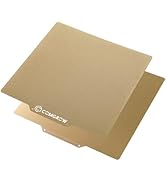
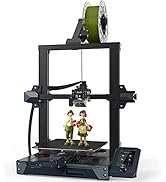
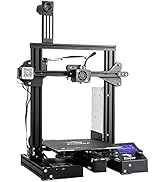
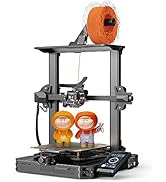
The Official Creality Ender 3 S1 Pro is a beginner-friendly yet professional 3D printer featuring a 300°C high-temp brass nozzle, an 80N thrust all-metal direct drive extruder, and a 16-point CR Touch auto-leveling sensor. Its dual Z-axis motors ensure smooth, high-precision prints up to 220×220×270mm. Enhanced with a 4.3-inch color touchscreen, LED lighting, filament detection, and power failure recovery, it offers a reliable, versatile printing experience for a wide range of filaments including ABS, PETG, TPU, and wood composites.








| ASIN | B09VB34771 |
| Best Sellers Rank | 86,590 in Business, Industry & Science ( See Top 100 in Business, Industry & Science ) 108 in 3D Printers |
| Guaranteed software updates until | unknown |
| Item model number | Ender 3 S1 Pro |
| Manufacturer | Creality 3D |
| Product Dimensions | 45.5 x 49 x 62.5 cm; 1 kg |
S**.
First 3D printer
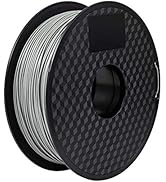
Easy to setup, instructions a little poor, but plenty on you tube to guide you. First print worked like a dream. The supplied filament worked better than a non Creality brand I bought, so would recommend buying theirs. Biggest learning was understanding how to level the bed, navigate the controls, and slice models. I am hooked ! Recommend as a first printer, but then I have no experience to compare other printers ;-)
D**N
Disappointments on quality contol
Arrived day early-good, one adjuster wheel loose in box plus one screw, no idea where or it belongs to printer. The SD card does’nt have much on it but I have it printing once I worked out the touch screen with no instructions
E**E
Printing within an hour
This printer is so good Ive purchased two. Im a big fan of creality and the performance and reliability of this printer is a leap from my CR10 purchased several years ago. Definitely beginner friendly and you can be printing within an hour of the box arriving. The firmware does change depending on when the product was manufactured, I actually prefer the UI in the older firmware although you can flash updates yourself. I had to make the choice between getting a bamboo X1 or a fast creality printer, I chose to have two slower printers running at the same time so I can keep different materials on each and also have the same workflow. This printer also works with cura where as many of the fast printers require custom software which may not be maintained in the future.
N**L
New item arrived used !!
Despite ordering a new item it arrived clearly used. Returning this item is a pain and you have to organise a courier yourself. Was told I would only receive a refund when it was back with them. In the end I decided to keep it as couldn’t be bothered with the hassle but it’s disappointing that it was like this. It came with no plug or as card reader and with someone else’s prints loaded on the SD card. I’m lucky that I have other printers but if your new to 3D printing give them a miss. I would like to give no stars but that was not an option.
J**N
.faulty heat bed stopped working
Amended due heat bed stopped working advised I would get a call for service support 8 days later nothing.returned to Amazon still waited Ng on a refund. intital impression was This is my fifth printer and by far my best so far . It came well packed and complete took only 20mins to put together only 10 screws just watch a video on YouTube so simple and well made. Bed was a little wobbly but slight tightening of the nuts under bed fixed it. The bed leveller worked straight off . Printing straight away. Think I'll go for a s1 plus knowing the quality. Until it stopped heating up after a week
P**.
Good for pros and beginners.
Set up and print, works flawlessly with minimum tinkering. Would highly recommend this product to advanced and beginners...
K**R
Fabulous all round
I've had this as a replacement for é others all of which were of different design. This is truly excellent although for PLA and PETG filaments I find that 3DLac is vital. Very sturdy and reliable. I've printed over 200 hours now and all is excellent.
K**A
The prints are good, but i have some gripes.
The ender 3 s1 pro is a good printer. the quality is good. the prints are smooth but the overall construction of the printer is disappointing. the two main cons are: 1: the wire to heat up the print bed gets caught on the beds motor sometimes, this is a minor issue when printing at the front of the print bed but when it does happen it can totally misalign prints. 2: you have to home the printer nozzle and bed before every print or you can risk damage to the printer. I didn't realise this when I first got this printer and have since damaged the print bed wires plastic chassis. These two points have disappointed me although the printer still prints perfect prints, although a little stringing is present out of the box (this can be fixed in CAD settings however) For the price this printer is basically as you expect it to run, but I do recommend other printers like the newer Elegoo Neptune 4 or similar instead of this printer. I will be keeping this printer however.
K**S
This is my first 3D printer and let met tell you, I am absolutely blown away. I got great results on my first test print. Since then I've printed several things and needed to make minor adjustments but this product allows for easy adjustment and fine-tuning. The packaging is great (tools and extra parts provided), but on to the elephant in the room: assembly and initial calibration/parameter setting. It took me approximately 4 to 4.5 hours from opening the box to my first successful print. Here is what I can tell you about that process: 1) TAKE YOUR TIME - The more careful and meticulous you are in this process, the better things go later. I think the reason I had such great success on my first attempt using the printer was due to me taking so long during the set up. I had some moments of frustration, but it really isn't that bad. This is a ~$200 3d printer with the quality and build size of printers that cost 2-3x+. The long initial setup and calibration is well worth it. 2) Use multiple sources during set-up - I used the 1 page instructions included, the instruction booklet which can be downloaded here (https://www.creality3d.cn/download/product-file_c0002), and, MOST IMPORTANTLY, this awesome guy's youtube video for the assembly (https://youtu.be/me8Qrwh907Q) and bed leveling (https://youtu.be/5eqTmb01cBk). A little over halfway through the assembly process I gave up on the manual and just carefully watched and re-watched the youtube video steps, cross-referencing with the manual once major steps were completed. LISTEN to this guy when he tells you to take your time! Examples include: ensuring the two main z-direction aluminum posts are equidistant at the top and bottom (bolt tightening trick), tuning the eccentric nuts on the 3-wheel rail sliding assemblies, bed leveling, and more. These small tuning steps during the assembly fix most all problems people have. 3) RELAX and realize this isn't an out-of-the-box ready to go 3d printer. It, like all 3d printers, need some tuning and a bit of experimentation/experience to achieve the printer's full potential. For example, the included test print was a smashing success, but my next, custom print didn't turn out as well. It didn't adhere to the bed after several layers and also was a tiny bit stringy in sections. I fixed the adhesion by telling it to print the object with a brim (layer under the object) and also turning on "Z hop when retracted" in case the nozzle was bumping something while it was moving between print areas (this option is in Cura, the slicing software - more about that below). I fixed the stringiness by turning down the nozzle temp about 8-10 degrees. 4) If you're having an issue, it's likely that 10 other people have asked about it online. Do some google-fu. This may be the most important part of successful 3d printing. There are SO many great sources and communities out there to help fix issues and speed up your progress. What software does this thing use!? Ok, well I didn't know jack crap about any of this a week ago, but here is what I've learned since. This printer uses g-code files when printing. G-code is a file that tells it where to go (x,y,z), what layer height to use, what printing speed to use, etc. G-code is generated by slicing software from a 3d model (usually a STL file). You can download Ultimaker Cura for FREE here (https://ultimaker.com/en/products/ultimaker-cura-software). In Cura, you can change all the parameters for your 3d printer easily (layer height, wall thickness, infill density, nozzle temperature, build plate temperature, support and adhesion structures, etc). Cura now has the Ender 3 as a printer option. The easiest way to get to 3d printing some cool stuff is to go over to a free 3d model website such as thingiverse (https://www.thingiverse.com/). Download the files for whatever you want to print. Open Cura. Drag and drop the stl file(s) of the object(s) you want to print into Cura. Adjust the aforementioned settings (layer height, speed, etc). Click the "slice" button at the bottom right. At this point I like to hit the "preview" button and drag the slider on the right up and down to look at how the printer will print the object. Once you're satisfied, select "save to file", save it on the micro-sd card, put the card in the printer, and you're ready to go. If you want to customize objects (outside of simple scaling and such) or make your own from scratch, god speed to you. It's a helluva learning curve, but that's what I'm working on now. I've heard Blender is a pretty good, free 3d modeling software (https://www.blender.org/). Most any 3d modeling software allows exporting to a .stl file Overall, I have to say that my expectations for this product were greatly exceeded. If you have a bit of patience and a willingness or ability to use google-fu to figure some things out, this 3d printer is amazing in both build quality and ease of use (once it's set up). If you don't, well I guess you'll need to shell out 5x+ the price
D**O
Excellente imprimante,montage très facile, fonctionne parfaitement des la mise sous tension avec les réglages d'origine,silencieuse, qualité d'impression au rendez-vous.
S**E
J'ai démarré l'impression 3D avec cette imprimante et je ne regrette pas ! Colis livré rapidement, très bien emballé. Guide d'installation sommaire, mais c'est facile à monter, même si j'ai clairement mis plus de 20mn. Les tutos sont bien faits sur @. Utilisation des filaments PLA et PETG sans aucun problème (Creality et Sunlu). Le logiciel "slicer" Creality est bien fait, et configure automatiquement les bons paramètres d'impression, qui n'ont jamais fait défaut. Pour démarrer, le logiciel de modélisation 3D "basique" Tinkercad va très bien, mais il montre vite ses limites. Pour les courageux, il faudra passer sur Blender (gratuit), mais là aussi il y a beaucoup de autos pour apprendre. Le plateau de la S1 est vraiment bien. Mis à part un manque d'adhérence à la 1ère impression, je n'ai pas eu de problème depuis. L'erreur était liée à la hauteur du plateau, réglée trop proche de la buse. Une fois ce réglage bien fait, plus d'erreur par la suite. Je suis étonné par la qualité d'impression, en paramètrant la meilleure définition. Pour les objets courants, même la qualité d'impression moyenne est excellente. Je n'ai pas eu l'occasion de tester le support. Dommage qu'il n'y ait pas le câble USB adéquat dans le colis pour raccorder l'imprimante au PC. Hormis ce détail, cette imprimante est vraiment géniale.
D**P
Bonne imprimante pour débuter. Beaucoup de mods disponibles. Impression très rapide avec un sonic pad
C**S
3 Month Update... as far as the 3D printing hobby goes this was the second 3D printer I purchased (previous was a Flash Forge Adventurer 3), I preordered the Bambu Labs X1C and soon after the P1P... well after getting out of hospital and actually sitting in the room with all the printers I saw some space and squeezed in a Prusa. Now if I ask myself which machine has taught me the most... easily the Creality... made it Simple and fun to learn on - Sonic Pad hands down. This retirement hobby has quickly become an obsession there is so much to learn and to buy... there are a lot of companies in the 3D printer game and being new I didn't know who to choose... I'm glad I went with Creality... their customer service has been fantastic !! I've never experienced anything like it... well I just set up a new resin printer (non Creality) maybe I'll be buying another Creality to compare! But with the Sonic Pad hooked up I have direct feedback on everything that is going on while it is printing.... and I have direct control of temperature, flow rate, speed ect to see the results immediately... just simply awesome! I am still a newbie in this game but for retirement... doing more working and hours learning than I ever did while being paid LOL A big thanks out to Rachel from customer service... keep up the great work! Was very close to boxing this back up for a return but I have grand parent patience now... and I can become a satisfied customer. Short version of story. Assembly was incredibly easy followed directions from the manual as you don't know who to trust online. My other printer is a Flashforge Adventurer 3 so bed leveling I thought may be trickier on this... Followed the directions set out in the manual and as the Z - offset is done at the beginning after the initial automatic level then outside is leveled... well tried to do first test print and.... grinding... there goes the PET plate (attached photo)... Problem I later confirmed is in the instructions... I later had adhesion problems and leveled it by; heating it up, manually leveling bed, running Auto Bed and then confirm Z-off set. Nothing adhered to the bed... until I did the above, oh and I had to replace damaged nozel. During this I had to take bed apart to confirm tightness of all wheels & belts. Finally bed adhesion... then prints randomly would stop mid print... back to reading... then flash card went corrupt... every card I could find in my house wasn't being recognized by the printer. Then I found an old card that worked but printer wouldn't load any of the files... that card went corrupt and crashed my new laptop... After reading I found out it requires a FAT32 formatted card 15GB or Less and that it reads from the card... Doesn't copy files over to internal storage as I had thought... ahhh that's why prints are stopping, and cards have been corrupted. Out to the store... no one sells cards that small... back on Amazon to order & wait. I'm now reasonably up and running... the Z-axis steper motors will probably need adjusting as measurment are a little off... also the carrier for the print head, a lot of wear and 'white' dust that does not look normal... seemed to be smooth but looks to be wearing prematurely and I will probably just replace it. I was not planning on getting a 3D printer for the printer to be the hobby... for me printing & designing is the hobby... I had decided to return this however after dealing with the challenges I have it printing... dialing it in will come over time... I will pick up a high end printer in near future... depending on health & mobility... At the moment I'm considering to keep this as a secondary machine for over flow and having a laser engraver on it could justify keeping it. I thought I could leave the machine with my wife and she could print things off... however think this is above her ability... she's sticking with Flashforge. Checked and return window is week after I get back so guess it is in your hands lol Very least I would expect is a new PEI sheet, Original Branded item not a knock-off & hardened steel nozzle... surprised they had brass! Contacted seller and their advice… if I want good customer service I should buy directly from their site next time! Not sure if I’m going to return it as now that I have it working it prints well… may buy something a lot better and keep this for backup… but I’m in hospital until mid January… interesting if someone reaches out. Don’t like leaving poor reviews… actually first time I’ve had to. If your buying this printer there are plenary of other sellers beside Comgrow … but if you buy from them make sure you purchase through their website to get the “good” customer service.
Trustpilot
1 month ago
3 weeks ago