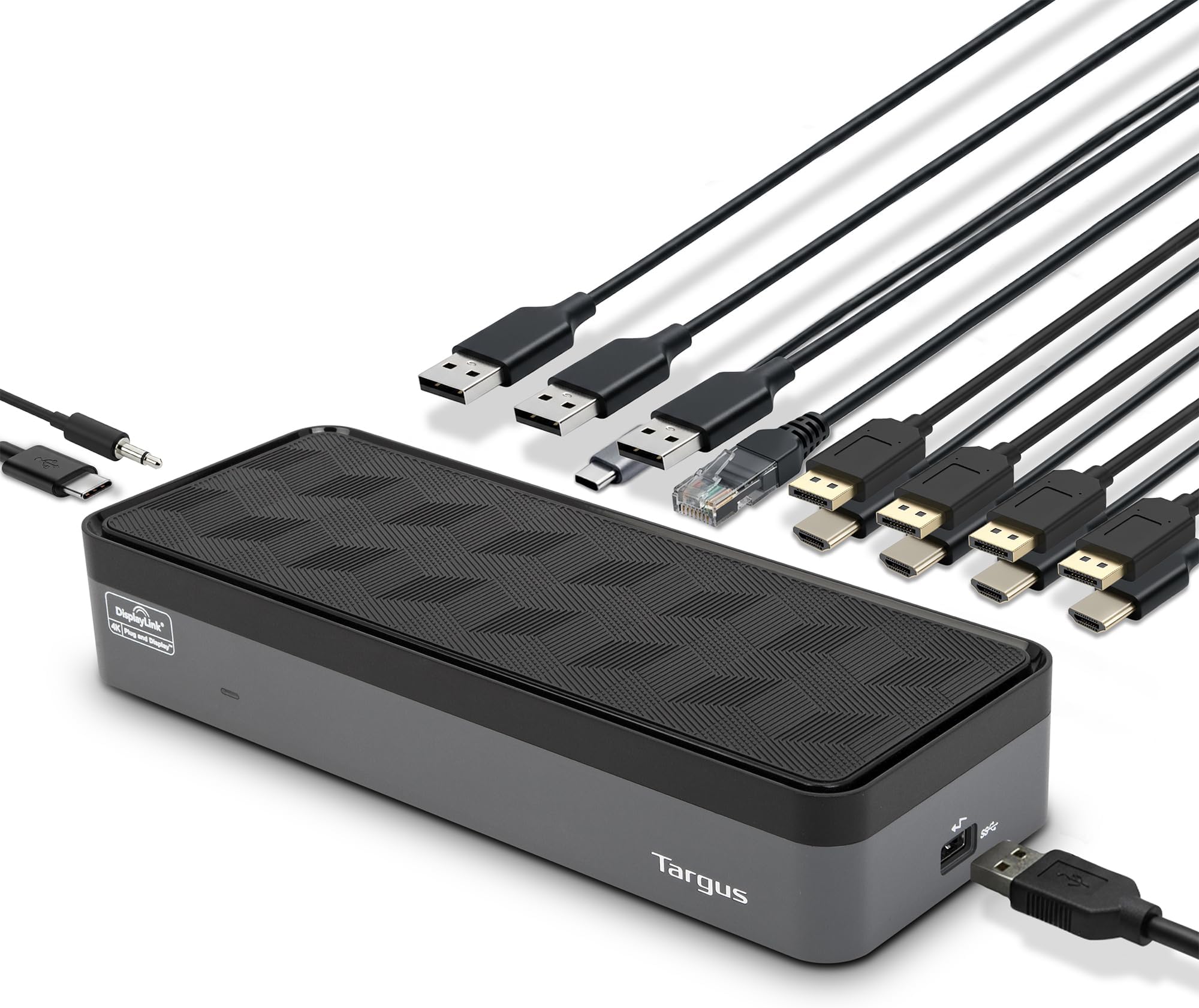
🚀 Elevate your desk game with the ultimate 4K powerhouse dock!
The Targus USB C Universal Docking Station (UNIV DOCK570) is a professional-grade hub designed to support up to four 4K UHD displays simultaneously via DisplayPort or HDMI. It delivers 100W power to your laptop, ensuring continuous operation while providing six USB ports, Gigabit Ethernet, and audio connectivity. Compatible with a wide range of devices including PCs, Macs, Chromebooks, and Android, it’s Thunderbolt 3 ready for future-proof performance. Perfect for multitasking managers craving seamless, high-resolution multi-display setups and universal device compatibility.


| ASIN | B07YHYWN1X |
| Best Sellers Rank | #30,969 in Computers ( See Top 100 in Computers ) #204 in Laptop Docking Stations |
| Brand | Targus |
| Built-In Media | UNIV DOCK570 USBC QUAD 4K 100W GRY |
| Color | Black |
| Colour | Black |
| Compatible Devices | Notebook |
| Compatible devices | Notebook |
| Customer Reviews | 4.4 out of 5 stars 1,998 Reviews |
| Global Trade Identification Number | 00092636329662 |
| Hardware Interface | DisplayPort, Ethernet, HDMI, USB 3.0, USB 3.1 Type C |
| Hardware interface | DisplayPort , Ethernet, HDMI , USB 3.0, USB 3.1 Type C |
| Item Dimensions L x W x H | 20.8L x 8.9W x 4.3H centimeters |
| Item Type Name | Docking Stattion |
| Item Weight | 1.89 kg |
| Manufacturer | Tragus |
| Number of Ports | 6 |
| Product dimensions | 20.8L x 8.9W x 4.3H centimeters |
| Total Number of HDMI Ports | 4 |
| Total USB ports | 6 |
| Total Usb Ports | 6 |
| UPC | 092636329662 |
| Unit Count | 1 Count |
| Wattage | 100 |
J**S
Enfin une station d'accueil universelle
Super ! Avec Targus nous sommes assuré que cela fonctionne. Le dock est compatible avec un double affiche HDMI ainsi que l'affiche du portable. Ce qui fait trois écrans. De plus, en fermant le plateau de mon portable, je peux travailler en double affichage. Le dock vient aussi avec des adapteurs pour charger le portable. Je le recommande. J'en ai essayé d'autres qui ne fonctionnait pas. Très satisfait !
T**R
Great Little Docking Station
Great little docking station. I use this for my work laptops when I take them home. Every time the company upgrades my laptop, they tend to use a different proprietary docking station. This docking station will work with any laptops that can support USB3. This docking station will connect to: DVI, HDMI, RBG monitor connections, ethernet connection to your network, Mini Dim audio jack to your speakers, and 2 USB ports to connect a USB mouse and keyboard. Just connect all the devices to the Universal Docking Station and connect the USB cable (Included) to your laptop. That's it.
A**.
Simplifies managing 2 screens. Now a single connection when I disconnect computer
Mac Pro 16" - hub that plugs into ports on computer were limited in power they transfer and only attached a single screen plus always for knocked. Under up needing multiple USBC cables connected to computer. Now have a single connection for power, 2 screens, keyboard and other USB connection
O**E
Works on Ubuntu 19.04 with DisplayLink
Super happy to have found this dock for my laptop running Linux (specifically Ubuntu 19.04 Disco Dingo). All the USB pass-through functionality works straight out of the box but you will need to install DisplayLink for any dock connected monitors to work. Being able to keep it under my laptop is perfect for me since it aligns the bottom of my laptop screen with the bottom of my second monitor. Added bonus is that it improved the cooling of my laptop too. I cannot say for sure whether it will work for 4k but I can definitely confirm that it supports 1440p and I assume it will indeed pass a 4k signal. Transferring files from my laptop's built in SD card reader to an external hard drive ran at the max speed rating of the SD card (160 MB/s) and reading off the external drive (USB-C ssd) did run at 520-540 MB/s so the dock doesn't seem to be a bottleneck. One minor complaint, having it connected hijacks all the audio even if don't have any audio out device connected to the dock (i.e. cannot use the laptop speakers). I assume there is a workaround for this but it hasn't been a problem for my workflow yet so I haven't taken the time to search more into this and it gave me an excuse to order new computer speakers which arrive in a few days (Monday September 9, 2019). I will update then if I run into any problems using external speakers connected to the dock. I highly doubt there will be any problems since it works just fine with headphones in the 3.5mm jack on the dock. Something to note about this, if you have a USB audio device with a headphone jack (such as a Yeticaster mic) then that will take priority over the 3.5mm jack. Pros Works with Ubuntu (with DisplayLink) Good instructions for installation (including Ubuntu specific instructions) Supports laptop and improves cooling Fast data pass-through Cons Hijacks all audio output
L**R
Works Just Fine for Me!
With some trepidation, I ordered this docking station to use with my new HP Envy m6-1125dx 64-bit Windows 8 laptop. After using business laptops with custom-made docking stations for years, I hadn't thought too much about the process of finding a docking station for this consumer laptop. As it turned out, it took a bit of a search. I learned about the latest generation of "universal" docking stations which are made possible by USB 3.0, as I understand it. Two reps at HP's Boise Sales Office (who were great, by the way) told me that the Targus ACP71USZ would work with my laptop (which has a USB 3.0 port), in spite of a review to the contrary on the HP website page describing the unit. In fact, they said, the Targus unit was connected to the same laptop in the "playpen" in their office, and they could vouch for the fact that it worked. So, I ordered it from Amazon. When it arrived, I followed advice others had offered in other reviews: (1) update your USB 3.0 host controller driver (mine was current); (2) download the latest drivers from Targus or Displaylink (ignore the CD that comes with the unit). Turns out DisplayLink had a newer version than Targus itself did, so I downloaded and installed it before connecting the unit to my laptop. Contrary to other reviews, the docking station DID have a power tip to fit my laptop, which was a relief, so the laptop charges when it's connected to the dock. Everything else (wireless keyboard and mouse, audio, printer) is powered through the USB 3.0 cable which connects to the dock. Once connected, the laptop recognized the dock, and everything worked just as I hoped, with no noticeable loss in performance! I like the fact that the docking station will accommodate any laptop for which there is a power tip, so this should be the last docking station I need to buy. The unit itself is very well made, and reflects a nice design. It even fits nicely within my monitor stand! Finding the power tips is a bit tricky (the HP reps were helpful here too); you flip up a door on top of the unit to reveal a compartment with 8 different tips. All in all, armed with the advice from previous reviewers and the HP reps, it was a piece of cake, proving it pays to do your research, I guess. Judging from the reviews, I guess the ACP71USZ will work with some laptops and not others, and in the final analysis there is really only one way to find out: order it from a store with a reasonable return policy and try it out! UPDATE: A little more than a year later, and the Targus unit is still going strong, with no problems over the past year. My Windows 8 computer recognizes it as part of the system, and even tells me when firmware updates are available, which was unexpected! This little unit still gets five stars from me! UPDATE 10/06/14: After working perfectly for 1.5 years, my external monitor (attached to the dock) stopped working. Attaching the monitor directly to the computer revealed that the monitor was working just fine. A visit to the Targus web site showed the same driver already installed. On a hunch, I visited the DisplayLink (whose logo appears on the product) web site and found a new driver. Installed it; problem solved. Lesson here: check BOTH the Targus and DisplayLink web sites for driver updates. By the way, tried running "Update Driver" from inside Device Manager, and it pointed me toward the Targus site, but NOT the DisplayLink site. UPDATE 01/18/16 Two years now, and aside from the driver lesson learned that I described in the previous update, it's been nothing but smooth sailing with this well-designed little dock! I'd still give it five stars! The dock is on my mind currently because up until now I've used a 24" external LED monitor, and my laptop monitor as needed. Now I'm thinking of adding a second 24" monitor, using the Targus dock. I'm not entirely sure of the best way to do that, since my current monitor uses an HDMI cable, and there is only one HDMI port on the dock. I'm sure a little study will turn up the answer to the cabling question.
Trustpilot
1 week ago
1 week ago