


🔌 Plug into productivity and never miss a beat with the TOTU 11-in-1 USB-C Hub!
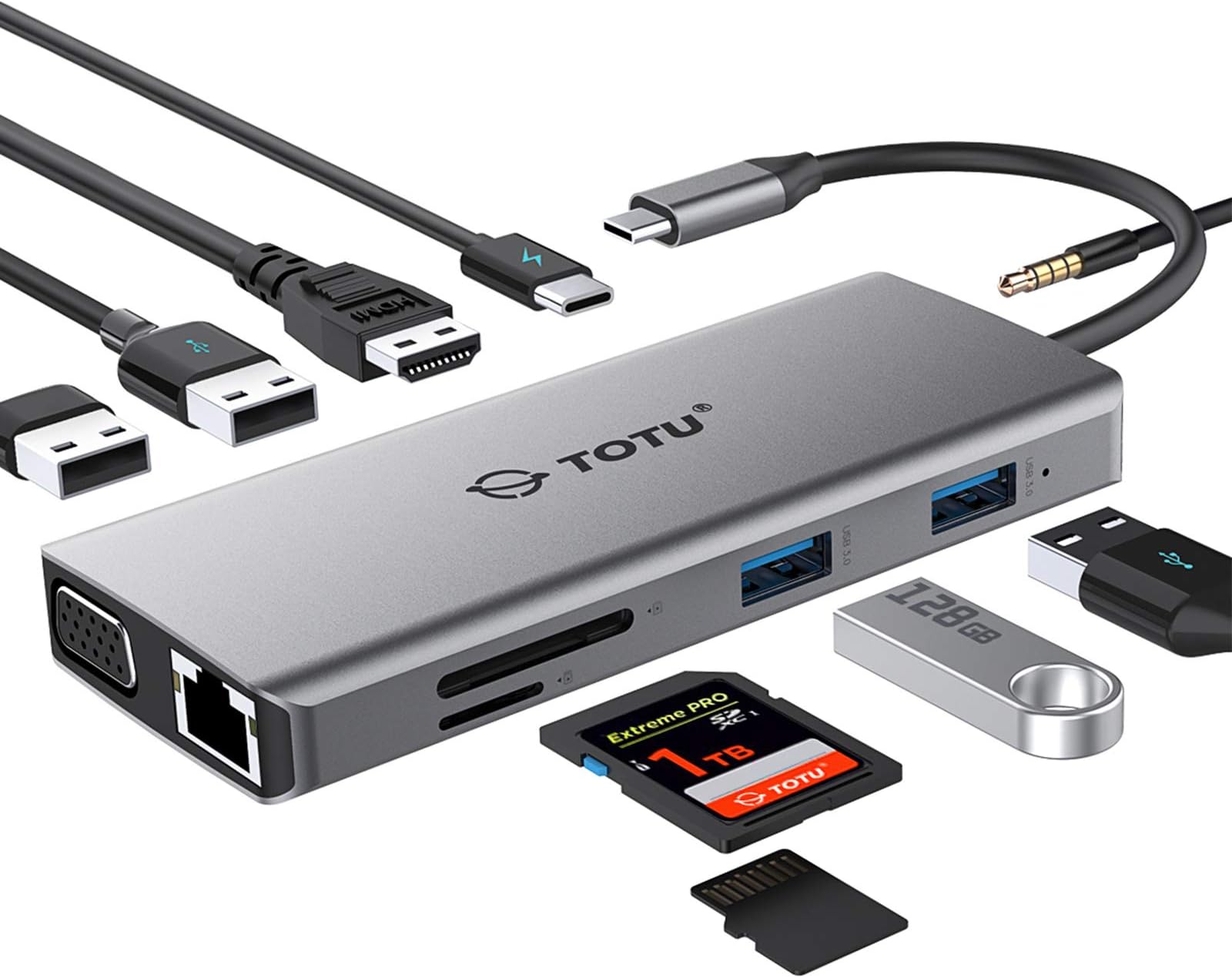
The TOTU 11-in-1 USB-C Hub is a premium multiport adapter designed for professionals and power users, offering 11 ports including 4K HDMI, VGA, Ethernet, dual USB 3.0 & 2.0, dual SD card readers, audio jack, and 87W PD charging. Compatible with Mac, Windows, Chrome OS, and select smartphones, it enables seamless connectivity, fast data transfer, and simultaneous charging in a sleek, travel-friendly aluminum body.




| ASIN | B07M8HLGBF |
| Additional Features | Powered |
| Best Sellers Rank | #6,785 in Our Brands ( See Top 100 in Our Brands ) #46 in Computer Networking Hubs #1,428 in USB Hubs |
| Brand | TOTU |
| Built-In Media | no |
| Color | Grey |
| Customer Reviews | 4.4 out of 5 stars 1,925 Reviews |
| Data Transfer Rate | 5 gigabits_per_second |
| Global Trade Identification Number | 00788000917138 |
| Hardware Interface | Ethernet , HDMI , USB 2.0, USB 3.0, VGA |
| Item Dimensions L x W x H | 4.7"L x 1.9"W x 0.5"H |
| Item Weight | 113 g |
| Manufacturer | TOTU |
| Mfr Part Number | TT-HB002D |
| Model Number | TT-HB002D |
| Number of Items | 1 |
| Number of Packs | 1 |
| Number of Ports | 11 |
| Operating System | Chrome OS, Linux, Mac OS, Windows |
| Special Feature | Powered |
| Total USB Ports | 4 |
| Total Usb Ports | 4 |
| UPC | 788000917138 |
| Unit Count | 1 Count |
A**A
iPad Pro 2018 tested, compatible!
I bought this for my iPad Pro. I searched far and wide for this particular hub, and it wasn’t an easy find, but I would say this is the best hub by far, for the iPad Pro. My requirements were that it have hdmi, 3.5 mm jack, at least one usb type a port for charging my phone, and support for charging the iPad while using other accessories, as well as not being flush with the side of the iPad due to the case I use. For me, the Ethernet, VGA, and other ports are bonus. Regardless, this hub works great. I have tested most ports and as long as the iPad supports them, they work. I have not specifically tested the Ethernet or VGA, but from what I have read otherwise, they should work well. I know specifically that both SD card readers, 3.5 mm jack, HDMI, and all the USB A ports (note: none of these work to attach external storage except for importing compatible photos, this is due to a lack of iOS support) work well, simultaneously, while charging the iPad through the one USB C port. The build quality is solid and lightweight. The little travel case is a nice gesture but ultimately useless. It is portable enough for me with a backpack, but if you are looking for something very portable, this isn’t it. This is more a do-all hub rather than a minimalist hub. Overall, this is well worth the price for what you get. Everything you have been missing since the advent of USB C is here, in a solid package and well-manufactured.
H**E
Top Dog
This is my second USB C hub that I purchased, so this will be somewhat of a comparative review. TOTU's USB C Hub comes with 11 total ports, which are: 1) 1 VGA 2) 1 HDMI 3) 1 Ethernet 4) 1 Audio/Mic 5) 1 SD Card 6) 1 Micro SD Card 7) 2 USB 3.0 8) 2 USB 2.0 9) 1 USB C Charging Port - 87W Max This hub has practically everything you could want in terms of ports, and if you're someone who likes to future proof in case the need arises for another particular port, you can't go wrong here. The build quality is actually quite nice. Coming in at 2" x 4 3/4", with a wire length of 5 1/2", it's definitely quite compact and shouldn't be a bother to travel with. I posted a photo of it next to a 2018 13" MacBook Pro for reference. It also has a nice weight to it, where unlike my other hub, it doesn't feel cheap. One standout feature is that there's an indicator light when plugged in. This gives you a peace of mind that the hub is in fact working, and was sorely missed on my other hub. It comes with this really cool traveling pouch to protect itself and whatever else may be thrown within your bag. It also has a unique design that allows you to bend the wire and put it into a little side slot next to the main one, something I've never seen before. Most USB C hubs I've looked at, even the other one I purchased, don't come with a pouch, so it's definitely a nice bonus to consider. Through my testing, everything works as you would expect it to work. All that's left for you to do is really compare other hubs in terms of price per port, and try to get the most optimal value for your needs while factoring in the extra features this one has to offer.
M**A
Worked Better Than Expected
I was skeptical that this one single hub would work well with all different attachments (ie. USB3, USB2, SD cards, etc), but I have had this hub for a couple weeks now and have been able to use the USBC, USB3, USB 2, and SD card slot successfully. I bought this specifically for my new 2018 MacBook Pro which only has USBC ports. While I love this computer, I hate that I can't plug USBs and SD cards directly into it like I could with my last 2010 MacBook. Having this one attachment that can can accept inputs from a wide range of devices will be incredibly helpful moving forward, and now I don't have to worry about storing and searching for individual attachments as well. This comes with a cute little faux suede drawstring bag to store the hub in and keep it safe, and it is easily accessible and takes up little room inside by top desk drawer. This hub will be used a lot, and I am pretty sure that it will stand the test of time because it seems pretty durable. Other people have reviewed that the things you plug into this port don't go in all the way, and I have experience this as well. It's not that you can't push them in all the way, it's just that you only need to insert a small part of your cord or card into the hub for it to work. The one problem I had was not anything to do with the hub. I have a Seagate external hard drive for all of my pictures, movies and other files that take up space on computers. When I plugged it into this hub, my computer didn't recognize the external hard drive. I found that I had to go to Seagate's website and download updated software to make my external hard drive work on my new MacBook (which has newer software and OS), and then I was able to successfully mount the drive to my computer when plugging into this hub. I was also able to plug in an additional external hard drive to the hub at the same time so that I could back up the first external hard drive to the other one. (I take a TON of pictures and videos, so I am very cautious about having backups). I was able to copy about 1T of data through the hub in about 3 hours, which is pretty standard if not faster than standard. Everything works great! Thanks!
G**O
TOTU USB C Hub Adaptor works great with my HP Elite X2 G1012
As many of you have experienced, 2-in-1 tablet / PC's are extremely limited in port availability. The HP Elite X2 G1012 is no exception. With a single USB-C 3.1 port that acts as an all-in-one charge port, along with a single USB 3.0 port, that is all you have. I normally need to connect via HDMI, VGA to external monitors while out at clients as well as have power plugged into the USB-C port, which is not possible without a USB-C hub. I purchased this, and am very happy with the results. The HP USB-C power cord plugs right into the power input port on the hub, and the Elite X2 charges normally. The added HDMI and VGA ports add the ability to extend / duplicate the monitor. The only drawback on this, and one of the reasons I removed one star was that you cannot use both the HDMI and VGA ports at the same time to extend to 2 external monitors. Windoze only sees a single extended monitor, and you must switch between the 2, but cannot use both at the same time. On the plus side, the microsd and SD card slots work great, along with the 2 USB 3.0 ports that I have 2 external drives connected to, one a 3TB powered external drive and one a 1TB non-powered drive. I can easily have all the USB and micro SD drives working simultaneously without any problems. The 2 USB 2.0 ports work great as well, with one exception. I have a Microsoft Keyboard / mouse combination that I plug the RF adaptor into either the USB 2.0 or USB 3.0 ports, and the keyboard sort of goes crazy, and I get mouse hesitation. I have to resort to using the USB 3.0 port on the HP Elite. One more issue I had, there is a headphone jack at the top of the device that when I plug in a wired headset to, the sound distorts with pops and hiss. I tried to update the drivers without luck. I also noticed that when you are transferring lots of data, the unit does warm up somewhat. The one other thing I noticed is that when I unplug the HP power from the power port, everything in the hub shuts down then re-starts. This includes the VGA / HDMI connections to external monitor, as well as external storage disconnects then re-connects. And when I plug the power back into the power port, again, I get a blip. But, for the price, at 1/2 price of the HP port replicator, you get more ports.
H**R
Simple, sleek and awesome quality
I needed a usb-c hub for many of my needs as below. 1. Connect to my Eithernet cable 2. Connect to my SD card 3. Connect to my 4k monitor (HDMI outlet) 4. Connect and charge my watch (usb) 5. Connect and charge my phone (usb) 6. Connect and charge my wireless earbuds (usb) Before, I had to wait for each charging process to complete and plug in the next charger sequentially. No more now! This simplistic and sleek usb-c hub does them all, and with great quality. I thought this usb-c was large, but it actually very small (roughly half of my phone in width), I can easily carry it to work or a coffee shop, it does not take any space on my desk nor in my bag. I have a 4k monitor, and when I connect to this hub with my HDMI cable, I am surprised that it does not reduce the resolution. It is crystal clear and vivid using this hub, the font is not stretched at all, which is the major difference between this high quality usb-c hub and other cheap ones (otherwise what is the point of having a 4k monitor). My phone charges very fast too! I do not see any delay for my monitor's refresh rate either. Network data transmission is also excellent, I do not feel any delay when plugging the ethernet cable into this usb-c hub. It is the perfect and long term solution for my need. This usb-c hub is very useful, saves lots of time and worth every penny !
A**8
Great Product Every Port I Think I Will Need
UPDATE 11/4/2021: After consistent use of the USB type A ports on this adapter with my MacBook Pro, I finally tried the HDMI port when giving a presentation at work. I failed to test the port before giving this presentation, and the HDMI adapter did not work. My laptop kept flashing the screen to dark like it does upon initializing an external display, but it was completely unusable. Thankfully, another co-worker had a laptop I could use to give my presentation. I contacted TOTU customer support, and even though my purchase was well out-of-warranty, they listened to my concerns, gave me a few steps to try, and when those steps failed to fix the problem, they promptly mailed out a replacement hub. They didn't even ask for the original one back. The new adapter's HDMI port works correctly, and delivery was quick. I was a little skeptical of the product after the HDMI port did not work the first time, but based on my experience with customer service, I would purchase one of these products again from this company! Thank you for supporting your product when there was an issue! Original Review: So far I am very satisfied with this product. All of the ports I have tried thus far have worked very well, the fit and finish of the product is great as well, and the fabric carrying case is a very nice touch as well. The finish matches my space grey MacBook Pro 16 inch perfectly! Overall, it's comforting to know that until USB3C/Thunderbolt 3 takes over entirely, I have an adapter that gives me every other conceivable port I will need, and it's small and light enough to carry with me wherever I go. Overall a very satisfied customer!
J**D
Essential for new-gen laptops
I received this 11-in-1 TOTU USB-C hub to review after I had purchased a similar 10-in-1 EUASOO USB-C hub for my son for Christmas. We were very happy with the EUASOO, but were curious about the 11-in-1. Basically, the only difference is that the EUASOO has 3 USB-3.0 ports while the TOTU has 2 USB-3.0 and 2 USB-2.0 ports, so one port more at the cost of having one USB-3.0 port less (may be important for some people). I have thoroughly tested the TOTU on my 2018 Lenovo X1 Carbon and all ports work very well: - HDMI: synchronizes very quickly (tried on a 2,560x1,440 AIO Lenovo) and even works with my old 1,920x1,080 Samsung monitor over HDMI-to-DVI converter - VGA: gives surprisingly clear images with little ghosting and color fringing (but blur exists compared to HDMI, not surprising) - VGA+HDMI: displays on two separate monitors simultaneously - SD card: works fine (tried 4GB and 8GB), did not test TF slot - USB-2.0: writing to an external HD I got about 40MB/s (maximum is 60MB/s but my drive is old) - USB-3.0: works well but could not test the speed since I did not have a suitable drive - Ethernet: works well, tested up to 100Mb/s - Audio: surprisingly load (much louder than from my Lenovo jack), mic works as well The Type C PD charging port works quickly and even with 5 devices connected and charging, the TOTU was at most slightly warm. Overall, I am very pleased with it. Since I travel and give a lot of lectures, not always is there HDMI available (old projectors always have VGA) and I often prefer Ethernet connection in a hotel over WiFi (speed and security). Finally, my Lenovo does not have a full-size SD card slot. The TOTO will replace my separate VGA, Ethernet, and SD card adaptors. Much less to carry and lose! This is a must for any new-gen laptop owner who needs flexibility.
A**R
Perfect!
I replaced my Surface pro with an HP Spectre which has USBC ports. I have three Microsoft Docks for my Surface computers (wife still using one) that each cost close to $200. I am elated to find that the TOTU hub does everything and more than the Surface dock, for a fraction of the cost! A big plus is the small size, which makes it easy to carry a spare. I use one additional monitor at the office and two at home. My other single adaptor (USBC to HDMI) would not open the external monitor without unplugging and replugging the monitor to the adaptor every time which is a nuisance, so I was nervous about how the TOTU unit would perform. At home I use an HDMI monitor and a travel USB monitor both connected to my laptop. I was delighted to find that I can keep both the HDMI and the USB monitor connected to the TOTU unit and only plug in the single cable and have both monitors open immediately - along with having them set up to the "Extend Screen" mode. This gives me three monitors (laptop, HDMI, USB) to move things around on instead of having duplicate screens! In addition I have the power feeding through the TOTU, and also my external speakers plugged in to the TOTU - everything working perfectly. I don't know how all that can be handled through one cable and USBC connection, but I am thankful for the convenience! Gary
R**O
Works well and it's much cheaper than Apple's
Packaging unit is a bit small, but everything fits inside. The quality of the adaptor is nice - matches Apple's MacBook Pro "Space Grey" color -, and can be seen in the pictures. The USB-C little cover is a nice touch as well. I have not tested all the ports yet, but the charging port and the 2 USBs 3.0 work well. If anything doesn't work as expected, I will write afterwards, but I don't expect any issues. The tiny sleeve package is nice, though the design for the cable inside doesn't really make much sense to me. Good value for money.
N**U
Pratique
Nous avons acheté un nouvel appareil Apple sans entrée USB. Comme nous en avions besoin pour utiliser nos clés USB pour notre travail, nous avons acheté cet adaptateur qui est très utile et facile d'utilisation.
W**.
The hub keeps disconnecting the HDMI, not worth the money
I am really disppointed with this HUB, my hdmi keeps disconnecting and a lot of noise in the display -- it seems faulty. I tried another hub that is half the price (£20) and it works just fine.
G**Z
Alles gut
Macht was es soll. Bin zufrieden.
T**M
Funktioniert leider mit mit Acer travelmate p2
An und für sich kein schlechtes Produkt. Eines der wenigen mit insg. 4 USB-A Anschlüssen (2x USB 2.0 und 2x USB 3.0). Wird relativ schnell sehr warm, aber das ist anscheinend normal. Leider funktioniert der Hub aber nicht mit einem Acer Travelmate p2 und Windows 10. Es verhält sich hier so als ob man den Hub im Sekundentakt aus- und wieder einstecken würde. Habe alles versucht (Bios Update, Windows Updates, sämtliche Device-Treiber Updates), nichts hat geholfen. Auf anderen Notebooks (Lenovo T470, Lenovo T490s, HP Pavillon) hat es problemlos funktioniert. Daher musste ich ihn leider zurück schicken da wir es grad für einen Wechsel der Geräte (HDMI Monitor, LAN, USB Eingabegeräte) zwischen dem Acer Schulnotebook und HP Gamingnotebook gebraucht hätten .... Der Anleitung liegt zwar eine Liste von inkompatiblen Geräten bei, der Acer ist da aber nicht aufgeführt.
Trustpilot
2 months ago
3 weeks ago