


Desertcart purchases this item on your behalf and handles shipping, customs, and support to Argentina.
⌨️ Light up your desk, dominate your game 🎮
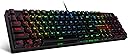
The Redragon K582 is a wired mechanical keyboard featuring 104 keys with linear red switches for smooth, responsive typing. It boasts full N-key rollover anti-ghosting, a durable design rated for 50 million keystrokes, and vibrant 16.8 million color RGB backlighting with multiple customizable modes. Compatible across Windows, Mac, and Linux, it includes software for deep key remapping and lighting customization, making it a versatile choice for professionals and gamers seeking performance and style.


| ASIN | B07KCRTN9Q |
| Additional Features | Backlit, Ergonomic |
| Antenna Location | Gaming |
| Best Sellers Rank | #1,272 in Video Games ( See Top 100 in Video Games ) #137 in PC Gaming Keyboards |
| Brand | Redragon |
| Built-In Media | USB Cable |
| Button Quantity | 104 |
| Color | Black |
| Compatible Devices | Gaming Console, Laptop, PC |
| Compatible Operating System Family | Linux, MacOS, Windows |
| Connectivity Technology | USB |
| Customer Reviews | 4.5 out of 5 stars 5,239 Reviews |
| Enclosure Material | Acrylonitrile Butadiene Styrene |
| Global Trade Identification Number | 04897093821799 |
| Hand Orientation | Ambidextrous |
| Item Dimensions L x W x H | 17.32"L x 15.75"W x 5.91"H |
| Item Highlight | 16.8M Color Immersive eSports Lighting Vibe, N-Key Rollover for Accurate Combos, 50M-Keystroke Durability, Customize Software |
| Item Weight | 1.01 kg |
| Keyboard Backlighting Color Support | RGB |
| Keyboard Description | 104 Keys Wired Gaming Keyboard |
| Keyboard Layout | QWERTY |
| Language | English |
| Manufacturer | Redragon |
| Mechanical Keyboard Switch Model | Redragon Red |
| Mfr Part Number | 038028809 |
| Model Name | Surara |
| Model Number | K582 |
| Number of Items | 1 |
| Number of Keys | 104 |
| Number of Packs | 1 |
| Number of Sections | 1 |
| Power Source | Corded Electric |
| Recommended Uses For Product | Gaming |
| Series Number | 582 |
| Special Feature | Backlit, Ergonomic |
| Style Name | Gaming |
| Switch Type | Linear |
| Theme | 6 |
| Warranty Description | 1 year |
A**S
My first mechanical keyboard - perfect!
Edit Edit - July of 2023. I have not changed out a switch in a very long time and this thing is SOLID. I still use it for daily work and then switch it to my home PC for personal use and gaming - and even my WASD keys are not needing swapping out. I love love love this keyboard, and never thought it would last this long! This is totally worth the investment and I will be purchasing this brand (and probably model?) again if I need another keyboard. Edit: Purchased this in Feb 2020 - it is now Sep of 2022, and this keyboard is flawless. I had a hiccup with my first one, where I had to swap out switches that went out unreasonably fast. They had me try a few things, and then sent me a brand new one. This new one has been working flawlessly since then. I have ZERO complaints. My keycaps are not even losing any definition, all keys work perfectly, and I use it on the daily for both work and after-work gaming. It gets beaten on slightly from gaming, and I type a lot for my job, and this has held up perfectly. I may have swapped out a switch or two over the last 2 years, but I still have plenty of spares from the original kit. This was a FANTASTIC buy that I do not regret in the slightest. The only modification I made was to get the tiny silicon o-rings to dampen the sound. Great buy, WOULD recommend, 10/10 I never really cared to upgrade to a mechanical keyboard. I didn't really see the point, and for sure didn't care for the extra noise. I am converted now, but this isn't really about the perks and benefits of mechanical vs standard. This was a budget keyboard, I think I got it for just under 50$. It is very well made, has extra switches and a key puller, and they keys are not too high to get irritating. I was looking for an RGB keyboard with per-key individual programming, and this one has it. You can set up customized colors for each key, which is amazing. But even without the software, the included schemes and patterns are INCREDIBLE. They seamlessly fade from color to color, and you can speed up or slow them down as you wish. There are some that are reactive, that speed up as you type quickly. There are some that have the keyboard dark until you type, and either the individual key lights up, or a single row wave shoots away from your keypresses, or a wave cascades out across the keyboard. There are some that just stay on, some that slowly fade across the board, some that are random on each key and they fade and change colors subtly. It's ridiculously gorgeous, and responsive. As a keyboard on its own it is VERY sturdy, and easy to type on - I am ruined for regular keyboards from here on out. This is a great buy for anyone looking for an actual RGB keyboard with individual lighting. 10/10 would buy again Edit: Bought this at the end of Feb, it is now May 11th, and my 'W' key started acting wonky. I'd have to hold it down longer when gaming, and it hesitated from time to time. It is probably my most commonly used gaming key, and commonly used in typing as well, so I guess it makes sense. They did provide swappable switches to replace it with, and having done so, I played a few rounds and it does seem to be resolved. Additionally, this is *not* a loud keyboard in and of itself, but the keys hitting the bottom is where the noise comes into play. This can get noisy - but I bought some O-rings after reading that someone else had tried it, and am pleasantly surprised with the results. It feels the same, and has a muted sound. I am still really really happy with this keyboard, and am just hoping that the failed switch was a one off. Edit - June 12th I still love this keyboard. But BUT! I have used my spare switches, and may need to be ordering more. I keep having keys that are 'going out'. They don't stop working entirely, but sometimes need to be held down, or hesitate before activating. It has happened with the 'W' key, the 'S' key (which both make it quite difficult for gaming) and now my 'n' key is giving me a hard time. I love this keyboard, and am not sure if it is just a normal thing, but my old membrane keyboard never did this. I am contacting Redragon to see if anything can be done. I hesitate to knock more stars off, but this is a solid keyboard besides this, and I have only had it 3.5 months at this point. Fingers crossed! Edit: June 20th, 2020 Customer support was fast, efficient, and really seemed to care. They were prompt and took care of my issues. I love my keyboard, and am super happy with this purchase. Returning this review to its 5 star status, as it is a superior product, and the customer service more than made up for the flaws in my first one. Thank you, Redragon!!!
U**K
Full LED Control for You Control Freaks!
The Redragon K552 (87 keys) is the bestselling keyboard on Amazon. (Not the K582 model you're looking at right now.) Over 35,000 reviews. But buyer BEWARE, it only has Rainbow LEDs. NO SOLID color config. And a lot of people are complaining. Odd. They used to sell a K551 (87 keys) Mitra model with full RGB customization. (Discontinued I guess. Way to cater to your customer base, Redragon!) I bought this K582 (104 keys) full keyboard instead because I wanted FULL control of the RGB LEDs. This was the right choice. I type mostly at night & I need a bright solid backlight color. And it was only 7 bucks more than the K552. And even with the extra number keys, this KB still has a pretty small footprint on my coffee table. (I run my PC on my widescreen TV in my living room. You should see my surround setup. *Chef's kiss*) Holy Red Switch, Batman! The price is RIGHT for a mechnical KB! And it feels solid. It's pretty heavy. (As heavy as my old German Perixx membrane KB which gave up the ghost after 9 years of daily use. THAT was a quality KB!) Other reviewers are right. There is a hollow metallic spring sound on the key strokes. Doesn't bother me. I'm usually bumpin' some sweet sweet Yacht Rock. But, it might bug the heck out of you. SOFTWARE NOTE: You WILL need the software download from Redragon for macro key programming. I don't game, so I don't need them. You DON'T need the software to change the LED color settings. You can change them from the KB. (Manual included.) But, I downloaded it anyway & monkeyed around with it. Then I got high & slowly started to enjoy all the pretty light combos. Ooo! Ahh! It's definitely easier to change the color scheme with the app than using all those function (FN) combos on the KB. The app allows you to set 3 different LED "Profile" configs. I set 2 SOLID color configs for typing & one DAZZLING config for when I get high & wanna trip out on the KB. So I recommend it. (Redragon linked me to a software download for the old K551 RGB Mitra model. Different than the Surara software shown in their product photo. LOL. Of course they did. Maybe cuz I run Win 7. See my screen capture.) The really NICE THING about this KB is that it REMEMBERS the last LED configuration when you boot up your PC. VERY NICE! (5 Stars for this alone!) Not so nice is every time I booted up I got the UAC (User Account Control) popup on my desktop on startup. This was after downloading the software. No problemo. I went to "msconfig" & unchecked Redragon in the "startup" tab. All gone. The UAC still pops up when I open the app. No biggie. Just click YES! "UPDATE TOOL" NOTE: The firmware "Update Tool" is bundled but separate from the RGB/macro software. It's in Chinese & when I ran it the 1st time it crashed the KB. It wouldn't work at all. I had to use my old KB to type my password on reboot & uninstalled the software. I reinstalled the software & ran the "Update Tool" again & the K582 came back to life after I fumbled around with it a bit. I don't read Chinese, but I think it's Mandarin. Hah! My advice is DON'T run the "Update Tool" unless you need it. SKIP IT. (Some guy on YouTube did that when he saw it was in Chinese, "Don't think I wanna run this." I laughed, "Rookie!") (I did scan the downloads & the Redragon program files with 3 different anti-virus programs. They're clean. I did something wrong the 1st time with the "Update Tool" because IT'S IN CHINESE for Pete's sake! I bet all the "reg" keys are in Chinese too. LOL.) The K582 also comes with a cap puller, switch puller & extra switches. And a cool Redragon sticker for your PC, car or refrigerator. I recommend the fridge. I LIKE IT! BIG UPDATE: 10-22-25 After a few years of heavy daily usage there is absolutely NO WEAR on any of the caps. NONE. I've always gotten some wear on all my previous keyboards after at least a year. MOST IMPRESSIVE! I was having some trouble with the letter "y" registering. I blew out the keyboard in my garage with my air compressor. Still a problem. I thought maybe the switch needed replacing (it comes with extras). After I pulled the cap (cap puller included) & reset it on the switch it started registering again. And I would have purchased this keyboard again. IT'S THAT GOOD! (I also just installed this with the software a few months ago on a NEW Windows 11 PC with NO issues!)
M**Y
My first gaming keyboard, and it's awesome
If this is your first gaming keyboard ever and you want the best option that suits your budget, this is it, no lie. The box came with the keyboard, 4 hot-swap keyboard switches, and a tool for them. It has quiet sounds thanks to the red switches, and the RGB lighting is adjustable. The color is accurate based on the description, and it's the perfect size for a full keyboard. It uses a wired connection so you don't have to worry about delay, and last but not least, it's very easy to use and suitable for all.
J**B
It is "good" but there are a couple of design flaws...
This review is coming from someone who has never properly owned a mechanical keyboard before. I had tried them but I could never justify spending spending $80-120 for keyboard alone. This keyboard is absolutely great but you get you pay for... at $50 this is a very fair price for it although at this price range expect some things to not be exactly perfect but then again if you're getting something this cheap be ready to expect some imperfections. I'll start with the one thing that annoyed me that most: 1) Color. This keyboard is advertised as having 16.8M colors, after all it is RGB. But the quality of the RGB lights is somewhat subpar, I'd say those claims of having 16.8M colors is an exaggeration. For example, solid colors that are close or similar to Red, Green or Blue look incredible but thats about it, you start to see some flaws when you start to experiment with some of the colors that require combining the different LEDs. For example, if you set the color to white you will notice it is not true white, there's a red tinge to the keys, it looks rather like a super light pink than white. This also happens if you select a super light blue color like light sky blue, there is the ever present red tinge, you can't tell it apart from the so called white color. But otherwise the other colors look mostly fine, can't say I can complain about rainbow colors, they look pretty but I'm more of a solid color man. 2) It can be a bit finicky at the software level. I left my old membrane keyboard plugged into my PC while I tested this keyboard and it seemed fine up until later on when I found the space bar, letters and windows key non-functional. I was sure the keyboard was defective and was already thinking of returning it, until I realized there was something wrong with the software drivers, it seemed it was conflicting with my old keyboard drivers, I unplugged my keyboard, restarted my computer and it went back to working as normal. Have had zero issues since then so if you come across a similar issue, be sure to check your inputs as they may interfere, though I've had my wireless mouse, DS3, DS4, and Xbox controllers also plugged in and had zero issues. Overall, this keyboard is fantastic. I mostly type with it, don't really play games with it but it feels so much more nicer to type with than my old membrane keyboard. Response is quite fast, lives up to it's n-key rollover, I've tested it up to 12 keys at the same time, works nice. Does take a bit getting used to if you're not used to mechanical keyboards like I am, but after 2 days the experience is incredible. I made a lot of typos before but now that I am getting used to it I can type like the wind. As far as noise goes, this is quite a bit noisier than membrane keyboards but not that much, it only gets loud if you're pressing down the keys hard like a madman. I'd say though, that as far as mechanical keyboards go, this is on the quieter side, you still get the common clacking sound from other keyboards but it is noticeably softer. I'd recommend this keyboard however since it is a very budget oriented keyboard don't expect this to be masterpiece because it is not, some corners have to be cut to lower the price and well you get what you pay for, but honestly at $50 its definitely a good buy but I wouldn't buy it if the price was over $60 though so make sure you get a good deal on it and be realistic about your expectations.
H**S
Smooth, Colorful, and Hard to Fault
I'm surprised by how much I've come to appreciate this keyboard. This keyboard shines if you have reasonable expectations, and don't mind the easy to press red keys. The keys are Outemu red switches and not Cherry red switches, but so far the function and feel are too similar for me to tell apart. In my experience the quality of the Outemu red switches are great in this keyboard and you should not worry a bit that they aren't Cherry Switches. Like any red switch, they are very easy to press and have the smooth downstroke with no bump. For people looking for a quiet keyboard, this is still a mechanical keyboard that has moderate clickity clack. When typing there is a considerable amount of noise compared to some quieter membrane keyboards. I see a lot of people complain about the noise of the keyboard, and I would guess most of them are used to a non mechanical keyboard. The red switches are very much on the quieter side in comparison to mx blue and mx green switches. There are too many rgb light settings to explain concisely, which always makes for a fresh and pleasing light show. There's always a new setting to find, when your current light setting has become stale to your eyes. The ergonomics of the keyboard are a good medium that isn't overdone, the keyboard has a nice curve without being too sloped or flat. It's definitely a comfortable keyboard to use. I've used this keyboard every day for 7 months, and it has not had a single problem or even a noticeable hiccup. Every key shifts properly, every rgb light still works perfectly, and there has never been a lag or issue in the connection. The keyboard itself has a solid build quality along with a nice weight, which together makes for a solid and sturdy feel while in use. After 7 months of consistent use, the software has always worked properly and the physical condition of the keyboard has no signs of wear. I am very pleased with the quality purchase. The Redragon K582 keyboard makes for a reliable product that I would definitely recommend, and even buy again. I bought this keyboard for $44.99 or $48.31 in total after any added fees or taxes, currently this keyboard is on sale for $35.99 and puts the total price right under $40 which is an absolutely amazing deal. The Redragon K582 is a 104 key keyboard with outemu red switches, and at a budget of $50 or less it is an easy top pick for me.
B**N
On par with top tier mechanical keyboards
Both my daughter and my mother have this keyboard and got it for a different reasons. My daughter is a gamer and wanted a mechanical keyboard that lit up that rivaled some of the top brands and she has not been let down. My mother just wanted a nice keyboard that felt good and lit up when it was low light so she could type easier. The sound quality is great, the colors are gray in materials. Feel good quality. I discovered red dragon almost 10 years ago if not more when I bought one of their gaming mice and is still the same quality. Big fan of the brand now
M**D
Great gaming keyboard
Great gaming keyboard for the price. The keys feel responsive and comfortable, especially for long gaming sessions. RGB lighting looks awesome and is easy to customize. Build quality feels solid and it works perfectly right out of the box. Definitely a good choice for both gaming and everyday use.
S**N
Great features, great price!
While on my search for a new keyboard, I had a few features I had to have included. Those being, 1. Cherry Red switches 2. Good ergonomics 3. Programmable Individual key backlights 4. Budget friendly. The Redragon Surara checked all of those boxes. I admit I spent the first 20 minutes playing through all of the different light shows. However the best feature, the one that sold me on this over the rest, was the individual programmable keys. Having big fingers and gaming on a PC, I fumble around a lot with the keys, often hitting the wrong key in a moment that requires precise keystrokes. With the ability to light up only the keys I will be using, and the remaining keys unlit, it makes it a much better gaming experience. In the picture I submitted, the light bleed shown isn’t nearly as pronounced as it looks. It’s not bad when actually looking at it, and for me it was a non-issue and certainly not a dealbreaker for a $35 keyboard (At the time of this purchase. Normally listed for $50 and I’d happily pay that if it wasn’t on sale) The keys were quiet while gaming and typing. I watched other user submitted videos and they were louder than what I experienced on my keyboard. The feel of the keystrokes were solid and didn’t feel mushy. I’d say it’s in between the feel of Mechanical and membrane. This was actually what I was hoping for as I don’t care for the feel of clicky mechanical keys while gaming, but for typing it’s fine. I never once questioned whether a keystroke registered while using this keyboard. So I highly recommend this keyboard if you are in the market for the same features as I was. Are there better keyboards out there? Sure there are, and the price points for those are set accordingly. I don’t feel like after using this one, that I should’ve sprung for a higher tier keyboard. Hope this helps in your research for your needs.
I**S
Sturdy and reliable
The usual quality and value
R**N
Very nice keyboard
Cool keyboard , perfect. As expected
A**A
Good product
This keyboard has been great for everyday use. The mechanical switches feel tactile and responsive without being overly loud, which is perfect whether I’m typing reports or gaming for a few hours. The RGB lighting looks good and is easy to customise through the software, so you can match it to your setup or mood. The 104-key standard layout means there’s no weird spacing or missing keys, so it feels familiar straight away — no learning curve if you’re used to a full-size board. The build feels solid and the feet make it sit nicely at a comfortable angle. For the price, it’s a really good option if you want a mechanical keyboard with decent features without paying a premium. Not a high-end enthusiast board, but more than capable for daily tasks and gaming alike. Definitely a solid choice if you’re stepping up from a basic membrane keyboard.
J**T
Never Use the Box Keycap Puller, otherwise a Great Full Size Red Switch MK Keyboard for the Price!
IDK if the damage is clearly Visible in the Picture but The provided Keycap Puller easily Damages the Key so never use it, get a different kind of Keycap Puller, this provided Keycap Puller is really not recommended as it damages the Keys This is my First MK so idk much, but from what I saw on YT is that, Red switches are supposed to be quite & Linear and this boi is Loud when typing fast but is smoothly Linear but No Tactical Feedback is really helps me to Mistype and not realise my mistake till I look at it. If you're getting your first MK then get Brown switches if possible as there's an actual Tactile Feedback which reduces the chances of Mistypeing happening and you not realising it. It's Great for Gaming, No complains There. The Build and Sturdyness of the Keyboard is Great! Feels like I can easily kill someone with it if I want to. The Bottom Rubber Grips & the Grips on Risers are actually great, and don't let the Keyboard slide unless some decent amount of force is put at pushing it. With the Risers it's actually even more difficult to Slide it which is great. The Risers are High quality and I doubt they'll fail within 2.5-3 years if taken care of it and not sit on top of the Keyboard. The RGB Brightness is OK not very bright but OK in dark, it's decently Bright but it's not the Best RGB MK in this price but OK. In the Pic you can see How bright the Keyboard is In comparison to Nitro 2022 LP keyboard. A Palm Rest would have been really nice but this is fine without it because of its design. I would suggest flipping the Space-Bar as it makes using it little easily and more comfortable. If it's your first MK Keyboard & want the Num Pad then maybe consider getting a TKM or 65% MK with a seperate Num Pad as most of the time it's not used. Also the "Home, PG UP & Down" group of keys are basically useless except for PrtSC key. In conclusion it's probably the Best Full Sized MK under ₹3.5k as it's competitor RedGear Invader mk881 has failing LED Light Issue and K551 doens't have that Software support & only 2 Bottom Grips which makes it vulnerable to sliding around without the Stands in. I think it's a little overpriced but still good for the price.
N**T
Klavye turkce ve rainbow
Arkadaslar urunde us rgb klavye dese de bana gelen ürün rainbow turkce klavye bunu düşünerek alin büyük ihtimal o modeli gondermiyorlar. Ilk izlenimlerin baya iyi fiyatina gore alinabilecek bir klavye bence red switch olmasi zaten cok iyi yaninda tus sokme aparati ve bir kaç tane red switch geliyor ince dusunulmus
Trustpilot
1 month ago
1 month ago