

🎧 Elevate Your Listening Experience!
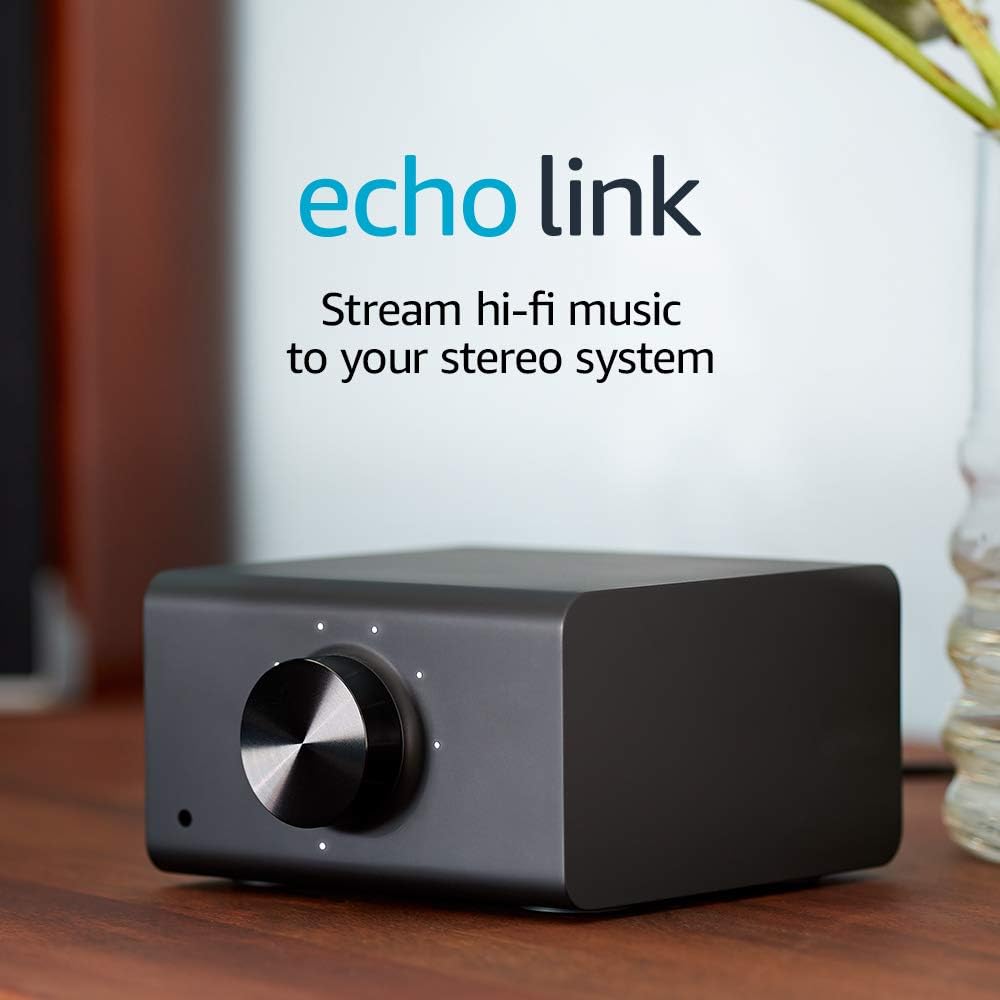
The Echo Link allows you to upgrade your existing stereo system with high-fidelity music streaming and Alexa voice control. It connects seamlessly to your stereo, supports multiple audio inputs and outputs, and enables multi-room audio playback, making it the perfect addition for music lovers looking to modernize their sound experience.


T**I
Dramatic improvement over the DOT connection
I had an extra Dot after upgrading another part of my home's Echo collection, so I connected it into a spare set of inputs on my main audio system. This was mainly an experiment to see if I could easily use Alexa to stream to the outdoor speaker system that runs off the main system so I wouldn't have to come inside to change CDs or flip vinyl every so often. The convenience of Echo voice control however just makes you do more and more with what you have, but in my case at least, the sound quality off the Dot was definitely lacking. In the house I have a mid-range somewhat vintage but very transparent audiophile system with a Musical Fidelity preamp into an updated Eagle Amp driving a pair of lightly modified Magnepan 1.6s. The Dot did what I originally wanted, but listening to it as the source other than when I was outdoors was fatiguing at best except for background entertainment music in whole house or main level configuration. No problem initially, but over time, the mismatch between the Dot and the main system's capabilities just got more and more annoying no matter what. I saw the Echo Link, liked the capabilities on paper vs what the Dot could do and grabbed one during a recent combo sale+credit card discount perq. One of these days, I may break down and invest in a decent external DAC and use optical connections, but for now, I just connected the analog outputs of the Echo Link with a set of garden variety RCA signal cables from the spare parts bin, powered up and joined it to my network. WiFi connectivity is required for initial setup, but was a little spotty compared to other devices in my network, so if you can connect via ethernet cable, I recommend that after setup via that required WiFi connection & Alexa is completed. I had very few issues with the setup process and quickly added the Link into the main floor group the Dot had been part of. BTW, I was pleased to see that the volume indicator LED's faded out a few seconds after any level adjustment whether by the large knob on the front or via the Alexa app - There are already too many LEDs glowing in the dark on too many devices in my life. With it all connected, I fired everything up on the main and asked Alexa to play some music. The initial sound was just....awful...harsh, grating, way too bright. Definitely was getting way more detail from the Link vs the Dot, but it was painful to listen to and I was considering returning it and investing in some other solution. I don't think I've ever had a component addition sound this bad on my system. before just giving up, I decided to let it run for a while with reduced volume and see if it settled in with some time on it. I let it run this way over a period of a few days, trying it out for a bit turned up each day. It seemed to get noticeably better after about the 3rd day. It was still too bright and harsh sounding, but it wasn't driving me from the room any more. I was still a little unhappy though, so today I yanked the original signal cables and started experimenting with some lower capacitance signal cables and now I have the Link giving me what I'd hoped for. I might try a few more interconnects, but right now, channel separation is very, very good / better than I expected. resolution and clarity are quite good for what this little device costs, and while I still prefer my other sources for serious listening, this is head and shoulders way above what the Dot can do. It is a worthwhile addition to my old school audio system, adding simple, convenient voice controlled streaming capability without spending a fortune that I can enjoy listening to. That said, on higher performance systems, you may need to spend a little time experimenting. I found it needed a little burn in time and was as in-your-face sensitive to cable characteristics as any piece of analog out audio gear I've owned. I'm a little disappointed in the Wifi but that may be something unrelated to the Link itself. I'm happy with my purchase and I'm keeping it.
S**E
Improved Sound Quality and Creative Ways to Stream Local Media with Plex over Multi-Speaker Groups
Hello, I purchased this because I wanted have improved sound quality and to use the link in a multi speaker group. I also wanted to be able to play local music from my collection over a multi-speaker group and the source of the local music would be from the very same receiver this is connected to. However, this has been a challenge because I'm still trying to figure out how I can make this happen. I'll try using the zone 2 output from the receiver. I'm using a Shiit Dac Modi 3 to help improve the quality of sound. Still learning and I'll update more as I go. If anyone has any advice on how to improve my listening experience, please chime in. Thank you! UDATE: Can’t play local files through it. Only streaming. Direct Line Audio input from other source does not work. Disappointing in that regard. It does sound slightly better than just an Echo Dot hooked up to the receiver and it can be used in a multi speaker group. My Yamaha receiver has Alexa built in but is very limited, that is partially why I purchased the Echo Link. I like having good sounding quality on my stereo and the ability to play across the house to different Alexa speakers. Just wished I could play my local files with Plex or other sources directly from the Yamaha receiver. The Schiit DAC is still in the equation and I haven’t compared the quality of sound without it. Update: 2/24/2020. I added a Bluetooth Transmitter (1Mii 230ft LONG RANGE Bluetooth Transmitter Receiver Bluetooth Audio Adapter Wireless Transmitter, Support AptX Low Latency & NFC, Digital Optical, RCA AUX 3.5mm for TV PC Bluetooth Earphone/Speaker )to the Echo Link by plugging it into the audio line Input and it actually works! I used my phone to play the Plex server to a group of speakers that I have designated. So I can play my local media over a multi speaker group. Pretty Cool. UPDATE: I’m going to connect a Chromecast to the line in on the link to play music from my Plex Server. I like listening to my FLAC music files from my own collection. This way I don’t need to tie up my Bluetooth connection on my phone but can still control the music from my phone via the Chromecast connection. I’ll let you know how this goes. UPDATE: April 30. I connected Chromecast to an Audio Extractor then split the Audio to the audio input on the Echo Link. I connect Plex to the Chromecast that sends My local music Files to the Echo Link. On Echo Link I can distribute my music to what ever Echo or Echo group I want to. It’s my work around to have Plex play on multiple speakers in different rooms. UDATE: May 8, 2020. Echo Link randomly goes off the network. Still online but won’t play music in a multi speaker setup. Went to try and fix it and it’s extremely annoying. The Amazon Alexa App now Crashed. I’m frustrated with this product. So much potential and it’s line audio distribution is really great idea. I think Amazon really needs to fix these buggy issues with firmware upgrades. Time to reduce my star rating. I really don’t like to do that but like I said it’s frustrating. Update: Use the Echo Link to stream my local music files. I connected a Chromecast to the audio line in and now I use the Plex App on my phone to cast to the Chromecast. Music is distributed over my echo multi speaker group including the Yamaha Stereo where the Link is connected to. It’s nice to have control and flexibility of where in my house I can play my local music collection through the Plex app.
B**E
I have nearly lost my mind setting it up properly but yeah this thing is really really great
The Echo Link shines as a music streamer. How you hook it up to a source and your sound system matters. The quality of your source and the quality of your speakers and amplifier are going to be the biggest confounding factors when it comes to your sound quality. Let's be clear, bit depth above 16 and sample rates higher than 44.1Khz for anyone not a sound engineer are not going to make a difference you can hear. If you are a sound engineer mixing tracks then yes these things matter significantly... sometimes. 16 bits will give you a loudness range of 96db while 24 bit will give you 144db range... your ears would be bleeding if you could actually reproduce 144db. Hearing protection is required at 85 DB and higher. You can't hear higher than 20khz so sample rates at 44.1KHz capture all the frequencies you need for a full spectrum human hearing range audio experience. If you are one of the super humans who enjoys audio up to 96Khz then yes you will need source files sampled at 192KHz and equipment to reproduce those higher frequencies. Finally lets discuss jitter. This is a psychosis of some in the audiophile crowd. The vast majority (read as all) of interface jitter is not louder than the sound floor of the sample. If interface jitter becomes noticeable then it means there has been some serious component failure perhaps accompanied by a burning smell and visible smoke. So if someone starts mumbling about all the jitter the Echo Link produces out its digital interfaces please direct them to an audiophile clinic where they can receive certified audiophile antipsychotics. OK now that is out of the way. The Echo link is pretty awesome especially if you are looking to stream music to it. The software is great you have an equalizer and a crossover. Is there another product in this price range that can do all this with all these inputs and outputs... no, no there isn't. First the pros: Giant volume knob with lights and you can control the volume via the software too Front headphone jack Tons of inputs and output ports including coax, optic and a subwoofer out! Excellent sound via digital inputs and Bluetooth Excellent software controls via the app gapless playback Cons: Configuration for the Echo link is a bit buried in the Alexa app Firing off a music stream in Spotify from the Alexa app will cause playback control in the spotify app to not work as expected until Alexa gives up the control... which as we all know Alexa is a control phreak and will not give it up easily. Audio timeout and audio delays. Well this is most likely not the Echo link. Weird things happen when you chain multiple DACs together. I can't tell you 100% it is not the Echo link but look at your setup first and ask yourself "Am I the cause of this problem?" because it is probably you.
S**E
Department of redundancy department
There's absolutely no reason for this thing to exist. Turns out that you can get identical audio quality using any normal Echo device in conjunction with a high-quality Bluetooth receiver such as an Audioengine B1 or Bludento HD. You will get the same exact bitrate and the same exact everything. If you don't like the DACs that come in those units, just Toslink it out from there -- bypassing those units' own DACs -- into whatever DAC blows your skirt up. The Echo Link can't even stream HD audio, just SD (44/16). So there's exactly zero point to using it with Amazon Music HD. (Well, actually that's not quite true: it _can_ stream in HD but you can only use their analog outputs!!! … and so if you want to do that you have to live with the crummiest DAC imaginable. Why it would be set up this way is beyond me. If you have a nice DAC, you definitely want to feed it a nice tasty HD bitstream. Believe me, just using SD with the Echo Link's digital out sounds better by far than using HD from their analog outs. This has to be an accident; why on Earth would they do this??) Adding the Echo Link to your setup is ->nowhere near<- as convenient as just using a normal Echo. It's a significant step backwards. The handoff between a regular Echo device and this piece of uselessness is nonsensical. And the voice commands get downright silly. Say someone rings the doorbell. With a normal Echo device, you say, "Alexa, stop!" and it stops. With this thing, you have to utter a whole mouthful, like, "Alexa, tell the Living Room Group to stop!" Lastly, they advertise an input pass-through, allowing you to place one device upstream of the Echo Link, and it's supposed to allow that input to pass freely whenever the Link isn't actually playing. This feature is extremely buggy, and at least in my case entailed going into the Alexa app to reconfigure and restart the device. Great idea but the implementation is absolute garbage. Why doesn't Amazon just put a Toslink output and an RJ-45 jack on a regular Dot? It would cost about $2 more, and be totally convenient. I assume they eventually will; they are smart folks, and it's just too friekin' obvious to not do that. Duhhhhhhhhhhhhhhhhhhhhhhh Amazon
J**D
An Echo confused about its purpose.
I've been using a Link almost daily for a few weeks, and I am both very disappointed that it didn't fulfill the purpose I bought it for, but am a surprised with the role it finally took on. I had bought the Link - as I'm sure most people do - to have a higher-quality output for my home audio system with the convenience of an Echo. However, it is inherently limited in it's audio quality as I believe at this point is does not work with Tidal Masters or Deezer Hifi, which means 320kbps is still the limit in streaming resolution. The optical output gives the option for an external DAC, and I've found the Link’s own analog output to be disappointing. I actually prefer the sound of previous Echos, especially the gen 2 Dot which I much prefer the sound of and was a fifth of the price. The Link has a flatter response curve but is also lifeless and dull. It is right on verge of being harsh and fatiguing. So, for your average streaming of Spotify without being too concerned with great quality, it’s maybe passable but way overpriced. But in the other areas of being an Echo it is frustratingly limited. No remote pairing and no internal microphone. The lack of ability to use an Alexa Voice Remote is maddening in its omission. To push music through the Link a second Echo has to be used. It can set to be the preferred output for a group, but Alexa speaks and listens through the other Echo. Changing tracks must be done through that Echo, which means having to yell over the music to have it hear me, and the music does not quiet for my voice. To change to the next track, the second Echo has to be used. To adjust volume without touching the Link, a second Echo has to be used. It all feels unpolished and difficult. Occasionally, telling the second Echo to stop the music will make it stop on the Link and for some reason it just switches to playing on the second Echo. The Link sometimes gets left out of playing through a speaker group. And connecting to a bluetooth device has to be done by app, there's no way I've found to tell the second Echo to pair the Link to bluetooth by voice. It all feels really half-baked. So it moved out of my main audio system. It just didn't bring the convenience of any other Echo device, and became decidedly more complicated. I don't mind getting up to flip a record or tape, but the whole point of Alexa devices is their beautiful ability to be controlled by voice from a distance, at least for me. It means being able to get work done and move around the house while being able to have some control over the music playing. The Link doesn't really allow that. Even just being able to push "skip forward" on a remote would be a huge improvement. But before packing it up and shipping it back, I tried using with my computer as a volume control for a pair of powered speakers. And here it does much better. The volume knob is within easy reach. I run optical from the computer to the Link, and it sounds good with my B&O S3s that punch up the sound. They can get very bass-heavy sitting on a thin-topped desk, but the Link's EQ let's me tailor the sound a bit. The headphone jack on the front sounds good also. It adds the ability to still use my desk speakers even if the computer is off through bluetooth, Spotify Connect or a second Echo. I really like it. But some limitations still persist: EQ modes are not supported - such as Night Mode - which would be really helpful, nor does it automatically reconnect to bluetooth speakers after unplugging a pair of headphones. Not deal-breakers, but still glaring omissions. I would love to use the Link as I intended in a home audio system, but it's lack of accessibility, polish and sound really doesn't make it a good fit. It’s just too hard to use without the added benefit of quality sound. But in certain uses - such as a volume knob with some bells and whistles paired with punchy active speakers - it is honestly a pretty useful component. Of course, I have hope the firmware updates will fix many of these problems, and that someday it can find its place next to the main system. But for now its limitations only barely justify its cost. And honestly it may not for many. I think the tepid overall rating it has is fair at this point.
S**E
The Only Way to Get Everything out of Amazon Music!
I attached the Link to my Yamaha A-S301BL with KEF Q150 speakers (amazing bookshelf speakers) and I used an S.M.S.L SU-1 MQA DAC with an optical connection to the Link (the Link doesn't have the greatest DAC) and Amazon Music (especially their Ultra HD selections) sounds utterly incredible! The Yamaha has a remote which controls volume in a much more incremental manner than Echo devices do (they have only ten 10% jumps). So I just turn up the Link's volume (and don't use Alexa voice volume commands) and then just use the Yamaha's remote. It's so much better than Alexa's mere ten increments and no more shouting, "Alexa, volume down!" I had the original Echo Studios (two stereo paired with the Echo Sub) for six years and they sounded pretty darn good. But this just blows them away. Using the Link with your good existing stereo system is the way to go (although I admit, mine cost twice as much as the Echo Studio setup I had). There isn't really any comparison to playing Amazon Music Unlimited (please update that app, Amazon!) through your good system with the Link as to playing it through the Studios (although I haven't heard the not yet released new Studio- but I just know that it couldn't compare with this). If you have a good system, the Link is the only way to go to fully appreciate Amazon Music in all its glory (although you won't get the spatial "Atmos" capability you get with the Echo Studios, but I think that's over rated anyway). It's really not difficult to set up (just Google how). You will need some kind of Echo device to interface with it, however. If you don't already have one, the cheapest is the Echo Pop and it works just fine (put it and the Link in a Group with the Alexa app and make the Link the "prefered" speaker and then you can just say, "Alexa play whatever" and it will over the Link to your stereo system without having to also say "On the Echo Link"). Also, forget about the Echo Link Amp. Use just the Link with a good system. You'll be stunned, I'm betting big! It's great, especially if you throw in a good DAC. The Link is the unsung hero of Amazon Music.
C**S
Great addition for audiophiles
I bought this to replace my analog cable from my Dot to my amp since it didn’t have the best quality. The link has solved the audio quality for me. While the Link showed in my Alexa app after it was shipped, I did have to go through the setup of the wireless connection for it to work on the ethernet connection. I also set the Link as the default speaker in the room. Asking the Dot to play Spotify will just start playing on the Link. Asking the Dot to stop or play works, just not as fast as if it was playing from the Dot itself. It works quick enough to mute when a phone call comes in. Power source isn't standard USB, its just a mini plug. Hopefully these aren't expensive should it ever break. I did connect my computer to the toslink input and verified that passthrough works. When the Link isn’t playing an Alexa music product, the passthrough is active sending that source to the link. There is no switching needed. Headphone jack and it works and you can change the level using the knob. Not sure exactly why there is a headphone jack since the amp it is hooked up also has a headphone jack if I really wanted to listen via headphones. Only music sources like Amazon music, iHeartradio, Tunin, Spotify, Tidal will play on the link. The flash briefing does not play through the link at all and plays out of the Dot. While a bit pricy, I’m happy that I get high quality audio out of the Link.
A**E
A (Relatively) Inexpensive, Reasonable Quality Streaming Device
With the demise of Google's Chromecast Audio, the Echo Link seems to be the lowest cost mainstream streaming device. It's adequate for entry-level audio systems, or if you just want background music while you get on with life. If you have a reasonably robust audio system and compare the Link to streaming DACs that cost $500 or higher, you'll notice a quality difference. So your mileage may vary. I purchased an Echo Link to feed a newly acquired PS Audio Sprout 100 and ELAC Debut B6.2 speakers. Since I had nothing with which to compare it, the Link sounded pretty good. I initially used RCA connectors, but after a bit of reading I discovered I could improve the sound by connecting the Link to the amp with a Toslink optical fiber cable. That bypasses the lower quality Link DAC, feeding the digital stream to the Sprout's superior internal DAC.. After a month of musical satisfaction, music streamed from the Echo Link began to stutter at the beginning of new tracks. The Link didn't always appear as an option on my Android Phone or Chromebook, and inputs from external devices were delayed and/or erratic. I had no such problem using Amazon Music Unlimited HD or Spotify Connect from an nVidia Shield connected through the Echo Link to the amp. After posting a review outlining these issues, I was contacted by the Echo Link team. They recommended a factory reset (hold the action button >25 seconds). This appears have resolved the issue - the Link now streams music normally and it shows up reliably on all my devices. With the WiFi issue is resolved, I find the overall audio quality about the same as a no-longer-available $30 Chromecast Audio dongle using Toslink to bypass the low-quality internal DAC. The chief advantages of the Echo Link are better integration with Echo devices, a physical volume control, and multiple inputs. For the price, the Link's sound quality is adequate for entry-level audio equipment and casual listening. The next step up for mainstream devices costs an additional $300, for something like a Bluesound NODE 2i. Withoug a side by side comparisons, you may be satisfied with the Link.
Trustpilot
2 weeks ago
3 weeks ago