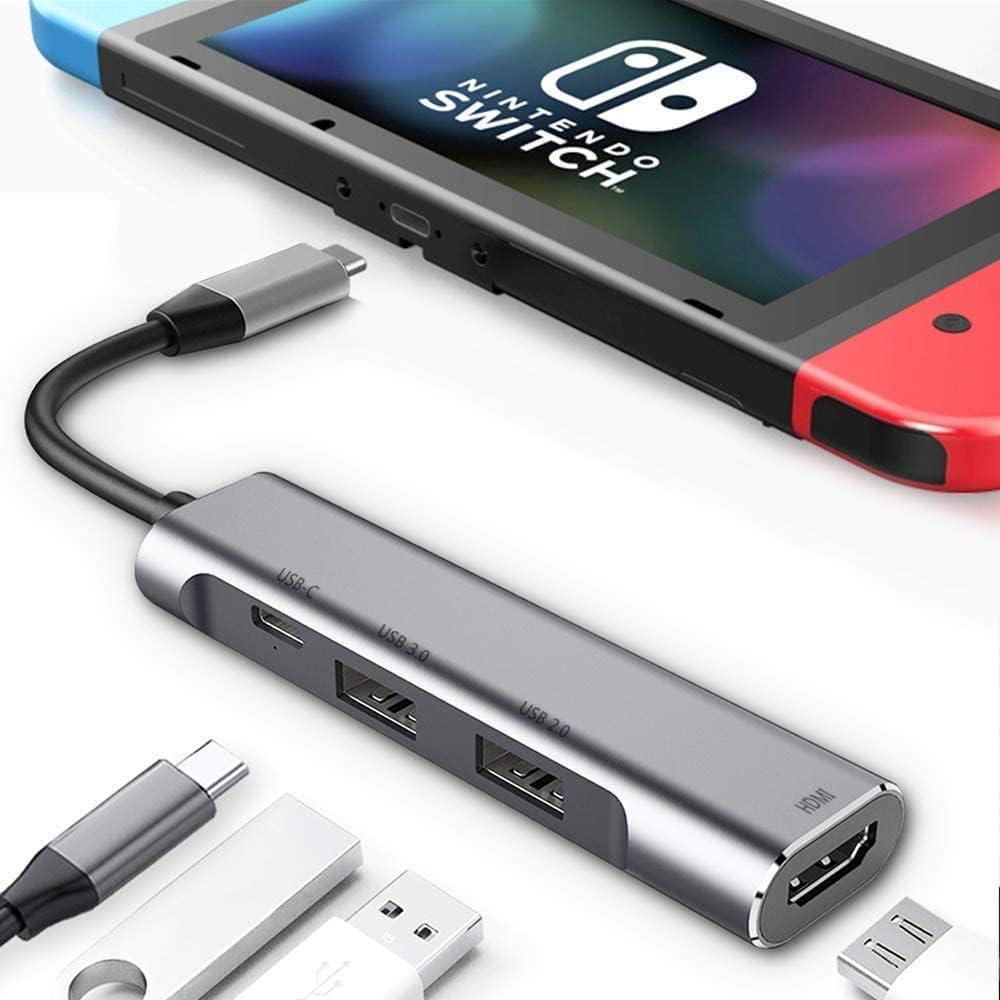
RREAKA 4 in 1 Switch Dock for Nintendo Switch 2/1/OLED
Product ID: 88464172
Details
- BrandRREAKA
- ColorSilver
- Hardware InterfaceHDMI USB 2.0 C
- Special FeatureFast Charging
⚡100W USB-C fast charging
🔌USB 3.0 high-speed data port
🖥️4K@60Hz HDMI output
Desertcart purchases this item on your behalf and handles shipping, customs, and support to Argentina.
🎮 Compact dock, colossal experience — game, stream, and charge on the go!
The RREAKA Switch Dock is a sleek, portable 4-in-1 docking station designed for Nintendo Switch 2/1/OLED and USB-C devices. Featuring a lightweight aluminum build, 4K@60Hz HDMI output, USB 3.0 data transfer, and 100W fast charging, it transforms any location into your ultimate gaming or productivity hub. Perfect for millennials who demand high performance and portability without compromise.




| ASIN | B07JK9DFKH |
| Additional Features | Fast Charging, Fast Data Transfer, Lightweight, Plug and Play, Portable |
| Best Sellers Rank | #2,307 in Video Games ( See Top 100 in Video Games ) #30 in Nintendo Switch Cables & Adapters |
| Brand | RREAKA |
| Color | Silver |
| Compatible Devices | Macbook M1,M2,M3,Type C Laptops,iPad Air/Pro/Mini,iMac,Steam Deck,Type C Smartphones,Mouse,Keyboard,iPhone 16 Pro Max,iPhone 16 Pro,iPhone 16,iPhone 16 Plus,iPhone 15 Pro Max,iPhone 15 Pro,iPhone 15,iPhone 15 Plus, Nintendo Switch, Nintendo Switch OLED Compatible Devices Macbook M1,M2,M3,Type C Laptops,iPad Air/Pro/Mini,iMac,Steam Deck,Type C Smartphones,Mouse,Keyboard,iPhone 16 Pro Max,iPhone 16 Pro,iPhone 16,iPhone 16 Plus,iPhone 15 Pro Max,iPhone 15 Pro,iPhone 15,iPhone 15 Plus, Nintendo Switch, Nintendo Switch OLED See more |
| Customer Reviews | 4.4 out of 5 stars 5,357 Reviews |
| Data Transfer Rate | 5 gigabits_per_second |
| Enclosure Material | Aluminum |
| Hardware Interface | HDMI , USB 2.0, USB 3.0, USB Type C |
| Item Dimensions L x W x H | 3.7"L x 0.9"W x 0.5"H |
| Item Highlight | 4K HDMI, USB 3.0 Port, Type C 100W Charging, Portable Mini Switch Docking Station |
| Item Weight | 32 g |
| Manufacturer | RREAKA |
| Mfr Part Number | RREAKA |
| Model Number | 4351605027 |
| Number of Items | 1 |
| Number of Ports | 4 |
| Operating System | Android, Nintendo Switch, Windows, iOS, iPadOS |
| Special Feature | Fast Charging, Fast Data Transfer, Lightweight, Plug and Play, Portable |
| Total USB Ports | 2 |
| Total Usb Ports | 2 |
| UPC | 793029632955 793029633013 |
| Unit Count | 1 Count |
| Warranty Description | 1 |
J**E
Perfect Travel Dock for Nintendo Switch — Compact and Reliable
This dock really makes you wonder why the official Nintendo Switch dock is so massive. I understand the original dock is designed to look nice next to your TV—this one definitely isn’t—but that’s not why I bought it. I use this specifically for travel. It’s perfect for hooking up my Switch to a TV at a hotel or a friend’s house without packing something bulky. I’ve tried several compact docks before, and some of them stopped working after only a few uses. This one, however, has held up really well so far and has been reliable every time I’ve needed it. Pros: Extremely compact and travel-friendly Great alternative to the bulky official dock Reliable performance compared to other small docks I’ve tried Ideal for hotels, travel, and visiting friends Easy way to play on a bigger screen while on the go Cons: Requires proper power via USB-C (power bank or adapter) to function Does not support HDMI auto-switching like some consoles (e.g., PS5) Not designed to look nice as a permanent TV setup Overall Verdict: This isn’t meant to replace your main dock at home—it’s meant for portability, and it excels at that. As long as you power it correctly and understand it won’t auto-switch HDMI inputs, it does exactly what it’s supposed to do. If you travel with your Switch and want a reliable, compact way to play on a bigger screen, this is a great buy.
J**S
Updated Review - Works great, perfect for travel
UPDATE - 02.14.19: The seller promptly contacted me after I reported my issue and was able to send out a replacement unit very quickly. I had to travel recently and was able to try the second unit for extended periods over multiple days with my Switch and my Samsung (using Dex) and I'm happy to report that it didn't have any of the issues my original one had. Even after binge watching some Netflix using my phone to tv the new one didn't even get warm to the touch and the picture quality (colors in particular) were even better than the last one so I'm going to guess I must have just gotten an odd one-off with the last one. Big thanks to the seller for getting the replacement unit out so fast, would highly recommend for anyone looking for a compact travel friendly option for either Nintendo Switch or Samsung Dex use. -------- Maybe I just got a bad one, but I think I'll stick to a real Nintendo brand dock. I followed the included instructions to use this for my Nintendo Switch and everything worked fine at first. Picture quality was OK, although there was some light image quality loss. But after 15 minutes of play time it just stopped working. I noticed the power indicator light was off so I went to make sure nothing came loose and the adapter was burning hot. I unplugged, replugged, still nothing. Let it cool down for about an hour and still nothing - no power light, my Switch doesn't recognize it, and I even tried to see if it would act as a Dex adapter for my Samsung Note 8 and nothing their either. It didn't seem to do any damage to my Switch, but I think I'll avoid the risk and return this rather than attempt another one.
R**J
Works with Switch 2 - requires high power supply
Works - however I tried with a 20w adapter and that was an egregious error. Need more W.
M**R
Great as long as you know this
I had a travel dock like this that only worked with switch 1 but wouldn't work with switch 2. So I got this to be the all around... It works for both. But don't leave your switch one plugged into it to charge, or you will have to hold the power button for 15 seconds then wait then press it again to turn it back on... For done reason this dock charges fine when playing, but if you leave it plugged in and turn off the TV and a switch 1... You don't be able to turn that switch one without disconnecting, resetting the console and waiting for a reboot. As long as you know that.... It's really good. Also you'll need a switch 2 worthy power supply if you use it for a switch 2. It will however work with a switch one on a lesser power supply like the one for switch 1. Also connected an iPad and an android phone to a TV with it too.
B**.
Samsung Note 10+ / Dex: 'moisture' detected / became useless after a week
I typically love these types of gadgets, being able to do things not typically thought of by others. And at first, everything was working fine. This device properly connected my Samsung to the LG TV I had, and Samsung Dex was working great (no lag, all games I tried worked)... However, the problems began when I used a charger to plug in through the Reaka USB-C HUB. Samsung Note 10, from dead, immediately rejected it stating there was moisture detected. - Bypassing the Reaka USB-C Hub with the *same* charger and cord, the Samsung Note 10+ Had no issues charging properly. This confirmed there was nothing wrong with the Samsung charging port, or the charging cord/brick. - Tried letting my Note 10+ be charged before I plugged the cord back into the Note 10+. This worked for a few hours, but Samsung Dex started to crash within minutes/TV No Signal. I went to look at the phone, it was giving me the same moisture detection error. Long and story short, my experience lasted all of a week, and will need to return and attempt another hub. Edit: I found out it was actually my Samsung's USB board. Had to replace it. Opened her up, replaced it, and moisture detected is gone. Changing my review because it had nothing to do with the device listed here.
S**R
Actually works! But you need to plug in an order.
I bought this a few months ago while I wasn’t at home. Needed a Switch dock that wasn’t expensive. It actually works as intended! However, you do have to plug in everything in a specific order or it won’t work. I believe other reviews also said the same thing. I can’t complain about that, it’s extremely portable and works with more than just a Nintendo Switch so it is a good trade off for me. You can easily fit it into a bag for traveling, which is exactly what I ended up doing. I’m also able to use my iPad on the TV, no specific order required. One issue is that if you’re trying to watch media apps on your Switch, it likely will not work. There is no HDCP handshake, so something like YouTube for example will not work at all. We thankfully have a Roku easily available at the TV so that isn’t an issue for us, but if your main purpose is to watch media, I would look into another product. I am not sure if other devices will give an HDCP error, since I haven’t tested it on my iPad.
S**N
Probably a fluke:edited
Well, i was really hoping this would work for me, and heck... maybe its just a fluke, but after plugging it into my Galaxy s8 and it turning into dex mode, after a few mins it starts to flash on and off (my tv screen) almost like its unplugging and replugging. Im using the original fast charger that came with my S8, and the original cord so that shouldnt be a problem. I followed the directions for this particular product: Plug power in to the hub, plug hdmi into hub and tv, make sure device is on and working, then plug the hub into the device. So thats out of the question. Honestly, i think its just a glitch with the product, and that its just mine that doesnt work... i think this mainly because i see very good reviews about this product (thats why i chose this one over the others). Ill keep fiddling with it, and see if i can get it to work properly (ive also tried multiple different HDMI cables, one being the one that came with my xbox one x, and one i bought thats allegedly "highspeed HDMI 2.0). Maybe its because im hooking it up to a 50 inch 4k smart tv? idk, because it says that it scales to 4k, so that shouldnt be it. Again, i think its probably just the one that i got thats defective.... Update! Ok, so this has gotten worse. I cannot even switch to screen mirroring mode, back to Dex mode without having to unplug my phone and restart it. It CONSTANTLY flickers, and then shows no signal on my T.V screen. So, i was thinking that it was maybe the charger I am using (which i dont think it really is, because i was using the original cable and box that came with my s8) and went out and bought a big powerful blackweb charger, thats rated higher than the fast charger that came with the phone. Still, it does the same thing. So, idk... hopefully its just mine, and i can get a replacement.
J**S
Works with Nintendo Switch and external monitor
I bought this dock specifically for connecting a Nintendo Switch to a portable KYY monitor. I had a similar dock from a different brand, but it didn't work with the Switch. I bought this dock and it worked perfectly. I actually like the blue and red color as well. It will make it easy to grab the right dock when wanting to connect my Switch. In case you are trying to connect a Switch to an external monitor, here's what I did. I connected a USB cord from a power adapter in the wall to the KYY monitor USB C input. Then I connected the HDMI output of this dock to a HDMI to mini-HDMI adapter into the KYY monitor. I also hooked up a USB cable to a power adapter plugged into the wall into the USB C connection on this dock. It didn't seem to work at first, but I was able to get it to work several times with no issues. I wasn't able to use my Hori split pads while holding the Switch, because the Hori Split Pads need power from the Switch. I'm assuming normal Joycons would work fine since they have their own power and can connect via bluetooth. I used an external bluetooth controller with the Switch hooked to the monitor with no problems.
M**S
Small but Mighty
Ive been using this as a full time replacement to my original dock, as it broke. Now, I was cautious about third party docks as there are claims that they brick and break your switch. However, I had seen good reviews on it and saw that it had been recommended by multiple people online; so I took the risk. I plugged it in and to my surprise, it worked quickly. The quality wasn't as bad as I was expecting and more importantly, I can fit it into my case and bring it anywhere. The portability of it is its greatest factor as with the original dock, I couldn’t bring it anywhere. Overall, this small dock really surprised me in terms of quality and portability; just make sure to use the original charging cable.
B**L
Parfait.
Parfait.
J**E
If it doesn't work change the plug or the HDMI cord, once it does you'll be very happy
Didn't work at first, so I changed the plug, still didn't work so I changed the HDMI plug and voilà, works like a gem! So pleased, small so it's very portable and you get a great picture.
E**N
Great Product - Easy to use and transport
Excellent device to connect multiple electronics to a screen. Easily transportable, light weight and great quality. Easy to plug in and works instantly, used on holiday in hotel, in work office and at home on the tv. Great value of money. One thing to note is that it requires additional power to work for example Nintendo Switch power supply but once powered works fine without issue. Assume laptop or other power source would be sufficient.
L**K
Great for traveling
This product is great for traveling with the Nintendo Switch as it allows for connecting the devise to a tv without bribing the original dock with you. Highly recommend.
Trustpilot
2 weeks ago
3 weeks ago