Buy anything from 5,000+ international stores. One checkout price. No surprise fees. Join 2M+ shoppers on Desertcart.
Desertcart purchases this item on your behalf and handles shipping, customs, and support to Argentina.
๐ Power Your Productivity with One Dock to Rule Them All!
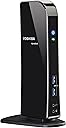
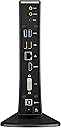
The Toshiba Dynadock Docking Station (PA3927U1PRP) transforms your laptop into a powerhouse workstation with a single USB 3.0 cable. It supports dual external displays up to 2048 x 1152 resolution, delivers immersive 5.1 surround sound, and offers six USB ports including two front 'always on' charging ports. Designed for universal Windows compatibility, it ensures fast data transfer and a clutter-free, professional workspace.
| ASIN | B006ZGWJU2 |
| Best Sellers Rank | #43,395 in Computers & Accessories ( See Top 100 in Computers & Accessories ) #1,527 in Laptop Docking Stations |
| Brand | TOSHIBA |
| Color | Pa3927u1prp |
| Compatible Devices | toshiba laptops |
| Customer Reviews | 4.2 out of 5 stars 494 Reviews |
| Global Trade Identification Number | 00883974669882 |
| Hardware Interface | 3.5mm Audio, HDMI |
| Item Weight | 1.2 Pounds |
| Manufacturer | Toshiba |
| Mfr Part Number | PA3927U1PRP |
| Model Number | PA3927U1PRP |
| Number of Ports | 17 |
| Total Number of HDMI Ports | 1 |
| Total USB Ports | 2 |
| Total Usb Ports | 2 |
| UPC | 803982740267 132017821399 163120312092 151903091524 012302520391 883974669882 887597148434 088021462472 956263371527 763615849869 |
| Warranty Description | 1 year |
A**N
The best choice for newer notebooks
I wanted a small-ish docking station for my new HP Envy, which has USB 3. I also wanted the docking station to accommodate the HP's HDMI port, as well as the TV I use as a monitor. This Toshiba satisfied all of those requirements, and gives additional worthwhile features, like supporting two monitors. (A nice touch was a supplied adaptor, which connects my VGA monitor cable to the DVI port of the Toshiba). The docking station connects to the laptop via a supplied 3-foot USB cable. I chose this type of connection over Bluetooth or IR for security (because of the work I do, I prefer wired connections) and ease of operation. This connection works great. However, I wish the cable were longer so I could keep my desktop clear of peripherals (I'll replace it soon). I wanted my notebook to sit on my desktop and remain uncluttered with wires, so I rejected other docking station designs, including HPs, which elevate the notebook, or plug into a physical mount. With the Toshiba, only the notebook is in the work area of the desktop, so I use its keyboard (no wireless keyboard needed) and the USB ports are available for multiple flash drives. A wireless mouse would be convenient. The Toshiba sits over on the edge of my desktop, with all the wires connecting to my peripherals neat and nearly out sight. The Amazon price was discounted, and I received the Toshiba in 2 days.
G**R
Works perfectly on USB 3.0 - great dock!
Flawless upgrade to my prior USB dock!! Have had a Kensington sd400v dock for several years. I run two screens off the computer (laptop, flat panel) and a third portrait screen off the dock. The Kensington always had issues with video (speed, video errors) but otherwise worked fine. I upgraded to the Toshiba Dynadock hoping the 3.0 speeds would result in error-free video. Was a little apprehensive about the negative reviews here, so I'll comment directly on some of the issues that others have experienced. 1. No problems with installation - ran the CD, the drivers updated themselves twice when the dock was plugged in, and it works with no issues. Toshiba uses a version of the same DisplayLink software that I used with the Kensington, however I note none of the errors I had with the sd400v. For example, the Win 7 drivers for the sd400v were notoriously difficult to get to install correctly. 2. No problems restarting the computer with the USB 3.0 connection. This problem is usually due to the USB 3.0 drivers and chips between the computer and the attached device. For example, I have had problems with a particular USB 3.0 hard drive causing the computer not to boot up. But no problems with this dock. I have a Clevo computer rebranded from Mythlogic with a Radeon graphics card, Win7 64bit (BTW a great company if you want a high-end laptop, much better price/performance than any of the "regular" brands) 3. The video has worked perfectly. No problems with video, response time equal to my other screens. No issues when I move windows back and forth to the screen (which used to cause problems before) 4. All of my USB devices on the dock work with no issues. I do not use either the audio or ethernet ports on the dock, so I can't comment on performance there. All in all, very pleased with this dock!!
R**.
A nice port expander
I bought the Dynadock (a port expander) to go on my wife's Sony Flip 13 to support a USB hard drive (with confidential information that stays home), a USB keyboard/mouse, and an exernal VGA monitor when working at home.. The Sony has 2 USB 3.0 ports and a single HDMI port. Using the Dynadock means she only has to unplug/plug two connections (Sony power and the USB to the Dynadock) when she travels and returns. Fortunately for me, she decided she didn't like the standup form factor, so I stole it and hooked it up to my little Samsung np300u1a-a01us, which actually has 3 USB 2.0 ports (one with optional sleep power), a VGA output, and an audio jack. Nevertheless, with the Dynadock, I can keep my USB hard drive(s) and USB CD/DVD drive connected to the dock, and I only have to undo two connections to take my PC elsewhere. The vertical, narrow form factor actually works well on my table. Installation was almost straightforward. I installed the software from the included CD, along with an update, and was off and running. I clicked on the notification icon for the displaylink, and saw the "check for updates" item, which I then clicked. The menu went away for about 10 seconds (with no evidence of activity) and then a notification bubble popped up with the message "Cannot Update Displaylink Sofware, Unable to connect to Microsoft Windows Update Server". I Googled "displaylink" and got the pointer to their download page, from which I was able to retrieve and install the latest update. (The notification menu item for update still doesn't work, and the "displaylink manager" item just gives you the current version number.) The audio and video setup items do work. As far as performance goes, I'm quite pleased, given that I'm driving the whole mess via a USB 2.0 port and my PC has an I3 processor. Keyboard/mouse and video response are indistinguishable from direct attachment of the monitor. I tried playing a DVD onto the monitor and separate speakers (all on the Dynadock), and the motion and sound were smooth and synchronized. I leave the Dynadock powered up, and I worried that this would leave the USB hard drives powered on as well (if you plug one into the Dynadock while the PC is not connected, it powers up and seems to stay up.) However, the Dynadock appears to shut down the drives if the PC is shut down while connected. I haven't tried this with either of the sleep/power USB ports on the front. Overall, I'm quite pleased with the device. I'd think it would be essential for some of the windows tablets that only come with a single USB port.
S**A
Ooooh I love this!
UPDATE: 25 December 2017 More than 4 year of continuous usage and still going strong! I still use this dock and I thought I'd come back and say how durable this thing is! I absolutely love it. I've added Plugable USB 3.0 Sharing Switch to it so I can share the same dock between two computers by pushing a button. ------- This is a fantastic work of art. Works as advertised. Computer: I use it on Windows 8 (download the latest drivers) on my Lenovo x220 Tablet/Notebook. I connected the DynaDock u3.0 on a USB 2.0 port and it works fine. I think it will be more awesome if my computer had USB 3.0 USB ports: I use all 6 USB ports: -Rear: HP printer, Webcam, Fitbit One dongle, wireless keyboard/mouse receiver (I have also tried external HDD) -Front: cellphone charging, spare for memory stick/lamp etc (very convenient) Displays: I use two monitors in extended mode both VGA, one connected via DVI connector (provided in box), other monitor connected to HDMI port via a Sandberg HDMI-VGA adapter, and it works flawlessly. I have not faced any of the issues mentioned in other reviews, I believe Toshiba has made enhancements to the drivers. For those having issues when the computer goes to standby, just prevent the computer from going on standby when docked by using a power plan. (You can enable the option to turn off displays, but not put the computer on standby). Please read the packaging and the description before you buy - this docking station does not charge your notebook and should not be expected to! Also make sure you use a genuine charger for your notebook, otherwise the display might experience flickering when connected to the Dynadock.
P**Y
Makes my Surface Pro a desktop replacement.
I recently bought a used Surface Pro on Ebay. And while its screen is amazing for tablet and ultraportable use, it isnt the best form factor for desk use at home. I found the Toshiba Dynadock after a little searching and it has exactly what I need: additional USB 3.0 ports, multiple video outputs, and 5.1 surround sound support. At was hesitant at first given some of the reviews, but these worries were quickly relieved. I downloaded the Dynadock drivers for Windows 8 from the Toshiba website, which I found difficult to navigate. But after installing the two necessary drivers, I connected my dynadock and it was recognized without problems. My dynadock currently has a 3TB Seagate drive, a Microsoft arc keyboard, a Microsoft arc mouse, a Dell S2340M 23" DVI monitor, and a Logitech 5.1 surround system. Everything was plug and play; the drivers all installed automatically. I'm mostly using this setup for business and productivity, as well as entertainment. I had everything setup and running in 30 minutes at most. I can't say it'll work this well for everybody but I could not be happier.
M**K
Best option on the market
After researching many option, I decided on this product because it has more features than any other product on the market. I love that there are four USB 3 ports and two USB 2 ports. DVI and HDMI work well. I read the reviews before purchasing and disagree that the item does come with needed drivers for windows 7 and prior. I had to download the Windows 8 driver/package but I received this product 5 days after the release of Windows 8. I didn't expect them to include Windows 8 yet but was impressed they already had the drivers. I had to install twice to get it to work but once installed, everything worked. I have two additional monitors connected to my laptop and it recognized both of them as an independent screen. I simply plug my Lenovo Ultrabook Yoga in and I have internet, monitors, additional keyboard and mouse. I do not see the delay as on review stated. It is not a dock as stated. You still need to connect the power to your Laptop but it is a great option to give you more options and connectivity with ease.
T**K
This Universal Docking Station is not bad. It has just about everything you need to ...
This Universal Docking Station is not bad. It has just about everything you need to make your laptop connect to all your essential "gear" with just one cable. I use Win 7 plus USB 3.0. Some reviews indicate the some people have had horrible experiences with this unit, but others found that it is ESSENTIAL to download the drivers to your computer first before connecting it. When I first connected it to my laptop, it seemed that all necessary drivers were found and started downloading automatically. Then I suddenly remembered that I read that the drivers needed to be downloaded first, so I quickly unplugged it from my laptop. Surprisingly, the downloads continued without any mishap and all seemed well after I plugged it back in. However, after several attempts, there was no video signal going to the video output. Through some research on the Toshiba Support website, I found that it is essential that you must also download the latest DisplayLink software. Toshiba does not provide this with the DynaDock. Why, I do not know (probably because there are continual fixes that are impossible and expensive to keep up with). DisplayLink makes no mention of Toshiba on its website, either.... there seems to be a strange relationship been the two. Never-the-less, once I downloaded the software from DisplayLinks website, magical and wonderful thinks began to happen. Not only did the video start working but vast options became available for all kinds of things.... things I'm still learning about. The styling of the DynaDock is nice, the stand is much better than I expected. The unit is sturdy and well built (substance and weight)... not cheapy and plastic-like (I hate that). It kinda has a "Connect-It-and-Leave-It" design which I like. No fussing with too many external options which sometimes can only add to your non-computer geek frustrations. I love the (backward compatible) USB 3.0 speed. Amazing that it can pass HDMI, Ethernet and all other signals at the same time. I'm sorry but USB 2.0 would not EVEN begin to handle that much data. I do wish that the design incorporated vertical positioning as well as the horizontal positioning. It also needs more HDMI ports with "connective" indicator lights. I recommend that you not pay too much for this unit ($139) as the prices are already beginning to drop. My guess is Toshiba already has a new design about to hit the market. I have bought a second DynaDock for my wifes laptop. She travels for work and I think she will really like the ease of the "one-cord connect" thingy.
E**.
Did not work for me, and my laptop is still trying to recover
I ordered this product to use with my HP Envy 17 laptop (running Windows 7) that I'd purchased over the summer. The goal was to phase out my 4-5 year old tower and make the laptop my sole computer. Naturally there are times when it's more comfortable to work at a desk, with a larger monitor and a standalone mouse and keyboard, so I was looking forward to using this docking station as a means of easily connecting my laptop to those peripherals as needed. Initially everything worked fine - I set up the Dynadock using the included CD, and downloaded the updated drivers from Toshiba's website. Thanks to the reviews here and elsewhere I knew to adjust the power settings of my laptop so that it wouldn't sleep or hibernate when I closed the lid, and I was excited to have the new flexibility of using my laptop as a desktop. However, after a day or two I had a need to reboot my computer and that was when the trouble started. After rebooting and logging in I saw nothing but a black screen with a mouse pointer. I could move the mouse, but that was it. Hitting the Window key to try to bring up the system menu did nothing, and I had no choice but to do a hard shutdown of the laptop by powering it off. This began several days of trying various combinations of System Restores, driver re-installations, browsing forums on Toshiba's website and others, etc. On occasion I would get back to a workable system, but then something would go wrong ( piece of software wouldn't start, my web browser wouldn't function fully) that would force me to restart, and when I restarted I would get the same black screen with the mouse pointer. Interestingly -- and fortunately -- I was still able to log in to a second account that was on my laptop, so at least I had some limited access. But I was never able to get everything running smoothly again, and so this is going back to Amazon while I continue to try to get my laptop back to the state it was in before I purchased this product. I had planned on using my holiday time off for much more productive activities than this. Before buying this product I spent a lot of time looking at the reviews for this item and its competitors, and I can see from the reviews that it's worked very well for a lot of people. I don't know exactly what went wrong with my installation or where the incompatibility is exactly, but I wanted to share my experience in hopes of sparing others the frustration that I've experienced over the past week. YMMV certainly applies here - you may well have the positive experience that many other reviewers have had, but be prepared to recover in case something goes wrong.
S**C
Worth Having
We have a busy office with multiple monitors and our staff work on site and in the office. It is a quick disconnect and go.
Trustpilot
1 month ago
2 months ago