Desertcart purchases this item on your behalf and handles shipping, customs, and support to Argentina.
๐ Power up your Logitech keyboard lifeโdonโt get left in the low-battery dark!
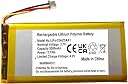
The AOLIKES 3.7V 3000mAh rechargeable lithium polymer battery is a high-capacity, safe, and easy-to-install replacement designed specifically for Logitech wireless gaming keyboards including G915, G913, G715, and MX Mini models. Engineered with built-in protections against overcharging, overheating, and short circuits, it extends wireless usage up to weeks, empowering gamers and professionals to stay unplugged longer while supporting sustainable repair practices.
| ASIN | B0CSC47FPC |
| Antenna Location | Replacement battery for Logitech wireless keyboard. |
| Battery Capacity | 3000 Milliamp Hours |
| Battery Cell Type | Lithium Polymer |
| Battery Weight | 39 Grams |
| Battery capacity | 3000 Milliamp Hours |
| Battery cell composition | Lithium Polymer |
| Best Sellers Rank | 54,144 in Computers & Accessories ( See Top 100 in Computers & Accessories ) 818 in Keyboards (Computers & Accessories) |
| Brand | AOLIKES |
| Brand Name | AOLIKES |
| Compatible Phone Models | Logitech Gaming Keyboard G915, G913, G715 Battery Replacement, |
| Customer Reviews | 3.3 out of 5 stars 18 Reviews |
| Manufacturer | AOLIKES |
| Model Name | Ahb355085pct battery replacement upgrade. |
| Model Number | BAT37V3K |
| Number of Batteries | 1 Lithium Polymer batteries required. (included) |
| Number of batteries | 1 Lithium Polymer batteries required. (included) |
| Recommended uses for product | Replacement battery for Logitech wireless keyboard. |
| Reusability | 3000mAh 3.7V Li-ion rechargeable battery. |
| Unit Count | 1.0 count |
| Unit count | 1.0 count |
| Voltage | 3.7 Volts |
T**.
Amazing battery, best investment I've made for my keyboard.
Amazing battery: the battery that comes from the factory in your keyboard is only half of the capacity of these. I use my keyboard wirelessly for at least 14 hours a day, and after installing this batter,y my keyboard now only needs to be recharged once a week. If you use it less and turn off the RGB you could probably get 2-3 weeks of use out of this battery. Installing is also very simple. Here are the instructions: 1. On the back where the sticker is (S/N and all that), peel back the lower half of the sticker. 2. You can use a heat gun to make it peel back easier if you don't want to ruin the sticker. 3. Underneath the sticker you'll find 2 screws, simply remove those and the plastic piece slides out. 4. Uninstall the old battery and plug in the new one; make sure the connector has a snug fit. 5. Put everything back, then turn off the keyboard (with the switch) and turn it back on. That's it!
"**"
The right to repair
Rather than just replacing things, as the big companies all want you to do, I'd always choose to repair them at a fraction of the cost. There are clear instructions on fitting these batteries on YouTube, and I'm typing now on my happily renewed keyboard.
ใ**ใ
ๆฎ้ใซไฝฟใใ
ๅๅๅ ้ปใง82%ใพใงใใๅ ้ปใใใใใใผใใบใฌใใชใจๆใฃใฆใใใ ใญใผใใผใใฎในใคใใOFFใฃใฆๆพ็ฝฎใใฆใใ100%ใพใงๅ ้ปใใใใ ใใไปฅๅพใฏๆฎ้ใซไฝฟใใฆใใ ๆญฃ็ขบใซใฏ่จๆธฌใใฆใชใใใฉๆฎ้ใซ1้ฑ้ไปฅไธใฏๆใคๆใใ
M**0
ๅ่ณชใ็ตใใฃใฆใใ
ๆบๅ ้ป44%ใ1ๆฅไฝฟใฃใใใใๅ ้ปใใใชใใชใฃใฆใใพใใพใใใ ใใใ่ฟๅใใใใจใพใ่ชฐใใฎใใจใซ่กใใฎใงใฏใชใใใจ้ชๆจใ ใธใฃใณใฏใใใฏในใใๅฝใใใๅผใใใๆนใซใใใใ
C**T
poor quality
crappy battery, started out good then 3 months later, completely useless and will not take a charge or hold it.
Trustpilot
1 month ago
3 weeks ago