


🎧 Elevate your audio game—because your sound deserves the spotlight!
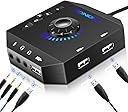
The PHOINIKAS T10 External Sound Card is a compact, plug-and-play USB audio adapter compatible with Windows, Mac, and Linux. Featuring 3 USB ports and 3 3.5mm jacks, it supports multiple devices including gaming consoles and microphones. With 4 EQ sound modes, volume control wheel, mic mute, and a 4-foot cable, it delivers stable HD sound and versatile connectivity for professional and gaming setups alike.


| ASIN | B07FP8PG9N |
| Audio Output Mode | Stereo |
| Best Sellers Rank | #114 in External Sound Cards |
| Brand | PHOINIKAS |
| Compatible Devices | Personal Computer, Laptop, PS5, PS4, Xbox One, Headphone, Microphone |
| Customer Reviews | 4.1 out of 5 stars 3,581 Reviews |
| Hardware Connectivity | USB |
| Hardware Interface | USB |
| Hardware Platform | Headphones |
| Item Dimensions L x W x H | 3.15"L x 2.95"W x 1.06"H |
| Manufacturer | PHOINIKAS |
| Maximum Sample Rate | 48 KHz |
| Mfr Part Number | T-10 |
| Model Number | T-10 |
| Number of Items | 1 |
| Platform | Windows |
| Surround Sound Channel Configuration | 5 1 |
| UPC | 693594449869 795787263044 |
| Warranty Description | 1 |
J**.
Powerful, Versatile, and Surprisingly Clear — A Game-Changer for My Audio Needs
I purchased the PHOINIKAS T10 External Sound Card back in June 2025, and after months of regular use on my laptop (October 2025 now), I can say it has earned its five stars. I have some nerve deafness, so hearing things clearly has always been a challenge. Even with the volume cranked up to 100%, Windows 11 just doesn’t get loud enough, and my laptop lacks any sort of manual volume control. This little sound card completely changed that. It provides a noticeable boost in volume and allows me to fine-tune my audio in ways the built-in system simply can’t. The onboard EQ functions are a big plus — four sound modes, including a surround sound option that really enhances clarity and spatial awareness, especially during games and movies. It also helps cut down on electromagnetic interference, which means I get a stable, clean HD sound without static or hum. For its price point, the build quality is solid and the functionality is surprisingly rich. I love that it supports both USB and 3.5mm connections, and I can even plug in a thumb drive directly — that’s not something I expected from a compact external sound card. The 3.5mm ports are thoughtfully designed: one for speakers or headphones, one for microphones, and a combination port for headsets with built-in mics. This flexibility makes it perfect for switching between gaming, work calls, and music without constantly fiddling with adapters. Overall, this is an outstanding little device that punches well above its weight. If your laptop’s audio is weak or limited like mine was, this is a simple, plug-and-play upgrade that makes a big difference. Highly recommended.
S**L
Inexpensive Audio Hub w/Mic Solution to avoid Direct Connect to Computer
My computer is behind my desk and a pain to get to for switching out my headset every time I want to use it. The sound hub worked great and it was inexpensive. The USB for the sound hub plugs directly into the computer and sits on top of my desk where I plug my headphone jack in all the time (and can mute). I also have external speakers (2.1 setup) that plugs into my other "headphone" jack in the sound hub. Originally it wasn't working for me but think it was my issue in the end but support was very good and responsive so kudos on their replies. Should be known, I have no sound quality issues but also only using my onboard 5.1 motherboard-connected audio so if you have a professional card of sorts, I don't know if switching to the sound hub would impact quality. Only real gripe (and minor considering the unit was inexpensive) would be to have a light for the Mic mute to let me know if currently muted or not. Hope this helps your decision to purchase!
C**D
Works pretty well
This does just what I needed it to do. The onboard sound of my desktop failed, and this replaces it pretty effectively. If you need something like this, this product is a very cost-effective solution. But there are a few things to be aware of. The volume knob is very pretty, with its ring of lighting following when you turn. But it doesn't drive system volume. That is, turning it doesn't tell the operating system to increase or decrease volume. Rather, there's some volume changing within the device itself. So you may find yourself confused if you also use other means of controlling the volume (like, I have a volume knob on my keyboard). It takes up another USB port, but because it's got three more of its own to offer, that's probably not a problem. I simply unplugged my keyboard from the PC, plugged this device into where it had been, and plugged the keyboard into THAT. But be aware that the USB dialect it speaks isn't the highest-speed. You won't want to plug your external hard drive into it, for example, because it'll be slower. The physical design of the device is odd. They seem to have thought more about symmetry than actual usage. The device's own USB cable comes off what the designers of the device think of as the bottom, with the speaker (or headphone) connector at the "top", and two of the USBs at the "left". The buttons are near the "right" edge of the top. With this layout it's natural to want to orient this on your desk so the USB cable is actually on the left (not on the bottom, because that would be coming out toward you, just where you don't want it!), and the buttons are facing you. The result of rotating it like this is that the next and previous track buttons seem reversed: hitting the one that's now on the left (they thought of it as "bottom") goes to Next, hitting the one on the right goes to Previous: intuitively backwards. But I can get used to that. Also, the Pause button is probably the one I'll use the most, yet they've made it the smallest button of all, again apparently for visual symmetry. There's an onboard Tone button. Don't use it, it's crap. You get three settings: regular, filter out most treble, or filter out most bass. Those latter two sound awful, making the control useless. But that's fine, the computer has its own equalizer anyway, there was no need for this device to have such a control anyway. Just avoid clicking that button.
S**X
Its just Plug in, Restart and Play! It saved my computer from the recycler!
I have an HP Envy x360 laptop computer. It was working fine until AVG Updater installed an audio update. After the update the sound card no longer worked. AVG couldn't restore it, HP couldn't either and the computer was indicating that the sound card was no longer recognized and wasn't working. The drivers were reinstalled repeatedly. The sound card is part of the mother board so the computer which worked fine but no audio was headed for the trash. I tried to find a sound card replacement on Amazon. there were none. I stumbled on this device and bought it. Plugged it into a USB port and it immediately worked! I use 3.5mm earbuds and the sound is perfect! A speaker would probably need to be attached the same way and would sound light years better than the computer speakers anyway. I can't recommend this enough! Thank you, Thank you, Thank you!
W**V
Product seems to be cheaply made (seems to be missing vital component-level protection circuits)
I bought this device to replace the microphone input on my laptop (which was horrible and had a lot of background noise). The PHOINIKAS External Sound Card worked for a while, and during this time it worked well -- it had good audio quality and the volume control knob (with illuminated level indicator) was excellent. However, the headline reads "Product seems to be cheaply made". After using the sound card for around a few hours (maybe 1 or 2) it started to crackle and distort -- all that I was doing at the time was playing sound through the headphones and using a microphone input Like I said, it sounded good and worked well up until this point. After rebooting the system to ensure it was not the operating system / sound service -- the device generated a lot of usb-related errors and was no longer recognized by the system. Other reports/reviews list audio crackle as an issue -- so I suspect that my issue was not a one-off error. Since the problem was related to the failure of the device's usb circuit/component -- my recommendation to the seller (and manufacturer ZhongTian DingSheng) is that they need to include the proper component-level protections to ensure that normal usage will not cause damage to the unit (e.g. protect against transients, voltage spikes, etc).
S**G
PHOINIKAS vs Schiit Audio Fulla
I've been using a Schiit Audio Fulla mini DAC with volume control with my laptop driving a pair of 1 by One 2-way powered speakers via headphone out. The Schiit died after 3 years so I replaced it with this. Yeah, I know the Schiit is $100+ more than the PHOINIKAS. This review is only for people like me who thought I could get by with a cheaper desktop DAC solution. The PHOINIKAS was easy to use, Windows 10 recognized it immediately and I was playing music in 15 seconds. Amazing features given the price. The sound is a huge step down from the Schiit Fulla: - It has roughly 10dB lower volume gain than the Schiit - It's not a clear and clean audiophile sound like the Schiit. - The bass is present but not well defined. It drops off below about 50 Hz and sounds like it's boosted in teh 100 Hz range. - The midrange is a bit recessed and not clear. This makes the upper bass sound overly resonant and boomy. - The treble is muffled. There is no "sparkle". Hi hats are lost in the mix. - The dynamic range sounds flat and not engaging. - The sound with the PHOINIKAS is much more coarse than the Schiit with significant digital "hash." - Essentially, the sound difference between the PHOINIKAS ($13) and the Schiit ($120) reminds me of the difference between the stock stereo system in my Subaru vs when I upgraded the speakers to some proper audiophile ones. Overall the PHOINIKAS is a great product for the money but the sound quality is no more than what you'd expect for the price.
C**H
Loving this thing. It sounds great, and even has a couple of USB ports!
I'm usually burning through some kind of USB volume knob apparatus every couple of years... Whether it is just a DAC, or an audio interface, usually what I've found is that the potentiometer usually goes bad after a while and starts crackling. I haven't had this device long enough to know how long it will be until it fails... But at this price, I don't even mind if it dies in a year or two. The sound is excellent (nothing to complain about with my Sennheiser HD 559's), and the addition of a few USB ports is super useful! Plus, the volume knob has a cute backlit LED so it's really easy to tell how far up you've got the volume set in a dark room.
N**Z
A BIG win for an HP Laptop running Ubuntu/Linux
I have an HP Envy 360 2-in-1 running Ubuntu/Linux. I'm still learning Linux but the audio input & outputs are constantly changing (sometimes I see them, sometimes I don't) as I haven't configured them to be permanently labeled yet (as I'm sure that'll take hours for me to figure out). All that to say is that this T10 external sound card is making my audio needs so much easier and gives me the extra needed ports. Thank you.
L**.
Headset MIC doesnt work
H**-
Perfect
Perfect interface and hub for PC and MAC
R**D
Excellent value all round.
This item is an extremely easy card to insert on the PC and it works immediately, the sound quality can be adjusted and is also excellent. The features of this sound card are all that is needed to set up All Around Sound. It is a sturdy piece of equipment and is really worth the money. I can strongly recommend this sound card. 100/100.
D**O
Très bonne carte son , produit fiable .
Carte son externe sans drivers , elle est reconnue automatiquement par Windows . Faite dans un plastique mat qui ne retient pas les traces de doigts , agréable au toucher . Elle a une prise micro que je n'ai pas testée et trois prises usb pour connecter ce que vous voulez : clé usb , clavier , souris etc .. ( j'y ai branché ma souris ) . Vu son prix il ne faut pas s'attendre à un bon rendu des basses mais le son est clair et correct . Seul défaut , la molette de volume manque de puissance , il faut la régler à 75 ou 80% pour avoir une écoute suffisante . Je l'ai achetée il y a un peu plus d'un an et elle fonctionne toujours aussi bien . Si vous n'êtes pas un mélomane exigeant vous pouvez acheter cette carte son les yeux fermés .
B**R
gute USB soundkarte
Ich bin absolut begeistert von der PHOINIKAS T10 USB Audio Adapter! Als leidenschaftlicher Musikliebhaber und Gamer war ich auf der Suche nach einer externen Soundkarte, die meine Audioerfahrung auf meinem PC auf ein ganz neues Niveau hebt - und diese kleine schwarze Box hat genau das getan! Die Installation war ein Kinderspiel - einfach Plug & Play! Keine mühsamen Treiberinstallationen oder Konfigurationen erforderlich. Ich habe es sowohl auf meinem Windows-Desktop als auch auf meinem Macbook verwendet, und es funktionierte einwandfrei auf beiden Systemen. Die Vielseitigkeit ist bemerkenswert - von PCs über Laptops bis hin zu Linux-Systemen, diese Soundkarte ist wirklich universell einsetzbar. Der Stereo-Sound, den die PHOINIKAS T10 liefert, ist einfach umwerfend. Klare Höhen, satte Mitten und tiefe Bässe - alles in einer kristallklaren Klangqualität. Egal, ob ich in ein intensives Gaming-Abenteuer eintauche oder einfach nur meine Lieblingssongs genieße, der Sound ist einfach unglaublich immersiv. Die Kombination aus 3,5mm und USB-Schnittstelle bietet mir die Flexibilität, meine bevorzugten Audiogeräte anzuschließen, sei es mein Kopfhörer, meine Lautsprecher oder mein Mikrofon. Die Möglichkeit, mehrere Geräte gleichzeitig anzuschließen, ist ein großer Pluspunkt für mich! Insgesamt kann ich die PHOINIKAS T10 USB Audio Adapter wärmstens empfehlen. Wenn Sie Ihre Audioerfahrung auf Ihrem PC oder Laptop verbessern möchten, ohne ein Vermögen auszugeben, ist dies definitiv die richtige Wahl!
Trustpilot
3 weeks ago
2 months ago