

Desertcart purchases this item on your behalf and handles shipping, customs, and support to Argentina.
🌈 Level up your desk game with RGB power and pro precision!
The Redragon S101-3 PRO is a wired RGB backlit gaming keyboard and mouse combo designed for both gamers and professionals. Featuring 6 keyboard and 10 mouse lighting modes, 5 programmable macro keys, and adjustable mouse DPI from 800 to 7200, it offers customizable performance and style. Its quiet membrane keys and ergonomic wrist rest ensure comfort during long sessions, while plug-and-play USB connectivity and hardware-saved settings provide hassle-free use across Windows, MacOS, and Linux systems.
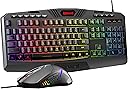


| ASIN | B00NLZUM36 |
| Antenna Location | Gaming |
| Best Sellers Rank | #97 in Video Games ( See Top 100 in Video Games ) #2 in Mac Gaming Keyboards #3 in PC Gaming Keyboards |
| Brand | Redragon |
| Color | Black |
| Compatible Devices | 🅃⓿🄿 🅢🅔🅛🅛🅔🅡 |
| Compatible Operating System Family | Linux, MacOS, Windows |
| Connectivity Technology | Usb |
| Customer Reviews | 4.5 out of 5 stars 51,743 Reviews |
| EU Spare Part Availability Duration | 7 years |
| Global Trade Identification Number | 00780411789670 |
| Hand Orientation | Ambidextrous |
| Item Weight | 0.98 kg |
| Keyboard Backlighting Color Support | RGB |
| Keyboard Description | RGB Gaming Keyboard with Programmable Keys |
| Keyboard Layout | QWERTY |
| Manufacturer | Redragon |
| Mfr Part Number | S101 |
| Minimum Required Operating System Version | Mac OS 10.15 Catalina, Windows 10 |
| Model Number | S101-3 |
| Movement Detection | Optical |
| Number of Keys | 114 |
| Number of Packs | 1 |
| Operating System | Linux, Win xp, Win 2000, Win vista, Win7, Win8 |
| Other Special Features of the Product | RGB Backlit, Ergonomic, Wrist Rest, Programmable Buttons |
| Power Source | Corded Electric |
| Special Feature | RGB Backlit, Ergonomic, Wrist Rest, Programmable Buttons |
| UPC | 780411789670 |
| Unit Count | 2 Count |
| Warranty Description | NO |
J**Y
Nice
Very cool nice lighting effects and works well
J**A
Great keyboard. Mouse... Out of box mouse issues - UPDATE 12/2019 - Great mouse/keyboard combo!
I bought this combination, expecting it to work out of the box. The Keyboard is beautiful and does a fine job of working for what I intend it for. The mouse... No spring back for either left or right mouse buttons. I am a little more than peeved at seeing this obvious factory issue make it all the way to my doorstep. Still mulling over what to do - I may send this back. Poor quality control. Update: On closer inspection, the mouse had been misaligned at the factory and the top and bottom pieces of the mouse body were not aligned correctly. I watched a video on YouTube for this mouse as to how to disassemble and reassemble the mouse and after a few minutes I had the mouse repaired. I *WILL* be covering this on my YouTube channel since I plan to review this combo set. One more item: Redragon makes it VERY clear that software is included with this package. It is most certainly NOT. And they go to great lengths to hide the software from the end user. I have found what I believe to be the software links, but plan to test before I share them here. I will bump up the review one notch if the package works out well over the long haul, but given the mouse issue right out of the gate and the promised software NOT being in the box plus the poor web site support to find the program, I cannot reasonably give Redragon a 5 star rating until these items are corrected. Update: December 2019 - I was able to correct all the issues with that first mouse and the software works just fine. I've since bought this combination of mouse and keyboard 3 more times and had no issues. This truly is a great keyboard/mouse combination and I've made it a standard setup on the 3 gaming systems I've built to date. Software is indeed on their website but it is a little strange to find - The mouse is on the website as "Redragon M601-3 CENTROPHORUS 3200 DPI Gaming Mouse " and has two downloadable executables - The Windows 10 version works just fine. I rarely run the software since it works fine without it but it is nice to be able to change the mouse parameters if needed.
P**A
Oh, joy! Love this combo!
I’ve been really enjoying my Redragon S101-3 PRO Gaming Keyboard and Mouse combo. Both pieces feel comfortable and well-made right out of the box. The keyboard has a smooth, quiet typing experience that I really appreciate. I’m usually a fan of clicky keyboards, so switching to a quieter keyboard was something different for me—but this one did not disappoint. The keys feel responsive, comfortable, and great for both typing and everyday use. I also love the RGB lighting on the keyboard. The colors look great and pair nicely with the mouse, giving the whole setup a clean and stylish look. The mouse feels excellent in the hand. I have smaller hands, and it fits perfectly—not too large and not too small. It feels comfortable to use for extended periods and moves smoothly. Overall, I’m very happy with this combo and would definitely recommend it to anyone looking for a comfortable, attractive, and affordable keyboard and mouse set.
J**7
Red Dragon Keyboard & Mouse combo
First, this review is for the replacement keyboard. The first one, the space bar didn't work, but the style and design are good, I figured I'd give it another try. Disclaimer, I have not tried as a gaming keyboard functions yet. This review is just for regular keyboard and mouse function. -Pros: Quiet, good feel while typing, keys feel like a mechanical keyboard without the loud clicking, back lighting is descent. A nice looking unit. The mouse is stylish, and will work good "as is" but you need to download the free driver and suite (suite loads with the driver). once suite is loaded the mouse becomes very adjustable to your needs. -Cons: Had read other buyers say they had same problem with space bar and other other keys. To me, a keyboard should be about typing first, everything else second. Just me. but this second one works is great. Can't find anything else to complain about, but again this doesn't cover the gaming functions. The mouse. The mouse comes with the LED set to "slow" pulse. so if you don't download the driver (suite built in) you have a standard mouse with a red "heart beat" back light (default setting). Yes, the light for the mouse can only be controlled from the suite! As I stated it was free Red Dragon site, and installed quick and easy....on my personal laptop. I work remote now and work on a company computer as well. I usually just pop the USB hub from one to the other. But can't put the driver on work computer. Enter mouse with a red "heart beat" light for 8 hours. Good for your personal computer, but probably not for a work environment. Will have to live with it for now. Included instructions are basic at best, and even going on YouTube couldn't find a lot of help with what all the programmable/gaming keys could do. -Overall, good value for the price, as my son sent over $120 on his gaming keyboard (SMH). I would just advise to buy "sold by Amazon" as I got my replacement within two days. Updated (09/14/2020) On work computer, running large cad program and multiple file docs, along with other programs. The mouse was very glitchy. I realized running though the USB hub made the mouse commands even moving the cursor “wait in line” to be executed. Not a long delay, but long enough to be aggravating. Computer is brand new, top self HP. So not the computer. Never had this problem with my wireless trackball mouse, with dongle plugged into hub. Not sure if this is all wired mouses or just this one. But I plugged it straight into one of the computers USB ports and now it works fine. Just a heads up. Might be the same for gaming.
M**Y
VERY nice!
Love this key board! I like to work in the dark at night and this keyboard is the greatest for that. The touch is terrific. You need to charge it up occasionally; the mouse too. I may get another one for my music studio. I had purchased a rather cheap one a few months ago to replace my big Logitech because the one I had is way too expensive now. This one is very reasonable. I just didn't see it before.
S**A
Smooth Keys and Nice RGB Lighting
I really like this keyboard. It works well with a wired connection, and the keys are very quiet with almost no noise. The typing feels smooth and comfortable, and it’s great for both gaming and everyday use. The RGB lighting looks nice and adds a great touch to my setup. Very happy with this purchase!
A**R
Need a super keyboard and mouse for under $30? (2020 update)
If you can spare two USB ports, this set is a fantastic bargain. Maybe there's more customization on more expensive gaming keyboards - this is my first step into the field. However, everything works great and I honestly have no complaints. It exceeded my expectations so far (A month or two of use so far). 2020 Update: I liked my first Redragon set enough to buy a second set for at work. The price is still right, and everything still looks and feels great. A few things have changed, though. The keyboard is now RGB backlit rather than plain unlit keys with red LED embellishments. There are FN controls to regulate the "breathing" (light-dark pulsing) of the keyboard, which is good because I found it distracting. The included instruction booklet lists these key combinations. FN+END pauses and unpauses breathing. FN+PGDN enables and disables the backlight entirely. FN+PGUP rotates through 3 still rainbow lighting arrangements. FN+HOME rotates through 7 monochromatic colors (white, blue, red, green, purple, yellow, and cyan). FN+INS smoothly transitions through the 7 colors over the course of a few seconds, though to my eyes the brightness was uneven. FN+UP and FN+DN scale through 4 levels of brightness, and FN+LEFT and FN+RIGHT scale through 4 speeds of animation. For my money, the backlight will be kept motionless on a monochrome light, but to each their own. All told, very happy with the keyboard. It also features two new sets of buttons above the F-row, which are oddly not backlit. The set to left of center includes links to My Computer, Search, Refresh, Email, Calculator, and Home Page. The keys to the right are media controls for Stop, Last Track, Play/Pause, and Next Track. These are all fine, but unnecessary since the F-row already has FN shortcuts to most of these things, and the topmost row, again, isn't backlit. And we have the mouse. It feels identical to the previous mouse, though it has 4 DPI settings rather than 3. There's a catch though, which is that the mouse backlight (red only) is set to "breathe" by default. To disable this, you'll need to download software from the Redragon support page. Although my mouse and keyboard both list their parts # as S101-3, the mouse is actually a M601-3 CENTROPHORUS. You'll need to download the drivers for this mouse in order to disable breathing. All the way left on the software's slider will disable the light fully, and all the way right will leave it permanently backlit (my preference). The other new thing with the mouse is that a LED flashes when you change DPI; it's flash speed correlating to how high the DPI is. It seems unnecessary but harmless. All told, my first impression is that the addition of pulsing lights just makes first time setup harder as you need to track down the software for the mouse and learn the keyboard controls. I want to take off a half point for the mouse not having a hardware option to disable the light, but all told I'll keep my rating at a 5 as the backlit keys are actually an improvement once you learn how to freeze them. ***** 2023 update - I deep cleaned the mouse some time ago and since it was beginning to wear off, I removed the painted black dragon silhouette from the mouse where the palm lies, revealing clear plastic underneath. Don't do that. The reason being, that my palm has slowly developed an irritation which has lasted weeks directly where that LED is closest when holding the mouse. I just now connected the dots and opened it again to insert some paper on top of it, but if my hand doesn't clear up within a week I'll remove the LED entirely and see if that helps. (Photo doesn't really do justice to the palm, but anyway trust me it's not great to keep LEDs millimeters from your skin without filtration of some kind.) I'll update if this does/doesn't resolve things.
M**.
Too many annoying quirks; you’re better off going wired.
I wanted to like the Redragon S101M-KS, but it ended up being more of a headache than a helpful wireless setup. First, the hardware had issues right out of the box, the zero key on the number pad was sticky from day one. More annoyingly, the connection was unstable, causing my computer to constantly chime with "new device detected" notifications every ten minutes. The most frustrating part is the incredibly aggressive sleep mode. If you pause typing for just a few minutes, the keyboard goes to sleep, meaning it completely misses your first three or four keystrokes when you start typing again. The LEDs also shut off after just two minutes. If you're reading in a dark room and go to type, you can't see the keys and have to blindly tap the Shift key just to wake up the lighting. Combined with subpar battery life that forced me to keep it plugged in constantly anyway, the "wireless" aspect completely defeated its own purpose. I ultimately gave it away and went back to a standard wired keyboard and mouse. Honestly, you barely notice the wires on a traditional setup, and having always-on LEDs with zero wake-up lag is a much better experience. Save yourself the frustration and stick to a wired setup. I cannot recommend this product.
R**H
Easy to use and very effective
Great keyboard I like it so much ❤️
C**S
Bueno
Se ve muy bien es muy práctico de calidad, los colores se ven geniales
م**د
منتج ممتاز
رائع
A**R
Misadvertised
Doesn't actually have compatible config programs availible.
M**P
جيد جيد
جيد جيد
Trustpilot
1 month ago
2 weeks ago