๐ฑ๏ธ Elevate your workflow with the MX Master 3S โ where precision meets quiet power.
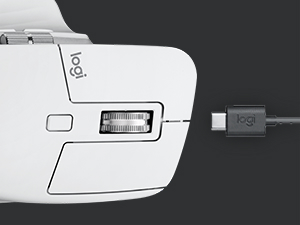
The Logitech MX Master 3S is a premium wireless performance mouse featuring an 8000 DPI Darkfield sensor for precise tracking on any surface, including glass. It introduces Quiet Clicks for 90% noise reduction, MagSpeed scrolling for ultra-fast and accurate navigation, and an ergonomic design optimized for comfort. Compatible across multiple OS platforms and devices, it offers up to 70 days of battery life with fast USB-C charging. Crafted with sustainability in mind, it includes recycled plastics and is carbon neutral. Ideal for professionals seeking productivity, comfort, and cutting-edge tech in one sleek package.


| ASIN | B09HM94VDS |
| Antenna Location | Office |
| Are Batteries Included? | Yes |
| Are Batteries Required | Yes |
| Battery Average Life | 70 days |
| Best Sellers Rank | 116,470 in Computers & Accessories ( See Top 100 in Computers & Accessories ) 2,198 in Mice |
| Brand | Logitech |
| Brand Name | Logitech |
| Button Quantity | 7 |
| Colour | Graphite |
| Compatible Devices | PC, Laptop, Chromebook |
| Connectivity technology | Bluetooth, USB |
| Customer Reviews | 4.5 out of 5 stars 10,977 Reviews |
| Enclosure Material | Plastic |
| Hand Orientation | Ambidextrous |
| Hardware Platform | Mac, PC |
| Included Components | Mouse, Logi Bolt USB receiver, USB-C charging cable, user documentation |
| Item Dimensions L x W | 12.5L x 8.4W centimetres |
| Item Weight | 4.97 Ounces |
| Manufacturer | Logitech |
| Manufacturer Part Number | 910-006557 |
| Model Name | MX Master 3S |
| Model Number | 910-006557 |
| Mouse Maximum Sensitivity | 8000 Dots per Inch |
| Movement Detection | Optical |
| Movement detection technology | Optical |
| Network Connectivity Technology | Bluetooth, USB |
| Number of Batteries | 1 Lithium Polymer batteries required. (included) |
| Number of buttons | 7 |
| Operating System | Windows;Linux;Chrome |
| Pattern | PC/MAC |
| Power Source | Battery Powered |
| Product Features | Lightweight, Portable, Rechargeable, Wireless |
| Range | 10.0 meters |
| Special feature | Lightweight, Portable, Rechargeable, Wireless |
| Style Name | MX Master 3S |
| Theme | Computer Accessories |
| UPC | 097855174789 |
V**T
Great Quality and very useful.
Best mouse I have ever used. Very stable, excellent configurable features. Just wished if it had a button to toggle between machines on top of mouse instead of bottom of the mouse. Other than that fantastic high quality product.
K**M
High productivity and high quality
Very high quality and very productive
B**E
Fantastic so far! Way too expensive. My new favorite mouse.
OK, I'm a major nerd and I have a ton of PC hardware at any given time. I run Linux for my daily use and boot into W11 for gaming, so my hardware has to perform well under both conditions. A good keyboard and mouse are some of the most important hardware. After all, they are the only part of a PC that we touch consistently. I've been using a Corsair Dark Core Pro (one of my all time favorites) and an older Logitech G602 (also amazing). I was ready for a change but did not want to feel like I downgraded. I strongly prefer a mouse of a more substantial size and the MX Master 3S fits my hand perfectly. Once I tried a mouse with a thumb rest, I could never go without it again. This one is also about perfect. I love the rubbery feel. The scroll wheel is the best I've used. It can be switched from notched to smooth. The notched is very quiet and smooth. Also, you can flick the wheel quickly and it will shift into smooth, fast scroll mode briefly and then switch back automatically. Genius! I also really like the aesthetics of this mouse. I NEEDED a gray tone to match my keyboard/mouse pad. This thing looks so good with the gray and chrome. I love it! For Linux, you need the Solaar application and you probably need to modify or add a udev rule so that the app will run without root privileges. If you are a Linux nerd, no big deal. For newer users, it's a little tedious just to make a mouse work. But, once it's running, the app allows all of the tuning you need for this mouse under Linux. I'm using it for gaming, too and I don't feel like I'm missing anything compared to my "gaming" mouse. It's kind of nice to ditch the cord. Over $100 is crazy for any mouse but if you are going to spend that much, this might be one of the very best choices.
J**O
my friend pitched this mouse to me as we work on our computers 8+ hours a day
....sad that i didn't know about this mouse earlier in life. I'm 6'3'' and have a bigger than average hand. my main priority was searching for a mouse that was wide and comfortable enough. If a mouse is ever too small for me, my ring finger and pinky will feel quite uncomfortable by days end. The logitech M3S mouse did the trick. even though my pinky finger is 'floating' when using the mouse, the grip from the ring finger = no tried fingers The customizability and re-mapping of buttons through the app is AMAZING. I feel like I'm taking advantage of my computer more with all the customizability. I feel like they could have added one or two more customizable buttons on the side. I'm always grimacing about which shortcut i should use for each dedicated button. but this is NOT A DEAL BREAKER. the matte feel of the mouse feels great in the hand the main magnet scroll wheel feels otherworldly and amazing, imo. strange sensation when you scroll and realize that it's only a magnet. if you're a fidget toy type of person, this wheel is the best thing in the world. you'll only only known when you scroll on it. *** this is probably poor wording --- note that i left the setting to 'click' (like a traditional mouse scroll wheel) and then tried remapping this button to lets say, 'next music track'. Overtime and constantly clicking the button changed the scroll sensitivity from 'click' to 'smooth'. i haven't found a workaround to this issues. I just can't remap this button is all, but NOT A DEAL BREAKER. the side scroll wheel is welcomed. never had a mouse that has a second wheel, and i use it as master to control volume. i really thought of getting the logitech M2S cause it was half off at the time , but these following features made my decision to get the M3S: -USB-C - makes charging a breeze with one less cable type. though you wont be charging much with how long the battery lasts -the clicking is much much more quieter than the 2S. hearing keys typing all day on a keyboard is a lot over time. lessening the noise of the mouse was a welcomed feature to my home office -3S just looked much cleaner aesthetically compared to 2S. just a guess, but the 2S design choice made me think like it was going to get dirtier more faster over time only Con: -bluetooth connectivity can be an issue -M3S mouse lag is a real thing -Out of the box, I had to fiddle with all my 2.0 and 3.0 USB ports -Needed to check out online forums for a solution -realized that i had to use 2.0 USB port. 3.0 was making the mouse very laggy / stuttering on screen -i imagine all my other devices signals' are also interfering with this mouse -eventually got it to work though after trying every port. luckily i have several -if these connectivity problems persisted, i would have probably returned this mouse. but the mouse and features are also so good that i was also considering dealing with a lifetime headache just for the features. just saying 9.5/10
C**E
Sensacional. Recomendo
Trustpilot
3 days ago
1 week ago