Buy anything from 5,000+ international stores. One checkout price. No surprise fees. Join 2M+ shoppers on Desertcart.
Desertcart purchases this item on your behalf and handles shipping, customs, and support to Argentina.
โจ๏ธ Elevate your desk game with the AI keyboard that types, swipes, and glows smarter.
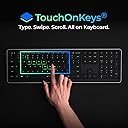
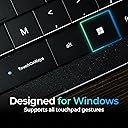
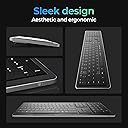
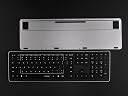
The Clevetura CLVX 1 is a cutting-edge AI-powered keyboard featuring silent low-profile scissor switches, a precision touchpad integrated into the keys, and multi-device Bluetooth plus USB-C connectivity. Its adaptive AI intelligently distinguishes typing from gestures, preventing accidental inputs, while customizable RGB backlighting and a durable aluminum chassis deliver both style and substance. Compatible across Windows, Linux, and Android, it offers up to 40 hours of battery life without lighting, making it the ultimate productivity hub for professionals who demand seamless control and sleek design.


| ASIN | B0FCSN1XPV |
| Additional Features | Bluetooth, Interactive Gesture RGB Backlit, Low-Profile Key, Touch On Keys โ Native Touchpad on Keyboard, TouchOnKeys App |
| Antenna Location | Business, Coding, Everyday Use, Gaming, Personal, Photo Editing, Productivity, Programming, Video Editing |
| Best Sellers Rank | #366 in Computer Keyboards |
| Brand | Clevetura |
| Built-In Media | Clevetura CLVX 1 for Windows, Quick Start Guide, USB-C to USB-C Cable (2m) |
| Button Quantity | 110 |
| Color | Windows layout, Black |
| Compatible Devices | Android, Linux, Mac (requiers TouchOnKeys App), Smart TV, Windows |
| Compatible Operating System Family | Android, Linux, Windows |
| Compatible Tablet Computer Models | Samsung Galaxy Tab S7 FE 12.4" |
| Connectivity Technology | Bluetooth, USB-C |
| Customer Reviews | 4.4 out of 5 stars 129 Reviews |
| Enclosure Material | Aluminum, Polycarbonate |
| Generation | 1st Generation |
| Global Trade Identification Number | 00198168409145 |
| Hand Orientation | Ambidextrous |
| Item Dimensions L x W x H | 17.2"L x 5.12"W x 0.49"H |
| Keyboard Backlighting Color Support | RGB |
| Keyboard Description | Touch On Keys AI Gesture Keyboard for Windows QWERTY 110 keys |
| Keyboard Layout | QWERTY |
| Manufacturer | Clevetura |
| Mechanical Keyboard Switch Model | Scissors |
| Mfr Part Number | CL11RA1ANSB0US |
| Minimum Required Operating System Version | Android 10.0, Windows 10 |
| Model Name | Clevetura CLVX 1 |
| Model Number | CL11RA1ANSB0US |
| Number of Batteries Required | 1 |
| Number of Keys | 110 |
| Power Source | Battery Powered |
| Recommended Uses For Product | Business, Coding, Everyday Use, Gaming, Personal, Photo Editing, Productivity, Programming, Video Editing Recommended Uses For Product Business, Coding, Everyday Use, Gaming, Personal, Photo Editing, Productivity, Programming, Video Editing See more |
| Style Name | Full-size Win |
| Switch Type | Scissors mechanical switches |
| Theme | Minimalism |
| Unit Count | 1.0 Count |
| Warranty Description | 1 year |
| Water Resistance Level | Not Water Resistant |
V**R
Very Impressed with the Quality
I bought this keyboard based on a friendโs recommendation, and I was honestly very pleasantly surprised by how good it is! First of all, the packaging feels premium โ everything is well packed, neat, and gives a high-quality first impression. Second, the keyboard has a touch feature on the keys, which lets you slide your fingers to control the cursor. Itโs very convenient and something I didnโt expect to use so much. The keys feel nice to press, and overall it just feels like a solid, well-made product. Great value for the price โ definitely recommend!
S**E
Was hesitant but this keyboard is worth it!!!
I'm really surpised at how great this keyboard is. I haven't completed the training (which claims to help understand when you're typing versus using the track pad) yet it works perfectly without any misinterpretations. And yes, I do rest my fingers on the keys so there is plenty of chances for it to think the wrong thing, but it doesn't -- it works! I'm using it as my couch workstation at night as a change of pace from sitting at my desk all day. Its the perfect solution for that and has sped up my productivity by not having to remove my hands from the keyboard to scroll or move the mouse or click. I am a highly skeptical buyer of tech products because I'm a very demanding user since I've professionally been in the software industry for 30 years. I'm so glad I took the chance and decided to buy this keyboard. Its leaps and bounds better than the tri-fold travel keyboard with a trackpad on the side that I bought about a month ago. Only note to mention is that it won't connect via Bluetooth to your computer until you use the included USB-C cable to wire-connect it to your computer and update its firmware. Then it connects seamlessly to 3 different devices via Bluetooth. Buy it, you wont regret it!
Z**F
Good to Awesome but hard to get initially working! (Have reasonable expectations)
Now. As you SHOULD expect is is trying to be BOTH a keyboard and a mouse/trackpad. It does both jobs *pretty well* once properly configured. It is GOOD for a use-case where you will still reach for the REAL track pad for LARGE cross-screen movements. I find that I use it PRIMARILY from just the H or J keys (right hand dominant) to slide the pointer a few hundred pixels on the screen and lightly tap the button (not enough to TYPE H or J) or tap the "left" mouse button with my LEFT thumb once positioned. This is PERFECT for what I wanted. I wanted a keyboard where I am MOSTLY working with an AI and sporadically typing, moving the pointer on screen _slightly_ then tapping a few keys. For sustained typing the fact that the keys MUST be smooth and tiled together leads to a lot of high speed typing mistakes where you accidentally hit a key NEAR where you thought your finger was. Other keyboards would have tactile key separations, shallow bowl shapes in the keys, or other guides. The typical raised "nubs" on J and F keys for touch typists to find the home row are PRESENT but very very subtle. This is NECESSARY for the design of being BOTH a track pad and a keyboard. I have multiple systems Linux, Mac, and one Windows box. I picked one Mac to install the custom drivers on. I had to have Claude Code help me set it up because the "human" directions were just plain out dated or wrong. Once Claude Code got it working I was able to get the firmware update. Once that happened it could work with my Macs seamlessly as BOTH a keyboard and a trackpad! I would give this 5 out of 5 stars IF it shipped with the firmware update that makes it ZERO setup. Once you get the firmware update on there it is practically a DIFFERENT device! Given that I EXPECTED the trade-offs knowing you can't both be a 100% keyboard and 100% trackpad without necessarily making design trades that would aggravate a high-speed touch typist (we're a VERY fickle bunch) I was pleased with the over all design. Bowls in the keys, wider key separations, that would make the touch typist happy but RUIN the experience for the more causal user looking for a smooth trackpad with occasional keyboard use. So I accept the fundamental design trades. EDIT: Very fragile. Be careful traveling with it
D**C
Frankenstein done right!
I have had this keyboard for 90 days, so I am past the honeymoon phase. If you donโt want to read this entire review, then hereโs the spoiler. If a Ferrari, a Bentley, and a Waymo had a baby, it would be this keyboard. I am a VP of sales, working from home, and doing Zoom and Teams presentations throughout the day. I have purchased keyboards in this category for 15 years. I have had the good, the bad, and the ugly, but never had 1 keyboard that did it all, until nowโฆ. Pros: what matters to me โข Excellent backlighting - I am older, I donโt need all the special lighting effects, so I love the fact that I could program the backlighting to just plain white! โข Excellent Bluetooth range โ I sit across the room, on my couch, about 15 feet from my laptop, which is connected to my 65-inch mounted flat screen. The keyboard works perfectly. โข Excellent multi-device toggling โ I have both a personal computer and a business computer, both connected to my flat screen. I am able to easily toggle back and forth between computers without leaving my couch! โข Touchpad โ I scoffed at this keyboard and refused to buy it because I thought that a keypad that doubles as a touchpad was nonsense (remember, I am at the โget off my lawnโ age). Anyway, I couldnโt find a better option, so I pulled the trigger. It took me a couple of days to get the hang of it, and a couple of weeks to master it. I donโt even think about it now. โข Numberpad โ Didnโt think I needed this, and still donโt, but I must admit it is โnice to haveโ, and well lit. โข Battery life โ I work from 6am-5pm, sometimes longer, it has never run out of juice on me. I charge it in the middle of the night. โข Build โ Feels like good quality, nice to the touch, responsive and seems sturdy. Cons: โข Expensive! Paid $250, hopefully by the time you read this it will be less. โข The App requires a wired connection. The good news is that I only needed the app once for setup, and havenโt needed it since. โข As a right-handed person, it would be nice if the touchpad extended another 2 inches further to the right, but I admit this is definitely a nit-pick. Conclusion: I took the time to write this long a@s! review because this is the best keyboard ever made in this wireless keyboard with touchpad category, and it ainโt even close (I have had them all over the years). I will probably buy another one as a backup when the price drops.
A**R
The hardware is lacking...
The touch feature is interesting and useful. They really got something there. But the build quality is... not great. Keys aren't all the same height, or slightly tilted. The spacebar is slightly elevated - maybe by design so you can feel the edge of the touch area. but it's not consistent. The right shift button doesn't work right - you need to hit it exactly correctly - if you depress it, get a click, but you're off center, it sometimes doesn't register. It's sporadic and inconsistent. Some of the keys wiggle a bit, most are tight, and some (of the wiggly ones) just sound a bit... crunchy. On a scissor keyboard it's an indication that the key's about to pop out in my experience. Hasn't happened yet, but we'll see. I haven't tried the software, and in the age of malicious updates, I don't intend to. The touch stuff works fine without it. Takes some getting used to and has a slight learning curve, but I don't have any complaints on that end. If the build quality was a bit more confidence inspiring I'd give it 5/5. Alas, it's not. I don't expect this to last long. I hope I can get used to hitting shift exactly right every time.
J**.
Replaced my lenovo thinkpad ultranav keyboard II
My main keyboard was a Lenovo Thinkpad Ultranav Bluetooth keyboard. I wanted to buy a second one of those for my office but found out that Lenovo pretty much discontinued them. Anyway, this keyboard fits that niche of not needing to move my fingers to use the mouse while typing. This keyboard typically rests on my lap while my laptop is ergonomically elevated. It's great, i dont need to reach for a mouse... like ever. Positives: + It detects when you want to use the mouse and when you don't want to use the mouse really, really well. My first option was a keyboard tray + magic mouse setup that I had constant issues with palm rejection. None here. The keyboard is wonky on macos without the driver software... install the driver softball. + it just works. It's a keyboard with an integrated touchpad. It works exactly as you think it would with no quirks. That's almost insane these days that a product that you touch constantly was shipped without some sort of issue. + the picture on amazon are out of date... the function,opt,alt,command keys layout for the mac keyboard match up exactly with how a macbook keyboard is setup... it almost stopped me from buying the keyboard. I'm glad I just bought it and was pleasantly surprised I didn't have to retrain my vscode shortcut muscle memory. Negatives: - Bluetooth connectivity takes about 15 seconds on a mac. Most notable when first turning on the keyboard and switching between devices. I have two macbooks that I switch between (work/personal) and it does irk me a little. I may even buy a second one of these keyboards just to handle that scenario. - The notches on F and J are very subtle. Hard to quickly get to touch typing. Had to use a little bit of grip tape to place on the keys to get my fingers quickly to the home-row while typing - wish there was a little more of wrist rest like the lenovo thinkpad keyboard. It's awkward to get to the mouse click buttons without some sort of hand anchor. I understand i'm prolly in a minority bc this keyboard is on my lap instead of a desk. I've learned to just use tap to click (which just works :) )
S**T
Timeline Scrubbing
I cut videos. The slider thing for scrubbing timeline actually works better than dragging with a mouse. Sounds dumb but it's smoother. Still grab the mouse for precise cuts but for scrolling footage and navigating I just stay on the keyboard. Saves time.
P**4
This is what I've been looking for
My mouse and keyboard combo weren't very easy to use for my setup. I use a small table that came with my recliner so I was hoping to find something that would combine the two. Then I came across this keyboard. So far it's working out great. Here are the pros: * Trackpad and keyboard in one...exactly what I was looking for. I can click, drag, create gestures and type on the same device. * The addition of physical left and right mouse buttons help for certain activities that aren't easy with a trackpad, such as highlighting areas when taking screenshots. * The backlighting helps when I don't have a lot of light to see the keys. * Ability to create gestures. This was super helpful for how I browse, for example, opening a tab in a new window, I use the 3 key swipe up gesture. For closing a window, I mapped alt + F4 to the 3 key swipe down gesture. * The number pad. I hate keyboards without as I use it often. * Typing is smooth and key feedback is just right. Cons: * Price. This is expensive for what it is. * Bluetooth. Bluetooth is great for short range but it can easily be interfered with for 2.4ghz wi-fi or other electronics. I wish this came with a dongle like some of the other wireless mouse/keyboard options out there. There was also an issue for me where the keyboards internal bus and my chipset weren't working properly so the keyboard would constantly lose connection. Because of this, I had to buy an external bluetooth dongle to get it to work without losing the connection. * It does take a little while to get used to. As others have mentioned, it requires the right amount of touch to do what you want it to. I found one of the hardest things for me was to click and drag as that is a double click and move and I opened files when what I wanted to do was move them. Overall, I'm happy with this keyboard and it is exactly what I was looking for. Most of my complaints are minor but still rating 4/5 due to lack of usb dongle option, price and time to adjust/learn the new device.
Trustpilot
5 days ago
1 month ago