Buy anything from 5,000+ international stores. One checkout price. No surprise fees. Join 2M+ shoppers on Desertcart.
Desertcart purchases this item on your behalf and handles shipping, customs, and support to Argentina.
🚀 Elevate your dual-PC setup with 8K triple-monitor mastery — because your desk deserves the future now!
The AV Access iDock D23 is a premium DisplayPort 2.0 KVM switch and docking station that supports dual computers and up to three monitors with resolutions up to 8K@60Hz. Featuring ultra-fast 2-3 second switching, USB 3.0 ports, 1G Ethernet, and a sleek CNC-machined aluminum design, it’s engineered for professionals demanding high performance, seamless multitasking, and a clutter-free workspace.


| ASIN | B0B72P2DBG |
| Amazon Bestseller | #81,215 in Computers ( See Top 100 in Computers ) #387 in KVM Switches |
| Brand | v AV Access |
| Brand Name | v AV Access |
| Circuit Type | 2-way |
| Color | 4K 2PC Input 2 Output HDMI |
| Compatible Devices | Projector, Scanner |
| Connector Type | HDMI |
| Contact Material | Metal |
| Contact Type | Normally Open |
| Country Of Origin | China |
| Current Rating | 3 Amps |
| Customer Reviews | 4.0 out of 5 stars 390 Your Review |
| International Protection Rating | IP54 |
| Item Dimensions | 14.3 x 2.3 x 2.6 cm |
| Manufacturer | AV Access |
| Material Type | Metal |
| Model | 4KSW21-DM |
| Mounting Type | Surface Mount |
| Number of Items | 1 |
| Number of Positions | 2 |
| Operating Voltage | 12 Volts |
| Operation Mode | ON-OFF-ON |
| Part Number | 4KSW21-DM |
| Specification Met | Ce Fcc |
| Switch Type | Slide |
| UPC | 795063902667 |
| Unit Count | 1.0 Count |
| Warranty Description | 2 years |
A**ー
問題無し
特に問題なく使えてます 発送用の外箱無く、商品パッケージにそのまま伝票貼られて送られてきます。 気になる方はご注意を
ひ**O
◆マルチディスプレーが簡単に実現できます!◆
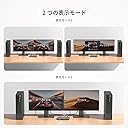
モデル『4KSW21-DM』 購入目的: 2台のデスクトップPCを有線キーボード1つ、無線マウス1つを共用し、 マルチディスプレー化すること。 モデル『4KSW21-DM』について 結果:類似品のKVMでいろんな問題が起きている口コミを見ていたので、『4KSW21-DM』で 問題なく簡単に実現できてよかったです。 2か月使用した印象では総合的にみて、機能の割にコストパフォーマンスが素晴らしいと 思います。 良い点:・KVMモードとUSBモードの2つのモードがあり選択切り替えが可能で便利です。 KVMモードでは、PC1台を選んでマルチディスプレーとして表示、 USBモードでは2台のPCをモニター1台づつに表示されます。 ・HOT Key機能があるので、KVMモードでどちらのPCをマルチディスプレーで 表示するかをキーボードで切替えられる。 本体の切替ボタンを使わなくて良いので将来のボタン故障を心配する必要なし。 ・周辺機器のインターフェースが多い:3x USB 3.0、1x USB 1.1に更に マイク端子、オーディオ端子も接続可能 USBには無線マウス、WEBカメラ、有線キーボード接続しています。問題なく稼働。 ・安定している。ノイズ、ちらつきなどは出ていない。 ・金属製のボディで頑丈にできている。冷却性も高い。熱くなることはない。 ・表示の切替は、数秒(3-4秒位)で気にはなりません。 ・機能の割にコストパフォーマンスが高い。 その他:PCーKVMスイッチ間をDVI-HDMI変換ケーブルで、KVMスイッチーモニタ間を HDMIケーブルでつないでモニターに映像を表示させています。 この変換ケーブルを使うとモニターから音声は出力されないと思っていたのですが、 音声もモニターのスピーカーから出力されました。ラッキーです。 しかし、初めの0.5秒音声が出ていないこと、その後音声は出ていますが 10分後くらいから無音になります。 OSのサウンド設定のボリュームコントロールで一旦ミュートにしてからミュート解除すると 音声が戻ってきます。PC2台とも同じ現象です。 そもそもこのような変換ケーブルで音声までモニターから出せるような仕様ではない ような気がしますが、何が悪いのか(ケーブル?ドライバー?Win11? 他?) 遊び感覚で問題点の切り分け作業をやっているところです。 Webで調べてみたところ、windowsでhdmi使用時に音声の頭切れ、途切れが 起こることがあるとのこと。 特に、KVMスイッチや複数の機器を介して音声信号を伝送している場合、 音声の遅延や欠けが発生することがあるとのこと。 根本原因はわかっていませんが、対処方法として、無音再生ソフトで 「無音」を再生し続ける方法があると知りました。 音声の途切れがなくなり、効果を確認いたしました。 この状態でしばらく使いながら、根本原因の切り分けを続けていこうと思います。
A**ー
惜しい…
切り替の割当可能なキーボードショートカットが少ない。TabまたはCapslock+1,2,←,→など、操作方法が限られる。キーボード以外の切り替えには本体に直接手を伸ばす必要がある。なので、KVM本体を隠したい場合は必然的にキーボードショートカットでの切り替えとなる。TabやCapslockを多用する方は注意。 着脱可能なワイヤードorワイヤレススイッチなどが付属してたら満点でした。そこだけが本当に惜しい。
信**い
ホットキーが動作する!!
切り替えが異常に遅かったり、使い始めたらすぐ壊れたりでなかなかよいKVMに出会えずにいましたが、やっと安定動作する商品に出会えました。 また、「ホットキー対応」と記載されていても動作する機器がなかったのですが、この機器はホットキーが動作します!そういう意味でもとても良いのではないかと思います。 1点難点とすればキーボード接続用のUSBが1.1なのでタッチパッド付きのキーボードなどは正常に動作しないかもしれません。通常のキーボードであれば問題ありません。
A**A
良い製品です
良い製品です。2台のノートPCと2台のディスプラレイを独立してコントロールでき期待していた機能です。注文済みになってから配達日がなかなか決まらず、配達まで2週間かかりました。USBケーブルが一本不良品でした。アマゾンでは返品しかできないようで再購入では時間がかかるため、別途USBケーブルのみ購入しました。
南**人
付属のACアダプターが不良、ホットキーが使えるキーボードに制限
セットアップ中に付属してきたACアダプターが不良(動作ランプが点かずDCの出力が無い)だと判明し、急遽同スペック同サイズの汎用ACアダプターを準備しました。本体はメーカー保証がありますが付属品の保証やサポートは期待出来ないので、海外メーカー製ですしその辺の融通や覚悟は必要です。 ホットキーに関して、Razer の BlackWidow V3 テンキーレスを使用してますがホットキー(TabやCtrlキーで切り替え)が機能しません。Logi の一部のキーボードでも機能しないというレビューを見かけたので、PC側と相互通信するような多機能キーボードなどでホットキーが機能するかは繋いでみるまで分からないと考えておいたほうが良いです。 私はデスクの手の届く位置に本機を置き、本体のボタンで切り替えることで対応しました(本当は見えないデスク裏に設置したかった)。 それ以外は動作も非常に安定しており、内部の鳴きや余計なビープ音なども無く快適に使えています。本体もしっかりした金属製ですし両サイドに通気口もあるため、熱も気になりません。
A**E
AV Access KVM Switch 2 Monitore
Habe das Gerät vor 2 Monaten gekauft und betreibe 2 Computer, 2 Monitore, Bluetooth Maus + Keyboard und ab und zu eine externe Festplatte. Das Gerät ist zwar nicht ganz günstig, aber bisher bin ich sehr zufrieden. Alle angeschlossenen Peripheriegeräte funktionieren einwandfrei.
D**E
Works great
Works really well, the build quality is awesome. I like that fact that is has a power button and it is externally powered. I use it with my Lenovo ThinkPad and MacBook Pro M2, and it works really well on single 4K 60Hz screen. The hotkey switching could be faster but I that does not bother me much.
L**A
Switch between work and game on a button
I was annoyed about dealing with my work and life on a small screen. This KVM switch came to my eyes, actually at first time I thought it was too expensive until I finally set it up and use it. It is worth the price. What impressed me first is the build quality, it looks not cheap at all. It can switch between 2 PCs in just 2 seconds with 60Hz 4K resolution. I compared a lot before my purchase, and similar KVMs at the about price just support 30Hz 4K, excellent! BTW, it works great with my Mac and Logitech wireless mouse.
J**Y
Great value and solid performance so far!
Product working as expected, the quality is great and hopefully it will perform well for a long time. I purchased this kvm for my home office, it need to be connected with 2 HDMI cables and 1 USB-B cable in PC and laptop ends. It make me easy to switch with 2 PCs, so far I'm loving it. The switch features 3 USB 3.0 ports, 1 USB 1.1 port, allowing me to connect all of my necessary peripherals including wireless keyboard, mouse and external USB drives, without any issues. Not like other switches, this unit also includes 3.5mm audio port, I don't need to long cable headset again to enjoy gaming and music. The switch is also well-built and sturdy, grey metel body making it a reliable addition to my work setup. They added a nice additional feature-locked power cord connector, which prevent power cord loose. This is amazing design. Overall, it was very nice for my application. I highly recommend AV Access KVM switch.
D**S
Guter Switch
Der AV Access KVM Switch macht mit seinem hochwertigen Metallgehäuse und sauberer Verarbeitung schon auf den ersten Blick einen guten Eindruck. Aber zum Glück sieht er nicht nur gut aus, sondern macht auch seinen Job perfekt. Ich habe den Switch an mehreren PCs, Laptops und sogar in Verbindung mit Konsolen getestet und hatte nirgends Probleme irgendwelcher Art. Von 1080p bis 4K und von 60Hz bis 144Hz lief alles ohne Probleme, genau wie die USB Schnittstellen. Ich konnte keinerlei Verzögerungen oder Einbußen in der Bildqualität feststellen. Dazu kommt die nette Optik des Switches, die bereits erwähnte hervorragende Qualität, so wie die gute Benutzerfreundlichkeit, durch die man nicht einmal eine Anleitung benötigt. Bei KVM Switches sind Bewertungen manchmal ein bisschen schwierig wenn es nichts zu meckern gibt, denn dann kann man im Grunde nur sagen "Alles töfte", aber das ist ja dann im Grunde auch die einzige Information die man braucht. Mir gefällt er sehr gut und alles funktioniert wunderbar. Und obwohl er nicht unbedingt günstig ist, ist der Preis durchaus gängig für Switche dieser Art. Von daher: Volle Empfehlung von mir.
Trustpilot
1 week ago
1 day ago