![J-Tech Digital 4K HDMI Audio Extractor, 4K@60Hz 1080P@120Hz 1080P@144Hz HDMI to Optical, 3.5mm Audio Converter Adapter, SPDIF, HDR10 CEC Digital Audio, DTS 5.1, [JTD18G-H5CHV2]](https://m.media-amazon.com/images/I/61NDtklpkPL._AC_SL3840_.jpg)




Desertcart purchases this item on your behalf and handles shipping, customs, and support to Argentina.
๐ฌ Elevate your AV game with flawless 4K audio extractionโdonโt get left behind!
The J-Tech Digital 4K HDMI Audio Extractor (JTD18G-H5CHV2) delivers pristine 4K@60Hz HDR10 video pass-through while extracting high-quality multi-channel audio via optical SPDIF or 3.5mm stereo output. Supporting HDMI 2.0b with 18Gbps bandwidth and HDCP 2.2, it offers flexible EDID audio modes for stereo or surround sound. Ideal for professionals seeking seamless AV integration, it includes lifetime technical support and a 1-year warranty for peace of mind.


| Asin | B0F7P179PK |
| Audio Output Mode | Stereo, Surround Sound |
| Best Sellers Rank | #251 in Video Converters |
| Brand Name | J-Tech Digital |
| Compatible Devices | HDMI 1.3 or later compatible devices |
| Customer Reviews | 4.0 4.0 out of 5 stars (49) 4.0 out of 5 stars |
| Included Components | 1 x power adapter 1 x user manual |
| Interface | HDMI |
| Manufacturer | J-Tech Digital |
| Material Type | Metal |
| Model | JTD18G-H5CHV2 |
| Number Of Channels | 6 |
| Number Of Items | 1 |
| Number Of Packs | 1 |
| Number Of Pins | 22 |
| Part Number | JTD-3262 |
| Unit Count | 1 Count |
| Upc | 810058922571 |
User
Works great for me! Firestick 4k - Projector - 5.1 surround! (Older receiver)
It took a little research on how to set it up right in order to get 5.1 audio from the optical cable. Many mention setting to PCM on the Firestick, but optical doesn't have the adequate throughput for 5.1 channels. Dolby digital+ would be ideal, but Dolby Digital setting worked for me.This is basically a budget home theater setup using an Elephas 4k supported projector, which does look much better in compressed 4k than standard 1080p, so the HDCP support helps to get the 4k picture. No noticeable audio lag. Connectivity was simple.
User
Keeps EDID display info after power off
Worked as expected, others should not be sold.My parents upgraded Xfinity and lost optical for Surround sound/BT devices. First splitter they manually had to reconnect the HDMI Cable each time they powered on... It should be illegal to sell a splitter that did not keep the display info (EDID).
User
Garbage.
Worked for about 3 hours before it stopped passing audio.
User
Great splitter for most anyone.
High quality sound with no latency. Iโm using this box to go from a streaming device to this box which splits out the sound to my balanced sound input connection and using studio monitors for sound output. The quality is super crisp. Would recommend. Good value for what you get and small enough to pop it behind any crevice you can find.
User
Solid, well-built, does a great job
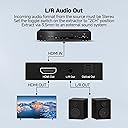
This device extracts the audio component of an HDMI signal, and makes it available via either analog stereo output on a 3.5mm stereo jack, or digital optical output via a TOSLink cable. No output cables are supplied, so youโll have to supply those yourself. However, one thing that is included is a โwall-wartโ style power adapter with a dedicated power cord.A nice thing about this device, and the company that sells it, is the actual brand name which is on the box, the device, the manual, and on their website. And itโs a real website with lots of audio / video products listed, including this one!I tested this device with a Roku Express streaming box, and the it worked well. One thing about this device which seems to make the price somewhat higher than other similar ones is that it supports the various resolutions at double the frame rate of the less expensive ones. I canโt say if thatโs true or not because I have no way of verifying it, so this review is only of the audio capabilities.The device needed to be set to the โTVโ position on its three-way switch. The other positions are โ2.0 Chโ and โ5.1 Chโ, which I assume represent encoded output signals, available if the input signal supports them. But on my Roku, "TV" was the only setting that produced audio.Installation is straightforward. To connect it, you plug the HDMI cable from the Roku box into this device, then run another HDMI cable from this device to the TV. (So youโll have to have a second HDMI cable available.)The video is viewable while the sound outputs are being recorded. But itโs not mandatory that you connect that second HDMI cable. You can just record the sound without viewing the video.Once the device is connected to the HDMI input, a green โLinkโ LED lights up, and the audio component of the input is available at the two outputs on the device. One is a 3.5mm stereo โminiโ jack, like for earbuds. The second is a digital optical output for a TOSLink cable. Again, youโll have to make sure you have the appropriate cables for the output(s) you want to use.I tested the analog output by recording it on a Zoom H2 recorder, then playing back the recording on my desktop computerโs pretty good speakers & subwoofer. The sound was clear and undistorted. There was no audible โmufflingโ or other changes to the audio quality.I tested the deviceโs digital output by connecting it to an AV receiver which usually gets its digital input directly from the TV. The sound was indistinguishable from what that AV receiver normally produces โ it sounded very good.Two other things I checked: first, both outputs are available at the same time. Second, thereโs no discernible โlagโ in either sound output when viewing the video through this device.One other thing - after running about half an hour, the device was cool to the touch, with no discernible increase in temperature.This is a well-built, solid device that does its job quite well. Based on some quick comparison shopping, itโs a bit pricier (say 7 โ 8 bucks) than others that do the same thing, but thatโs explained by the higher frame rates it supports, and by the included power adapter.So I would definitely recommend this device if you need to record the sound part of an HDMI signal, and that signal is at the higher frame rates this device supports.
User
Didn't work for me
Probably just me.
User
It does pass through 4K and surround sound
This is a tough one to review. I have a new TV with an old surround sound system and needed something to get the best picture quality because my surround system would only pass through 1080p, not 4K. When I ordered this, the price was around $10, so I'd say that's a pretty good value because it does work -- I get full 4K HDR picture with Dolby surround, and that's nice. The tough part of the review is this: when I started using it, it would take a while to kick in, starting with a blue screen for several seconds but eventually giving me the home screen of my streaming unit. Then the home screen showed fine, but when I tried streaming the first program it gave the spinning circle showing that it was buffering, stuck on the circle, and then audio would start streaming but no video. I would have to start my show over several times before I actually got video going, but then proceeding shows after the first would play fine. That's irritating to me but completely unacceptable to my wife, so opinions vary on whether it's actually even useable or not. The oddest thing about it is that after a few days use it seems to start fine. My only issue now is there's occasionally a dropped frame or something along those lines where I get a black screen for a second here and there through whatever show I'm watching. We are a streaming household now with no live TV, so I can't say how this device would react to a moving picture immediately on startup like live TV since our startup is the home screen of our streaming device. With the issues it has, I'm tempted to go back to just running through my AV receiver to have surround sound and go with the upscaled 1080p video from my TV which was a pretty darn good picture to begin with. I'm giving it four stars but that may be a little generous and I certainly couldn't go higher.
User
Huge sound from a tiny box.
I picked this little guy up in hopes of simplifying my home theater setup. I use a Bluray player, streaming box, and Laserdisc player (running through a video processor into an HDMI output). These sources run through an HDMI switchbox with several outputs. One goes to my flatscreen, one to a projector, and one to this audio extractor. With 2 digital and one analog source, audio switching and synchronization were always an issue. This little box does an excellent job of streamlining all of my audio sources into a single optical line I can run into my reciever. Now, I just leave my reciever set to optical and use the switchbox to toggle through sources. Everything is crisp and clear with no perceived lag or sync issues anymore. The build quality is impressive. It's made out of heavy duty, powder coated steel. I appreciate the power connection isn't just a generic micro usb, or usb-c, as most compact electronics use nowadays. It's a much stronger and more reliable connection. As previously stated, I'm using this exclusively as an audio extractor. I'm not utilizing the video pass through, so I can't speak on resolution or anything. That being said, the included literature states resolution is fully compatable up to 4k. In the end, this solved all of my problems and almost achieved everything I was hoping for. The only negative I will mention is I wasn't able to get it to send a DTS signal to my reciever. It's supposed to allow several 5.1 channel surround formats to pass through, including DTS. However, no matter where I set the switch to on the box, I could only get my reciever to recognize PCM stereo. This may be an issue with my Bluray player. I have a pretty old Sony BDP-S390. I can get DTS to work with the coaxial digital output, but I couldn't verify if the same signals were being passed through the HDMI cable. I was able to decode Pro Logic II from the PCM signal. This is good enough, but I was really hoping to be able to decode DTS. It's so much better than Pro Logic. So I still have to change one audio input if I want the full effect of DTS. It still achieved 95% of what I was hoping for. I'm very pleased with this box.
User
It extracts audio and sends it on a legacy 1080P FHD video format
Exactly what I need to extract the audio from my HDMI to send to my legacy Reciever that is only used for audio, and the TV gets the Dolby Vision 4K 3840P HDR on the other split.
User
NรO FUNCIONA NO HTV
Nรฃo funcionou
User
Audio Optical & HDMI simultaneous sound output device
This is one of the few solutions to be able to extract Audio from an HDMI signal to an Optical Output (TOSLINK) AND also have the audio going to the HDMI output.
Trustpilot
1 month ago
1 month ago