


Desertcart purchases this item on your behalf and handles shipping, customs, and support to Argentina.
🚀 Elevate your AR experience—connect, play, and impress like never before!
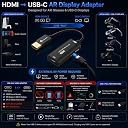
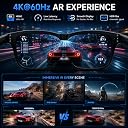
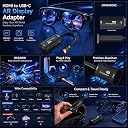
The Guermok AR Glasses HDMI to USB-C Display Adapter is a precision-engineered video converter supporting up to 4K@60Hz and 1080P@120Hz output. Designed for compatibility with top AR glasses and USB-C displays, it enables seamless connection from HDMI sources like gaming consoles and PCs. Its compact aluminum build ensures efficient heat dissipation, while a dedicated 5V power input maintains stable, low-latency video transmission for immersive gaming, streaming, and professional use.







| Asin | B0F42T7ZMF |
| Best Sellers Rank | 2,564 in PC & Video Games (See Top 100 in PC & Video Games) 4 in PlayStation 5 Adapters |
| Box Contents | Product Manuals |
| Brand Name | Guermok |
| Colour | Black |
| Compatible Devices | Gaming Console |
| Connector Type | HDMI, USB Type C |
| Country Of Origin | China |
| Current Rating | 1.5 Amps |
| Customer Reviews | 4.3 4.3 out of 5 stars (606) 4.3 out of 5 stars |
| Input Voltage | 5 Volts (DC) |
| Item Dimensions | 10.3 x 6.3 x 1.7 centimetres |
| Item Weight | 23 Grams |
| Manufacturer | Guermok |
| Manufacturer Part Number | Ua-100 |
| Model Number | GM-161-Black |
| Number Of Items | 1 |
| Number Of Ports | 2 |
| Package Quantity | 1 |
| Power Plug Type | No Plug |
| Specific Uses For Product | AR Glasses, Game console, Monitor, Computer, Smartphone, Tablet |
| Unit Count | 1.0 count |
User
It works great, but not with sound (at least for me)
HDMI to USB-C video works just by plugging in. The fact that my external USB C monitor requires power meant that I had to put USB C power into this converter so 2 cables from the laptop to the external monitor is a pain (not the products fault). Other than that it works well and is good value, small size, looks durable and well made.The downside (and maybe not the products fault) is that sound wasn't passed thru. I think that this maybe the HDMI port on the laptops fault? (I don't know) but sound did not come out of my AR glasses. When I use another laptop to the same AR glasses with a normal USB-C port (without this converter) sound works.I didn't consider the need for sound so never checked up before purchasing so wont knock it down a star - but bear it in mind, you may not get sound working.
User
Impressive
Works well with my laptop and RayNeo glasses
User
Good
Adequate for the job
User
Works with rayneo and Xbox
Seems good works as described
User
Works well
Excellent works with rayneo4.
User
AI glasses connect
This product is for those who want to get direct connection a Xbox and PlayStation with no fuss, that's it
User
Depends what you want it for.
I’m giving 3 stars because it meets my minimum expectation. It seems of reasonable quality too. I’m disappointed that the hdmi end is fixed. I’d have preferred to have used my own extra long cable. The usb-c cable is also rather short but is high spec.I bought this adapter out of curiosity as to whether I could watch a 3D blu-ray through my Xreal 1s glasses via my Sony player. Unfortunately, in spite of my fiddling around with settings on both devices, the player would not accept that it was connected to a 3D capable display.I could however, play standard blu-rays, which looked great. I used the 3D conversion within the glasses instead, which was okayish.So for connecting to a device like a Blu-ray player this adapter works very well but with limited cable length.I can’t recommend for 3D viewing though.
User
A must for using your Switch 2 with Xreal Air 2 glasses
Don't normally do reviews, but having recently upgraded to a Nintendo Switch 2 I was disappointed that my Xreal glasses dock would not work with the new console. This is a literal game changer.When paired with a portable Switch 2 dock works perfectly (even though the sound work around in the listing is a bit of pain to have to do every time), and yes it does mean having to find two usb-c power sources but who doesn't have loads of leads lying around these days.I can even connect my Sky box to the glasses to watch F1 on a massive screen.
User
Adatto anche per chi pratica FPV digitale con stazione ad uscita HDMI (ruby, openIPC, ecc.)
Ho preso questo adattatore per provare i miei occhiali Viture Pro XR al posto degli eachine EV300D.Ho una stazione di terra basata su Ruby FPV che gira in RPI4 con uscita HDMI. Mi serviva quindi un convertitore di protocollo HDMI -> Alt DP via USB C.Ho deciso di provare questo prodotto perchè ho trovato il suo formato molto comodo e per le caratteristiche dichiarate rispetto al prezzo richiesto.Quando mi è arrivato ho deciso subito di provarlo collegandolo alla stazione di terra.E' stato un disastro, potevo sentire l'audio di avvio di Ruby ma vedevo soltanto uno schermo verde.Ho provato quindi a collegarlo al mio decoder. Sentivo l'audio ma schermo nero.Sono andato un poco nel panico, pensando che non funzionasse.Smanettando un poco su internet mi sono reso conto che questi problemi possono derivare da uno scambio non corretto o assente degli EDID (Extended Display Identification Data) tra il dispositivo HDMI ed il convertitore. Inoltre ho appreso che un possibile formato fisso, riconoscibile da questo genere di adattatori, è il 1080p. Il mio decoder era impostato a 1080i, lo ho quindi cambiato e subito ho potuto osservare un magnifico e luminoso schermo da 135 pollici davanti ai miei occhi. Immagini televisive fluidissime e nitide. E stavo sfruttando solo la metà delle capacità di questo convertitore.Sono quindi passato al mio obiettivo primario, collegare il convertitore all'uscita HDMI della mia stazione di terra FPV (Raspberry 4).Sempre cercando su internet ho trovato le impostazioni da inserire nel file di boot del raspberry per avere un output compatibile con questo convertitore:hdmi_force_hotplug=1hdmi_group=1hdmi_mode=4Modificati questi parametri mi sono potuto godere le immagini trasmesse dalla mia telecamera di bordo con una nitidezza e fluidità di gran lunga superiori al mio vecchio visore.P.S. devo fare un mea culpa di non aver letto prima il manuale nel quale ci sono una serie di "tips" per i "troubleshhoting" che mi avrebbero portato subito sulla strada giusta per far funzionare il dispositivo.In generale: Sono rimasto molto molto contento del prodotto!
User
Article bien
Fonction bien
User
goeie hardware.
Tezamen met powerbanks leveren het onafhankelijk stroom voor de VR-bril
User
Flawless 4K signal—perfect for external monitor mirroring!
I picked this adapter up to help with external monitor mirroring for my Lumix S5 Mark II X, and it has worked absolutely flawlessly. Getting a clean HDMI signal converted to USB-C can be tricky for portable displays or AR glasses, but this hub handles the 4K@60Hz output perfectly with no noticeable latency, signal drops, or flickering.The 4.9-foot cable length is a really nice sweet spot, long enough to route cleanly around a camera rig or a desk setup without leaving a huge, tangled mess of excess wire to manage. The build quality feels robust, and the adapter simply works straight out of the box without any weird handshake issues or extra software. If you need a reliable, high-quality way to drive a USB-C display from an HDMI output, this is exactly what you need. Highly recommend!
User
Works really well.
This Guermok HDMI to USB C Video Display Adapter works really well and it connects my Geforce RTX 2060 in my Windows PC to my Viture Luma glasses without issues. I do not need to install any driver for it to work. The provided USB C power cable is long enough so that I can obtain the power easily from other power sources other than from my PC. I highly recommend this adapter to PC users who want to connect AR glasses to their computers.
Trustpilot
1 month ago
1 day ago