![Texas Instruments TI-36X Pro Scientific Calculator [Import] [Parallel import goods]](https://m.media-amazon.com/images/I/51bthC5dcmL.jpg)


📐 Master math like a pro—no graphing, no limits!
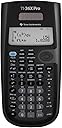
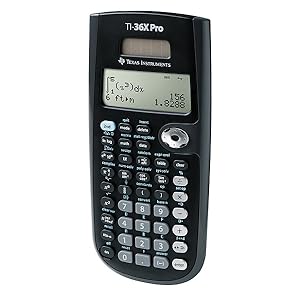
The Texas Instruments TI-36X Pro is a solar-powered, four-line scientific calculator designed for high school to college STEM students. Featuring MultiView display and MathPrint technology, it handles advanced math and science functions without graphing capabilities, making it ideal for exams and courses where graphing calculators are restricted. Lightweight and reliable, it supports unit conversions, fractional calculations, and trigonometric functions with precision.

| ASIN | B004NBZB2Y |
| Amazon Bestseller | #173,562 in Office Products ( See Top 100 in Office Products ) #91 in Scientific Calculators |
| Batteries Included | Yes |
| Batteries Required | No |
| Brand | Texas Instruments |
| Color Name | black |
| Customer Reviews | 4.7 4.7 out of 5 stars (21,925) |
| Date First Available | September 21, 2011 |
| Display Size | 3 |
| Display Type | LCD |
| Item Model Number | 36PRO/TBL/1L1 |
| Item Weight | 150 g |
| Item model number | 36PRO/TBL/1L1 |
| Manufacturer | Texas Instruments |
| Material | Plastic |
| Model Year | 2013 |
| Product Dimensions | 24.64 x 17.02 x 2.79 cm; 149.69 g |
ろ**と
いろんな関数電卓使ってきたけどとにかく使いやすくて演算結果もなかなか正確。 筐体が薄いのと、独特のクリック感があり、また計算履歴が残ってたり、電源がきれても入力途中ならそのままで復帰してくれるのもこの電卓ならでは。 パソコンでの計算ができない現場では大活躍してくれてます。 マニュアルは英語ですが、関数電卓を 使ったことがある人にはマニュアルを読まなくてもほとんどの操作ができると思いますよ。
ふ**ゆ
他の方もおっしゃているとおり,ボタンの二度押しでサブファンクション呼び出しができるなど非常に使いやすい関数電卓です。 計算順序が北米式となっていますが,入力時にカッコをつけまくる癖があるので問題ありませんでした。 ディスプレイの視認性は国内メーカーの最新機種には劣りますが,屋内使用には十分で,不便さは感じていません。 商品とは関係ありませんが... 注文時,最初に「火バサミ」に「Scientific Calculator」と書かれたシールが貼ってあるものが届きました。 返金→再度注文 でちゃんと電卓が届きました。 TI製他機種のレビューなどを見ると,TI製電卓は(マーケットプレイス出品のものも多いためか)よく間違った品が届くようですので,急いで必要な方はとりあえず国内メーカの下位グレードを買って,時間に余裕があるときにじっくり選んで購入することをおすすめします。
P**A
パッケージを開けたときのがっかり感は、他を圧倒するくらいの威圧感がある。 しかしこれは、外観が安っぽいだけのことであり、電源を入れた瞬間、TIワールドに引き込まれる。 マニュアルは付いてくるが、これを必要としないくらいの親近感がある。 通常、一つのボタンは、2つないしは3つの機能くらいしかないが、この電卓のそれは「キーを複数回押すことで」様々な機能を提供する。 しかもそれが本体に印刷されているため、マニュアルはまったく必要としない。 関数電卓としては、価格を含め途方もないポジションに君臨していると言える。 日本ブランドのギミックにあふれたおもちゃを選ぶのであれば、こちらを強く勧める。 HPの35Sを含め、この二つのメーカーの電卓は、他の追随を許さないところにいる。
ク**チ
カシオ、シャープ、キャノン、hpと使ってきましたが此方も中々良いモデルです! 能書きは英語でしたが、ある程度使える人はなれるまで、時間はかからないと思いますよ! 初心者でも、イジって入れば大体は使えると思う。 職場には誰も持っていないので羨ましがられたり、優越感に浸れたりデキマス! 人と同じのが嫌だったら迷わず買えよ、買えばわかるさ。優越感に浸れ!
の**ら
普通の関数電卓です。カシオやシャープと比較しても機能的に過不足は有りません。 問題点もありますが、私的にはお気に入りでメインで使っています。 良いところ 1.サブファンクション(キーの裏側の機能です)の呼び出し方法が秀逸。 [SHIFT]や[2nd F]を使わず、キーを2度押し、3度押しで希望の関数を呼び出せる。 2.計算結果をとりあえず少数で返してくれる。 解が パイ/2 の時に 1.570796327 を表示する。[<>]キーを押すと、パイを含む分数解の表示も可能。(カシオやシャープと反対です) 3.電源を切っても計算結果がクリアされない。(シャープと同じ) 悪いところ 1.計算の優先順位が北米ルール。 有名な? 6÷2(1+2) の計算結果が 9 になる!? 6÷(2(1+2)) と入力するなど、この癖を意識しながら使う必要があります。 2.一部の関数が使いづらい。 時分秒の計算機能はあるのですが操作ステップが多すぎます。こんな時には素直にシャープの電卓で計算してます。 3.web上の写真では良く分かりませんが、右側の機能キー(÷ × - + enter など)がメタリックで見づらい。 私は刻印された記号に白いインクを流し込んで使っています。<<お勧め どのメーカーのものを使っても、それぞれに長所と短所がありますが、使い物にならないような関数電卓は見かけません。 昔と違い関数電卓の価格はお小遣いレベルです。この電卓とカシオ、シャープ、キャノンなどの2千円クラスを複数所有して気分で使い分けるのもありかなと思っています。
M**2
非常に使いやすく便利。 コンピューターサイエンスや統計計算をするのに最適な電卓です。手放せない。
カ**ス
なかなかいい関数電卓です! また、ほかの関数電卓では 統計や複素数モードに切り替える時、 モードボタンを押してそのメニューから選択しますが、 この電卓は、セカンドファンクションに モード切替キーが設定されているのです。 なお、行列やベクトルなどの高度な数学計算にも 対応しています! 行列式や逆行列、ベクトルの内積やベクトルの外積が 必要なら使ってみましょう。 CASIOでは、fx-915ESやfx-JP700、Canonでは、F-789SG、 SHARPでは、EL-520Mが同等の機能を持つ機種です。 この電卓が気に入らないのであれば、上記の機種を お勧めします。インターネットで調べてみましょう! 特に注目したいのは、分布計算ができることです。 正規分布や二等分布、ポアソン分布計算など、 合計7種類の高等分布計算が出来ます。 ただ一つ、欠点を言うと、√キーが セカンドファンクションのあり、 非常に使いにくいです。 逆数もセカファンにあり、キーセンスは最悪です。 こう言ってしまうと怒られるかもしれません(笑)。 メモリーの呼び出しは一覧表示でとても 使いやすかったです!これは評価したいです。 電源をOFFにしても計算履歴が消去されないのも 大きな魅力です。重宝するべきでしょう! 操作方法も特殊で高機能な関数電卓でした。 Texas Instrumentsさん、なかなかやりますね!! 操作方法が特殊な上、マニュアルが英語なので 初心者には決してお勧めできませんが、 操作方法が理解できれば、意外と使える関数電卓です。
東**鶏
全画面ドットマトリクスの(少し)高機能な関数電卓ですが… ・キーの2度押しで目的の関数を呼び出せるが、それはごく一部のみ。 平方根がそうなってないッ!! つまり通常の裏キーに廻ってるので[2nd][x^2]と2ストローク必要なのは奇天烈大却下である。 ・電源切っても履歴を呼び出せるのは米国メーカー製としてはごく普通だが 履歴を呼び出して「確定」させないと追記・修正ができないのは本機最大かつ致命的な欠点。 行列やら計算できるってもそんなのPCにやらせたほうが何倍もいい。電卓には電卓なりの道があるというのに、高機能と言えばどんどんPCにもできるのを付け足して、肝心なUIをおろそかにしている感が多分にある。 三角関数などはキーを押すとsin, sin-1, sinh, sinh-1とループするが、じゃあx2と平方根も同じ様にループさせろと。なぜ平方根は[2nd][x^2]なんて2キー仕様にしたんだ。バカかよ。三角関数キーあたりの仕様が素晴らしいのに、なに手抜きしてンだTIは。どうせ高校生向きだからこんなんで良いだろって舐めてンのか!? 裏と表が逆じゃね?っていうキー ・平方根 ・quit ("安全"な画面クリアキー) なんでこれが設定で決められないの? ・数式通り表示と実数表示 →tan60度を計算させると√3と表示がでてくる。まあ、そうなんだけど キー押せば1.7320508ってでてくるんだが…デフォルトで人並みに奢らせて欲しいんだよ。 わざわざキー押さなくても最初から奢らせてほしいんだよッ!(机ドン 危険な[clear]キー ・これ、画面クリアだけでなく、履歴クリアも出来る…というか画面クリアするつもりでこのキーを連打してると履歴が丸っきり消えてしまう。まあ、そりゃクリアって書いてるからそうなんだろうけどさあああああ!! (ちなみに画面"だけの"クリアなら[2nd][mode](すなわちquit)で出来る) 北米式計算術 ・6÷2(1+2)は9を返す。国内メーカー製関数電卓は1を返す。これはTIを筆頭にいわゆる「北米式計算術」として認知されているが[要出典]、単純に省略された"*"を補完しているだけであり、国内メーカーは省略された"*"の優先度の方が高いという忖度で計算を行っている。これはどちらが正しいかという話ではなく、俺がこっちと決めたからこっち、という話なだけである。
A**G
Great calculator for STEM/Engineering students. It has most features you need for courses where only scientific and non-graphing/programmable calculators are permitted. Definitely has a learning curve if you intend to use many of its features but it is worth the time. Size-wise, it's slim and light-weighted compared to other graphing/programmable calculators (my favorite trait of TI-36X Pro). If your kid is going to college soon, buy them at least two of these.
K**S
I am a 3rd-year Engineering student, and this calculator has become my goto calculator for exams. I own at least 7 or 8 scientific calculators (lost count now), and 3 graphing calculators: these include the HP 50G Graphing calculator, the Sharp EL-516 and I have also used the Casio 115/991ES in the past (same calculator, just different branding between the US and Canada). The Sharp and Casio calculators are the most direct comparisons, while graphing calculators are obviously usually seen in a separate league. I won't compare this to TI's other scientific calculators, because this is simply the most powerful scientific calculator that TI makes. PROS compared to Sharp/Casio's most advanced scientific calculators: 1) Multiline display, and the interface actually uses the multi-lines. If you look at the Casios and Sharps, they use the mult-lines for displaying fractions and the last answer, but never display more than the last answer. In comparison, this TI-36X Pro uses all four lines, so that the last three answers/equations can all be displayed. It's much more like a graphing calculator in this respect. 2) One single mode for all functions; no need to switch between complex mode, normal mode, polynomial mode etc., like the Sharp and Casios do. It's merely for historic reasons that the Casios and Sharps still do this, and it makes so much more sense to have everything done in one mode (like a graphing calculator). 3) Solid, tactile buttons that have a slight "click" when you push them. I really like this, because I don't even need to be looking at the keys to know whether my keypress has registered or not. I find with the Casios and Sharps (particularly the Sharps) that they have keys that are really easily depressed, and don't give you great feedback on whether they've been clicked. 4) Really, really good interface. If you have ever used a graphing calculator from TI, you will feel right at home. The matrix equations, polynomial solver and and linear equation solver all have graphing calculator-like input, which should be both very familiar to many users, as well as intuitive for those new to TI UI design. For example, the polynomial solver is like a computer wizard, taking you through the steps for entering the coefficients of your equation. Really easy to use. 5) Cycling through functions with a single button is pretty innovative, and I think faster than using the 2nd function or (even worse) relying on entering another mode or menu. For example, in order to access ASIN, you just hit the SIN/ASIN button twice to cycle to ASIN. It's really easy and doesn't require you to use two separate buttons. 6) Really good definite integration and derivation. It works really well, and is faster than my Sharp (I performed a side-by-side comparison multiple times for speed). CONS 1) The intuitive interface comes at the expense of a few more button clicks in a few situations. For example, the polynomial solver is dummy-proof for entering your coefficients, but I generally feel that the Casio and Sharp calculators can accomplish the same thing with 1-2 less clicks occasionally. 2) Variables (other than 'x') are difficult to access. The variables are all stored under one button, which you cycle through. 'x' is easy to access since it is the first variable, but to access 'z', you need three button clicks. To access 'b' requires 6 button clicks. I would have preferred an alpha key for access keyboard variables, or a menu with number shortcuts. 3) The silver buttons and silver rocker colour are poor. I know that many other reviews have complained about this too, and it is a bit annoying. It definitely doesn't make the calculator unusable or anything, but they are a bit hard to read, and I personally also feel that they look out-of-place on a calculator that otherwise has rather dull (and more professional) colours. 4) This is a personal pet peeve, but above the "enter" button on the button-right, the TI-36X Pro has a Decimal/Fraction conversion button instead of the "multiplication" operator button; instead, the operator buttons have all been shifted up by one. TI has many other calculators, and most of them have the operator buttons right above the Enter key... which makes sense to me, since they are frequently used. I would have preferred to have the Decimal/Fraction conversion button above the operator keys, to make this keyboard more standard in comparison to other TI and HP calculator layouts. I sometimes hit the conversion key instead of the "addition" operator key as I am used to from other calculators (as a side-note, TI and HP prefer the single-column 1x4 layout of operator keys, whereas Casio and Sharp prefer the 2x2 layout of operator keys. You can easily adjust to either, although I personally prefer the TI/HP layout, as it's easier to access single-handed I think). PROS to graphing calculators What really pushes this calculator over-the-edge for me is that it feels like a graphing calculator in many respects; the interface is intuitive, the line display maximizes all your command history... and it does this while focussing on the main features you might need, such as matrix calculations or solving polynomial expressions. Obviously this can't do graphing, since it isn't a graphing calculator, but it does have a "function table" where you can enter a function and it automatically gives you the y values for an interval of x. That allows you to quickly plot a function's general curve on paper using the provided xy points. Very useful, and for this I have been able to stop needing a graphing calculator. Not only are graphing calculators not allowed on many exams, but some of the more advanced functions on graphing calculators (ie. matrixes) actually require fewer button presses to do on the TI-36X Pro. And I'm tired of changing batteries on a graphing calculator. In other words, I can actually accomplish stuff faster and more reliably on the TI-36X Pro. Honestly, this is a fabulous calculator. The Casio and Sharp calculators have been around far longer, so that's why you may hear some older users advocating for them, but the TI-36X Pro embraces a more intuitive UI with single-mode operation, and packs a few graphing calculator features which cover 99% of everything I do on a calculator in Engineering. I highly recommend this calculator for anyone in need of the most powerful scientific calculator on the market, or a graphing calculator user who finds that they don't need all that functionality and just want something a bit lighter to carry with them.
I**I
Elle fait très bien le boulot
O**Z
Esta es la primera calculadora de Texas Instruments que pruebo después de toda la vida utilizar Casio y tenía algo de miedo de que no me fuera a acostumbrar a la distribución de las teclas o funciones pero la verdad fue una transición muy sencilla y estoy mucho más a gusto con ella. Este modelo es perfecto desde prepa hasta universidad, resuelve ecuaciones, derivadas, integrales, matrices y cálculos estadísticos, es muy completa, equivalente a una 991 de Casio. Comparación Casio Vs TI Ventajas • Historial, tanto resultados como operaciones que se guarda incluso después de apagarla, esto es la cosa más útil que he visto para problemas en los que tienes que hacer varios pasos, es muy cómodo tenerlos anotados en la misma calcu y volver a escribirlos con una tecla, para mí esto fue lo más decisivo para probarla • Teclas muy intuitivas: la distribución se ve rara al inicio pero sólo es agarrarle, por ejemplo la tecla que tiene Pi le das una vez y poner Pi, otra vez y es e, una vez más y es i, se me hace más rápido y menos complicado que el shift + tecla de las Casio. Contras: • El menos no funciona como signo negativo, son 2 teclas diferentes, al inicio se te puede ir y que no salga una operación por lo mismo • Si quieres notación científica tienes que ponerlo en la configuración, no hay una opción intermedia de que a partir de tantos decimales se ponga en automático, entonces me ha pasado algunas operaciones que el resultado es por ejemplo 1.6393627x10^-8 y si no activo notación científica me lo muestra como 0.000000001, entonces esto es un poquito molesto, pero es rápido cambiar la configuración y ya que la operación se guarda en el historial no es algo tan malo.
A**Z
Good
Trustpilot
1 week ago
4 days ago