Desertcart purchases this item on your behalf and handles shipping, customs, and support to Argentina.
โก Elevate your network game with multi-gig power and cloud-smart control!
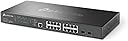
The TP-Link Omada SG3218XP-M2 is a professional-grade, intelligent managed L2+ switch featuring 16 multi-gigabit 2.5G ports (8 PoE+), 2 x 10Gbps SFP+ uplinks, and a 240W PoE power budget. Designed for high-performance WiFi 6/7 deployments, it supports advanced security, static routing, and cloud-based centralized management via Omada SDN, making it ideal for modern enterprise and SMB networks seeking scalable, high-speed connectivity with simplified control.


| ASIN | B0CXLR9MQL |
| Best Sellers Rank | 74,603 in Computers & Accessories ( See Top 100 in Computers & Accessories ) 474 in Network Switches |
| Box Contents | Power cord, Quick Installation Guide, Rack Mount Kit, Rubber feet, SG3218XP-M2 Switch |
| Brand | TP-Link |
| Brand Name | TP-Link |
| Color | black |
| Colour | black |
| Compatible Devices | Desktop, Laptop, Printer, Camera |
| Compatible devices | Desktop, Laptop, Printer, Camera |
| Customer Reviews | 4.3 out of 5 stars 33 Reviews |
| Data Transfer Rate | 30 Gigabits Per Second |
| Interface | PoE, SFP |
| Manufacturer | TP-Link |
| Manufacturer Part Number | SG3218XP-M2 |
| Model Number | SG3218XP-M2 |
| Number of Items | 1 |
| Number of Ports | 16 |
| Number of ports | 16 |
| Platform | Not Machine Specific |
| Switch Type | managed |
| UPC | 840030709722 |
| Upper Temperature Rating | 40 Degrees Celsius |
| Voltage | 240 Volts (AC) |
R**S
Good price, works with OMADA system
As you of now, no issues whatsoever. Only complaint I have is the fan its a bit loud even with light load. Will probably replace it soon with a noctua fan. But overall I am happy with the 2.5gb connections
C**G
Good switch functions.
Good switch functions. The only issue is the noise of the cooling fans.
D**Y
Good switch
SG3218XP-M2 - a very nice 16 port 2.5GbE with 2 SFP+ ports. The fans are a bit noisy when the switch is starting up. Nice switch to upgrade my home network backbone for servers/storage. Can configure the switch via GUI or can use the controller software/hardware. The mounting brackets are also very nice. You can rotate them, so you can mount to the wall or under a desk. Please note, only the first 8 ports have PoE.
R**R
impression a year later: good deal
no subscription or management appliance needed. not loud, not bright, not flimsy. works fine for months on end in a back pantry running a couple poe devices, and can do basic things like vlan and link-aggregate. no nat/firewall but thats a plus for my use. if you want there is an app, you can see link states and graphs and intuitively configure each port seems very fast. i have a poe wifi-6 ap (w/ guest & private networks, using the same vlans as wired ports), a poe camera, a couple fast ethernet connections and some workstations & tvs, a printer. this thing never seems to need reboot or any other grief. would recommend for home / office or retail
R**E
Works great, as advertised, but stock fans are comically loud.
I got this because it was the only thing available that fit my criteria for my home backbone switch. I needed a total of 16 2.5Gbps ports, I needed at least 4 of those to be PoE, and I wanted to have SPF+ 10Gbps for uplink to be a little future proof. I could not find anything else that met those criteria. This switch is working great and does what I'd hoped. The management options are more than I as an average home user needs, but they are out of the way in a default sense. Had to do a firmware upgrade out of the box, not surprising, but not the most intuitive, since it does not automatically load the new firmware, but rather "stages" it and you have to configure it to switch. I'm sure that is "enterprise grade", but again, overkill at home. I will say that the noise is terrible. I had this switch in a closed cabinet, in a room with the door closed, and you can hear the fans through the walls. It was ridiculous. However, I followed the excellent advice from "WR Parker" (in the reviews) to swap in 20mm Noctua fans - it was easy and worked immediately. The Noctua fans are so quiet I had to double check to ensure the device was on.

Trustpilot
2 months ago
2 weeks ago