Buy anything from 5,000+ international stores. One checkout price. No surprise fees. Join 2M+ shoppers on Desertcart.
Desertcart purchases this item on your behalf and handles shipping, customs, and support to Argentina.
⚡ Command your devices like a pro — 16 channels of power at your fingertips!
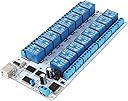
The SainSmart 16-Channel 9-36V USB Relay Module is a versatile, opto-isolated relay board featuring 16 SPDT relays capable of switching up to 10A at 250V. Designed for seamless USB control, it supports a wide DC voltage range (9-36V) and includes LED indicators for each relay output, making it ideal for home automation, robotics, and custom electrical projects.


| ASIN | B0793MZH2B |
| Best Sellers Rank | #513,723 in Automotive ( See Top 100 in Automotive ) #162 in Automotive Replacement Relay Control Module Relays |
| Brand Name | SainSmart |
| Coil Voltage | 36 Volts |
| Connector Type | Usb |
| Contact Current Rating | 10 Amps |
| Contact Material | Silver |
| Contact Type | Normally Open |
| Current Rating | 10 Amps |
| Customer Reviews | 3.5 3.5 out of 5 stars (42) |
| Manufacturer | SainSmart |
| Maximum Switching Current | 10 Amps |
| Maximum Switching Voltage | 36 Volts |
| Minimum Switching Voltage | 9 Volts |
| Mounting Type | PCB Mount |
| Operating Time | 0.5 Seconds |
| Operation Mode | Electrical |
| Part Number | USB Relay Module |
| Wattage | 90 watts |
S**Y
Mediocre, but ok for price paid.
As another has noted, do use the external power supply port and pull the jumper. It had issues just running off the usb power. I was also able to confirm the other report that sometimes if you go too fast a relay can miss a command, but I saw that more often on usb bus power. A good power supply makes it reliable and faster to respond. In my case I have hundreds of amps available. I wrote my own linux driver that waits for the reply to echo back before considering it applied. I can run this in fast process-level parallel and the reply messages can interleave. So I have a random-delay-then-retry logic to make sure it gets a correct acknowledgement. Seems to be reliable enough when I do that. See serial on then off, then parallel (don't wait for reply) on then off. That being said the rest of the world is at 115200 baud for usb serial. Why default to 9600? The ch340 family can go that fast if they changed one line of code. I also found that it's decently reliable if I close and reopen for write after every command while not waiting for a reply (about half as fast). Even though it's not perceptably any slower (at 9600 baud). That must mean the wait time before resending is clearly almost imperceptible. This means their microcontroller code is a little broken to not be handling these requests with pointer queues to a ring buffer, but they are actually doing work while they have listening turned off. I tried adding characters to pad space in time predictably. It didn't work. It's just oddly buggy when you go fast. Other then these notes, it appears to work decently enough. I'll be rewiring my van to use this to control all my 12v appliances. The LED indicator lights work well,
B**N
If using python convert their chart to decimal.
To control this in python, convert their spreadsheet values from hex to decimal. Excel and office libre has a built in function hex2dec. Put the corresponding row of decimal values separated by commas into a bytearray, then send to serial. Upgraded to 5 star. Been using this thing for a few years to control a semi automatic homebrew system. Once I figured out how to code for it, it was super simple to use. I like that I can control it over usb, was the big selling point. Got it connected to a raspberry pi on a touch screen.
J**S
commands missed if run too fast
No documentation came with this, but I managed to find enough information to get it to work on the SainSmart website. I wanted to use it to control some penumatic valves. I noticed that occasionally one of my commands would be ignored, and after some testing I found that there seems to be a flaw in its firmware that will cause it to miss commands if you give the commands too fast. This device is very slow anyway, it only seems to work at a baudrate of 9600 which is much slower than other USB relays. This would have been fine for my application as I only need to switch the valves every few minutes, but the problem is I need to issue a command to close one and open another back to back, and the only way I could get it to perform reliably was to put a rather long delay after every command, which made this useless for my application. I ended up using two separate 8 channel USB relays by a completely different manufacturer.
L**N
Marginal relay card, poor documentation
I purchased two of these cards. Overall this relay is marginal at best and probably not worth the trouble for most people. Overall good: - Low price - 16 channels 1 board - No 'daughter board' for the USB host module Overall bad: - No HID compatible software support, no provided drivers for linux, very little documentation - The status command doesn't return anything, which I think would be a key software feature is to check what we think the relay is doing with what the board says the relay is doing. - One of the board makes a whining noise when contact is closed - Tough one for me: there is no hardware level serial number, which means we can't really guarantee we can keep multiple boards addressed properly. There are potentially ways around them, but none of them come without cost and complexity. - No 'plug style' 12v power in like the Knacro 8-channel relay I found on amazon that worked nicely. You have to put in a spliced power chord into screw terminals. The board itself seems sturdy but there seems to be a persistent whine while in the 'on' state once I got them working (after multiple hours of nonsense trying to figure out how to get moving). It isn't supported by most of the major type of relay drivers (such as usbrelay on linux or ondrej1024's excellent relay driver application on github), or even compatible with the other HID type 16 channel relays that Sainsmart also sells. It isn't obvious on the website, but I was finally able to get this to work using a python script I found on github using the serial commands from the Sainsmart Wiki page. Amazon doesn't allow us to post external links in their policy, which is quite frustrating since they profit from this type of poor product with poor documentation. Anyway if you search for RJ QinHeng Electronics HL-340 on gitgist, you can see some code that might help if you use python and pyusb, or mine that I posted (username ldnelso2 on github). My first clue was the device type not being the same as the other sainsmart boards: Device Type: QinHeng Electronics HL-340 USB-Serial adapter Then I found the serial commands to send by copying and pasting from the serial communication document I found here (which isn't obvious from the sainsmart website). Again, Amazon's policy won't allow me to post the link so you will have to search for it by the SKU and find it. You have to add '0x' for hex command sending in the script since you are sending hex over USB , thus in the python script you can define them: # Sainsmart 16-channel commands to modify RJ's python script from the above gitgist link: op_all = [0x3A, 0x46, 0x45, 0x30, 0x46, 0x30, 0x30, 0x30, 0x30, 0x30, 0x30, 0x31, 0x30, 0x30, 0x32, 0x30, 0x30, 0x30, 0x30, 0x45, 0x31, 0x0D, 0x0A] cl_all = [0x3A, 0x46, 0x45, 0x30, 0x46, 0x30, 0x30, 0x30, 0x30, 0x30, 0x30, 0x31, 0x30, 0x30, 0x32, 0x46, 0x46, 0x46, 0x46, 0x45, 0x33, 0x0D, 0x0A] c6_on=[0x3A, 0x46, 0x45, 0x30, 0x35, 0x30, 0x30, 0x30, 0x35, 0x46, 0x46, 0x30, 0x30, 0x46, 0x39, 0x0D, 0x0A] # and so on. . . Like the other reviewer mentioned, it might be easier to convert the serial commands to decimal from hex and send those, depending on what you are trying to do. So, basically, this card is not worth all the hassle! Go ahead and spend the extra $20 or so and buy a Denkovi USB board. Much better, and way better software, support, and documentation.
T**C
Seems to work. Haven't connected anything to the relays or used the external power supply yet. Only got as far as writing a LabVIEW vi to control it.
G**G
Funcional y robusta
A**R
Updated review: the board uses "Modbus ASCII" protocol. Knowing that makes the commands far less cryptic. The supplied documentaton (PDF and XLS) has errors in the checksums for channel 15-off, 16-on, 16-off. I got lucky and found the source code for Sainsmart's Windows app, and can confirm the device supports more Modbus functions than documented: 1 (read coils), 2 (read discrete inputs), 5 (write single coil), and 15 (write multiple coils).
Trustpilot
1 day ago
3 days ago