Buy anything from 5,000+ international stores. One checkout price. No surprise fees. Join 2M+ shoppers on Desertcart.
Desertcart purchases this item on your behalf and handles shipping, customs, and support to Argentina.
🔍 Measure with Precision, Charge with Confidence!
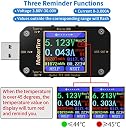
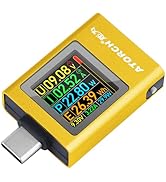
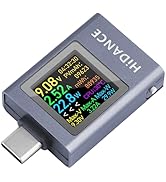
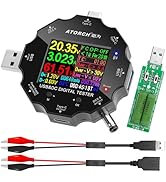
The MakerHawk USB Multimeter is a versatile testing tool designed for professionals, featuring a 1.44-inch LCD display, multi-protocol support, and a robust alarm system for temperature and voltage monitoring. Its durable design and flexible screen rotation make it ideal for various applications, ensuring accurate readings from any angle.


| ASIN | B07DCSNHNB |
| Best Sellers Rank | #57,308 in Tools & Home Improvement ( See Top 100 in Tools & Home Improvement ) #47 in Voltage Testers |
| Brand | MakerHawk |
| Brand Name | MakerHawk |
| Color | Light black |
| Compatible Devices | USB chargers, PC/laptop/desktop computer, mobile phone, power bank, car charger, cable |
| Customer Reviews | 4.3 out of 5 stars 1,410 Reviews |
| Item Dimensions | 2.8 x 1.25 x 0.49 inches |
| Item Weight | 18 Grams |
| Item dimensions L x W x H | 2.8 x 1.25 x 0.49 inches |
| Lower Temperature Rating | 10 Degrees Celsius |
| Manufacturer | MakerHawk |
| Measurement Type | Multimeter |
| Minimum Operating Voltage | 4.5 |
| Model | se |
| Part Number | se |
| Power Source | Corded Electric |
| Style | Voltage Tester |
| Style Name | Voltage Tester |
| UPC | 192684491714 |
| Unit Count | 1.0 Count |
| Upper Temperature Rating | 100 Degrees Celsius |
V**Y
Getting to know the MakerHawk USB Multimeter
My experience with the MakerHawk USB Multimeter can be summed up in one phrase: "works well after I figured out how to use it." When I first unboxed it, I was a little overwhelmed by the amount of information on the screen and the various buttons. There wasn't a clear, intuitive path to simply measure voltage and current right away, and I felt like I was fumbling through the settings. It definitely required me to sit down, read the instructions, and look up a few videos to understand its full functionality. Once I got the hang of it, however, the device proved to be incredibly useful and accurate. It's a powerful tool for anyone working with USB devices and power delivery. I've used it to test cables, monitor charging speeds on my phone, and troubleshoot power issues with small electronics projects. The ability to see real-time data on voltage, current, power, and even the total energy consumed is invaluable. The screen is bright and easy to read, and the rotating display feature is a nice touch. Despite the initial learning curve, I can now confidently say that the MakerHawk USB Multimeter is an excellent piece of equipment. It's a reliable, feature-rich tool that provides the data you need to ensure your USB devices are functioning correctly. The frustration of the initial setup has been completely replaced by the satisfaction of having a powerful tool in my kit.
J**Y
This is sweet. Five stars.
This is one of my favorite purchases from Amazon in a while. I didn't realize how much I needed it until I had it. I was able to go through all my cables and purge the ones that had some bad internal connections, was also able to check on some USB power banks, and also test each of my USB wall blocks. It's amazing how much you learn in a short time about your different chargers and cables and how different they can be. Some wall blocks put out too much voltage (which is why I bought this tester, because I had a brand new wall block fry a security camera by putting out too much voltage), and it's also fascinating that some cables seem to intentionally provide imline voltage control even one paired with a wall block that is putting out too much juice. The device itself is really easy to use and has lots of intuitive features. This was money very well spent for me and although I'll probably never use it as much as I did in the first 24 hours, it's a handy thing to have around because it's hard to test USB stuff with a regular meter. Mostly it's just cool as all get out.
.**D
Nice device though one concern
Works as described. My one concern is the back surface is the bottom side of the PC board making it potentially susceptible to ESD. An insolative cover sheet of some form other than the PC mask would have been a much more robust protection for the device.
D**Z
Good for testing, nice screen.
Great little gadget. Color screen is easy to read. Good for testing voltage and current from chargers and portable solar panels with USB-C outputs.
T**5
Good value. Works as advertised for USB-C PD in/out
This item works as advertised to monitor voltage and current to USB devices. Can monitor USB-C voltage and current via the in/out ports. Graphs of power usage are a bonus.
D**R
Great way to measure power draw from various USB devices.
Fun gadget to see what power draw different USB devices pull. Helpful for troubleshooting devices that aren't working either. If you like to mess around with USB devices in a tech sort of way, this is a great little tool.
W**E
Mixed feelings for me
First, FYI: The "Product Catalog--Read and Download.pdf" on the Mediafire web site referenced by the QR code on the USB meter package gives you links to where to find manuals, PC software, and Android apps for your model tester. Me, I bought the A3 Bluetooth meter. On the positive side, the readings on it match my Fluke 77, and my other USB tester doesn't. So seems accurate. On the negative side is the Bluetooth functionality. It will probably suffice for me, but just barely. All I want to do is check the USB voltage and current on a device sealed in a box. Because I can't see the meter I want the display on the meter to be turned off. Check and check with the Android app. However the Android app's graph readings go crazy after awhile (2-1/2 to 13 minutes so far for me). The readings on the device's display stay stable. Since I will just need to do a quick check once in a while, no problem for me. Re-running the app will correct the readings for another few minutes, but don't look to monitor things full time with the app! Also, the settings for things like device "Screen Off" keep changing from app run to run too (0 is 'always on', FYI). A note at the top of the "Product Catalog--Read and Download" page says there is an iOS app, but as of today 10/22/22 I can't get it to work. The app can't see the device, nor can the iPhone's Bluetooth settings. So neither app is working very well, and don't expect any updates. The Android app you can download from the Mediafire site is 4 years old. I think the "E-Test" app on Google Play is older. I don't see a date on the iOS app "E_test", So I don't think it has ever been updated. The only review there is 2 years old. Neither have good ratings. So buy for the meter, but skip the Bluetooth unless you have simple needs like me. :-)
D**O
Big help in a little package
I love real time information, and this little meter gives! So far I've been able to evaluate batteries and charging rates of a few devices that I was having issues with. While it can't fix anything by itself, it's certainly a big help in evaluating chargers & battery conditions.
Y**I
Good
Good
M**O
Recomendable
De muy facil uso, creo que el manual lo podrían colocar en alguna página, esta de un tamaño mínimo y creo le falta detallar cuidados y precauciones al usarse
C**.
Gostei do produto
Já foi entregue
I**D
Nice Device for checking USB power flow. Unfortunately USB-C doesn't seem to work.
Nice easy to use Device for checking how much power is flowing on various USB supplies and devices to be charged. Great for this.... Unfortunately USB-C doesn't seem to work and doesn't enable flow through USB-C or even power the device as the other formats do. Unfortunately also the QR code doesn't lead to the right instruction manual. Apart from USB-C and the instructions not being available, it would have got a 5 star.
M**T
useless
Was working fine until at one point part of the screen for some reason stopped working. Went to the electronic recycling world.
Trustpilot
5 days ago
2 months ago