Buy anything from 5,000+ international stores. One checkout price. No surprise fees. Join 2M+ shoppers on Desertcart.
Desertcart purchases this item on your behalf and handles shipping, customs, and support to Argentina.
🔐 Secure your legacy rig with future-proof TPM 2.0 power!
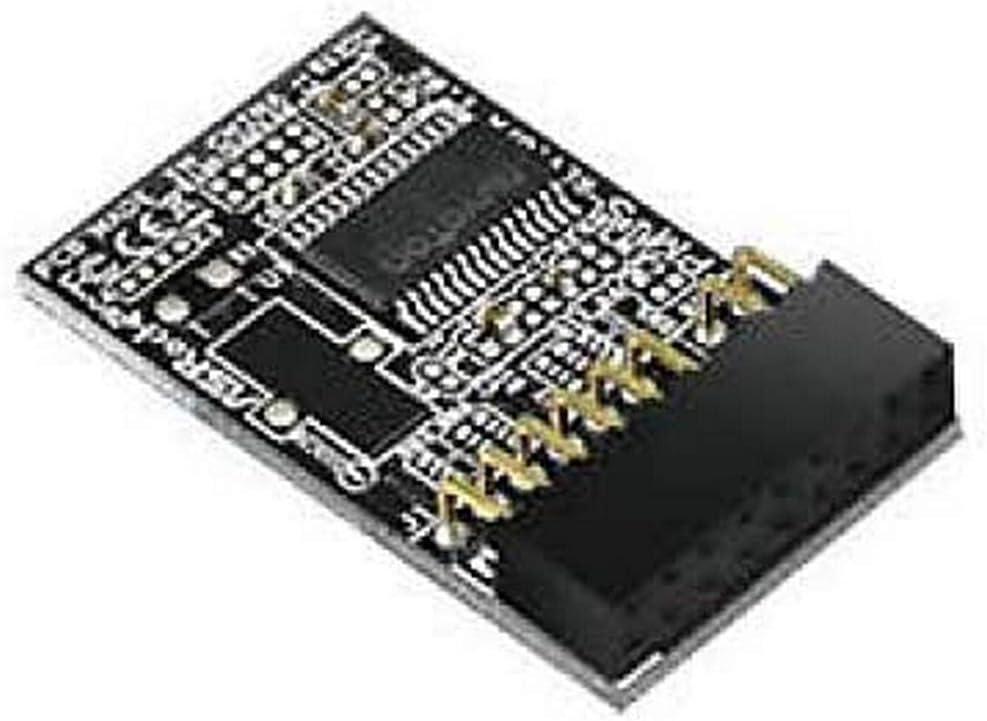
The ASRock TPM2-S TPM Module (V2.0) is a compact, energy-efficient security upgrade designed to bring Trusted Platform Module 2.0 capabilities to compatible ASRock motherboards. It supports advanced encryption standards, defends against multiple attack vectors, and is fully compatible with Windows 8.1, 10, and essential for Windows 11 compliance. Easy plug-and-play installation makes it the perfect choice for professionals looking to extend the life and security of their existing PC setups.
| ASIN | B06XPR5943 |
| Best Sellers Rank | #104 in Computer Motherboards |
| Brand | ASRock |
| Built-In Media | ASRock TPM2-S TPM Module |
| CPU Model | Core i5-10400 |
| CPU Socket | 370 |
| Chipset Type | Intel B460 |
| Compatible Devices | Personal Computer |
| Compatible Processors | Intel 10th Generation Core Processors |
| Customer Reviews | 4.6 out of 5 stars 704 Reviews |
| Global Trade Identification Number | 04717677331387 |
| Graphics Card Interface | PCI Express |
| Item Dimensions L x W x H | 2"L x 0.4"W x 6"H |
| Item Type Name | Motherboard |
| Main Power Connector Type | 24-Pin |
| Manufacturer | ASRock Rack |
| Memory Clock Speed | 1333 MHz |
| Memory Slots Available | 2 |
| Memory Storage Capacity | 16 GB |
| Mfr Part Number | TPM2-S |
| Model Name | TPM2-S |
| Model Number | TPM2-S |
| Platform | Windows 10 |
| Processor Socket | 370 |
| RAM Memory Technology | DDR4 |
| S/PDIF Connector Type | Optical |
| System Bus Standard Supported | SATA 2 |
| Total PCIe Ports | 4 |
| Total SATA Ports | 1 |
| USB 2.0 | 1 |
| Warranty Description | 1 Year |
R**R
Windows 11 requirement
I got this for a 5 year old pc, the pc worked fantastic and would have been fine, but windows 11 required TPM, so I got this. The chip was very easy to install and was just plug and play. No hassle of trying to get drivers or install software. For upgrading, it was affordable and I had no compatibility issues.
D**K
Works as stated…
Brought TPM 2.0 capabilities to my older ASRock Z97 Pro4 motherboard once i updated the BIOS to the latest Beta version. Wouldn’t have bothered & just replaced the MoBo except it’s running an OC’d 4790K processor that still has a biy of giddy up left in the pony. Next step is to migrate the system from Win 10 to Win 11. If any issues or problems arise with the module, I will update the review…
T**N
Works as expected
I was trying to test out the Windows 11 Insiders build, but my PC was reported as incompatible because there was no TPM detected. After reading articles about how most recent motherboards have TPM integrated, I checked the settings, but the only place I could find it in my ASRock BIOS was in the Advanced page showing that it was enabled, but no chip was detected. After ordering this item but before receiving it, I finally found an article that mentioned the Intel Platform Trusted Technology (PTT) settings are manged from the Security page of the BIOS. After more research, I was starting to get even more concerned that I ordered the wrong product because the ASRock page for their TPM modules has a note on both TPM 2.0 versions that says, "Supported on selected motherboards. Please refer to motherboard selection for more details. Not supported with Intel® 8 and 9 series chipsets." I have a Z390 chipset that isn't not listed in the compatible motherboards, and my CPU is an i9-9900K (9 series). After finally receiving the TPM module, I disabled the PTT in the BIOS and tested. It turns out that this is the correct TPM module for my PC if I want to use a discreet module. Windows had no issue detecting the TPM 2.0 version and allowing me to set the Insider settings to install Windows 11. I'm not sure why the ASRock webpage seems to have incorrect information regarding compatibility. So despite the fact that this TPM module works with my 2 year old motherboard, I am curious if it will work with my brother's 6 year old computer. His ASRock motherboard is probably too old to have onboard TPM, but the pin layout for a discreet module is the same as mine. I don't know if TPM modules rely on specific chipsets or CPU or if the TPM is hardware independent.
R**R
Perfect fit and function!
I have a 4 year old IBUYPOWER tower PC with an ASRock Z390 motherboard. The computer came with Windows 10 and I decided to upgrade to Windows 11, but the upgrade advisor said my PC was not eligible as it did not have a TPM 2.0 module in it. I purchased this module and installed it in less than 10 minutes. Booting back up, I went into the bios and could see that it had recognized the module so rebooted and was able to do an upgrade to Windows 11 without any problems at all. This module has been completely troublefree and the system has run perfectly. I absolutely recommend this product if you need to add TPM 2.0 to your ASRock system!
A**E
9900K + Z390 Taichi Ultimate
It's not entirely clear from the description, but if you have a ninth gen Intel CPU and a motherboard with a TPM header, this is likely the part you need for Secure Boot and other TPM functions. Plugged it in, turned on Secure Boot in the BIOS, and everything worked immediately.
D**.
Check compatibility!
CONFIRM YOUR BIOS WILL SEE THIS DEVICE!!! This device only works if your BIOS can read it. In my case my ASRock H97M Anniversary bios couldn’t so it didn’t help make my system Win 11 compatible (this was the only thing holding me up). Not sure how many boards this will actually work on but can’t knock the device for my lack of research .
C**D
Works even on this old ASROCK board!
If you have an old ASROCK x99 Extreme4 motherboard, this TPM will work great. The ASROCK website doesn't list this motherboard as supported on their TPM list, but it does have the TPM pins and this TPM2-S module does indeed work perfectly. Make sure to download the latest BIOS firmware updates for it, because they include TPM 2.0 module support and also the microcode updates to fix Intel speculative execution exploits. If you're using Windows 10 or 11 and you don't have BitLocker enabled yet (you probably don't, unless you are replacing an old TPM 1.2 module you had), then be sure to enable SHA-256 in the BIOS and disable SHA-1. SHA-1 is only the default for compatibility reasons for older operating systems like Windows 7. SHA-1 was already broken so it's insecure. Presumably if you're getting one of these modules you're doing it for the security benefits, so it's a little pointless unless you enable SHA-256. Another thing. The main difference as far as I understand between TPM2-S versus TPMS-2 since they're both TPM 2.0 modules is where the IC on the board is manufactured, but they're both approved by Microsoft. The IC on this TPM2-S module is made by the Germany company Infineon Technologies (IFX). Aaaaand lastly, if you're using this module you're also using an older processor like me that's still pulling its weight. Between the firmware updates for the microcode and the newer Windows 10-11 core isolation features, you're using translation layers and emulation layers to make up for features you don't have in hardware that newer Intel processors come with built in. So my point here is, if you weren't overclocking your CPU before, you should do it now. If you need to get a new power supply to get more headroom then do that, but you should be overclocking to 4GHz-4.4GHz. That way the performance costs of the various security features won't be that noticeable. I used to have an optimized custom overclock configuration going, but the newer BIOS updates have some overclocking presets that honestly work perfectly fine. So if you're not very overclocking and tuning savvy, just go and enable one of the easy overclock presets in the BIOS and you're good to go! Once you do get into Windows, you can go to Start -> Run and type in "tpm.msc" to open the Trusted Platform Module Management where you can see info about the installed module. Status: The TPM is ready for use. Manufacturer Name: IFX Manufacturer Version: 5.63.3353.0 Specification Version: 2.0 Just be sure that if you do enable BitLocker drive encryption that you don't later take your TPM module out without realizing it, because then you won't be able to read your encrypted drive.
D**T
It's a TPM. It works.
Perfect TPM for my Asrock motherboard. The system I put it in is an i7-7700K based machine, which doesn't natively qualify for Window 11. Even though there's an official work-around for that, I really wanted to be sure I had a TPM module. This is the exact model Asrock said to use, it fit perfectly, the BIOS saw it immediately, and Windows 11 does too. While the CPU itself isn't supported, I feel better having the TPM installed even if the workaround for the older CPU doesn't require it.
G**L
ok
fonctionne très bien sur ma carte mère asrock z270 thaichi
T**Y
Es lo que es
Y funciona como ha de funcionar. Habilita el uso de mejor encriptación, y se pueden guardar certificados del Estado para DNIe o firma electrónica.
E**R
Works on my ASrock x370 killer sli/ac
Got this so I could upgrade my old PC to windows 11. Had to also change my boot hard drive from Master Boot Record to GPT to get upgrade to work but so happy that my pc is on windows 11. Upgraded from a 1800X to a 5900X in my PC so I should have a few more years before needing a new PC.
G**S
Cheap and effective solution for installing Windows 11 on an older PC
This is a small module that I could easily insert in the appropriate slot on my ASROCK Z270 motherboard. Windows 11 could then be installed in dual boot om my home desktop. There exist workarounds to install W11 without TPM. However, adding an actual TPM module is a simple, cheap and effective solution.
W**Y
Super!
Funktioniert einwandfrei.
Trustpilot
2 weeks ago
1 month ago