


✂️ Upgrade your creative edge with blades that cut sharper, last longer!
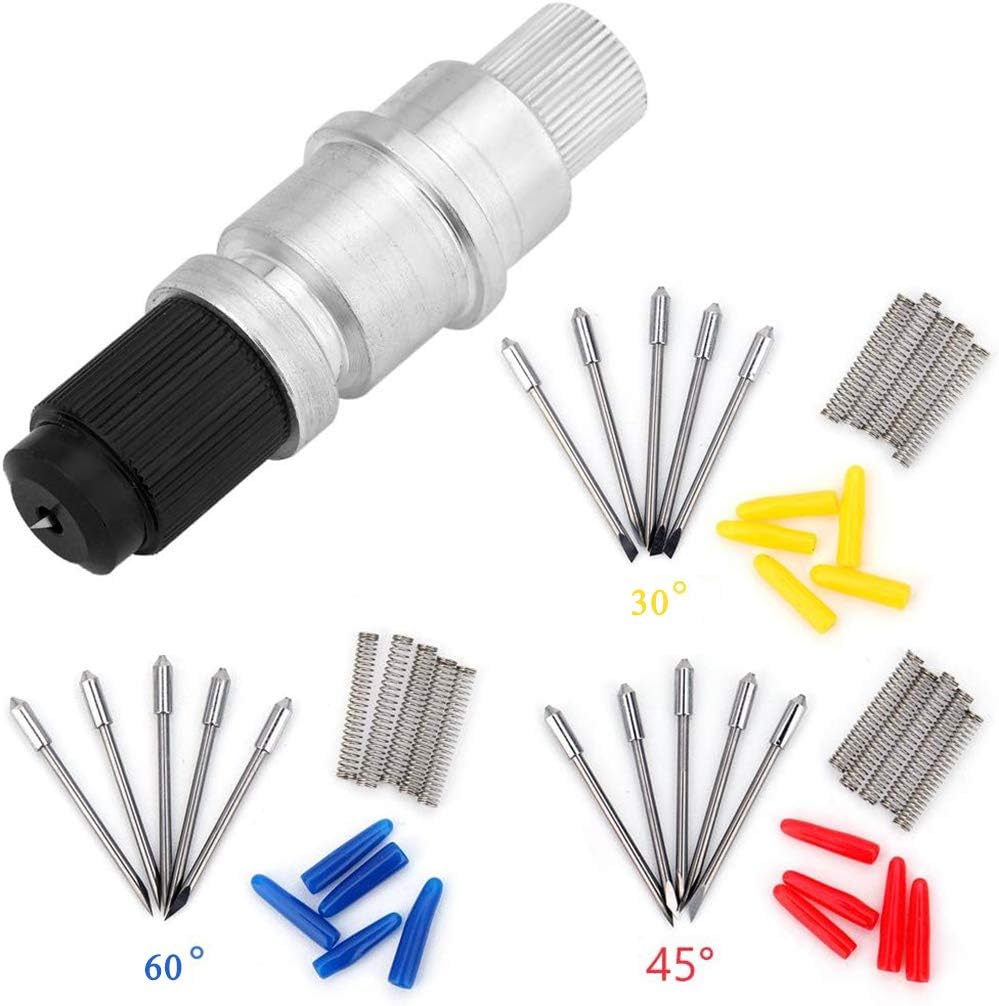
The EVISWIY CB09 15-piece blade set offers professional-grade cutting precision for Silhouette Cameo and compatible machines. Featuring 30°, 45°, and 60° blades made from ultra-hard alloy, this kit handles everything from delicate vinyl to thick fabric. Manual depth control ensures tailored cuts, while the included holder and springs provide a complete replacement solution—perfect for makers who demand sharpness, versatility, and value.


| ASIN | B07D838BHJ |
| Active Surface Area | 120 sq in |
| Best Sellers Rank | #52,213 in Arts, Crafts & Sewing ( See Top 100 in Arts, Crafts & Sewing ) #32 in Scrapbooking Die-Cut Machine Blades #46 in Scrapbooking Die-Cut Machines |
| Brand | EVISWIY |
| Brand Name | EVISWIY |
| Color | Blue,red |
| Customer Reviews | 4.2 out of 5 stars 1,105 Reviews |
| Item Length | 2.04 Inches |
| Item Weight | 1.13 Ounces |
| Manufacturer | EVISWIY |
| Material | Vinyl,Leather |
| Material Type | Vinyl,Leather |
| Operation Mode | Manual |
| Print media | Card stock, Fabric |
| UPC | 711102557667 |
| Unit Count | 16.0 Count |
F**.
Sanded down the sides to fit my Cameo 5
I’m leaving 5 stars although it required modification. It’s a great price and a great replacement. I did have to take my nail drill (yes A NAIL DRILL FOR YOUR 💅) and kinda slim down the housing so the adapter could close. It works perfectly! There’s a little guess work when it comes how much of the blade tip to let out, but if you can visually compare to another manual blade-you should be able to guesstimate 😬
L**Y
Great blades for silhouette cameo
These blades are awesome!!!!! I ordered them because i needed to cut some very small text in adhesive vinyl with my cameo and the regular cameo blade wasn't doing a great job. I read on the internet that a cb09 blade was good for intricate cuts. Ummm...what???? I had never even heard of that, but if course I found them on Amazon. These come with a holder, blades in 3 different sizes and springs. You assemble them yourself but it is very easy. Mine did not come with instructions, but there are lots of you tube videos that show you how to do it. The blade sizes are 60degree, 45degree and 30degree. You want to select the blade depending on what material/project you are cutting. Mine didn't come labeled but they are color coded (30-yellow, 45-red, 60-blue). They also don't adjust numerically like the cameo blades do, you just have to eyeball it. This has not been hard for me. If you have an old cameo blade, you can set that numerically and then adjust the cb09 blade to look visually the same. The 60degree is good for intricate cuts and thin material like regular adhesive vinyl, so it worked awesome for my small text. The 45degree is good for standard materials like cardstock and thicker vinyl. The 30degree is good for thicker materials like fabric and heavyweight cardstock. After I finished my first project a few months ago, I have used only these blades with my cameo. In my opinion they work way better than the silhouette rachet blade, plus they are a way better value since you get a bunch of each size. Sometimes you may need to adjust the blade size depending on what you are cutting. Recently, i was cutting some adhesive glitter vinyl using the 60degree blade. I was having trouble cutting it all the way through, even after adjusting the blade and cut settings. After a few failed attempts, I finally switched to a 45degree blade and it cut the vinyl like butter!!!!! Seller was great - very responsive and helpful when I inquired about getting an extra blade holder.
A**A
Fits Cameo 1-4, good sharp blades
After doing hours upon hours of research, I ordered these blades and holder to fit a Cameo 2 that I was gifted. I am just starting off and am new to all of this so really took a chance with all of the cheap replacement items I ordered on Amazon. I got my Silhouette for free, but there were no blades, cutting mats, or power cord. The CD in the box was outdated. In case someone else is gifted one or finds one cheap, here's what I did: I downloaded the Silhouette software on their official website. This gave me the most up to date app to use all of their machines. I ordered these replacement blades, making sure they said CB09. I ordered this brand specifically because after scouring the web, I was relatively sure that this blade holder would fit the machine without any adjustments. I made sure to check each blade for the angle, as the colors differ from other brands. I then marked the blade bags accordingly. For me, yellow was 30°, red was 45°, and blue was 60°. I carefully put the new 60° blade into the new holder with the springs provided, then adjusted the new holder so that visually it looks exactly the same as the old ratchet blade, adjusted to level 3. All of my other adjustments will now be made in App instead of on the blade for the time being. I popped that blade holder in my machine, and tried it out. This blade works much much better than the manufacturer blade. It cut through cardstock easily without any catching or tears. It also reduced my cut time by like 80%. I was actually yelling with how impressed I was! In my pictures, the V day lettering is done with the previous manufacturer ratchet blade. It took over 10 min to cut the cardstock, caught on the paper, and barely cut other shapes that I could even punch/weed out in one pass. The rough draft of the balloon card is what the new blades cut. The Cameo 2 with these blades cut the whole card out in one pass in less than 120 seconds. I will definitely purchase again when needed.
A**A
Fit Cameo 4 with Modification
The blade holder fit into my Cameo 4 AFTER I used my Dremel and ground down the bar. These holders sometimes fit and sometimes don't. However the blades are sharp and work well so if you have a Dremel, or know someone with a lathe that can do metal, it only takes about 10 min or less to grind it down to fit with the bit I pictured. You can also use a stone bit, it just takes longer.
L**N
Cuts cleaning and love that the blades are replaceable!!
Took a little bit to figure out how to install these since there are no instructions included, but you need to take the black cover off the front and insert the silver end of the blade into the center, then remove the color coded cap from the blade and screw the black cover back on. The wheel on the opposite side lets you adjust the blade depth (manually - it's not an autoblade). Then insert in the gray adapter that comes with your Cameo 4 (I have the 4 Plus). It is a SNUG fit, but the thin plastic of the adapter will push onto the body of blade holder. I slipped it into my #1 tool slot in place of the autoblade and in silhouette studio, set it to manual blade, 1mm (I tested using copy paper). I did the copy paper, medium (20lb) preset but changed the force to 15, passes to 2, and speed to 5 as I was cutting circles so wanted it to go slow on the curves. It printed PERFECTLY the first time! I will be interested to see how long the blade stays sharp, but with multiple blades in the set, it's going to be easy to keep a sharp one on hand. Highly recommend it if you have a Silhouette cutter!
R**E
Does not fit any of the holders for the cameo pro 4
This is what everyone recommends. But it does not fit any of the holders. If it actually fit... I'd rate it higher. But don't bother. Either the QC is so low that you might get the right size. Or you can modify it to fit the holder. Or you can find a different one that will for the same price.
J**G
Might Not Fit your Cameo 4 Adapter
From what I hear CB09 blades are just great. However, to work with a Cameo 4, it has to fit in the blue adapter, and this one doesn't. Scuttlebutt online is that quality control varies on this particular one, so some will fit, and some won't. I was not able to put it in my CB09.
A**E
Saved my project twice!!!
I bought these last year, 2022, and used one to cut out some football flag names and numbers for a big order I get every year. I forgot I used this blade last year to cut these flag names and numbers out. This year, when I got the same order, I got the auto blades out that I have from Silhouette and tried to cut. It was just ripping my project apart! I tried several blades and even opened two new blades! None of them would cut without tearing up my project. Then I started looking through my stash of blades and found this blade from last year and remembered I used this last year!! It saved my project! Again!! The order I was working on was over $900! Since I only do it once a year, I forgot this is the blade I had to have to complete this project. I used the same blade from last year. I just inserted it into the #1 slot of my silhouette Cameo 4 and started cutting. Since I got the blade depth correct last year, I didn’t need to do anything. It cut perfect from the first cut to the last. 3 days of cutting on my 24” mat!!!!! That says it all!! Not one cut was messed up because of the blade! 🤩 Over 130 cuts! Every one of them was cut perfectly! I’m so impressed with these blades, I’m thinking about buying another set just to have on had. Even though I’m still using the very first blade I installed! You do have to mess with the blade depth before the first cut on anything For me, these aren’t just about all the money I saved but it saved my $900 project twice!!
Trustpilot
1 month ago
2 months ago