Buy anything from 5,000+ international stores. One checkout price. No surprise fees. Join 2M+ shoppers on Desertcart.
Desertcart purchases this item on your behalf and handles shipping, customs, and support to Argentina.
🔭 Elevate your optics game—capture the cosmos and wildlife like a pro!
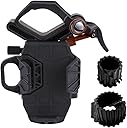
The Celestron NexYZ is a universal smartphone adapter engineered for seamless 3-axis alignment with telescopes, binoculars, spotting scopes, and microscopes. Its robust metal and polymer construction ensures durability in the field, while the spring-loaded clamp fits a wide range of smartphones—even with cases. Compact and travel-friendly, NexYZ lets professionals and enthusiasts alike capture stunning images and videos through their optics with precision and ease, supported by a 2-year warranty and US-based customer service.


| ASIN | B07D7V3B8M |
| Additional Features | The NexYZ provides you everything you need to capture sharp, detailed images and video. |
| Best Sellers Rank | #12 in Telescope Photo Adapters |
| Brand | Celestron |
| Built-In Media | Includes two expandable adapter rings for microscope eyepieces |
| Color | Black |
| Compatible Devices | Telescopes, Binoculars, Spotting Scopes, Monoculars and Microscopes |
| Compatible Phone Models | Fits a wide range of smartphones, including the latest devices from Apple, Samsung, and Google. |
| Compatible with Vehicle Type | Outdoor Activities |
| Customer Reviews | 4.2 out of 5 stars 6,028 Reviews |
| Enclosure Material | Cast Metal/ Injection molded Fiber reinforced Plastic |
| Global Trade Identification Number | 00050234810555 |
| Item Dimensions | 5.25 x 6 x 8 inches |
| Item Type Name | Celestron 81055 easy nexyz 3-axis smartphone adapter, black. |
| Item Weight | 1 Pounds |
| Manufacturer | Celestron Acquisition LLC |
| Mfr Part Number | 81055 |
| Model Name | NexYZ 3-Axis Universal Smartphone Adapter |
| Model Number | NEX-3AXI |
| Mounting Type | Clamp |
| Shape | Rectangular |
| Special Feature | The NexYZ provides you everything you need to capture sharp, detailed images and video. |
| UPC | 050234810555 |
| Warranty Description | 2-YEAR WARRANTY |
| Water Resistance Level | Not Water Resistant |
| Weight Capacity Maximum | 10 Ounces |
S**L
Solid mount. Easy to set up, and adjust.
Works great with my Pixel 2xl! I tried another mount first (one of the cheaper ones that basically just screws clamps down on the phone and eyepiece) and they were extremely difficult to line up as any looseness necessary to adjust would allow the phone to move way more than was possible to control, and locking it down again would throw off adjustment again, plus the mount pressed down on the buttons on the phone, preventing proper use while in the mount. This mount is spring loaded for the phone holder, so placing the phone in is quick, easy and secure, plus it doesn't push down on the phone's buttons. There are adjustments for the X, Y and Z plane, so once the phone is in place, all it takes is adjustments of three knobs to line the phone up. I was unable to line up the other mount in any sort of reasonable amount of time or effort. This mount was lined up in about a minute. The clamp spring that holds the eyepiece is not strong enough to hold the phone level, but that's not an issue as there's a 'safety lock', which when screwed tight, keeps the clamp from opening, and securely holding the holder to the eyepiece. The X/Y/Z motion might be too loose when you get the mount to hold the phone steady in certain orientations, however there are small screws on the mount which control the force necessary to move those knobs, which can be adjusted from very loose to unmoveable. The manual does not cover this at all, which might explain some of the bad reviews, but once you know about them and adjust them as needed, you won't have any issues. The only 'issue' I've had is that the phone's camera is wide enough of an angle that there is vignetting on the corners of the image. This isn't an issue with the mount, but more of an issue with the focal length of the phone's camera, and the FOV of the eyepiece itself. If your phone has a 'zoom' lens or portrait mode, or perhaps if you have much more expensive eyepieces than I have with wider FOVs, then this might not be an issue. The image can also be zoomed in, digitally, or the final image cropped. Something to keep in mind. Great mount. Highly recommended.
J**N
Great SmartPhone Adapter for Scope
I had ordered a Scope to use to get close up pictures of birds, the moon, etc The phone adapter that came with the Scope was not stable and very difficult to get my phone aligned correctly. Also, the phone was "held" in place by a suction cup on the adapter, and I never did trust it staying on. So I did some research and came across the Celestron NexYZ Smartphone adapter. I read some reviews of it and saw some videos of its use. I was impressed. Now it does cost a good bit, about $65. But I was so frustrated with the adapter that came with my Scope that I went ahead and purchased it. And I am so glad I did. It was so much easier to set up and use. with the other adapter I was very concerned with my phone falling off and hitting the ground, but with this one my phone was securely in the adapter. My phone is securely in place on the sides and bottom of the adapter. One reviewer had stated that it is heavy and hard to get it to stay in place. However, if you tighten down the button that holds it to the lens it will be fine. I did have to use a pair of pliers to do that. And lastly, it is so easy to adjust the position of your smartphone in this thing. I would highly recommend this phone adapter. It works very well.
G**R
Probably the best smartphone camera adapter available
The Celestron NexYZ smartphone adapter is probably the best cameraphone accessory available for this price, but it’s not without some minor imperfections. If you’ve ever held a smartphone camera over a telescope or microscope eyepiece, you know that it’s nearly impossible to get a consistently usable image. Furthermore, taking a movie via a handheld hovering technique is completely out of the question. I’ve used a couple different inexpensive smartphone adapters for eyepieces, and they just do not deliver, largely due to the difficulty in lining up the camera’s lens with the sweet spot of the eyepiece. I think the Celestron NexYZ is really the best sub-$100 product to address this issue. The NexYZ is made of a lot of different plastic and metal components. The metal components seem solid, while the plastic components, not including the knobs, feel kind of cheap. I’m guessing this was to make the unit as light as possible, since it will be hanging off of your expensive eyepieces. There are a lot of moving parts in this small package. The main clamp opens by depressing the outside lever, followed by positioning the clamp’s arms around your eyepiece and letting go. Initially it’s a loose hold, but you can quickly tighten the clamp by spinning the orange knob that you see on the right in the pictures. This will lock the NexYZ in place. From there you have to gently open the smartphone holder by pulling the spring-loaded slider on the left of the device. Slide your phone in and slowly allow the slider to grip your phone. The face of the holder that interfaces with the back of your smartphone is rubber, so it shouldn’t scratch anything. Now you’re ready to line things up for image acquisition. At this point you’ll be doing a lot of fine tuning with the x, y, and z positioning knobs, which are all located on the rear of the NexYZ. If you are using a monocular eyepiece telescope or microscope, hopefully you already positioned your subject in the field of view. With a microscope, this isn’t much of an issue for fixed specimens or static cell cultures. With a telescope, however, you probably want an equatorial or motorized mount that is tracking your planet or star of choice because it will take you at least 2 minutes to line things up with your phone on the NexYZ, and the planet or star probably moved out of your field of view by then. Something to consider. With an incredibly aligned finder scope you might be able to manage lining up a subject through the camera phone without finding it with your eyes and tracking with an EQ mount first, but it’s a significant challenge for anything other than the moon. If you have a binocular eyepiece system, you can clamp the NexYZ on first, and still find your subject through the other available eyepiece. With your phone clamped onto your eyepiece, you need to open your camera app and then try your best to line things up with the x, y, and z knobs. The knobs are well-designed, and they will slide your phone smoothly on metal tooth-strips guided by metal gears. The NexYZ makes this alignment task as easy as possible – but be aware that it’s still probably not as simple or as quick as you want it to be. While the clamp is pretty sturdy, I found that hitting the virtual shutter button on my phone’s screen caused enough vibration to result in blurred pictures. I highly recommend setting the camera to a 3-second timer to get clear, vibration-free images. Clearly, there was a lot of thought that went into designing the NexYZ. But there are a couple design quirks that prevent a 5-star rating. First, the inside of the clamp has a thin layer of foam affixed by adhesive. The foam is really, really thin. Like maybe a millimeter or two thick, at most. After two days of use, I already have tiny nicks and impressions in that that foam layer that don’t give me a lot of confidence about its long term durability. I’m already thinking about buying a thicker strip of foam with adhesive backing to solve this problem in the near future. Next, there are two plastic ring adapters that you use to wrap around smaller microscope eyepieces which give the clamp something to really grab onto. The plastic rings are cut on an angle on one side so you can kind of open up the ring a little to fit them onto the eyepiece. Again, I’m not sure about the long-term durability of bending and opening these cut, hard plastic rings. I would think a neoprene type of washer/ring would have done a better job. Finally, the arms that directly hold your smartphone are somewhat limiting. These are hard plastic arms (with an interior matte plastic finish) gripping your phone with a spring-loaded mechanism. The hard plastic arms worked just fine to hold onto my iPhone 7 while it was inside a slim case, but I wouldn’t trust the arms to hold onto a case-less phone over and over again without eventually risking a scuff mark. Thin foam on the inside of the arms seems like an obvious oversight here. These problems can all be solved with $5 in hardware or craft parts, but still, with all the other fantastic design elements in the NexYZ, I’m sad Celestron didn’t go a bit further to perfect this product. Overall, I think the NexYZ is still, by a wide margin, the best smartphone adapter for the price for telescopes and microscopes. I wouldn’t bother with the adapters that cost $25 or less…they will leave you wanting because those cheap adapters hardly allow you to smoothly line up your phone in the x and y directions, let alone provide any hope of finely tuning your z-axis alignment. With a couple extra dollars in foam and neoprene, and some engineering ingenuity, you can modify the NexYZ to be a 5-star accessory for your imaging needs. There are small caveats that I feel I need to mention when it comes to smartphone imaging. You need to have tempered expectations as to what your smartphone’s camera sensor can do, even with a steady camera mount. To give you an idea of what you’ll get with a smartphone camera set to “auto” with the flash off, there are two attached images taken with an iPhone 7 mounted in the NexYZ. One picture is Jupiter with a few moons captured with a Celestron NexStar 5SE and a Celestron 24mm-8mm zoom eyepiece at 12mm (about 100X magnification) with a mildly turbulent sky in a light polluted area. The second picture shows a eukaryotic cell culture with a simple Nikon TS100 phase contrast microscope outfitted with a 20X achromat objective and 10X eyepiece. The final caveat I’ll mention is that I only used an iPhone 7 to test the NexYZ at this point. I have no idea how well it performs with a dual lens cameraphone like the iPhone X or Galaxy S9. It may be a real challenge to align those types of phone cameras with most eyepieces that limit fields of view. UPDATE FALL 2018 I used the NexYZ throughout the summer and into the fall and I still think it's 4-5 stars. I did experiment with a few different adhesive foams to put into the clamp, which made some subtle improvements, but I haven't settled on the perfect solution. There are a few things you should think about, though. First, think about spending a few bucks on a good camera app where you can manually control exposure times. Sometimes Jupiter or Mars are so bright that you can't make out details or pick up moons. You can sometimes get better images with shorter exposure times, but then stack ten images together using Photoshop or other image processing programs. Also, it is a challenge to get good pictures with short eyepieces (high mag). Once I start using 9 or 8mm eyepieces, there just isn't a lot of eyepiece for the clamp to grab. What tends to happen with those eyepieces is that your phone will weigh down the clamp and the camera lens won't be "looking" straight down into the eyepiece - it will be looking down into the eyepiece on a slight angle, which causes problems with the field of view and focus. My opinion is that this is still a good smartphone adapter, and I'll stick with my 4-star evaluation. Just don't expect the NexYZ to be simple plug 'n play magic. You will need to spend some time with it making subtle adjustments until you find positioning that works for you, your scope, and your phone.
M**G
IMPORTANT! Please read. Best mount I've found.
Ok, so some people have noted the mount can be loose and the phone will not stay in position. This is a case where RTFM (Read The Fine Manual) would have saved the day. Each axis has two adjustment screws that tune the tension of the linear rails increasing the stability of the mount. Look up "NexYZ tension adjustment" on Google for the manual and watch my review video. Overall this mount exceeds my expectations. It is far sturdier than I expected, but not as sturdy as it could have been but enough to easily trust my note 20 ultra to it. Is it worth the money? Absolutely. Does it work as well as I would have liked? Not as well as I would have liked. However, this is the best mobile device digiscopeing mount I've found. It has metal rack and pinion gearing and well thought out adjustment mechanisms. It has generous fitment; a Note 20 Ultra fits with room to spare. The Eyepiece arm has excellent fitment and a very good tension adjustment mechanism. It works well on my large 2" Mead QX eyepiece. My real issue with it is the need to be able to move the phone out of the way to position, and reposition. The phone back over the eyepiece for long exposure. Secondly, you WILL need counterbalance weight if you are using a GOTO telescope. Please please please for the sake of your poor telescope's gears, do not use this without balancing your scope with your eyepiece, mount, and phone. Those are minor gripes and definitely not a deal breaker. There is no way you could get me to send it back. By far the best mount.
D**D
useless if you only have usb-c
I was very excited to try this out, but unfortunately, I cannot use it. The problem is that in order to take pictures using a telescope you MUST have a remote trigger to take the photos (even with more sturdy adapters, a la DSLR astrophotography), or you will not get usable pictures due to vibration of the image from touching the phone to take a picture. When using a cell phone, that means you must either have a trigger that uses the headphone jack (which are all but extinct on high-end phones these days), or a set of usb-c earbuds with a volume control (you can set most camera apps to use the volume control to snap pics). The problem with this latter situation, which is the one I'm in, is that the mount blocks the bottom center of the phone, where all usb-c charging ports are located. This also means that you cannot charge your phone while it is installed in the adapter. As such, I will regretfully be returning this product since the only reason I bought it was to take pictures from my telescope without having to purchase a laptop (required with dedicated AP cameras). If anyone from Celestron is reading this, I would STRONGLY suggest making the next revision with a nice sized hole in the bottom of the phone part of the mount. This way, users can pass a wire through to the usb-c port for charging, or more importantly, shutter control. This would still work fine for live viewing, or perhaps for hooking up to a microscope where vibration is less of an issue, but is entirely useless for taking pictures from a telescope eyepiece.
M**C
Best Cellphone mount for a telescope. Period! Not perfect, but better than other solutions
1. I have tried three different cell phone mounts on my small telescope. This one -with the "z" axis (distance froim lens) adjustment works best. 2. These two quick shots were taken on my Galaxy S20 5G -using this mount. Much better than I was able to do with other mounts. Over time I am sure I will do better! 3. It takes only a minute or two to use! Longer time to read the instuctions than to just do it! (1) find the star/ planet/ other target . (2) attach the phone to the mount & attach the mount to the telescope (3) turn on the camera app (4) Shine flashlight/small light back down your the tube from the front (aperture) and align your phone screen so the light is in the middle of the screen (5) use your sighting scope to "catch up" with [get re-aligned on] the star, planet, object (becasue it's being moved out of the picture whille you are setting up! :-) (you might be able to use the camera screen for something like the moon. . ) (6) adjust your telescope focuser to get a crisp picture on the phone camera screen and start taking pictures! Hint: I recommend using a "non touch" method to take photos. My S20 allows me to use voice to take photos so I don't touch the phone while shooting. Some phones will let you take timer-controlled shots. - Anyway, better not to induce vibration when taking pictures through a telescope. Overall, it works and I am very happy I bought it. It offers a higher quality solution when compared to other cell phone mounts:-( 3. This one is not perfect. It is difficult to attach to small (high power) lens, but overall it is simple to use and works
T**R
Love it!!!!
Love this and has been a big help in taking videos and photos of outer space
W**D
Neat concept, poor in reality, returned it.
I rarely write reviews, but I was so disappointed in this product that I am making an exception. I am mostly interested in visual observing astronomy, but like anyone else sometimes you see something so spectacular that you'd like to get a picture of it, and this item sounds like the perfect solution. However I found that there were two major problems in general and one specifical to my setup. The first major problem was that the plastic flexes due to the weight of the phone. I have a large Motorola Edge Plus 5G UW 22 that I tried first. Get it all set, let go and it would all go out the window because the plastic flexed and the camera position/angle shifted and lost the view in the eyepiece. Tried a smaller (and lighter) iPhone SE, same problem. Second major problem was that the settings didn't stay in place, particularly the Y axis. Eventually I found that there are set screws that can tighten this up, one of the set screws was backed out so far it was almost falling out. After tightening these down the problem was considerably better, but it struck me as either poor QA or possible a previously owned and returned unit. The last issue was that this added too much weight to the end of my SLT tracking mount such that not only could it not track the object anymore, it couldn't even stay stationary. I could move the telescope forward on the dovetail but not enough to fully counteract the hefty weight added by this contraption and the phone. My guess is the person who has the type of telescope mount to counteract this won't be using a NexYZ for astrophotography. I wanted to like this, and perhaps it works well for some applications, but it was a bad fit for me.
A**R
Great product.
I could secure my phone over the eyepiece of my telescope without breaking any sweat.
M**T
Pratique et bien conçu. Top !
Utilisé sur Jumelle astro (sur trépieds) et télescope (sur des oculaires 1,25" via l'un des deux adaptateurs complémentaires inclus) avec un iPhone 13 Pro, je dois reconnaître que si cela demande plus de manipulations qu'avec un adaptateur T2 pour appareil photo (qu'il suffit de visser), cela n'en demeure pas moins génial. Les optiques sur smartphones sont de petit diamètre, et selon le modèle, elles ne sont pas placées au même endroit, et pire maintenant, les smartphones en ont plusieurs. Cela a pour conséquence de demander un peu de réglage préalable: - Choisir l'objectif du smartphone à aligner avec l'oculaire (quand il y en a plusieurs) - Trouver le réglage du logiciel de photo du smartphone permettant d'utiliser l'objectif en question - Aligner précisément (dans les 3 directions) l'objectif et l'oculaire Cela implique de passer un peu de temps la première fois en pointant sur un objet fixe et suffisamment lumineux (pour ne pas en plus galérer avec la mise au point logicielle du smartphone). Ensuite, il devient possible de faire de très belles photos souvenirs. Je n'ai pas encore regardé s'il est possible de procéder comme avec une caméra astro pour faire de l'empilement, mais déjà, pour quelques euros, on est en capacité de faire facilement des photos lunaires, planétaires, d'observation en journée, etc. Je n'ai pas encore eu de ciel suffisamment clair pour essayer sur des amas stellaires. Je pense que pour une utilisation avec un smartphone (solution "cheap" donc), c'est déjà très très bien ! J'ai apprécié la qualité générale de l'objet (pas de jeux sur les éléments mobiles, facilité et précision des réglages, possibilité de ne pas dérégler entre 2 utilisations. Franchement, c'est top !
A**K
Well engineered; not lightweight.
A very versatile, well engineered, very adjustable holder. Bigger and heavier than you may think when ordering. Both my big binoculars and SLR camera are used with tripods, so weight is not an issue for me.
B**Y
The best quality smartphone adapter I've tried
I have used this to take some great photos. It holds firmly without any wobble and is super adjustable. Attached are a couple of images I took with my phone thanks to this adapter keeping it in the sweet spot over my telescope's eyepiece. Highly recommended.
望**ア
予想以上の性能
望遠鏡に装着。3次元微調整で満足。 微調整ネジが少し硬い。
Trustpilot
3 weeks ago
4 days ago