Desertcart purchases this item on your behalf and handles shipping, customs, and support to Argentina.
📅 Elevate your family’s organization game—because paper calendars are so last decade!
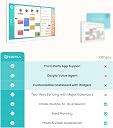
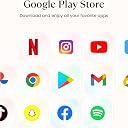
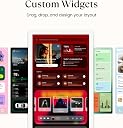
The Cozyla Calendar Plus 2 is a 24-inch smart digital wall calendar featuring a vibrant touchscreen, real-time syncing with major calendar platforms, and a customizable dashboard via Google Play Store. Designed for busy families, it includes a chore chart with rewards, smart meal planning with recipe streaming, and a voice-activated AI assistant to streamline event and task management. Wall-mountable and eco-friendly, it transforms household organization into a seamless, interactive experience.
| ASIN | B0DHCJ14ZZ |
| Best Sellers Rank | #29,712 in Office Products ( See Top 100 in Office Products ) #16 in Digital Calendars |
| Brand | cozyla |
| Brand Name | cozyla |
| Customer Reviews | 4.6 out of 5 stars 253 Reviews |
| Item Dimensions W x H | 13.57"W x 22.65"H |
| Item Highlight | Customizable Dashboard, Electronic Touch Screen Wall Planner with Voice Agent, Chore Chart&Reward, Meal Planner & Wall Mount |
| Item Weight | 4.7 kg |
| Manufacturer | cozyla |
| Material | Plastic |
| Model Number | CZL-WH-22 |
| Model Year | 2026 |
| Mounting Type | Wall Mount |
| Part Number | CZL-WH-22 |
| Product Dimensions | 13.57"W x 22.65"H |
| Size | 24 inch |
| Year | 2026 |
M**S
MOVE ASIDE PAPER CALENDAR. Amazing way to keep track of your life!!!
This calendar is a really nice way to keep track of everything going on in our busy lives. The size is great to be able to see everything quickly. If you've never had a digital calendar before this is really easy to set up and use. It does sync with your google account which makes it simple to use with your google calendar. It has options to set up multiple calendars for multi-person households. We love the option to add different members of the family and to set specific tasks by person. The chore chart is so useful as well. We love being able to view Youtube videos and have it set up on the counter to look at recipes while cooking. The screen works really well and is super clear. Definitely worth the cost!!
Z**E
Cozyla Calendar; great for families!
A month in now and we love our Cozyla! It has been a lifesaver in our neurodivergent household. Easy to use, set up takes about 30 minutes. I haven't downloaded any apps that didn't come directly installed on the device because the Cozyla hub ticks all of our boxes. We love the ability to add chores for everyone or individually and that it comes with a reward option. It helps to keep my son on track during the week and gives him the choice of how to spend his reward points on fun treats or family outings. I also utilize the meal plan and grocery list widget EVERY DAY. I love that I can just ask the Cozyla agent to add things to my list and help me organize my day. We had one little hiccup that customer service has already made right for us, within a day all of my questions were answered by a person which I appreciate TREMENDOUSLY. So far so good! It truly has become the hub of our household. It looks sleek in our kitchen and I appreciate having a copilot during dinner prep and meal planning. Now I can plan meals and order groceries at the same time! My son loves being able to add his own shopping lists for himself or the family.
S**R
A Great Addition to Our Family Routine!
We’ve had the Cozyla Calendar Plus 3 (24" 2K Smart Digital Calendar) for over two weeks now, and both of my kids—ages 6 and 15—absolutely love it! It has been a great addition to our home and helps make daily routines more organized and fun. What they enjoy most is checking off their tasks as they complete them and watching their stars add up toward their rewards. It’s a simple but effective way to keep them motivated, encourage responsibility, and make everyday chores feel like an achievement rather than a task. The large 24-inch display is clear and easy to use, and having our family’s routines and activities in one place is very convenient. I especially love that it appeals to both my younger child and my teenager. Overall, we’re very happy with our purchase. It’s more than just a digital calendar—it’s a fun and practical tool for keeping the whole family organized!
E**S
Worth the money (for me)! Keeps the whole family on track.
The Cozyla Plus 2 24" Calendar has been a great addition to our busy household. One of my favorite things about it is how easy it is to set up and start using. The interface is intuitive, so you don't have to spend hours figuring out how everything works. Mounting it was also surprisingly easy, and once it was on the wall, it became a convenient central place for keeping our household organized. The picture quality is excellent and the large 24-inch display is bright, clear, and easy to read from across the room. It makes checking schedules, appointments, and daily tasks quick and effortless. I especially love the features designed for families with kids. The reward system gives children a fun incentive to complete their chores and responsibilities, turning everyday tasks into something they can actually get excited about. It has made it much easier to keep everyone accountable without constantly reminding them. The meal-planning features have also been incredibly helpful. With a busy household, figuring out what's for dinner every night can become a chore in itself. Having our meals planned and displayed in one place makes grocery shopping, meal prep, and keeping everyone on the same page much easier. Overall, the Cozyla Plus 2 has helped bring our family's schedules, chores, and meal planning together in one easy-to-use system. The simple setup, easy mounting, excellent display, and family-friendly features make it a great option for anyone trying to keep a busy household organized.
T**E
Finally, a Calendar That Gets the Kids Involved!
We originally bought the Skylight Calendar, but quickly realized that many of the features we wanted required a subscription. We decided to try the Cozyla Calendar+ 2 instead, and we’re really glad we did! The biggest reason we bought it was to help motivate our kids to stay on top of their chores, and it has worked better than we expected. We can assign chores, give them points for completing them, deduct points when chores are skipped, and let them earn rewards with their points. Our kids are actually excited about earning points, and they’ve even started doing extra chores because they want to earn more. Losing points also seems to be a lot more effective than asking, “Did you do your chores?” for the 47th time. You can adjust points at any time. We've also set up items on the board that they can choose from to spend their points on which makes it very fun for them and something to strive for. We also love having our entire family’s schedule in one place. Appointments, activities, chores, and even dinner plans are all right there for everyone to see. And now, instead of hearing “What’s for dinner?” five times a day, we can just tell the kids to check the calendar. Small feature, HUGE win for parents! We haven’t even used all of the features yet, but the ones we are using have already made a noticeable difference in our family’s routine. Overall, we’ve been very happy with the Cozyla Calendar+ 2. It keeps our family organized, gets the kids more involved, and makes chores feel more like a game than a daily battle. We also really appreciate not having to pay an ongoing subscription just to access features we already purchased the calendar for. Our kids love checking the calendar several times a day!
E**K
Ideal family hub
Having a dedicated device to manage household chores and family events has been a fantastic addition to our home. I prefer the Cozyla due to the inclusion of the Android Play Store significantly expands its utility. Pros: - It functions effectively as a central control point for smart home devices. Ability to use as a photo display when not in use without a subscription is great. - Being able to install dedicated apps—such as those for vacuum cleaners or daycare management—makes it an ideal solution for managing shared household accounts. - The app receives frequent improvements, and the post-purchase support team is excellent. They have been able to provide answers to specific technical or usage questions that were not available on online forums. Cons - For the price, the omission of an ambient light sensor is disappointing. The display remains very bright at night, which can be disruptive. - The device is quite thick, and the provided mount causes it to protrude significantly from the wall. Because of the speaker positioning, it is difficult to utilize third-party mounting alternatives. Despite the hardware limitations, if you’re wanting a digital calendar, the device's functionality and customer support makes it the better option, especially during a sale. Also noticed that there is a subscription model coming soon which is not good. Will update based on which features are locked
A**X
Nice display and very helpful for a large family with kids!
We are very pleased with our Cozyla! The display is nice and bright, and we love how colorful it is! It was fairly easy to sync our iPhone calendars with it. It is so helpful to have a large calendar display for our whole family to see because we have several kids with lots of different activities. We love having the option of chores and routines as well! Those were easy to set up and assign to each kid. Our kids love the touch screen nature of it, and it helps motivate them! One of the main reasons we went with Cozyla over other brands was because so much more was included with it right out of the box instead of having to pay a monthly or yearly subscription fee. Highly recommend the Cozyla!
C**R
As a family with ADHD, we are BIG FANS! Excellent product with room to become even better!
We have had our 24" Cozyla Calendar+ 2 for two and a half weeks now and are overall very pleased with the product! We had been considering the Skylight but ultimately chose the Cozyla for 2 main reasons: 1. We preferred a 'no subscription' model. I know that the Skylight has several features available without a subscription, but I had a feeling we'd want to use all of the features and did not like the idea of seeing features on the screen that were blocked by a paywall. Especially with a big investment like this, I was not interested in seeing future updates be offered behind a paywall as well. 2. I really wanted the customizability of the Cozyla's screens. I did not like that the Skylight does not have the ability to see tasks AND a calendar view on the same page. The Cozyla's screen and widget functionality is extremely versatile and resizing and moving widgets is incredibly easy. What had been holding me back from purchasing the Cozyla a while ago was the lack of parental controls -- I am happy to say this is no longer an issue! In the last few months Cozyla has been rolling out several big updates -- both on the device itself and also on the mobile app, parental controls being one of them. It seems to me that the Cozyla team pays attention to customer feedback (including the comments on the "Cozyla Community" facebook group) and has been tailoring updates to address said feedback. What I love about the Cozyla: -the 24" screen is the right fit for us. We're renting, and have limited wall space that would work for us and be accessible for littles, so we ended up ordering a 3rd party stand off of Etsy and are very pleased with our setup -the "tasks" and "to-do's" have been our most used features by far! I know that it's still new and novel but our 8 year old son has been constantly nagging us parents to add more options for tasks for him to do to earn rewards (which we haven't even set up any rewards to redeem yet!). I'm VERY excited to try out a brand new feature which appears to be a "chores grab-board" where different chores are up for grabs for anyone who is able to do them first. In our home we are wanting our older kids to start cluing into what our family goals are and take the initiative when it comes to contributing to those goals so this is perfect for that! -the "Cozyla Community" facebook page is incredibly useful for advice on setting up your device, how to customize it to it's full capability, set custom wallpapers, etc. -We are a family of at least 3 ADHD people, and to be able to have visual reminders in the middle of our home that can be updated from anywhere, can't be misplaced or buried under clutter, and is visible to everyone regardless of whether they own a smart phone is HUGE. I'm thrilled with the independence it's encouraging in our children, and the ability to gather together and look at goals and our calendar together is exactly what we were hoping for. -We are not interested in using this device at all for it's ability to access streaming apps, games, etc. but I will say the app library is very convenient for accessing the recipes app we have already used for years, pulling up our nursery cam after the kids are in bed, adding things directly to our virtual Smith's/Kroger grocery cart, and I'm sure other uses we haven't thought of yet! As I type this review, I've got the screen set to display our nursery cam so I can keep an eye on kids playing upstairs. I love that it's big enough that from across the room I've got a clear view! -I truly feel like I have barely scratched the surface of what the Cozyla has to offer. I'm extremely pleased that despite it being a subscription-free model, it seems like the Cozyla team is still very much invested in giving it's customers new features, listening to feedback, and continuing to make it an even better product. What I hope to see in future updates: -The ability to sync google calendars to multiple users. We're trying to migrate over from primarily using google calendar. Our google calendar setup currently is: one calendar for all shared family events, one calendar for "kids" events, and two more calendars for each parent. As things are now, there isn't a way to translate that over to the Cozyla calendar -- you can sync the calendars, but each calendar can only be synced to one individual user. We created a "Reese Family" user to circumnavigate the issue but I'm not loving it. -I would love to see the ability to sort to-do list items by flagged vs. non-flagged items for my own to-do list tracking -I would love to see the ability to search the recipe library by ingredient and see recipes that have that ingredient show up (for example search 'smoked sausage' and any recipes that have that as an ingredient populate the results) -I would love the ability to set to-do list items to be able to repeat, as of now that's only available on "chores". Not a big deal, but it feels a bit funny that my reminder to myself to call my mom every week is listed as a "chore". -As of right now, we will not be using the grocery list function of the "Meals" app only because when you add a recipe's ingredients list to the grocery list it *does not show the quantity of each item on the grocery list itself*. This to me is a massive oversight and I can't image it won't be fixed soon. -There are a few small design elements I would change. When entering the parental controls pin #, the numbers are displayed as you type them in, as opposed to character masking (where characters are converted to asterisks **** as they are typed in). On a screen this big, and with the number pad being SO large, it's really difficult to avoid my son looking over my shoulder. He even said to me the first day "It's really tempting for me to want to see the code that you're typing in, even though I know I shouldn't.". A small technical issue -- when you name a "List", I assumed that pressing the enter arrow at the bottom right of the keyboard would save the contents of what I'm typing, but instead the text box behaves as if I've pressed "enter" by tabbing down to a new line. -Overall, I think all of these could be easy fixes! None of them are permanent! I'm setting a reminder right now to come back in six months to check if this review needs to be updated, I'm excited to see what new things have been discovered in that time. Thanks Cozyla!
J**E
Sleek, Smart, and Surprisingly Addictive
I’m completely obsessed with this! I wasn’t expecting it to become the most-used item in my house, but here we are. It looks like a minimalist piece of digital art — sleek black frame, ultra-clean interface — but underneath that beauty is a total productivity powerhouse. I mounted it in my office and immediately started calling it my “command center.” LOL The touchscreen is sharp and incredibly responsive — no lag, even when switching apps or typing quick notes. It synced with my Google Calendar in under 60 seconds and now displays all my appointments, events, and reminders in a gorgeous visual layout. The brightness auto-adjusts depending on the time of day, and you can even set “quiet hours” so it doesn’t glow at night. You can set themes and adjust the layout to your own aesthetic. I’ve customized it to show a colour-coded schedule, daily chores, weather, meal plans, and even rotating motivational quotes. It genuinely makes me more accountable. What really impressed me is its versatility. You can wall mount it for a sleek, tablet-on-display look, or prop it up like a desk dashboard. It supports Google Play apps, so I added Spotify, a grocery list app, and even Google Tasks for my own to-do list. It’s like having a digital assistant living on the wall. If you’re someone who juggles multiple schedules, activities, chores, and family members, this honestly becomes a brain-saving tool. It’s one of the rare devices that feels like a luxury and a necessity all at once. I can't recommend this enough if you're ready to level up your home’s organization — it’s absolutely worth every penny.
A**M
Great 24 Family calender
The Cozyla Calendar+ 2 is a large, wall‑mounted digital calendar designed to help families and busy households stay organized. It functions as a smart display and family command center, combining scheduling, task management, meal planning, and entertainment in one device. Design and Display The Cozyla Calendar+ 2 looks and operates like an oversized Android tablet mounted on the wall. It is available in 15.6‑inch, 24‑inch, and 32‑inch sizes, with touchscreen support and both portrait and landscape orientation options. Reviewers consistently highlight the large, clear display as a major advantage, especially for viewing multiple calendars at once. Core Features The device syncs with Google, Apple (iCloud), and Outlook calendars, allowing multiple users to view and manage schedules in one shared space. Each user can have a color‑coded calendar, making it easy to see who is doing what at a glance. Beyond basic scheduling, Cozyla includes: Chore and task management with reward and gamification elements Meal planning and shared grocery lists Notes, reminders, and widgets (weather, photos, to‑do lists) Access to Android apps such as YouTube and streaming services These features make it particularly attractive for families with children. Ease of Use Most reviews describe the interface as intuitive and family‑friendly, with children able to add tasks and events easily. However, some users mention that initial setup and calendar syncing can take time, especially for less tech‑savvy users. Performance and Reliability Professional reviewers generally praise the system’s performance and flexibility, but several note occasional syncing issues, which can be frustrating given that calendar reliability is the product’s core function. Pricing and Value The Cozyla Calendar+ 2 is considered a premium product. Prices vary by size, with larger models costing significantly more. A key advantage mentioned in reviews is that there is no mandatory subscription, unlike some competing digital family calendars. Large, easy‑to‑read touchscreen Strong family‑oriented features (chores, meal planning, rewards) Supports multiple calendar platforms No required subscription Cons Overall Verdict The Cozyla Calendar+ 2 is best suited for busy families or multi‑person households that want a central, highly visible organization tool. While it may be expensive and require some setup patience, reviewers agree it can significantly improve household coordination when used consistently.
K**Y
little helper
Wow big Family Calendar! I like that system so easy to use my Memory so bad frequently forget something it very useful addition to our home and helps keep everyone organized.
A**R
Absolutely love this calendar for my family
We got this Cozlya digital calendar over a month ago and I waited this long so I can leave an objective review after a month of use. Honestly, it exceeded my expectations. First of all, the packaging was super nice. It came in a secure box and everything was sealed up with plastic wrap. The device itself has a great finish and the color is sleek and clean. The touchscreen feels premium and it really does look good on the wall. Very giftable too! Once we opened it up, the setup was faster than I thought. We synced both my and my partner's Google calendars in under a minute. Now we can both see our schedules side by side on one big screen. I added the to-do list widget and meal planning board right away. It also shows the weather, and even lets us use other Google Play apps. I’ve got YouTube and Spotify on there for cooking time vibes. We mounted it in the kitchen and now it’s like our daily control center. We assign chores using the built-in chart (everyone gets their own color!) and check things off as we go. I also love that we can plan meals and it even generates a grocery list. No more whiteboard scribbles or asking “what’s for dinner.” Overall, this calendar really helped us get organized and on the same page. It’s not just a calendar, it’s more like a smart dashboard for your family life. Although it took us a few weeks to fully familiarize ourselves with it. Now, everyone from kids to adults can use it. If you’ve got multiple people with busy schedules, I really recommend this. It made our house feel calmer and more in sync. Worth every penny.
K**Y
Nice digital Calendar
This digital Calendar is a game changer in our house. It was very easy to set up and use. The digital calendar is the best part, everyone’s schedules are color-coded and synced in one place, so it's hard to miss or double book events and activities. The big 24" screen makes it easy to see anywhere in the living room, and adding or moving events is super quick. The dashboard setup is also very convenient, you can pin the calendar, to-do lists, weather, meal plans, etc. Finished activities can be checked off which is good for organizing. It also supports Google Play apps so we can add tools we already use. Overall, I highly recommend this useful family planner.
Trustpilot
2 weeks ago
1 month ago