


๐ Elevate your workspace โ triple screens, turbo speeds, zero compromises!
The 2024 Latest Version Displaylink Adapter is a premium USB-C docking station designed for MacBook M1/M2/M3 and Windows laptops. Featuring 13 ports including dual 4K HDMI, VGA, USB 3.1, Ethernet, and a 100W PD charging port, it enables seamless multi-monitor setups and high-speed data transfers. Its sleek aluminum design is portable and durable, supported by a 3-year warranty, making it the ultimate productivity booster for professionals craving efficient, clutter-free workstations.
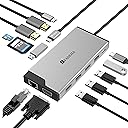


| ASIN | B0DDKXLLV5 |
| Additional Features | Fast Data Transfer, Heat Resistant, Pass Through Charge |
| Best Sellers Rank | #38,992 in Computers & Accessories ( See Top 100 in Computers & Accessories ) #1,423 in Laptop Docking Stations |
| Brand | BFADEHA |
| Color | space silver |
| Compatible Devices | Laptops, Macbook, iPad, iPhone |
| Customer Reviews | 3.9 out of 5 stars 108 Reviews |
| Data Transfer Rate | 5000 megabits_per_second |
| Enclosure Material | Aluminum |
| Hardware Interface | Ethernet , HDMI , MicroSD, USB 2.0, USB 3.1 Type A, USB 3.1 Type C, VGA |
| Manufacturer | BFADEHA |
| Model Number | DV3 |
| Number of Items | 1 |
| Number of Ports | 13 |
| Operating System | Windows, macOS |
| Special Feature | Fast Data Transfer, Heat Resistant, Pass Through Charge |
| Total USB Ports | 5 |
| Total Usb Ports | 5 |
| UPC | 797409117261 |
| Unit Count | 1 Count |
| Warranty Description | 3 Year |
A**T
Works flawlessly on my Dell Inspiron Laptop and Mac Mini
The adapter is working great so far! I've connected it to my Dell Inspiron 7300, with two monitors, and have not experienced any issues. Very plug and play friendly. I've also connected to my 2018 Mac Mini, installed the driver for the monitors, and everything went smoothly. I'm able to use both monitors on the Mac. Very pleased so far with this product.
F**O
Very functional
I have used the product for a few days and it meets all my needs. The displaylink is a fantastic resolution if you have a macbook pro or macbook air with an M1 chip because it allows you to use more than one external display. The product is compact and also allows you to charge your phone with the usb-c on the front.
T**A
Inconsistent performance
This hub worked well for some time and then wouldnโt. For awhile Iโd reboot and then it would work. Now it doesnโt work at all, no matter what tricks I follow on the support site. Frustrating for the usb ports and one display port to go out at once
A**N
Essential Hub for Any Setup!
I recently purchased this dock hub, and it has completely transformed my workspace! The variety of ports it offers is impressive, including USB-C, HDMI, I can easily connect my laptop to a monitor and still have room for my external hard drive and other devices.
N**T
Can't believe it works! 3 Extended Monitors from my M2 Macbook Air
I'm amazed with how many docks out there can't do what this dock does. I'm able to have 3 monitors off my one MacBook Air M2, all extended! Meaning I can have a separate visual on each single monitor and something else on my actual MacBook for 4 screens. And the price you can't beat. I have 2 hooked up via HDMI, a 3rd is hooked via VGA. In certain instances I'd say the Display Link software can be a bit gimmicky from turning off monitors and things of that nature but most importantly, it works!
J**Y
Worth every penny!
Been looking for a good price on a display link that would work with my Mac Air and my Lenovo think pad, for compatibly for dual monitors. Got this on a prime day deal and now switching between computers is so much easier!
J**H
Macbook Air M1, 3 Displays works
Just to keep it simple, 3 displays on the M1 works. Didn't feel like pulling my laptop setting it up and trying to get good angles since this is an amazon review. You can take my word for it. Also DONT buy a warranty, it comes with a 3 year warranty. Luckily I was able to cancel mine.
K**E
It's ok as long as I don't need to use it daily
This works good, but not ideal. When I have my PC laptop connected, at times my wireless mouse and keyboard get jumpy and delayed. If I change what port the dongle is in, it seems to help for a few more hours. It's not a deal breaker, but it is frustrating when working from home all day and it slows me down. I don't work remote daily, so it's not a huge deal, but it would be if I used it daily.
Trustpilot
3 weeks ago
3 weeks ago