Buy anything from 5,000+ international stores. One checkout price. No surprise fees. Join 2M+ shoppers on Desertcart.
Desertcart purchases this item on your behalf and handles shipping, customs, and support to Argentina.
🚀 Elevate your home Wi-Fi game — never miss a beat or a byte!
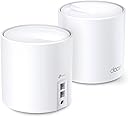
The TP-Link Deco X20 Mesh WiFi 6 System delivers ultra-fast AX1800 speeds and expansive 4000 sq.ft coverage with dual-band mesh technology. Featuring 2 Gigabit Ethernet ports per unit, advanced OFDMA/MU-MIMO for multi-device efficiency, and robust parental controls plus security via TP-Link HomeShield, it’s designed for seamless, secure connectivity across any home or office. Easy app setup and Alexa voice control make it the smart upgrade for modern connected lifestyles.


| ASIN | B08D5X9GWC |
| Antenna Location | Gaming, Home |
| Antenna Type | Fixed |
| Best Sellers Rank | 237,840 in Computers & Accessories ( See Top 100 in Computers & Accessories ) 492 in Whole Home & Mesh Wi-Fi Systems |
| Box Contents | 1 RJ45 Ethernet Cable, 2 Deco X20 Units, 2 Power Adapters |
| Brand Name | TP-Link |
| Colour | White |
| Compatible Devices | Personal Computer, Smartphone |
| Connectivity Protocol | wi-fi |
| Connectivity Technology | Ethernet, Wi-Fi |
| Control Method | App, Voice |
| Controller Type | vera |
| Coverage | 4000 square feet |
| Customer Reviews | 4.5 4.5 out of 5 stars (2,600) |
| Data Transfer Rate | 1775 Megabits Per Second |
| Frequency | 5 |
| Frequency Band Class | Dual-Band |
| Has Internet Connectivity | Yes |
| Has Security Updates | Yes |
| Is Modem Compatible | Yes |
| Item Dimensions L x W x H | 11L x 11W x 11.4H centimetres |
| Item Weight | 2.58 Pounds |
| LAN Port Bandwidth | 1000 Mbps |
| Manufacturer | TP-Link |
| Manufacturer Part Number | Deco X20(2-pack) |
| Maximum Upstream Data Transfer Rate | 1800 Megabits Per Second |
| Model Name | Deco X20 |
| Model Number | Deco X20(2-pack) |
| Number of Ports | 2 |
| Operating System | Linux |
| Other Special Features of the Product | Parental Control, WPS, Wireless |
| Router Firewall Security Level | Basic |
| Router Network Type | router |
| Security Protocol | WPA-PSK, WPA2-PSK, WPA3 |
| UPC | 840030701115 |
| Unit Count | 2.0 count |
| Voltage | 12 Volts |
| Wi-Fi Generation | Wi-Fi 6 |
| Wireless Compability | 802.11ac, 802.11ax, 802.11b, 802.11g, 802.11n |
G**A
Perfect Customer and Technical Support
An excellent mesh Wi-Fi solution that keeps improving over time. I’ve been using six Deco X20 units for around four years, and all of them are still performing flawlessly. After installing a firmware update last year via the app, I experienced an issue and contacted TP-Link customer service. My case was escalated to their technical support team, where Laurel took ownership and followed up consistently. His support was exceptional—he went above and beyond and even provided a custom firmware specifically designed to resolve the issue with my Deco setup. Since then, my network has been running perfectly and even better than before, with new features such as device renaming and various device-type selection. I highly recommend TP-Link Deco, not just for the quality and reliability of the product, but also for TP-Link’s commitment to continuous improvement, competitive pricing, and genuinely excellent customer services support like the support I received from Laurel and the technical support team.
A**K
I had a simple setup, which most of us have in our home a ISP router with a Wifi AP point installed in a central location. As I started adding more and more devices I started to have issues with the ISP setup and started looking for options. TP link was on sale and had read good things about the Mesh WiFi. No more dead spots and consistently get good speeds all around. Initially had a lot of trouble with the setup, contacted TP link support which I believe is still out of China. I had to undergo a lot of Troubleshooting with the TP link engineer which took two weeks and the final outcome was to RMA the devices. I have read forums and looks like some of these devices do have issues. TP link RMA policy is to ship the units back before they send a replacement. They do not pay for shipping. So if you have issues contact Amazon for replacements immediately. Pros:- 1.) Easy to setup. Deco app guides through the process of installation and also is less buggy. 2.) Homecare which comes by default for lifetime on the these devices is a good selling point 3.) Parental controls are good, at least I found them to be good for my purpose 4.) Have tested a 3 device setup with almost 60 devices turned on at a given time and it has worked as expected 5.) Have not had issues with smart devices which only use 2.4Ghz Cons :- 1.) Some of the new devices are plagues by issues which results in replacement of the entire unit. I had to replace 3 of my units 2.) TP link should be open about hardware revisions and what changes they bring in with such revisions 3.) RMA policy requires owners to bear shipping cost, not like Amazon return 4.) Turn around time to get a senior engineer at TP link to work on troubleshooting could take 2 weeks, since I believe engineers are in China.
I**N
So far I’ve been using them for 2 years. Pros: they are very easy to set up, great quality, they do not drop connection, very stable internet as long as you set them up right, the app allows you to label them, they work fine for connection up to 1Gb. Make sure you connect your main to your modern near an open space centralized and with an Ethernet cable cat 5 or higher. Each has a duel Internet port in case you want to hardwire into a device instead of wife. Cons: the app sometimes prevents them from working properly so sometimes you simply have to open up the app so it can reboot itself, after a reboot sometimes they don’t automatically start working (so you must unplug the power of those showing red, will quickly reboot and show green), my biggest issue, the app displays usually the wrong speed, sometimes showing mbps or kbps, speed fluctuates a lot, even when you perform a 3rd party speed test, not exactly sure why. Location is a must, you must make sure they are set as close to each other as possible while getting a strong signal ( must play round to find the sweet spot). Over all they are great if you set them up properly, they provide great internet, very easy to use and set up, requires no maintenance but updates, so far I’ve had no issues for the last 2 years. I would recommend the Decos.
R**S
Dead zones are a special kind of frustration. That one corner of the house where your video call freezes, the back bedroom where streaming buffers every few minutes, the garage where your phone gives up entirely. The Deco X20 exists to solve exactly that problem and it does so with a minimum of fuss. Setup is where this system immediately earns goodwill. The Deco app walks you through everything in plain language and the whole network was up and running in under fifteen minutes, which for networking hardware is practically unheard of. No cryptic router menus, no digging through settings pages that look like they were designed in 2003. Just a clean app experience that gets out of your way fast. WiFi 6 makes a tangible difference in a busy household. Multiple people streaming, gaming and on video calls simultaneously without anyone complaining about lag is the real world benchmark that matters, and the X20 handles it comfortably across 4000 square feet without breaking a sweat. Coverage is genuinely seamless as you move between rooms, with devices handing off between nodes so smoothly you never notice it happening. The units themselves are compact and understated enough to sit on a shelf or counter without looking like networking equipment someone forgot to hide. That sounds minor but in a living space it genuinely matters. For very large properties or extremely demanding multi gigabit needs there are more powerful options out there, but for the overwhelming majority of homes this system hits a sweet spot of performance, simplicity and value that is difficult to argue against.
R**L
These Deco WiFi MESH access points eliminated dead zones in my home. I replaced my ISP provided WiFi which barley covered my 2 story home. Now I have WiFi through my entire house, every room and even outside on our deck / yard. Not only is my coverage improved but my WiFi speed is 3x as fast as it was with my ISP provided WiFi. The installation is fairly simple. Plug into your ISP provided router and then connect the two Deco together via ethernet cable. Recommended to disable the WiFi on your ISP provided router to prevent interference. There is an app which can show metrics for your WiFi network, show you which clients are connected and run speed tests. You can also add parental controls by device to limit use and filter content. The app also provides paid premium options for added network security such as intrusion protection.
A**I
Great product. Works well. Only gripes are: 1. One of the hubs has to be the main hub, which means that it has to be plugged into an Ethernet port or the modem itself. I only got 2 hubs, so it left me with very few placement options, because the 2nd hub has to be placed strategically in the house to avoid dead spots. 2. The second issue I ran into was with devices such as the iPhone, which use a random Wi-Fi address to connect via Wi-Fi. Because of this, the devices often get recorded as “iPhone”, and then need to be manually renamed in the app to keep things tidy. Other than these 2 issues, the mesh network has worked great, and devices have switched between hubs seamlessly. Probably would still buy again when on sale.
Trustpilot
1 week ago
2 days ago