
Buy anything from 5,000+ international stores. One checkout price. No surprise fees. Join 2M+ shoppers on Desertcart.
Desertcart purchases this item on your behalf and handles shipping, customs, and support to Argentina.
🎯 Elevate your PS4 game with precision and power — don’t just play, dominate!
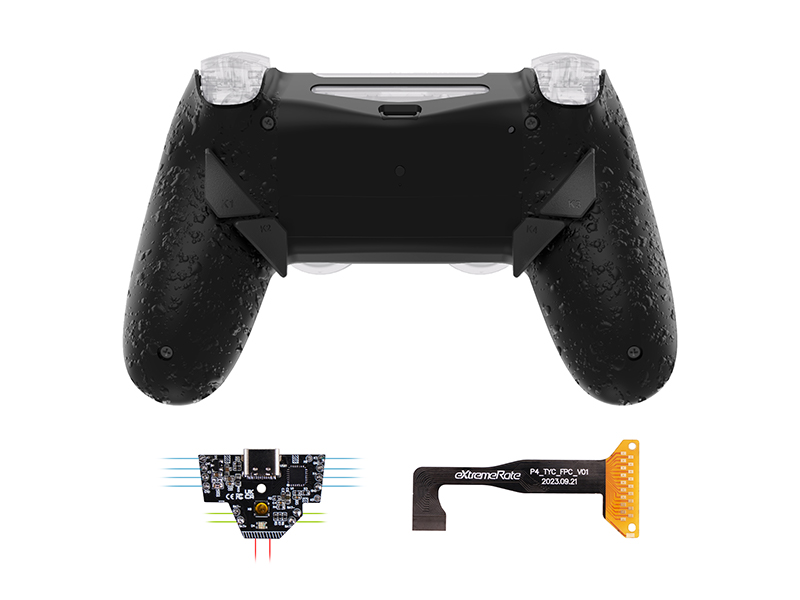
The eXtremeRate Dawn Type-C Remap Kit transforms your PS4 Slim Pro controller (JDM-040/050/055) into a professional-grade esports tool. Featuring a redesigned black back shell, 4 ergonomic programmable back buttons, and 6 customizable mapping profiles, it upgrades your controller’s charging port to Type-C for faster, more convenient power. Installation requires disassembly and optional soldering, with full video guides available. Compatible with popular eXtremeRate mods, this kit is a must-have for serious PS4 gamers seeking enhanced control and style.


| ASIN | B0DCBW7NSY |
| Best Sellers Rank | #12,769 in Video Games ( See Top 100 in Video Games ) #86 in PlayStation 4 Accessory Kits |
| Brand Name | eXtremeRate |
| Color | Black |
| Compatible Devices | PlayStation 4 |
| Customer Reviews | 3.8 3.8 out of 5 stars (65) |
| Hardware Platform | PlayStation 4 |
| Item Dimensions | 5.91 x 3.54 x 0.59 inches |
| Item Weight | 50 Grams |
| Manufacturer | Extremerate |
A**A
Perfect ,does what it says
Works perfect ,it's easy to swap the bindings and the USB c port works great with my ps4
A**A
Todo ok
C**C
Good, but issues when playing on Steam
Good product, but if you plan on using this on Steam read this!!! Assembly is overall pretty easy if youre careful. If you dont plan on soldering then the hardest part is probably gonna be snipping off the extra unneeded wires and pins. Be careful with the wires, as they are VERY VERY thin and easy to tear or pull from the PCB. The USB C upgrade is very nice and works fine. The back buttons work well, however can possibly feel uncomfortable to people with bigger hands. MOST IMPORTANT, PLEASE READ THIS PART!!! The biggest problem i had with this is the use on PC, specifically steam. When I tested this on a gamepad tester online, all buttons worked and I had no problem. However, when I tested it on Call of Duty, which i play on steam, the controller was EXTREMELY buggy. Whenever pressing X, Steam overlay would open, whenever pressing R2, a screenshot would be taken, and almost every button did something weird. This was not just with the backbuttons, but with every button. I was able to fix it by turning off some controller settings in steam and reinputting the inputs. After I did this, it worked good like how a normal controller would. I found it very annoying to have to disassemble the controller and make sure all of the components were working when the entire time it was because the new USB C connector was causing the problem
L**N
Pretty Good
Incredible value considering how much a pro controller is! It took me about 30-60 minutes to install. The buttons are a distinct click when pressed. I will say however, the part of the button your finger touches, is a little wobbly because of the types of buttons they used. But looking back on this kit being fairly cheap (compared to Scuff), I had no issues.
A**O
Compré 2 de estos equipos. Pero en uno el Flex que conecta con la placa del mando con la placa de asignación de botones a los que se dobla hace que mi mando se vuelva loco.
A**N
All kitted out PS4 controller for only $40
R**.
Best looking controller
Flawless works just as intended. Thanks again Extremerate
S**K
flex cable causes issues
Fun project but i had issues with the ribbon cable not seating properly and causing connection issues, seems like it would be better to glue the cables together and maybe the board rather than have 2 flex cables making contact to well 1 contact point which means 1 cable will slip on the other causing said issue. Also the button placement isnt that good but i cant see any way to make it better without getting rid of the batter altogether and making it a dedicated wired controller which i think id rather have anyway since i dont own a ps4 and just like their controllers.
A**U
難易度で言うとそこまででもないです。初めてこういったことをする方にもおすすめだと感じました。
P**I
旧型からプロファイルが複数登録できるようになったのと背面ボタンのキャップの予備が同梱されているのは良かった Youtubeの「eXtremeRate PS4 Controller NEW DAWN Remap Kit Type-C Version Installation Guide」という動画を見れば導入は大体わかりますが所々問題があるので画像を上げておきます スティックの修理で何度も分解すると抜き差しする形式のフラットケーブルの接点のパターンが剥げる可能性が高いので短いケーブルと挟み込む形式の延長コネクタを改造して取り付けました ●リマッピングのやりかた ・プロファイル切り替え(全部で6、消灯は割り当てなし) 設定ボタンをダブルクリックでプロファイル変更 青→緑→水→橙→紫→白→(消) ・リマッピング リマッピングしたいプロファイルを選択 設定ボタンを5秒間押す→LEDが点滅してリマッピングモードに 背面ボタンのどれかと登録したいボタンを一緒に押し続けるとLEDが赤色で3回点滅し登録されます (登録してあるボタンに同じボタンを登録すると背面ボタンが未登録状態になります) 設定ボタンを5秒間押す→リマッピングモード終了 ・現在選んでいるプロファイルの初期化(他のプロファイルは初期化されません) 初期化したいプロファイルを選択 L1、R1、↑、←、△、○、を5秒間同時押しするとLEDが赤色で3回点滅して 選択中のプロファイルの背面ボタン全てが未登録状態になります
A**V
Rien à redire sur la découpe de la coque, mais concernant l'installation plusieurs points d'amélioration sont possibles : pré-étamer les câbles pour le mappage des clics de sticks, mettre un bouton de configuration mieux ajusté (le mien est trop court et je ne peux pas l'utiliser sans curre dent), les nappes ont une longueur très juste, et ont tendance à TRÈS mal se placer lors de la fermeture de la coque, des câbles LED sont préinstallés (je ne les utilise pas) et posent aussi énormément problème pour la fermeture, il faut couper les pattes en trop soi-même lors de l'installation. Enfin deux soucis ergonomiques selon moi, les touches K2 et K4 rentrent dans les doigts au niveau de la pointe inférieure, c'est assez inconfortable, et superposer les boutons pour les utiliser avec des doigts différents serait certainement plus pertinent.
P**P
Ottimo si adatta bene al dualshock 4
G**5
One of the best products on the market. However, my big fingers suck at putting small screws in holes highly recommend a better screwdriver
Trustpilot
3 weeks ago
1 week ago