Buy anything from 5,000+ international stores. One checkout price. No surprise fees. Join 2M+ shoppers on Desertcart.
Desertcart purchases this item on your behalf and handles shipping, customs, and support to Argentina.
🔥 Dominate the game with precision and style!
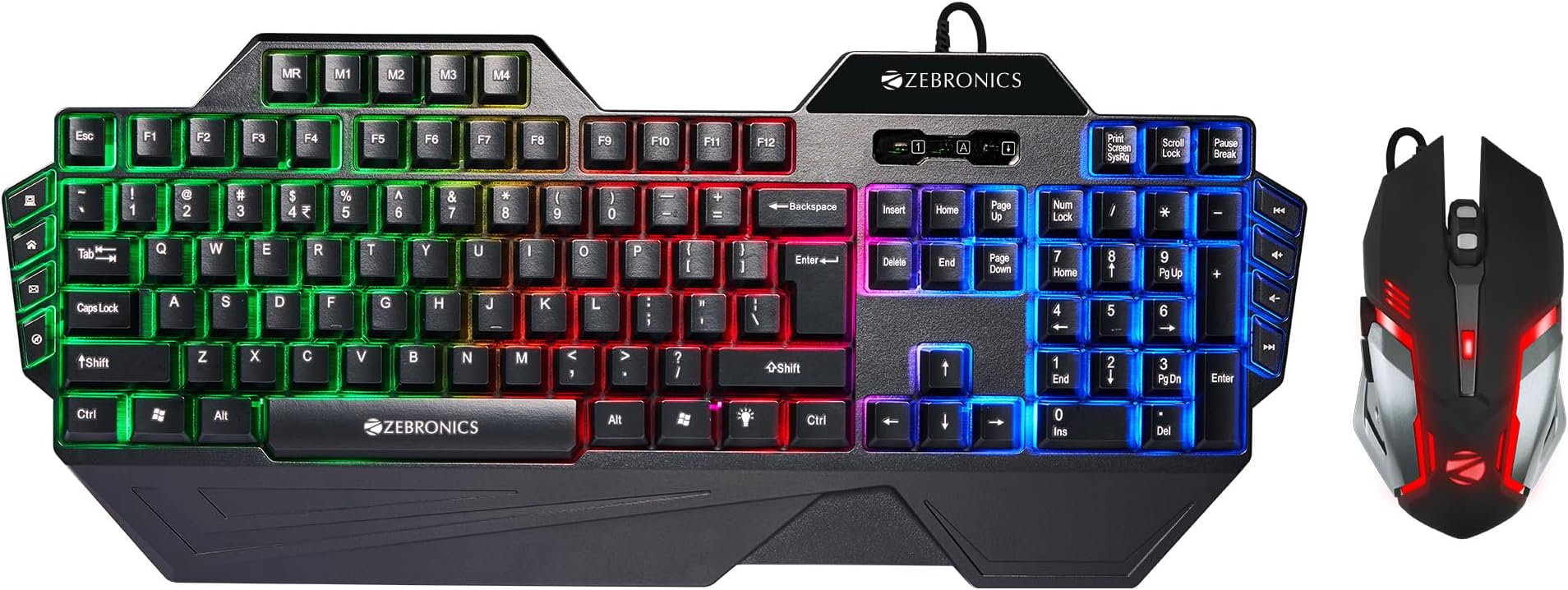
The ZEBRONICS Optimus Gaming Keyboard & Mouse Combo offers a high-resolution 3600 DPI sensor mouse and a 117-key keyboard with dedicated macro and multimedia keys. Featuring a durable braided cable and gold-plated USB connectors, it ensures reliable connectivity. Its customizable multicolor LED lighting and ergonomic design provide both style and comfort for extended gaming or work sessions.


| ASIN | B0CT3RQQ1N |
| Are Batteries Required | No |
| Best Sellers Rank | #780 in Computers & Accessories ( See Top 100 in Computers & Accessories ) #10 in Gaming Keyboards |
| Brand | ZEBRONICS |
| Brand Name | ZEBRONICS |
| Colour | Black |
| Compatible Devices | Gaming Console |
| Connectivity Technology | Usb |
| Country of Origin | China |
| Customer Reviews | 3.9 out of 5 stars 6,316 Reviews |
| Hand Orientation | Right |
| Importer Contact Information | 13/7, Smith Road, Royapettah CHENNAI-600002 |
| Item Type Name | Gaming Keyboard & Mouse set |
| Item Weight Unit of Measure | 940 Grams |
| Keyboard Description | Gaming |
| Keyboard Layout | QWERTY |
| Manufacturer | 13/7, Smith Road, Royapettah CHENNAI-600002, Zebronics India Private Limited |
| Manufacturer Contact Information | 13/7, Smith Road, Royapettah CHENNAI-600002 |
| Manufacturer Part Number | ZEB- OPTIMUS (BLACK) |
| Model Number | ZEB- OPTIMUS (BLACK) |
| Movement Detection | Optical |
| Network Connectivity Technology | Usb |
| Number of Keys | 117 |
| Operating System | Windows |
| Other Special Features of the Product | Ergonomic |
| Packer Contact Information | 13/7, Smith Road, Royapettah CHENNAI-600002 |
| Power Source | Corded Electric |
| Special Feature | Ergonomic |
| Unit Count | 1 Count |
| Warranty Description | 1 Year Carry Into Service Center |
A**A
Everything is good
It is worth for money I bought it for 899 and it has a plastic body and the cool rgb lights are super and over all it is the best if you get it below 1000 and it's mouse is also soo cool and sleaky design which fits in you hands easily and the keyboard is a bit bulky and it is durable and great for daily gaming or working it has ghosting buttons and the marco buttons settings is a bit hard if you are new to it and the user manual does not explain you about it
D**H
value for money
i bought the package for the keyboard mainly especially cuz it has the dedicated macro keys and safe to say everything works extremely well but i reduced one star cuz the mouse was not working properly sometimes M1 does not work. over all good product and worth of money, and it sounds really will also ,but the keyboard lighting could be improved and the build quality is also top notch I can say thin cuz I rage quit on it many times and all the times it still works must buy.
V**D
Value for money combo. CHECK THE END FOR RGB FUNCTIONS.
1 MONTH REVIEW I bought the combo for 1200 and I must say it is one of the best purchases value for money purchases I have done on Amazon. Received it without any damage to the products. Packaging was excellent. However, there was no user manual for the various buttons. No software disc to control the RGB and DPI on the mouse either but you don't need it nor should you expect it at this pricepoint. Coming down to the actual products, the keyboard was way bigger than I imagined it to be. Going from a basic flat keyboard to this felt like a huge jump but I got used to it after a day or two. The mouse is really smooth and works really well even without a mousepad underneath it. The changeable DPI settings are really handy when you are playing a new game and need to change the sensitivity quickly. For work - I work as a content writer so I needed a keyboard that wouldn't hamper my typing speed and this keyboard delivered. My typing speed was 60-70 wpm with 80ish accuracy with my old keyboard. It jumped to 90-100 wpm but with 94+ accuracy after using this new keyboard for the FIRST TIME. Let that sink in. The mouse is excellent though it's sensitivity can be hard to manage if you arent used to it. You can simply lower sensitivity in windows or set the DPI setting to 1600 to resolve this. For gaming - The keyboard has literally no input lag and ghosting. Even if I pressed 3-4 keys simultaneously they would all get registered without any problem. The keyboard feels quite clicky even for a membrane keyboard which makes your gaming experience even more fun. I tried the mouse in various FPS games like Doom, Modern Warfare, CS and Black Ops and it did NOT disappoint. My aim was accurate and precisely where I wanted it to be. However, I couldn't land super accurate shots every time because of the sensitivity but it's not the mouse's fault, it's because I don't have a mousepad to go with it. Pros - 1.Keys are clicky even for a membrane keyboard. 2.Keys can be removed and replaced easily. 3.The RGB is decent and has various modes but I don't use it that much. 4.No ghosting whatsoever. 5.The DPI settings on the mouse work flawlessly. 6.The RGB on the mouse looks absolutely stunning. 7.The mouse model is identical to the Logitech G402 which costs more than this combo combined. I confirmed this with my friend who owns the mouse. 8.Customer care is responsive and I received a response under 2 days after submitting query. 9.Can't get better value for money. Cons - 1.No user manual. You will need to either call customer care or figure out everything yourself. To spare you the trouble, I'll include a few function keys in the bottom so be sure to check them out. 2.The keys aren't backlit which basically means you can't use the keyboard in the dark without any lights on (See photo attached) 3.The keyboard is a bit bulky. Definitely not something you should carry around. 4.The side below the keys is not covered with opaque plastic which basically means you can see everything inside. Some may find it neat. I personally didn't. Shortcut keys for the keyboard Zebronics didn't bother to tell - Fn + Pgup - To increase the brightness of the RGB. Fn + PgDn - Same as above, but it decreases the brightness. Fn + Lightbulb button besides right Cltrl - Switch on/off RGB and switch between the different color modes. Fn + Windows key - Locks the windows key. These are the ones I can remember from the top of my mind. Other Fn keys are pretty obvious. And for mouse, Hold the DPI button (the one below the middle mouse button) if you wanna turn the RGB off. Hold it again to turn it back on.
A**Y
Very low quality item
The keyboard i got it doesn’t work . The keys doesnt work at all . Apparently i have to go to a service center to replace it which is far
R**K
A
“I’m really impressed with this Zebronics keyboard and mouse I ordered from Amazon—great quality and budget-friendly!”
S**J
Gaming mouse
Gaming keybord & mouse its amazing & lightweight but mouse not working please replace my order
M**R
I'll give 7 out of 10
Overall quality is good but, ctrl button on my keyboard stopped working two times, but they gave me a new one in service center. Also in dark u cannot see the buttons symbol because light doesn't pass through the buttons.
M**S
Keyboard is great mouse sucks
Mouse sucks but yes at this pricing nothing can even get close to it keyboard amazing but I would prefer they make the keyboard more expensive and remove mouse from the combo and increase the keyboard quality Keyboard lightning at this price point is good Durability isn't really good Works fine Grip is ok not the best Makes quite alot of sound
Trustpilot
2 days ago
1 day ago