Buy anything from 5,000+ international stores. One checkout price. No surprise fees. Join 2M+ shoppers on Desertcart.
Desertcart purchases this item on your behalf and handles shipping, customs, and support to Argentina.
⚡ Command your PC like a pro—no HDMI, no fuss, just pure control.
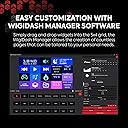
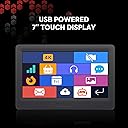
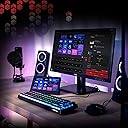
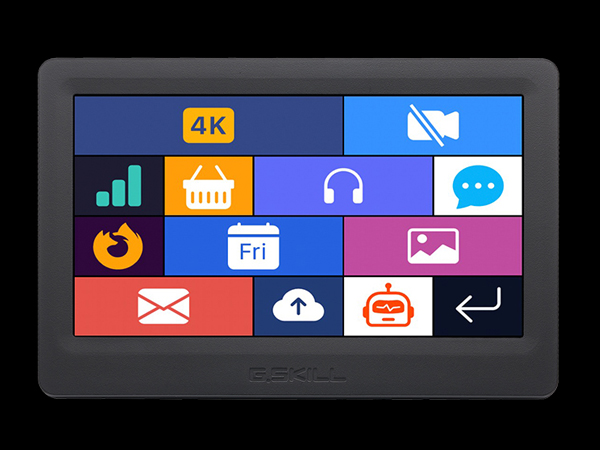
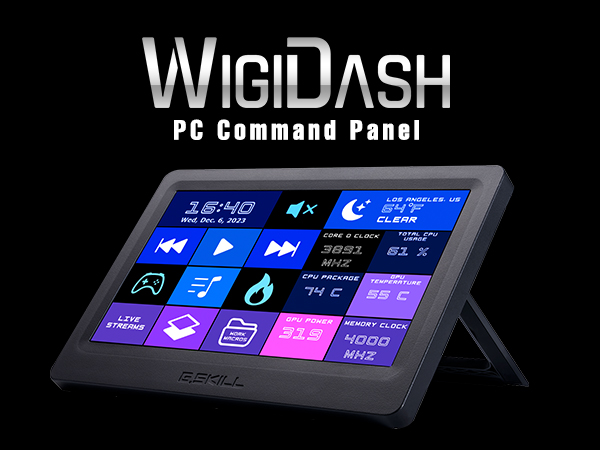
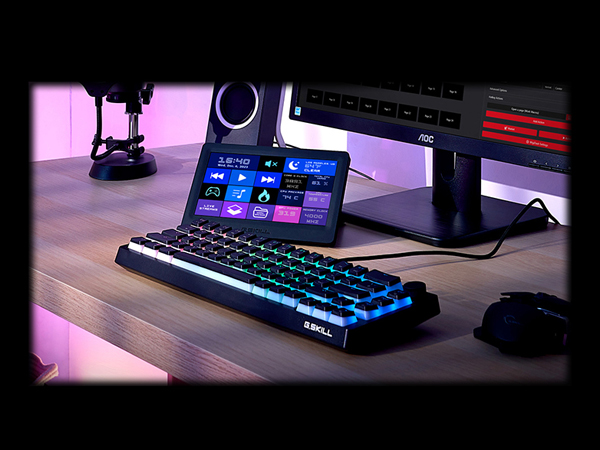
The G.SKILL WigiDash PC Command Panel is a sleek 7-inch USB-C powered touchscreen designed for Windows 10 and 11 users who demand real-time system monitoring and customizable control. Featuring a 1024x600 resolution, it supports up to 20 widgets per page with unlimited pages, integrates with HWInfo and AIDA64 for detailed sensor data, and eliminates the need for HDMI connections, making it a minimalist yet powerful addition to any professional or gaming setup.


| ASIN | B0CNGSPS1N |
| Additional Features | Backlit, Customizable Display Keys, Hotkeys and Media Keys, Integrated Stand |
| Aspect Ratio | 16:10 |
| Best Sellers Rank | #70,190 in Electronics ( See Top 100 in Electronics ) #1,452 in Computer Monitors |
| Brand | G.SKILL |
| Brightness | 300 candela_per_square_meter |
| Built-In Media | USB Cable |
| Color | Black |
| Compatible Devices | Desktop |
| Connectivity Technology | USB |
| Customer Reviews | 4.0 out of 5 stars 111 Reviews |
| Display Resolution Maximum | 1024 x 600 |
| Display Type | IPS |
| Global Trade Identification Number | 00848354044734 |
| Hardware Connectivity | USB |
| Has Color Screen | Yes |
| Manufacturer | G.SKILL |
| Model Name | WigiDash |
| Model Number | GD-A7PCCSK-WGD |
| Native Resolution | 1024x600 |
| Processor Count | 1 |
| Resolution | SVGA Wide |
| Screen Size | 7 Inches |
| Special Feature | Backlit, Customizable Display Keys, Hotkeys and Media Keys, Integrated Stand |
| Specific Uses For Product | Multimedia, Gaming, Content Creation, Productivity |
| Total Usb Ports | 1 |
| UPC | 848354044734 |
| Warranty Description | 1 Year Manufacturer Limited Warranty |
D**Y
Nice display as long as you have the budget
I've been using my Wigidash for a month now, no issues at this point. Used it for a few weeks using the included HWinfo gadgets, which work fine enough if you don't want to pay for AIDA. But then I upgraded my AIDA key (was using an older version that didn't work with the wigidash) and now I'm using AIDA for my main display. I'd moved over from my old Logi G19 LCD display to this, and being a touch screen this gives me easy access to multiple screens by swiping. I can swipe one direction to get to another page set up with some hotkey buttons to adjust the lighting on the screen or to make the screen sleep (used if I have my display sleep for a while). So if you're looking for a way to adjust the display brightness, it's in those hotkey options, you can add them to the screen for adjustment. YMMV, but I'm able to have my wigi sit below my monitor, that'll depend on your monitor height. The direction of the USB-C port I can see may bother some people, if so the solution would be a $6 90-degree adapter on amazon. I decided it didn't bother me enough for the expense and the issue with having the cable come in at 90 degrees is the potential to unplug it if you're moving stuff around. It may be something that they had fixed, but I have no issue with AIDA and wigi software loading order. AIDA does load up first but wigi will grab the data when it loads up so I haven't had to tweak anything to make it work. Anyway, thumbs up so far. Got mine on sale during Prime days, so you can always wait for that or Black Friday sales if you want to save some money and I believe AIDA is on sale on Black Friday usually, for new licenses. For license renewals, those are usually on sale a few times a year. They'll send you an email. UPDATE: I've been using this for 18 months now, no issues with it. The Black Friday price is a great price for it.
T**.
Great Sensor DIsplay using Aida64!!!
While the Elgato Streamdecks are hands down the best dynamic button box's, the G.Skill Wigidash makes for the best HW Sensor display using Aida64. I have a couple Stream Decks and have used them with HWinfo to display things like CPU Temp, Utilization, etc and they are nice, but you can only display on each button with is quite small. The huge advantage of the Wigidash is that the display is huge (7 inches diagonal), looks great, AND since it uses USB for power and data it does not take up a monitor plug if you have triples or VR. The refresh rate seems to be slow, and the responsiveness is not the best. G.Skill's software is Alpha at best as it does come close to Elgato's Stream Deck software integration. Button Box: Winner Stream Deck HWinfo Display: Tied as Stream Deck will allow more mini-displays but the Wigidash looks better Aida64: Hands down the Wigidash!!! Ease of use: Stream Deck Customization of display: Solid winner with Wigidash While the Streamdeck ecosystem is well built with a ton of interactions and API's, the customization using Aida64 as a Hardware Sensor Display make this one hit wonder a winner! Interestingly when you use it with Aida64 you just put an icon using the Wigidash app, then customize the display inside Aida64. This means that if you know Aida64 or are willing to learn how to make a display you have endless options that look great! If you want plug and play with minimum effort, probably not the best device. Also responsiveness is SLOW, there is no haptic feel like the tactile buttons on the StreamDeck so if you are looking for a button box the StreamDeck still wins. If you can get both you are in heaven!!!
E**Z
It's a great idea, needs time to mature in its execution
Not bad. The only issue that I have is that the user interface is super amateur. You can go really far with customization if you have the time, money and some patience. I say money because customization isn't native. You'll need to buy the pro version of AIDA 64, and even then it's going to take a lot of time and effort to set it up exactly the way you want it. If G.Skill adds more native customization/monitoring support I'd totally recommend this, but in it's current form I think I would have been better off purchasing an external touchscreen display and setting up AIDA64 myself.
L**F
Better than a hdmi senser panel
This a great option for monitoring systems information. Please note this is not plug and play it takes some tinkering to get set how you want but is very customizable and worth the investment in time and money for me. But if you know how to use aida64 this is a much better option than an HDMI small monitor as it is all usb and not a second monitor. My only wish is for more widgets and discord integration.
K**B
Not my cup of tea
I wanted to love this product. The problem I have is that aside from the touch screen aspect of this display, I can't find anything else positive to say about it. The stock software that comes with it does not read my sensors other than the predefined profile. If I delete the said sensors, they no longer appear for me to add back to the panel. In addition, the entire GUI of their software is bad. While the WigiDash supports AIDA64 sensor panels, I find the lack of available premade sensor panels for the stated resolution to be almost nothing. Most are in higher or different resolutions. When using one of the few "stock" or the 1 custom one I found designed for the wigidash. the screen flickered which was maddening. I only wish it would be a smooth transition and not a flicker. Sadly, I bought some other no-name brand displays that are cheaper and do "exactly" what I wanted it to do. If you want to use this display for its system monitoring only, I would look elsewhere.
K**A
Works as expected, highly editable
Clear bright panel, great to fit free HWinfo numbers and a clock. Can use AiDA64 and other things too. Not hard learning curve to make it show what you want how you want. Can edit size and colors. Connects through a single USB-A 3.0 cable for both power and data and can be placed on the side of the PC without blocking RGB. Of course it does need software sitting in the background to work (which means some minimal PC resources are used), which you can set to start with your operating system.
R**Y
Very Nice Tool
Pros: 1. No more trying to see the AIO LCD screen from across the room. 2. AIO with LCD screen added cost, and only for that AIO 3. No losing my investment if I decide to try a different or better cooling system. 4. Can assign screen buttons to PC commands Cons: 1. It can be just a little slow (not instant) on startup and selection. 2. No wall mounting or hanging options 3. The software driver does not wake from sleep mode. I have it set so the driver starts when the PC starts, and that works fine. So you must exit the app/driver and let it reload, and it comes up. 4. HWINFO is included with the device for (at this writing time) $108 5. Community groups with different screen setups. For what I wanted it for (monitoring my PC performance), the WIGIDASH is perfect. I sit 14 feet away from my two 55-inch monitors. Hitting 120-144 Hz at 4K, the PC with a 4090 is best right next to the monitors for short video cables. With the WIGIDASH, I plug it into a USB Hub on my desk, and I have all the info right there at my fingertips (no HDMI or display ports required, just USB connection). It lets you pick from any of the HW info 64 and AIDA 64 sensor readings. It does have a nice desktop kick stand. I had it set up in an hour.
K**R
One of the best sensor panels available
I've been in the market for a sensor panel but what held me back is the fact that most sensor panels require you to plug in a USB connection plus HDMI. The HDMI connection always bothered me. Because my video card would have to put out frames not only to my gaming monitor but also a secondary display. This WigiDash does not need a HDMI connection for it to run. All you need is a USB C cable. That's huge. The screen is bright and vibrant. The touch response is slightly on the slower side but seeing that this is sensor panel I hardly ever touch the screen anyway. The software that GSkill put out on the first try is pretty good with tons of customizations. The amount of widgets in their market is small right now but with time Im sure it will add way more. But the main feature and the biggest widget you can add is Aida64 senor panel themes. Works perfectly with it. This opens up a whole world of customization to the next level. Pretty much anything you can imagine. The stats from widgets respond instantly and real time stats on my vitals on my pc. I would highly recommend this sensor panel to anyone that hates the idea of adding a second monitor to their video card out. Anything to save my frame rates......
D**R
The best
Can't live without it .. glad I found one definitely worth it .. to maximize this you will need Aida64
A**E
Leider enttäuscht.
Ich habe mich echt auf das Gerät gefreut aber wurde enttäuscht. Die Software ist echt buggy, habe mir ein Profil angelegt so wie ich es benötige, aber nach dem Neustart des Rechners war da ganze Profil weg. Das starten der Software war nicht mehr möglich. Sie stürzte beim aufrufen sofort ab. Habe es zurückgesendet und warte derzeit auf die Gutschrift des Kaufpreises.
E**R
Con falla
Tiene problemas de ensamble, faltan tornillos y el puerto de conexión estaba desalineado. Escribí a G Skill para que me dijeran el tamaño de los tornillos y no tuve respuesta
M**A
Looks awesome
Great addition to my computer setup
S**E
You need Aida64 to get full benefit
I already has Aida64 so my Wigidash does everything I need. Will be great however if they can expand their market place as there are not many widgets available right now
Trustpilot
1 week ago
2 weeks ago