Desertcart purchases this item on your behalf and handles shipping, customs, and support to Argentina.
๐ Elevate your desk game with Acerโs ultimate 9-in-1 USB-C hub โ because multitasking deserves no limits!
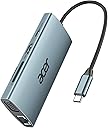
The Acer 9-in-1 USB-C Hub is a premium docking station featuring 4K HDMI and 1080P VGA outputs for dual-display support, ultra-fast 5Gbps USB-A data transfer, a 1Gbps Ethernet port, and a 100W Power Delivery charging port. Crafted with durable aluminum, it offers broad compatibility across Mac, Windows, Linux, and ChromeOS devices, making it the perfect all-in-one solution for professionals seeking seamless connectivity and productivity on the go.


| ASIN | B0CQSZYWT8 |
| Additional Features | 5Gbps Data Transfer, 4K@30Hz Max HDMI, PD 100W Fast Charging, 1GB Ethernet, 1080P VGA |
| Best Sellers Rank | #69 in USB Hubs |
| Brand | Acer |
| Color | Space Grey |
| Compatible Devices | Broadly compatible with Windows and MacBook computers with USB-C, featuring DP Alt Mode, PD charging, USB4, and Thunderbolt 3/4/5 support. Compatible Devices Broadly compatible with Windows and MacBook computers with USB-C, featuring DP Alt Mode, PD charging, USB4, and Thunderbolt 3/4/5 support. See more |
| Customer Reviews | 4.5 out of 5 stars 1,384 Reviews |
| Data Transfer Rate | 5 gigabits_per_second |
| Enclosure Material | Aluminum |
| Global Trade Identification Number | 00195133234962 |
| Hardware Interface | Ethernet , HDMI |
| Item Dimensions L x W x H | 4.33"L x 1.97"W x 0.67"H |
| Item Weight | 2.88 ounces |
| Manufacturer | acer |
| Mfr Part Number | ACER-UC906 |
| Minimum Required Operating System Version | Windows 7 |
| Model Number | ODK390 |
| Number of Items | 1 |
| Number of Ports | 9 |
| Operating System | Chrome OS, Linux, Windows, Mac OS, Android |
| Special Feature | 5Gbps Data Transfer, 4K@30Hz Max HDMI, PD 100W Fast Charging, 1GB Ethernet, 1080P VGA |
| Total USB Ports | 3 |
| Total Usb Ports | 3 |
| UPC | 195133234962 |
| Unit Count | 1 Count |
| Warranty Description | 1 year manufacturer |
Z**O
Best Hub for Surface Pro 11
This Hub has it all! The hub features a solid case with RJ 45 jack (ethernet), USB, HDMI, VGA, SD, Micro SD and more. The new Surface Pro 11 Snapdragon X and Elite is finicky when paired with a Type C USB hub, after two others failed to connect or did not allow it to recognize the RJ45 port, I was not hopefully with this one. However, it exceeded my expectations and works! This dock/hub provides full port usage in a nice form factor. The cable is long enough to not hang on the port but short enough to not be in the way. It was a simple plug and play and within seconds the devices recognized it, not drivers to install or software to download. Utilizing a Type C thunderbolt charging block it told me when the one being used was underpower when connecting the device, usb and HDMI while charging. This was good to know, it DOES Not come with its own power brick which would have been great to get a PD 100W or 65W charger included, but for the price of under 30 dollars this isnโt expected. Compared to the Surface Hub it works much better and there appear to be NO random disconnects for this hub, like others. I tested it for compatibility to worked with the MBP (intel), IPAD, Android Phone, M3 MacBook, Surface Book 2, One X Player 2 (Ryzen APU), Surface Pro 11 and a few others and all devices functioned as required with it. It just works, this is the one to purchase Good on Acer for this HUB.
A**H
Time tested - it has PERFORMED!
We have been using this well over a year for a Franklin AT&T internet box with only one inlet/outlet. Either plug in for power or to a routerโฆ this hub has worked magnificently! Fast, reliable and always connected. It has paid for itself many, many times over.
S**Y
It's Okay
Itโs been a mixed bag with this hub. My laptop would not recognize an external monitor through the hubโs HDMI port and had to plug the cable directly into the port on my laptop. Currently I have the following attached to the hub: a power cable for my external monitor, a cable for an external HDD that I use for backups, a printer cable, and an Ethernet cable. I friend suggested that I might have too much running through the hub and that I try disconnecting the Ethernet cable and plugging in the HDMI cable. I did but the monitor was still not recognized, so I went back to my original setup. Occasionally I loose the Ethernet connection and have to push the connector into the port. I never had that problem with this Ethernet cable when it was plugged into my desktop, so it seems to be a problem with the Ethernet port on this hub. I havenโt tried the other ports on the hub, so I donโt know if they work. I wonder if I have a defective unit or if this is a more widespread problem. I only turn on the external HHD when I do backups. With the Ethernet cable attached and 2 things powered on, the hub is noticeably warm to the touch. I wonder how hot the hub would get if I were also using the USB C and HDMI ports. In all, Iโm not impressed with this hub. Update: Acer Customer Service contacted me. I didn't ask for a refund, but they made one anyway. It really wasn't a problem with the hub but a mismatch with the USB C port on my laptop. Acer's response keeps me as a loyal customer. They went above and beyond my expectations. I am changing my rating to 5 stars due to their excelent customer service.
C**I
This gets the job done.
USB hubs such as this are like a jack-knife; with the different cables going in and out of them. I purchased this one specifically to replace an older one that was not self-powered. I noticed with my older one that my computer would get quite hot; and my internet speeds (it has an ethernet port) were slower than simply using WiFi. I selected this product from Acer because it checked all the boxes that I need: it can plug into an AC wall outlet (via a USB-C connection - and you can also use it without this connection); fast ethernet hookup, and three fast USB-A ports. My internet speed with this Acer USB hub is much faster than my previous one, and faster than WiFi. Of course, internet speed depends upon a number of factors: your purchase plan from your ISP provider, where you live, the CAT cable you are using, etc. But my speed went from 144 bps download (old USB hub) to 587 bps (Acer hub). My only complaints are that (1) it won't read my keyboard - I have to plug that directly into the computer, and (2) the ethernet hookup stopped once. It always needs to be connected before connecting the USB-C 100W AC power; or it will not work.
I**.
This One Rocks!
Excellent USBC Hub. Acer is a trusted brand, and the item is AUTHENTIC. You can utilize the added USBA ports, SD/Micro SD Reader slots HDMI Connection for an additional monitor, and am For newer PCs and tablets that have limited or no USB ports I highly recommend this hub!!! It consolidates multiple uses from one USBC port while still allowing for the device to be charged through that port.
J**A
Super easy to use, fast for large datasets and perfect for a 4k monitor
I bought it for my 4K LG Ultrawide monitor, and it has been and excellent acquisition; super easy to use and it has great speed, especially when it comes to large datasets. The materials of what it is made of are quite good, thus I am sure there is not any question about its durability. It never gets warm, and it is perfect to transport as it has a perfect size.
S**.
Great when it works, but intermittent Ethernet issues
I picked this up to use as a travel hub for my laptop. I use it for the HDMI port as well as the Ethernet connection. I find it is decent for travel but have experienced some inconsistent performance with the Ethernet. It will occasionally drop the connection then re-link. I ended up replacing as my main travel device it because of the intermittent issues with Ethernet, but will keep it around as a backup. One thing to note about this item - it is not built by Acer. It is an "Acer-branded gadget." That means another company paid a licensing fee to Acer to use their name, so Acer does not provide support. This particular item is manufactured by NewEase Tech Co., Limited, and the only support channel is via email.
N**E
Works well, no issues
Excellent hub to connect my small, lightweight laptop to external USB devices and HDMI when away from home. Wish it had more USB ports on it though.
G**S
A good docking station
This arrived in good time. It was small enough to fit through the letterbox. It works well.
A**E
Funktioniert mit MacBook Air M4,macOS Tahoe 26.2,
Funktioniert perfekt mit einem MacBook Air M4, macOS Tahoe 26.2 In Benutzung/getestet sind: USB-Hub, Ethernet, HDMI-Schnittstelle, USB-C-Stromversorgung
J**R
A must-have for a laptop with limited ports
I was looking for an RJ45 connector. I bought this one because it has all the other ports that my laptop doesnโt have. The RJ45 to LAN connector works fine.
P**0
Product Review
This is a really useful accessory for macbook and new generation pc and mobile users,, helped me alot with my daily chores and handling my business work
P**N
Good product !
It serves the purpose of connecting multiple devices including power cable to the laptop. Works fine so far. Happy to use it.
Trustpilot
3 weeks ago
1 month ago