Buy anything from 5,000+ international stores. One checkout price. No surprise fees. Join 2M+ shoppers on Desertcart.
Desertcart purchases this item on your behalf and handles shipping, customs, and support to Argentina.
🖨️ Print smart, print fast, stay connected — your home office MVP!
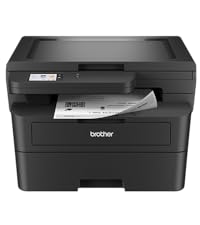
The Brother HL-L2405W is a compact, monochrome laser printer engineered for home and home office use. Delivering sharp black & white prints at speeds up to 30 ppm, it features dual-band wireless connectivity for versatile device pairing and a 250-sheet paper tray to minimize interruptions. Manage printing remotely via the Brother Mobile Connect app and enjoy cost-effective, hassle-free toner replenishment with the Refresh subscription trial. Backed by a 1-year warranty and robust support, this printer blends efficiency, reliability, and smart technology into a sleek desktop companion.


| ASIN | B0CPL7HRQN |
| Additional Printer Functions | Print Only |
| B&W Pages per Minute | 30 ppm |
| Best Sellers Rank | #906 in Office Products ( See Top 100 in Office Products ) #2 in Laser Computer Printers |
| Brand | Brother |
| Built-In Media | AC Power Cord, Drum Unit, Toner Cartridges |
| Color | Black |
| Compatible Cartridge | TN830, TN830XL, TN830XL2PK |
| Compatible Devices | Laptops, PC, Smartphones, Tablets, iPhone |
| Connectivity Technology | USB, Wi-Fi |
| Control Method | App, Touch |
| Controller Type | Android |
| Customer Reviews | 4.2 out of 5 stars 2,316 Reviews |
| Display Type | LCD |
| Dual-sided printing | No |
| Duplex | Manual |
| Hardware Interface | USB |
| Initial Page Print Time | 8.5 Seconds |
| Ink Color | Black |
| Item Dimensions D x W x H | 14.2"D x 14"W x 7.2"H |
| Item Type Name | Laser Printer |
| Item Weight | 15.1 Pounds |
| Manufacturer | Brother |
| Maximum Copy Resolution Black and White | 1200 x 1200 dots_per_inch |
| Maximum Copy Speed Black and White | 30 ppm |
| Maximum Media Size | 8.5 x 14 inch |
| Maximum Print Resolution Black and White | 1200 x 1200 Dots Per Inch |
| Maximum Sheet Capacity | 250 |
| Model Name | HLL2405W |
| Model Number | HLL2405W |
| Model Series | HL-L |
| Number of Drivers | 4 |
| Number of Trays | 1 |
| Other Special Features of the Product | Envelope Printing, Network-Ready |
| Output sheet capacity | 250 |
| Paper Size | Up to 8.5 x 14 Inches |
| Print media | Envelopes, Labels, Paper (plain) |
| Printer Connectivity Type | USB, Wi-Fi |
| Printer Output Type | Monochrome |
| Printer Type | Laser |
| Printing Technology | Laser |
| Processor Count | 1 |
| Resolution | 1200 x 1200 |
| Series Number | 2405 |
| Special Feature | Envelope Printing, Network-Ready |
| Specific Uses For Product | Home, Office |
| Total USB 2.0 Ports | 1 |
| Total Usb Ports | 1 |
| UPC | 012502672715 |
| Unit Count | 1.0 Count |
| Warranty Description | 1 Year Limited |
| Warranty Type | Limited |
| Wattage | 450 watts |
B**Z
Fast, Compact, and Reliable Printer
The Brother HL-L2405W is an excellent monochrome printer for home or office use. The wireless setup was quick and easy, and the printer connects smoothly to phones, laptops, and tablets. Print quality is very sharp and professional, especially for documents and reports. I also like how compact it is because it doesn’t take up much desk space. The printing speed is impressive, and the machine operates quietly compared to other printers I’ve used. Overall, this printer delivers dependable performance and great value for the prIce
S**.
Great printer, better than any brand I ever had before! Controls much easier to set than others.....
This printer plugs in, downloads latest drivers automatically by using simple instructions. I didn't even have to read instructions. I pulled it out of box, removed packaging, put paper in it and then printed out a test copy. First attempt worked perfectly. I love how the printer stays plugged in to my USB port and just SLEEPS until I push the PRINT command to make a copy. Suddenly, lights come on, a slight whirring sound begins, and good ol' "R2-D2" comes to life and prints a great copy. (This is all SO MUCH BETTER than the Canon printer I had for 8 years that was always a challenge to get it working properly.)
R**S
Easy to Install on Starlink, Great Print Qualilty
I was having a terrible time trying to connect my older HP Laser Printer to the new Starlink. Turns out it didn't have the technology built in to connect easily with the newer routers. So I gave up and ordered this Brother unit that had great reviews here on Amazon. For just $138 it really was easy to install and didn't involve much input from me. The print quality is excellent. I connected it to two Samsung Android phones and four PCs, two of which were Windows11 and two Windows 10.
R**A
Definitely a solid investment for basic printing needs
I’m very happy with this monochrome laser printer it’s fast, reliable and delivers consistently sharp text, which is exactly what i need , set up was straightforward and it conected with any issues, it’s a great choice if you’re looking for a no-fuss, efficient printerthat focuses in performance.
V**S
Good printer with difficult wi-fi setup for older macs. (But it works!)
I had an older Brother printer that was 15 years old. This one is lighter but also made like most things today, more flimsy. I noticed that especially with the paper tray. It feels like one drop would shatter it. I have an older Mac and though the wired setup was easy as most reviewers mentioned. But getting the wifi setup was a pain. I followed directions and it still took several hours. I unplugged modem, printer, computer off multiple times and it would still not recognize the printer. What finally worked for me was dumping the driver and reloading. This time it automatically pulled up Bonjour and airprint which made things easier and the wi-fi works! Woo hoo! I have High Sierra (yeah, I know) so wasn't sure the wireless would connect. It prints well, and does print out of deep sleep which I didn't expect from other reviews. I hope this printer lasts as long as my old one, but since most products die faster now I would be surprised. I did not setup refresh because I don't print much and all the reviewers said it is highly annoying and full of ads. I didn't have to load any software - just the driver. I don't print from my phone so would probably have to download the app which was where folks were getting constant ads and updates. Wish it copied like my old printer but it's about 1/2 the price so you get what you pay for!
L**.
Fantastic Home Office Printer!
I'm super happy with this printer! I needed something for my home office that was reliable and not insanely expensive. As long as you are good with just black and white, this will meet your needs! An added bonus is the iOS app from Brother and also having the ability to scan documents too.
K**A
Quick setup. Fast and clear. Can be set-up without a PC. Beware if you use an EERO Mesh System!
4/17/25 Update: After a few months of use, the printer went into Deep Sleep and when it came out, my EERO 6 had blown it away. After several tries to reconnect it, I reset EERO power and was then able to re-connect to it. I then contacted Brother support and found that (A) Deep Sleep can not be disabled. Tech also sent me a link on "using dual band and Mesh networks". Found that (B) Brother doesn't do 5gHz AT ALL. (C) suggests that you use only SSID's that are 2.4 gHz ONLY. (D) They also say in the note that they "have no way of stabilizing their (apparently all Brother devices) wireless connection with EERO routers" and recommend using another. brand. BUMMER...My fiber service supplies only EERO's. I was on its duel band login but I had them set up a second login that is 2.4gHz ONLY. If this happens again, I will reconnect to that one. If that doesn't work reliably, there are cheap portable devices that will log into EERO's WIFI and then set up their own WIFI network (as a totally different login) I can connect the Brother to. Maybe that will work. Got a LOT OF PAPERWORK with this printer. Cards about phone apps etc. 3 different warranty sheets. I’ve set up a lot of printers over the years so I had faith that if I could connect it to my WIFI network I’d be done. The quick connect instructions (down loading the software as shown to the PC) had several options. The all wireless approach asked for a user and password. I tried several and couldn’t get it to work. My second try was using a USB cable. That worked great. The printer logged onto my WIFI. Green light came on steady. At least for the initial connection, It’s critical that you follow the instructions and RESTART both your computer and the printer. Power them both completely down. Then power up. The printer logged onto my router and when I looked for the printer on my MacBook Air, the printer was there and showing green idle. I also tried “add a printer” and it did so. I deleted the second one. It printed great. My IPhone also found it (both were logged into my wifi) and it printed from my lPhone. My wife’s WIN11 laptop also connected as expected. It’s not clear if this printer uses a chip in the toner cartridge. Some 3rd party toners say they have them. Loaded the Brother Connect app. Looks like it’s an alternative to using the PC & web site to initially install the printer. Would be good If I didn’t have a PC. Updated the printer’s firmware. Registered it and changed the password. It displays the toner level. Seems to be useful in that it accesses my iCloud files and I can print them from the app - all on my iPhone. However, it’s got lots of ads and IMHO is over-complicated to set up. But, today, more and more people have only a smart phone (no PC) so the app takes care of them well. The toner meter shows its full. If it’s correct, it means Brother included a standard toner cartridge, not one with just a little in it like most other printer manufacturers do.
A**R
Unnecessarily Complicated to Set Up, Seems to Work Fine
I print from my laptop, never my mobile device. Setup for this printer is via a QR code, so after spending more than an hour going through the registration/setup process, I was only able to use the printer via my phone. Useless to me. At the very end of setup, there was a message to go to the Brother website to setup to print from my computer. Geez!!! Just show the computer setup option without having to scan the QR code and wasting time setting up on a device I never print from. I then spent another hour+ setting up for my laptop. Before printing, I clicked the Brother Print&Scan icon to register my printer. It didn't recognize the password on the back of the machine and it didn't recognize the password I'd assigned from the mobile set up. Brother wanted me to enter the serial # on the back of the printer. I'm old. My eyesight isn't great and after 4 attempts to enter the serial #, which BTW, cannot be displayed as you input it, there was no way to confirm if I'd made a mistake keying the # or if it was because I couldn't tell if the last digit of the serial # was a zero, O or a Q, and besides, by that time I was too tired and too irritated to continue because I'd already spent more than 3 hours unboxing and setting up. Setting up this printer was ALMOST as bad as getting a new computer and trying to figure out all the settings. Next, I set up the dashboard. After entering all the required info, I received a message saying that processing dashboard setup would take an hour, please be patient. OK, it was 10pm. I was not in a good mood. I tried to turn off the printer by pressing the power button. The machine stayed on even after multiple attempts. I said the F word and unplugged the printer. (The following day, there was enough light to read the display and I noticed a "Shutting Down" message after pressing the power button, so after waiting patiently, the machine did finally shut down.) At 7:54am the following morning I received an email saying my dashboard was available! Whoo Hoo! - only 10 hours later, and only to find out that the "dashboard" was designed to sell me products, not to configure print options as I'd expected. I spent the next 7 hours procrastinating weather or not I had the sanity and/or energy to actually test the printer. I finally sucked up and tested the printer, which worked like a charm and gave me decent quality albeit somewhat dark prints. As an artist who uses B&W photocopies in my collage work (the main reason I bought the printer), I did appreciate that the copies are more like old school photocopies that lack the shiny quality so often part of photocopies from Staples, etc. nowadays. The matte prints are easier to hand color with colored pencil or watercolor. And, MOSTLY, I also appreciate that I can now print from home instead of having to go to Staples every time I get a collage inspiration. Would I recommend this printer? Not sure. Setup is definitely unnecessarily complicated - even for a 71yo former software analyst. If the machine works as expected long term, I'll probably forget about the problems I had setting it up and recommend it. The price is definitely reasonable. The footprint is bigger than I expected, and because I'll only be using it intermittently and the manufacturer tells me not to keep it plugged in when not in use, I will probably find it a hassle to crawl under my desk to plug and unplug it every time I want to use it. Edit: I discovered that I can make lighter prints from MS Word by selecting "Printer Properties" then selecting "Advanced Printing Options" and clicking "Toner Save Mode". I made this change under the default print options, but it did not change the default, so I am stuck doing this every time I print a new document. The lighter prints are exactly what I was hoping for and I'm happy to conserve toner to extend the toner cartridge life.
I**L
Buena compra
Para imprimir documentos en casa es excelente está impresora, buena calidad de imagen, con bandeja para 250 hojas y equipo compacto pero de buena estructura.
R**A
Excelente oportunidad
Buen precio y calidad
C**Z
excelente producto
llego muy rápido y en excelentes condiciones
G**A
Meh
Muy buena, pero gasta mucha tinta por impresión, aunque pongas "draft" en config. Pero imprime excelente y nunca he tenido problema con conexión a mi compu / cel.
Trustpilot
1 day ago
1 month ago