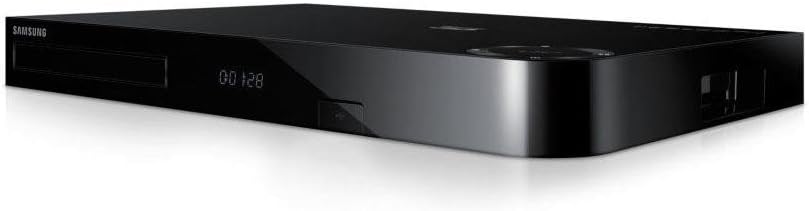
I first rated this box 5* then 3* and now 1*. Please read full review as I updated review a few times as things went downhill. After careful consideration I decided to take the plunge and purchase the Samsung BD-H8500M. All in all it's a great piece of kit all bundled together as one device. I own a Samsung Full HD TV around 4 years old and wanted to replace my awful YouView. As my Samsung TV is considered old and has no smart capabilities and wanting a device that I could record TV programs the Samsung BD-H8500M ticked all the boxes and more. It's a responsive device. I don't find any lagging at all as some have mentioned and is a pleasure to use after using awful YouView. The device is packed to the rim with features and built in Wireless is a huge bonus. The device looks sleek and modern and has a nice softer look with the corner curve on the right hand side, the build quality as expected from Samsung is outstanding. I have to be honest majority of my devices are now Samsung except a few and have to admit the quality and build of their products beats many other manufacturers by a mile. I have used this device allot since owning including apps for example Netflix, streaming Netflix over WiFi through the Samsung device is a breeze. No freezing no nothing. Just smooth and responsive. I do own an Asus RT-AC68U (5GHz/AC) Router which is one of the fastest routers on the market as of writing this review plus I have 38MB fibre so do bare that in mind. Casting music/films from my Nexus 5 and laptop to the device also works flawlessly. This is great as if your having a house party and your friends for example have some good tunes on their mobile they can cast the music to your Samsung BD-H8500M to play on your TV, even better if you have surround sound. They can also plug the phone into the Samsung device with the correct cable and have it charge whilst streaming music form their mobile. The web browser works surprisingly well and is ok for showing your friends something on the web through the Samsung device and on your TV. The picture quality is superb and the Guide is also much nicer than most user interfaces i'v seen on such devices. The remote control has many buttons (shortcuts) to things you will likely use most which is something I do like. Currently as of writing this review there is no BBC iplayer still but to be honest this isn't to much of a problem. I believe you can view the BBC iplayer through the built in browser until the app becomes available. The delay is because of licensing issues and to my understanding not something Samsung has much control over so i expect in due course the app will be available. It should be though as everywhere this device is listed shows BBC iplayer which is really misselling a product as it makes one believe it's available and as of yet it isn't. I am very pleased with this device and am very pleased I choose it over other brands. If there was something that really bugged me about the device is when you have something about to record a box comes up in left hand corner saying about program about to start recording etc, this is really annoying and confused me at first. I just don't see the point in the device telling you this, i know it's going to record because i set it to record and don't want a nuisance dialog box popping up reminding me it's about to start recording, besides it was confusing at first. Also when a recording has completed again it tells you, so so annoying. It asks something about switching over when a recording is about to start, can't quite remember off top of my head but again it feels pointless and just confused me at first, it has no place and no sense to it. I wish Samsung would update the firmware an allow us to at least turn these confusing and annoying messages off. I would also like to point out the dimensions Amazon have stated are entirely incorrect, Amazon states the dimensions are (10x10x10cm) lol. A blu-ray disc is 120mm (12cm) diameter, then add the HDD and the rest! lol. The correct dimensions is 430 x 55 x 282mm (WxHxD). The dimensions specially the width is larger than most devices but this is to be expected from a device with a built in 3D blu-ray player and a HDD (hard disk driver) for recording your tv programs etc. I highly recommend the Samsung BD-H8500M 3D Smart Blu-ray Disc Player with 500GB HDD and Built In Wi-Fi . I don't think you will find a device that can really outperform it. To be honest it does everything one would wish for from such a device and beats my YouView by a mile. If your after a smart box, with 3D bluray, Smart capabilites, built in WiFi, an easy to use and setup device then i would recommend this device. Initial cost seems steep but for me it wasn't as expensive as buying a new Smart TV which i was considering at first, besides if I had gone for a Smart TV i still would not have had a Blu-ray player and recording capabilities built in to a new TV plus my current Samsung Full HD 1080p TV is still working flawlessly well so no need for a new TV as 3D and a few other gimmicks that come built in to the new TV's isn't something i'm interested in rite now, so this device in essence gives me all the latest features at a fraction of the cost of a good quality reliable Smart TV. UPDATE: (31/07/2014) For the past several days when pressing the guide button the guide isn't always loading forcing me to go to box and turn the box off then back on again. If the problem persists I'm sending back to Amazon, this is a costly device and I expect it to at least work as it's expected to. It isn't the remote control as I have brand new Energizer 2300MAh rechargeable batteries that I put in the remote. Only seems to happen to guide. My review has gone from 5 to 3 stars because of this, the Guide is an essential part of the device obviously and without this always loading it defeats the purpose of the Guide and device. UPDATE: (01/08/2014) BBC iPlayer now available for download!! Not very easy to find so do the following: 1) Press the "Home" button on the Samsung Remote Control 2) Choose "Samsung Apps" then "Ok" on remote control to go to Samsung Apps 3) Top right hand corner there is a circle with a white magnifying glass in it (search button) select it and search for BBC iPlayer, BBC iPlayer will then show as available to download. I first did not find it, i went to the "What's New" option when Samsung Apps is open but it did not show there oddly. I've only quickly tested but BBC iPlayer seems to be working without problems, app loads and does what it suppose to and streaming at HD for me is brilliant (no buffering issues etc). I am on fibre however. **** By default BBC iPlayer Video Quality setting is set to Standard Definition (SD), if you have a fast internet connection like myself and want the highest quality streamed then Open BBC iPlayer -> Settings -> Video Quality -> Scroll to "High Denfinition (HD)". **** Firmware Update: I checked the Samsung Website and notice a Firmware update that was released on the 29 July, 2014. Unfortunately Samsung doesn't provide release notes so I can see exactly what has been updated, fixed, changed etc. However I went into settings it found the latest update which at the time of writing this update was Firmware 1005 (B-FB4HRDEUC). My current version before update was Firmware 1004. I'm on a fibre connection so updating should be a breeze specially as the firmware update is 497.06MB, however at 100% it failed to update mentioning something along the lines of "800 Resource Error". I tried multiple times and same error. I then decided to update firmware by downloading the latest firmware from Samsung's website and update it via a USB flash drive. Again kept failing but no specific error message. I telephoned Samsung and after a long chat the gentleman said he would phone me back in 10 minutes as he couldn't get his computer to connect via Remote Management. I have not got a call back several hours later, however I decided to turn the box off by the wall leave it for a minute then turn back on, oddly enough about a minute after turning the box back on a dialog box bottom left hand corner popped up saying Firmware has been successfully updated to Firmware 1005. Not sure why it would not update, no thanks to Samsung for getting back in touch with me, he told me he would ring me on my mobile in 10 minutes, he said he would just restart his computer then phone me back to try Remote Management again as he think there might have been a network problem is end, rubbish just a useless support agent. The firmware has now updated. So anyone who get problems like me please restart the box even though it may say failed as it oddly worked for me. The programs guide has been updated now and looks slightly better, where the information about a program would display underneath when scrolling on a program and look cluttered in the guide it is displayed at the top so looks neater and less cluttered. Hopefully this will sort out my Guide not always displaying when pressing it on remote control as I've mentioned above. Only time will tell. Apart from that I can't notice anything else as of yet and obviously BBC iPlayer is available for download via Samsung Apps. UPDATE: (03/08/2014) For the past 48 hours this box has been a nightmare, latest firmware update has made things worse. Sometimes when trying to open an app it just closes back to tv viewing screen, It has also now started to fail when trying to record some programs, box has gone sluggish and tends to freeze, guide still isn't always opening when pressing the "Guide" button on the remote control, i keep having to turn box off else it grinds to a halt, I am constantly finding the same problems with these boxes regardless of manufacturer, after a few weeks most they tend to show their true colours, they start to fail miserably, become slow, sluggish, fail to record sometimes, requires regular turning off by the wall, firmware updates seem to make things worse not better. Same thing all the time. I would no longer recommend this box to anyone. It's such a large price tag for a box that fails miserably. Complete waste of my time and money. Have authorised a return with Amazon for a full refund as it's not acceptable a device with such a price tag can't do even the most basic of things without having multiple problems with it.