Buy anything from 5,000+ international stores. One checkout price. No surprise fees. Join 2M+ shoppers on Desertcart.
Desertcart purchases this item on your behalf and handles shipping, customs, and support to Argentina.
💻 Light up your stream, stay sharp, and never miss a moment!
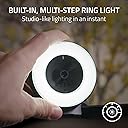
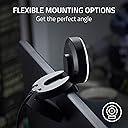
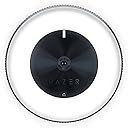
The Razer Kiyo is a premium streaming webcam featuring a built-in adjustable ring light, delivering flawless on-camera illumination without extra equipment. It supports 720p streaming at 60 FPS for smooth motion and 1080p at 30 FPS for full HD clarity. Equipped with fast, accurate autofocus and broad software compatibility, it’s designed for professional-grade streaming and video calls. Its compact, portable form factor makes it ideal for gamers and content creators on the go.


| ASIN | B076QK6489 |
| Antenna Location | Video streaming |
| Are Batteries Included? | No |
| Best Sellers Rank | 4,441 in Computers & Accessories ( See Top 100 in Computers & Accessories ) 39 in Webcams |
| Box Contents | 1 product |
| Brand Name | Razer |
| Camcorder Type | Webcam |
| Colour | Black |
| Compatible Devices | Personal Computer, Laptop, Tablet |
| Country of Origin | China |
| Customer Reviews | 4.3 4.3 out of 5 stars (6,260) |
| Effective Still Resolution | 4 MP |
| Effective Video Resolution | 720 Pixels |
| Exposure Control Type | Automatic, Manual |
| File Format | YUY2/MJPEG or H.264 |
| Flash Memory Bus Interface Type | SD or eMMC |
| Flash Memory Installed | 128 GB |
| Flash Memory Speed Class | C10 |
| Flash Memory Type | SDHC |
| Flash Memory UHS Speed Class | U1 or higher |
| Flash Memory Video Speed Class | V10 |
| Focus Type | Auto Focus |
| Form Factor | Compact |
| Global Trade Identification Number | 08886419377108 |
| Has Image Stabilization | No |
| Image Aspect Ratio | 16:9 |
| Image Stabilization Type | Fake |
| Item Dimensions D x W x H | 6.9D x 6.9W x 4.8H centimetres |
| Item Type Name | Razer Kiyo 1080p 30 FPS/720 p 60 FPS Streaming Webcam with Adjustable Brightness Ring Light, Built-in Microphone and Advanced Autofocus, Black |
| Item Weight | 7.05 Ounces |
| Lens Type | Prime |
| Manufacturer | Razer |
| Maximum Aperture | 3.5 Millimetres |
| Maximum Display Resolution | FHD |
| Maximum Focal Length | 60 Millimeters |
| Minimum Aperture | 22 f |
| Minimum Focal Length | 30 Millimeters |
| Model Name | RZ19-02320100-R3M1 |
| Model Number | RZ19-02320100-R3M1 |
| Network Connectivity Technology | USB |
| Operating System | Windows |
| Optical Zoom | 3 x |
| Product Features | Face Detection, PC / Mac, Webcam |
| Product Warranty | 1 Year Manufacturer |
| Screen Size | 2.45 Inches |
| Sensor Type | CMOS |
| Shooting Modes | Automatic |
| Style Name | Kiyo |
| Supported Audio Format | PCM |
| Supported Image Format | JPEG |
| UPC | 814855025039 |
| Unit Count | 1.0 count |
| Video Capture Format | MP4 |
| Video Capture Resolution | 720p |
| Viewing Angle | 81.6 Degrees |
| Water Resistance Level | Not Water Resistant |
| White Balance Settings | Auto |
| Zoom | Optical |
S**.
High-quality camera with a very bright ringlight
The camera quality is excellent quality, my partner has gotten into streaming and this camera does the job extremely well. Looks like an entire professional setup when you have your video on, the ringlight is very bright and does a great job in conjunction with the camera to give a bright video quality. Surprisingly this also has a mic built in, it's not the highest quality but it also does the job. Overall an excellent investment if you spend alot of time on video.
D**I
camera
top camera for streamers
E**G
Kiyo camera Win10 installation not obvious
Not perfect, a bit overpriced but OK so far, although installation was a bit mysterious. Windows 10 desktop machine. The user manual is very sparse. The led did not light up when it was plugged in as the manual said. Windows did not give any notification about detecting and setting up a device. I thought it was incompatible or broken. (Also tried a Dell laptop, Win10, it gave a brief device detection notification but gave no "ready to use" status). The Razer Synapse installation wizard popped up after a minute, with several options ticked that at first glance appear to have something to do with the camera but this is an apparent false flag. I did not bother installing any of the Synapse software, none it seems to have anything to do with the camera and it would use up nearly 400MB of my disk space. You may find some configuration for the Kiyo microphone there but other users have noted that the Kiyo mic quality is not the best for real streaming enthusiasts. I went hunting for clues as to whether this thing was installed in Win10. Settings->Devices listed the Kiyo under Audio, so it had obviously detected the microphone. Settings->Search "camera" comes up with "Camera Privacy Settings". You need to switch access "On" for any of the apps listed that you wish to use with the camera. I switched them all off except for the Camera app. In the start menu I typed "camera" and the Camera app showed up so I opened it. The Kiyo sprang into life, the led light ring came on and the app had images. Light ring adjustment is neat and the picture/sound quality is good enough for my purposes. The led shining in your face might get annoying if in use for long periods and I could do without the reflection of it in my glasses. Otherwise so far so good. I was then able to open the non-Windows apps that I wanted to use the camera with - Zoom, VLC and OBS. They all detected the Kio and it functioned in all of them, although some of the settings in the individual apps need adjusting but I've not delved that far yet. It worked with Zoom just fine and that will do for now.
C**Y
Great Camera
This is the second one I have had of this camera. My first one stopped working after 14months but emails to Razer and Amazon Customer service and it was soon replaced. After the service received and quality of the item, I'd happily buy this item again. Picture is great and the brightness of the light can be adjusted. Simple to use, just plug it in and off you go
M**X
DO NOT BUY - Awful software, unusuable in Teams & Zoom. Loses settings. Features break.
AWFUL, AWFUL SOFTWARE. DO NOT BUY EDIT: And the support is just as bad. A dozen emails to their support team trying to resolve this, and I've had a dozen pointless responses. They cannot or will not submit a bug report / feature request to their software engineering team to even begin the process of resolving this. I'm upgrading this review to add more details. DO NOT BUY THIS CAMERA. The software is awful, the webcam is unusuable in Teams or Zoom meetings. It constantly loses its settings. Two days in and now the Pan/Tilt/Zoom settings have stopped working completely. Awful software and buggy firmware have ruined what should have been a really good webcam. DO NOT BUY. I'm opening a return with Amazon for mine now. ==================================== Original review: First of all, this is a nicely made camera, and first impressions are good software and excellent customer support. The ring light works well, and also makes it very obvious when your camera is on. But. The software is awful. - The camera isn't named in Zoom, I have to select "USB Video Device". My Logitech was named. - In fact, the camera settings are so bad that it's useless for calls in Teams or Zoom - The preview settings in the Synapse software in no way match the camera view in Zoom, so the settings utility can't fix the problem - While Zoom is using the webcam I can't access or change camera profiles in Synapse So basically, THERE'S NO WAY TO ADJUST WEBCAM SETTINGS. You can adjust the settings while in Synapse only. You can't adjust the settings for any actual application, and the preview in Synapse doesn't match what the other applications will get. Worse, the settings are lost every reboot (which I now see is reported online by many previous customers). And two days in I find that the pan, tilt & zoom settings no longer have any effect. This is so much worse than my Logitech it's a joke. Logitech's software allows you to change pan, tilt, zoom, focus WHILE YOU'RE IN A MEETING. Imagine that, a webcam that actually lets you use it as a webcam. With Razer you're locked out of all of that, the softtware is it's useless. The Razor is clearly false advertising - "Full Camera Controls with Razer Synapse 3" is a lie. You have partial controls with Synapse, which may or may not work, and which don't cross to other applications. I purchased this camera as an upgrade from my Logitech because I wanted the ability to quickly switch profiles. I have to use Zoom, Teams and OBS with work, and all three need slightly different zoom, pan, tilt and settings. The promised "Full Control" in Synapse 3 is no such thing, you have basic lighting options, and then Razer have added an "Advanced Settings" button which opens the standard Windows webcam control dialog. The problem is NONE OF THESE "ADVANCED SETTINGS" ARE SAVED, which means profiles do not include: - Saturation - Sharpness - Zoom - Exposure - Pan - Tilt - Low light compensation On top of that, the Razer software has no way to easily switch between profiles. Synapse profiles have no way to add the Kiyo device. Checking online you can add mouse profiles, keyboard profiles, lighting profiles, all of which can be assigned to hotkeys. But Kiyo appears to be in a walled off section of the Synapse software. So the only way to change webcam profiles is to: - Close the application you're using - Open Synapse - Navigate to the Kiyo webcam - Change your webcam profile - Manually change "advanced" settings - pan, tilt, zoom, exposure, etc... - Close Synapse - Relaunch your application AWFUL, AWFUL SOFTWARE. DO NOT BUY
M**S
La caméra Razer Kiyo est exactement ce dont j'avais besoin pour commencer mon aventure dans le monde du streaming. Je suis ravi de cette petite caméra qui offre une qualité d'image exceptionnelle, une installation facile et de nombreuses fonctionnalités utiles. La première chose qui m'a impressionné, c'est la qualité de l'image. La Razer Kiyo propose une résolution Full HD (1080p) qui offre des détails nets et des couleurs vives. La fonction d'éclairage annulaire intégré est un énorme avantage, car elle assure un éclairage uniforme et flatteur, ce qui est essentiel pour paraître professionnel à l'écran. L'installation est un jeu d'enfant. Il vous suffit de la brancher, et elle est prête à l'emploi. Elle est compatible avec la plupart des logiciels de streaming populaires, ce qui simplifie encore plus les choses. De plus, le support réglable vous permet de positionner la caméra à l'angle parfait pour votre diffusion. Ce que j'apprécie également, c'est le fait que la Razer Kiyo dispose d'un couvercle de confidentialité intégré. Vous pouvez facilement fermer le cache lorsque vous ne diffusez pas, ce qui est rassurant du point de vue de la sécurité. Enfin, le rapport qualité-prix est excellent. Vous obtenez une caméra de streaming de haute qualité sans avoir à dépenser une petite fortune. Si vous êtes un débutant dans le streaming ou même un créateur de contenu expérimenté à la recherche d'une caméra abordable et efficace, la Razer Kiyo est un excellent choix. Dans l'ensemble, je suis ravi de ma Razer Kiyo. Elle offre tout ce dont j'ai besoin pour diffuser des vidéos de qualité professionnelle sans tracas. C'est un excellent investissement pour tout aspirant streamer !
G**Z
Działała przez trochę ponad 2 lata. Dzisiaj przestała działać - pojawia się krótki błysk na ringu i tyle. Aktualizacja firmware nie pomaga.
E**E
Buena definición Cumple con lo especificado Buen PVP
M**N
as expected
P**K
Really good quality
Trustpilot
3 weeks ago
3 weeks ago