⚡ Power your home network like a pro—fast, simple, unstoppable!
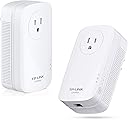
The TP-LINK TL-PA8010P KIT is a dual-pack powerline adapter delivering up to 1200 Mbps over your home’s electrical wiring. Designed for easy plug-and-play setup, it supports a wide range of devices via Gigabit Ethernet, making it ideal for streaming, gaming, and professional work-from-home setups. With HomePlug AV technology and a 2-year warranty, it offers a reliable and fast networking solution without the hassle of new cables.


| ASIN | B00Y3QPG1A |
| Best Sellers Rank | 207,296 in Computers & Accessories ( See Top 100 in Computers & Accessories ) 295 in Powerline Network Adapters |
| Box Contents | 1 product |
| Brand | TP-Link |
| Brand Name | TP-Link |
| Color | Black |
| Colour | Black |
| Compatible Devices | Desktop, Keyboard, Laptop, Mouse, Projector, Smartphone, Tablet |
| Compatible Operating System Family | Windows |
| Compatible devices | Desktop, Keyboard, Laptop, Mouse, Projector, Smartphone, Tablet |
| Customer Reviews | 4.2 out of 5 stars 713 Reviews |
| Data Link Protocol | Ethernet |
| Data Transfer Rate | 1200 Megabits Per Second |
| Data link protocol | Ethernet |
| Data transfer rate | 1200 Megabits Per Second |
| Global Trade Identification Number | 00845973092627 |
| Hardware Interface | Ethernet |
| Hardware interface | Ethernet |
| Item Weight | 426 g |
| Manufacturer | TP-LINK |
| Manufacturer Part Number | TL-PA8010P KIT |
| Model Number | TL-PA8010P KIT |
| Number of Items | 2 |
| Product Warranty | 2 year manufacturer |
| UPC | 845973092627 |
| Unit Count | 2.0 count |
A**R
Another awesome TP-Link powerline adapter - read my review answering other reviewer's complaints
First - powerline networking isn't for every deployment. These are no exceptions to those tricky areas (old house, noisy appliances or devices, poor wiring, etc. - so just know that going in. But for most people in recent, modern, up to code residential dwellings (especially the large homes where range extenders connected to these will really be up to twice as fast as the all wireless range extenders which have to share time - no way around it) - powerline networking can be the best thing that ever came your way. Second, anyone who knocks these because they don't get 1200 Mbps data transfer rate should be ignored. It's a number - a theoretical maximum rate for the chipset used, like your "AC1900" wireless router, where you also don't get 1900 Mbps. Every manufacturer labels devices this way, so live with it. Also, speed isn't the only consideration. Wireless networks drops packets like crazy or sometimes just have gaps in communication - there is only so much RF you can squeeze in the same band. Especially given the transient nature of the devices (fire up your phone next to your tablet while using your notebook while streaming to your Chromecast or using your Roku (with its $%&#* WiFi remote!!!!) and run a good network sniffer and see how many packets you lose or delays you see. My ASUS RT-AC66U and my ThinkPad with it's Intel 7260AC card has faster speeds than these adapters, but is not even close in terms of consistent packets with low latency. Your web surfing via wireless - not a problem, most likely - but your DVRs and streaming devices really appreciate steady, low latency throughput. So, enough whining about people's unrealistic expectations. I added these to my existing TP-Link AV500's (and wifi range extender) and just like those, these were plug and play. I've never had a glitch or rebooted the range extender for 2 years on the old units, I expect these will be similar. (and after 3 weeks have seen no issues). I used two ThinkPads, Ixia QCheck and Totusoft LANSpeed to measure all sorts of combinations, trying these in a dozen different outlets, with and without a cheap power strip and saw consistent results. My exact speeds don't matter (although they were over twice as fast as my AV500 units) - you use these sorts of tests only for baselining and your own reference to find the best outlets. *** One hint *** for those who complain about these partially blocking the other socket in your outlet - plugging these into a surge protector (or UPS, which I tried for fun) is a no-no, performance blows - that's a given. But go to Walmart and buy the $3 power strip with the short cord (it doesn't say surge protector - that one is $2 more and is not what you want) and you can plug into those without a drop in speed. That will solve your blocked plug problem, and in some cases make for an easier installation (it all depends). DO NOT let those complaints scare you away. I also tested these with my $1.50 6 inch 3 prong male-female extenders that I use for those annoying AC adaptors that suck up too much space and also saw zero change in performance. These are fast - the fastest AV1200 units right now according to smallnetbuilder's tests, and inonically the most inexpensive AV1200 units on the market. Drop dead simple to use, reliable, and...why haven't you bought these already?
N**F
HIGHLY RECOMMENDED PRODUCT. Answer to my internet problems!
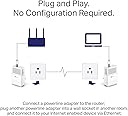
This is the answer to all my internet connectivity issues. I live in a townhouse with 3 floors, and the house is supposed to have a "home run" in that the modem/router should work on any DSL in the house, but it apparently only works on one phone jack, located on the first floor. This led to connectivity issues in my room on the third floor, where it became unbearably slow, even disconnected multiple times. There was an instance where my internet disconnected 4 times within roughly 20 minutes. I tried different methods: changing the wifi channel, buying and installing a range extender, but these didn't help at all. I was really frustrated with it all: the constantly buffering video, the choppy Skype calls, etc. When I first heard about this product, I was quite skeptic, given my experience. I did a lot of research on Powerline Adapters, comparing the speeds with range extenders, if it really works, and so forth. I gave it a shot, and I'm really really glad that I made that decision. Its a simple plug and play, plug one to the modem/router, plug the other to the device you want. Its so simple and straightforward. I did speedtest comparisons with all my connections: the modem directly to my laptop via LAN, laptop wifi via Range Extender, laptop via modem wifi, and laptop via Powerline Adapter. The direct connection would obviously be one of the top speeds; and the Powerline Adapter matched the modem speed, and to my surprise, sometimes even surpassed it. I can't recommend this product enough. If you're worried about the distance between modem and device, don't worry; I was worried about that too. It worked perfectly for me. Now I'm sure that everyone's situation and wiring in their house varies, but in my case it worked out quite well. I do suggest to plug these adapters in on an outlet, and not on a power bar or extension cord just in case. That way there won't be too much interference. Other than that, I highly recommend!!! :)
R**C
Instalación inmediata, altamente recomendable
Excelente opción para ampliar la señal a el 2o nivel de la casa. La compañía de cable proporciona un módem inalambrico el cual deje en el primer nivel con este equipo conecte un router en el 2o nivel tan simple como plug & play y la velocidad se mantuvo a 28 de 30 mb contratados
J**N
Easy to use, good quality, minor flaws.
This is a great product! Running an Ethernet cable across the house is unfeasible at times, and this solves the issue. Until I get my own house and run cat6 all over, this is going to be a staple for me. I'd always been a little wary because I'd heard some bad things about power-line adapters, but now that I've been using it for 3 months I wish I had tried them sooner. Pros: Works. Gets decently fast internet across the house, without running more wires. Really easy to set up. Literally plug and play. Pass-through outlet means the original outlet is still usable Network speed is pretty good. A little slower than straight to the router, but not too bad. Cons: Too big for the outlet - it covers up both outlets even if plugged into the bottom one. Network can be a little slow and unsteady at times. Especially if you have the washer/dryer or microwave running, the extra electrical noise will sometimes cause the connection to drop out (only occasionally!) or slow down. But, this probably depends a lot on your house's wiring too. Overall, I would buy again. That being said, I would prefer to use something like a MoCA adapter if possible, and I've had better signal quality with them before. My current residence didn't have a coax circuit to where I needed it though, and this makes a great alternative.
T**R
Bailed me out when I needed a more reliable connection.
I was in a living environment at the time circa Summer 2016 to Fall 2017 where my setup was in a 'dead zone' for WiFi, meaning that I couldn't get a very stable connection and would deal with occasional internet drops. I had considered a USB WiFi adapter, but wasn't 100% if that would've helped with the issues I was having at the time, so I ultimately decided on going for this TP-Link powerline adapter. One adapter was plugged into the wall where the router was located on the top floor, and the other adapter was plugged into the wall where my setup was located on the bottom floor. This setup gave me the stable internet I needed, I never had any serious drop outs/technical mishaps during the year it was largely in use, and although I was unable to get the full speeds that our ISP at the time provided, it was still more than sufficient and quick enough that I was satisfied. Whilst this has since been replaced by newer powerline offerings from TP-Link, this was an ol' reliable when I needed it the most. TP-Link has served me well, and though I no longer need a powerline adapter with my current setup, I would happily use one again if absolutely necessary.
Trustpilot
1 week ago
1 week ago