Desertcart purchases this item on your behalf and handles shipping, customs, and support to Argentina.
๐ Upgrade your speed, upgrade your hustle!
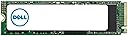
The Dell 256GB Class 40 M.2 2280 NVMe PCIe 3.0 Gen 3x4 SSD delivers high-speed storage in a compact form factor, compatible with both laptops and desktops. Designed for easy installation and backed by Dellโs 5-year warranty, itโs the perfect upgrade for professionals seeking reliable, fast, and portable internal storage.
| ASIN | B0BZJL9BRB |
| Additional Features | Portable |
| Best Sellers Rank | #1,283 in Internal Solid State Drives |
| Brand | Dell |
| Built-In Media | Dell SSD 256GB Class 40 |
| Cache Memory Installed Size | 256 GB |
| Compatible Devices | Desktop, Laptop |
| Connectivity Technology | PCIe NVMe |
| Customer Package Type | FFP |
| Customer Reviews | 4.4 out of 5 stars 23 Reviews |
| Digital Storage Capacity | 256 GB |
| Enclosure Material | Printed Circuit Board and Solid State Flash Memory |
| Form Factor | M2 |
| Hard Disk Description | Solid State Drive |
| Hard Disk Form Factor | 2.5 inches |
| Hard Disk Interface | NVMe |
| Hard-Drive Size | 256 GB |
| Hardware Connectivity | Solid State Drive |
| Installation Type | Internal Hard Drive |
| Item Dimensions L x W x Thickness | 3.2"L x 0.9"W x 0.1"Th |
| Manufacturer | Dell Computers |
| Model Name | Dell M.2 PCIe NVMe Gen 3x4 Class 40 2280 Solid State Drive |
| Model Number | SNP112P/256G AA615519 |
| Number of Items | 1 |
| Special Feature | Portable |
| Specific Uses For Product | Personal |
| UPC | 884116326298 |
| Warranty Description | 5 |
L**R
It works and was easy to install
If you're wondering how difficult it is to change out your solid state drive, don't. It's a piece of cake. Remove the screws from the bottom of the laptop. Disconnect the battery...the plug to the motherboard. One screw holds the solid state drive card...really, it looks like a small memory card/board. Make sure you discharge any static electricity by touching some bare metal. Then tilt the old board up and pull it out. Push the new one in...much easier than the memory Dimm boards I've installed on my desktop. You really have to lean on those to get them in. This was easy to push in. Note the slot on the end...it only goes in one way. My old solid state card had 2 slots on the end...the new card has only one slot, but it fits and works fine. Replace the screw, plug in the battery, replace the bottom cover and that's it. Piece of cake. Oh, and have a flash drive with Windows 10 ready to install and away you go. Mine booted up and installed Windows without a hitch.
M**H
Good transaction - Slow shipping
Everything was fine about the transaction except it took forever (8 days) to get it delivered. It's an SSD, not something big or complex.
A**E
What I needed
My computer said I needed a new drive and after I got this. I took it to a guy how was able to fix my computer and now I can play my games again ๐
R**S
New SSD??? Nope. USED!!!
Product description said NEW, This SSD had another Windows system installed on the SSD It was used!!.
M**W
Good quality replacement from a Dell laptop
I was a bit worried about this product has when it arrived it was not the same brand as the hard drive I was removing. I installed it in the laptop only to find it it already had windows installed on it which made my job a lot easier so overall very pleased with my purchase
E**L
Fit Perfectly
It does what he was described but it didn't come with any screws for the M.2 SSD. And it came with a pre installed Windows OS
Trustpilot
1 month ago
2 months ago