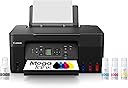
🖨️ MegaTank G3270: Print smarter, save bigger, connect easier!
The Canon MegaTank G3270 is a wireless all-in-one inkjet printer designed for home and home office use. It delivers high-volume printing with up to 7,700 color pages per ink refill, includes up to 2 years of ink, and features a 1.35” LCD for easy control. With Wi-Fi connectivity and compatibility with smartphones and tablets, it offers seamless print, scan, and copy functions while saving users up to $1,000 on ink costs compared to traditional cartridge printers.


| ASIN | B0BSMSYM9N |
| Additional Printer Functions | Copy, Scan |
| B&W Pages per Minute | 11.0 |
| Best Sellers Rank | #647 in Office Products ( See Top 100 in Office Products ) #87 in Computer Printer Ink & Toner |
| Brand | Canon |
| Built-In Media | PIXMA MegaTank G3270 Wireless All-in-One Printer, Set of Ink Bottles (GI-21: PGBK, C, M, Y), Print Heads, Documentation, Power Cord |
| Color | Black |
| Color Depth | 16 Bits |
| Color Pages per Minute | 6.0 |
| Compatible Devices | Smartphones, Tablets |
| Connectivity Technology | USB, Wi-Fi |
| Control Method | App |
| Controller Type | iOS |
| Customer Reviews | 4.1 out of 5 stars 5,186 Reviews |
| Display Type | LCD |
| Dual-sided printing | No |
| Duplex | Manual |
| EU Spare Part Availability Duration | 5 Years |
| Global Trade Identification Number | 00013803351507 |
| Hardware Interface | USB |
| Ink Color | Black |
| Item Dimensions D x W x H | 21.9"D x 16.4"W x 10.6"H |
| Item Height | 10.6 inches |
| Item Type Name | Inkjet Printer |
| Item Weight | 13.2 Pounds |
| Manufacturer | Canon |
| Maximum Copies Per Run | 99 |
| Maximum Copy Resolution Black and White | 4800 x 1200 |
| Maximum Copy Resolution Color | 4800 x 1200 |
| Maximum Print Resolution Black and White | 4800 x 1200 Dots Per Inch |
| Maximum Sheet Capacity | 100 |
| Maximum print Resolution Color | 4800 x 1200 Dots Per Inch |
| Media Size Maximum | 8.5 x 14 inch |
| Model Name | PIXMA G3270 BK |
| Model Number | 5805C002 |
| Model Series | PIXMA G3270 |
| Number of Trays | 1 |
| Other Special Features of the Product | Borderless Printing, Display Screen, Energy Star, Epeat Qualified, Network-Ready |
| Output sheet capacity | 100 |
| Paper Size | 3.5” x 3.5” (Square), 4” x 6”, 5” x 5” (Square), 5” x 7”, 7” x 10”, 8” x 10”, Letter (8.5” x 11”), A4, A5, A6, B5, Legal (8.5” x 14”), U.S. #10 Envelopes, Card Size (91 mm x 55 mm), Custom size (width 2.1–8.5 in, length 3.5–47.2 in) |
| Power Consumption | 16 Watts |
| Print media | Card stock, Envelopes, Glossy photo paper, High-resolution paper, Paper (plain) |
| Printer Connectivity Type | USB, Wi-Fi |
| Printer Output Type | Color |
| Printer Type | Inkjet |
| Printing Technology | Inkjet |
| Resolution | 600 x 1200 |
| Scanner Type | Flatbed |
| Special Feature | Borderless Printing , Display Screen, Energy Star, Epeat Qualified, Network-Ready |
| Specific Uses For Product | home, home office |
| Total USB 2.0 Ports | 1 |
| Total Usb Ports | 1 |
| UPC | 013803351507 |
| Unit Count | 1.0 Count |
| Warranty Description | 1 year |
| Warranty Type | Limited |
| Wattage | 16 watts |
S**1
Much easier to setup using the Windows app!
Since 1995 I've used many printers starting off with a Canon bubble jet. Since then I've used Brother, Canon, Lexmark and Epson. Admittedly for print quality Epson's sub lim dye is the best printing you're going to get. Their ink also lasts longer in regards to photo-life. As far as cost and availability of their ink at stores though is another question. Cost-wise they're all pretty much on par with each other for all brands these days. You can improve the print quality on Canon printers but you'll have to fool with the settings to get there which I don't mind doing. You'll also use a little more ink but that's the cost of quality. The Windows App made setting this printer very easy and kudo's to Microsoft and Canon for that. This is my first tank printer which I'm looking forward to using but you have to keep in mind that if you don't use the printer at least some what regularly, the ink to the printhead WILL dry out if you leave it idle for too long. Keep that in mind for EVERY printer unless you're using a laser jet. After adding the ink and updating the software I printed out my test page, simply scanned it and the printer itself set the print alignment to it's best settings. Super easy! Print outs aren't the fastest which is fine I'm not looking for speed to be honest. Print quality is very good on standard settings but I'll probably set it for best print quality later. Canon printers inherently have a sequence of sounds that hasn't changed in 28 years lol. Same for most other brands too. Not annoying but not silent either so don't expect that. It's no louder than the other brands. Canon has always done good black and white printing well before the other printer brands and their color quality has improved significantly as well. Having tanked ink versus having to buy cartridges is VERY cost effective! You essentially pay double for the printer but save long-term in the amount of printing (the REAL cost). We used to have a Cartridge World store that would sell refurbed ink tanks that worked 100% of the time but that location closed recently and sadly. If you have one near you I highly recommend them! I had recently bought an Epson XP4200 AOI printer but finding the cartridges took some time and forget locating them in your local store unless you get lucky, then came the cost. The XL cartridges range $30-$50 which is about what I paid for the printer new. Even off brand ones aren't that cheap. Having a tankless printer saves me time in finding ink and saves me a ton of money over having to buy overly expensive cartridges. Many of the 3rd party ones don't always work either so it's iffy in regards to cost savings. If at some point I have to do the printhead bath to clean them I don't mind, it's well worth it for not having to buy outrageously expensive cartridges. I'm done with them! I definitely recommend this printer even if you're only doing average home use. Just remember to use it every week even if just once.
C**R
Excellent choice for small cost
This review is weighed by its cost and performance. I had short term need for a scanner not a high volume printer and ended up impressed by all aspects. Okay the scanner software is clunky but works and is free. Printing quality is very good even compared to machines far more expensive. Haven't attempted faxing but with scanning direct pdf I likely never will need to. Yeah the screen is very small but clear enough for 77 year old eyes. If your needs are limited or wallet is strained one can't go wrong with this all-in-one printer.
T**.
Pretty good all-in-one ink tank printer.
When my 3-year-old Epson Eco tank AIO printer gave out I did some research online and this printer kept coming up with consistent 5-star ratings, so I thought "why not"? Now first off, I have to say Amazon REALLY messed up the delivery! The day it was supposed to arrive I got a text saying it had been delayed in transit and was going to be here the following day. When it didn't arrive, the Amazon driver stated he couldn't "gain access" to the apartment. Further investigation determined he "got lost", and these drivers have a satellite map system in their delivery trucks? When it eventually arrived another day later (2 days late in all) one corner of the packing box was damaged and there was no Styrofoam "peanut fill" inside the box, and as the packing box was much larger that the printer box, I was worried about damage to the printer from it sliding around in the packaging due to the rigors of transportation. Fortunately, there were none. SO, for all the mess up with delivery, sorry, but Amazon only gets 1 star for their role in this. Unpacking the printer was easy, and after placing on the printer stand section of my computer desk, I started the installation. No instructions are provided - you are directed instead to Canon's website for installation and setup instructions. As I did not want this taking up bandwidth on my Wi-Fi I used a USB cable; BEWARE, if you want to do the same as no cable is provided, but fortunately I had one hanging around to do the job. Following the installation instructions online was pretty simple as was filling the ink tanks, however, DON'T use ALL the ink in the bottles, but instead watch closely on the outside "windows" for each color ink tank until the ink reaches the clearly marked "FULL" line and then quickly remove the ink bottles. The rest of the set up was pretty straight forward, downloading software, drivers etc., but for some reason Windows 11 didn't auto detect the printer the first time I went to use it, so I had to shut the printer down and re power it up for before Windows found the printer. The print test was perfect, and the auto alignment also set the thing up perfectly. I scanned a document and a picture, and both appeared to be reproduced faithfully when compared to the original documents. I deducted 1 star because unlike most AIO ink tank printers in its class, it doesn't print on both sides, but I was aware of that before purchase, and the issue of initially failing to find the printer in Windows 11 also factored into that 1-star deduction. As I said, I use mine plugged into a multi-USB port extender bank so I can't speak to ease of set up for Wi-Fi. I also don't do any highly sophisticated color printing, such as high-res photos, so I'm not sure if it will hold up to that type of usage but it certainly meets my needs. Conclusion? A pretty good ink tank All-in-One printer for home and home-office use, and it goes without saying that in common with all these ink-tank printers available now, this will save a TON of $ compared to the old inkjet cartridge system available on other inkjet printers on the market. Will it last as long as its predecessor? Don't know obviously but the initial build quality appears to be top notch.
W**W
Canon MegaTank Printer is Awesome
This printer is a workhorse. I have yet to buy more ink for it. I have had HP printers for years and they sucked up the ink really fast and it was so expensive. I had an older Cannon printer before and it worked well, so I thought I would try this new one. So far there is still lots of ink for all the colors and we have done a lot of printing on it so far. It was easy to set up too with the app you add to your phone, iPad, or computer/laptop. Love the wireless feature and it doesn’t lose WiFi signal. My previous HP printer would always lose the WiFi signal and I had a hard time getting it to work. I donated the HP printer that didn’t work very well with WiFi and bought this Canon MegaTank and I am very glad I did.
A**A
White Updated G3290... NOPE!!!!!!!
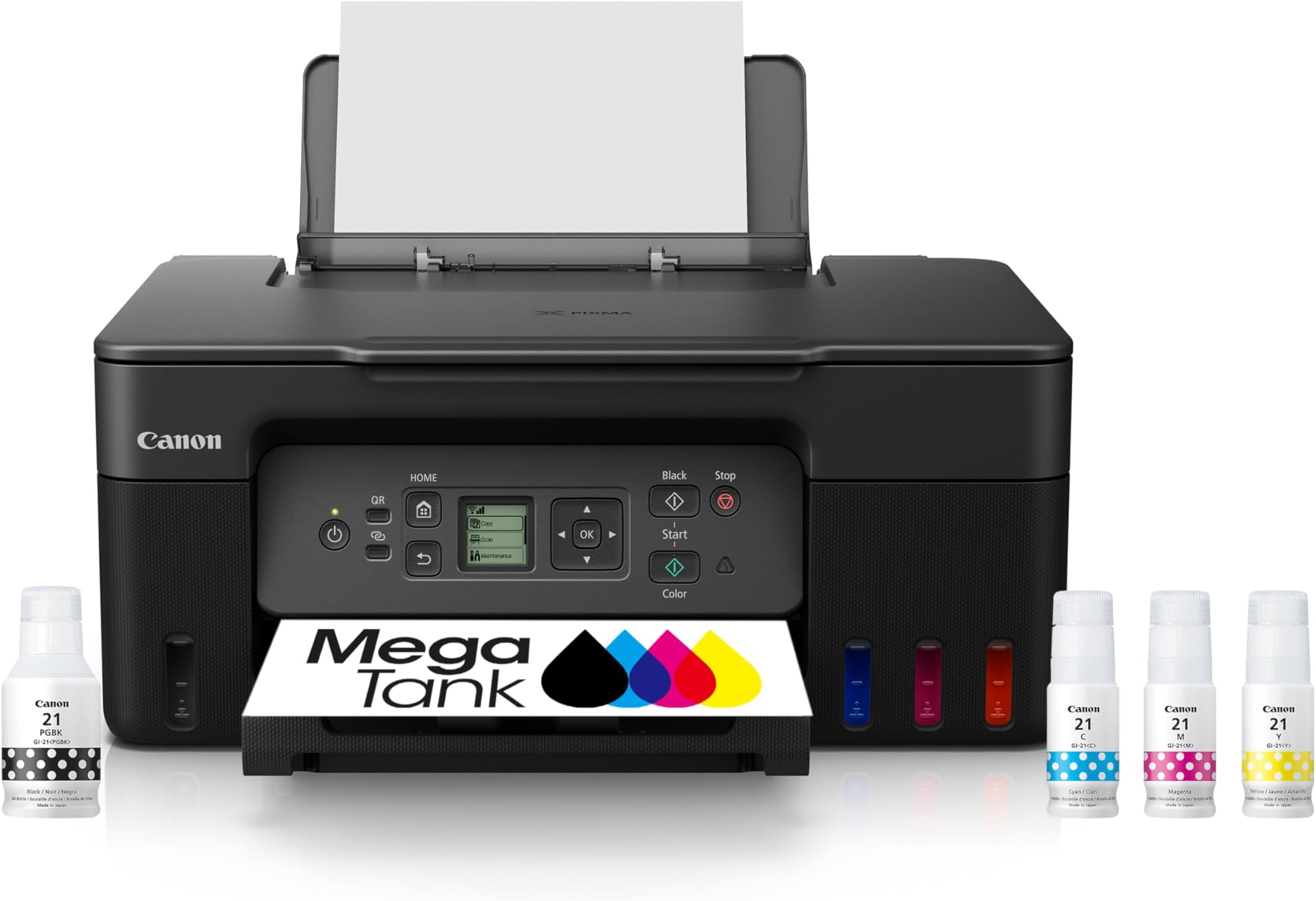
I wanted to like this, I was SO excited to order and receive it... but already out of the box the setup to connect was frustrating and we kept going around in circles. The QR code on my android, once the page loaded... did not stop loading. The setup page just kept spooling glitching and resetting so there was no way to actually connect that way. Tried it on my tablet (would be mostly printing from that) and my android phone (same conclusion). Had to do it with PC. The LCD screen and lack of instruction also frustrated my partner. FINALLY after Forever we got it connected. Which leads to HOURS to try to get a decent true black print. I tried 10 different type of papers (glossy, semi gloss, matte, presentation paper, plain and some others). Every print on glossy looks the same. Faded, Red Hue, MUD. Every print on Matte turned out a little better (at least not red hue) but Grayish hue and not black black. The Only Black I saw even close to black was on test print on plain paper. Any image that printed black was a Black and white image on plain paper (which may work on glossy except I do a lot of color). THERE IS NOT ENOUGH PRINTER SETTING OPTIONS in the Canon apps. You cannot tweak it, tweak alignment, no contrast/brightness, no color intensity no detailed options whatsoever. It is the worst printing app editor for artists. You just have to be happy with quality either Standard or High, a paper type, borderless option. No much else really. I downloaded All the Canon apps for this particular model from their site. There is basically NO printer app that will work with Canon that has detailed printing options mentioned above. I thought with Canon being about images, that somehow they would have it together enough for artists, but they seem to cater to Only general basic consumer and not the artist. The App/s are FRUSTRATING and Severely lacking. The printer itself is noisy and a busy body. Constantly nagging you and beeping as soon as you put paper in it want's to know what paper size/type... BUT they ask the same question in the printing app itself, the two don't always talk to each other. I shouldn't have to always answer and set that info twice. Then after every individual print it seems to clean its heads. Fine... if I were doing a ton of printing. . . but after every single print (literally when I print one sheet and nothing after). Then it takes around 10 min. for a Full color borderless print. Which would be fine... except it does not print true black or Black at all ... just a muddy brown/red/gray black. There is no troubleshooting that can fix the color not printing correctly because it can recognize and only do a close to black IF the image is B/W to begin with on basic paper... but if you are doing color... with a lot of black in the image... Forget it. AND... because this was brand new and no clogged anything. Straight out the box issues from setup/connect to print. I tried on all platforms (phone/tablet/PC desktop), I also tried to print from dif. apps like Photoshop, photo editor from my comp etc... just to try to bypass the Canon Lack of editor feature set. Nothing worked. I also tried dif. setting options in the Canon app (changed paper settings, changed standard to high (pretty much the only setting options they gave). And all gave the same muddy red/brown/gray/black options. This has been one of the most depressing, frustrating, angry experiences I've ever had with a printer and printer app. I CANNOT recommend for ANY artist that wants true black or control over print edit features mentioned above. You will upset if you settle for this. I either have to get a machine that isn't refillable (which is Gonna SUCK)... or suffer the fate of forking over 3xs the amount for another refillable brand that I've heard may leave paper feed perforated track marks in gloss photo paper. Neither option is good. So many other things to say about the experience... but I'm TIRED! Returning, and someone else can feel what I felt when they open the box swimming in the inks I filled in the tank and couldn't take back out. Attaching pics for reference of color prints. One of the pics has a set of 1" button prints for reference of what the black should look like and doesn't. That was printed on my old Epson. The OG image on the rest of the prints was Very bright and the black was very black. The prints that look a little less Red are on Matte, and the others are on glossy... and the black and white design was B/W to begin with on basic paper. Much Luck People, and Canon... PLEASE DO BETTER!!!
R**X
Plug-and-play using the Ubuntu operating system, both scaning and printing.
The Canon G3270 printer is plugged into my venerable 2008 iMac running Ubuntu 25.10 (Apple makes a good product but they end support way too early) and it works great right out of the box. The G3270 supports Linux and for the Ubuntu operating system it is plug and play. There is no user manual included and the only instructions are to install Canon's printer app for Windows or Apple and follow the directions. No apparent support for Ubuntu and this might have been a problem; however, the Canon website has some FAQ for the G3270 which provide sufficient information. Here are the steps: 1. unpack 2. remove the tape from the printer lid 3. plug into the computer using a USB cable (not included) 4. plug into power 5. power on and follow the instructions on the printer's screen (three more steps as follows) 6. install the two printer head cartridges 7. fill the ink tanks 8. add paper and run the initialization (6 minutes) Both print and scan functions work as usual, but the scan is pretty slow, maybe 30 seconds or more. After printing the Ubuntu printer test page, I scanned it to see how it looks. I also scanned in the nozzle check test pattern to see how well it picks up the colors. It is good enough for my purposes. Filling the tanks was so easy that I thought I must be doing something wrong. Nope, the bottles have tops that prevent you from putting the ink in the wrong tank and the tanks hold precisely one bottle of ink so no overflow occurs. No ink on my hands what-so-ever. The Canon website has Linux drivers, but there was no need to install them. Maybe there is some advantage with the drivers installed, but for me, "if it ain't broke, don't fix it." I am quite happy that this printer is supported by Ubuntu both for printing and scanning right out of the box.
J**A
Good value printer
Good value printer. Plenty of ink with the "Megatank". I was concerned about ink spillage for the initial ink fill up to the printer ink tanks. The ink bottles are designed well. Each color& black bottle has an index molded into the bottle that prevents you from putting it in the wrong location. Good engineering design there. Not a drop was spilled when the bottles were turned upside down to insert them into the ports for the ink tanks. I'm hoping this will end all the annoying ink cartridge replacements like I did with my old printer. Setup was a little tricky at first using the provided QR code. I would have preferred have a DVD disk to do the setup. My Iphone, Tablet and Laptop running Windows 11 went smoothly for the setup. I also have an older desktop PC running Windows 7 that I keep offline most of the time. I was planning to use the USB port on the printer with the older PC. I was not able to get the driver setup to work with that PC. I tried copying the driver download to a memory stick but I got an error message right away when I tried to open the setup file. I'll work on that problem later. As far as printing documents, the printer operates very well. The 2-sided printing works well and photos resolution looks good. It's so new that I haven't tried to use some of the other features yet.
E**Y
Clogged Print Head
I’ve had this printer now for about a month. Overall it does a decent job at printing high quality images. (I use it to make collectible, non-tcg cards). However, if you are buying this printer to print lots of full color images, be warned that the print heads may get clogged. After a week of not printing, my print heads were clogged. Tried cleaning them with a solution recommended for this printer model, and it made it worse. (Could have been something I did wrong). Either way, finding a replacement printer head is quite difficult. You can only buy a legit canon head on the canon website. No stores sell it, which is quite frustrating. Overall, the printer is decent. Seems like print quality does go down when you’re not constantly printing with it. Connectivity was easy. The app is ok. I will also note that it does lose connection with my devices sometimes, but not enough to affect my rating. All I’d say is I wish it was easier to buy replacement parts.
Trustpilot
2 months ago
1 week ago