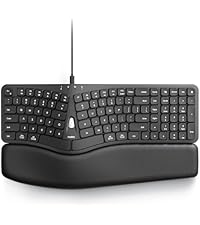
⌨️ Elevate your workflow with comfort and style — type smarter, not harder!
The Nulea Wireless Ergonomic Keyboard combines a split, curved design with multi-device Bluetooth and USB connectivity, a vibrant 7-color backlight, and a powerful 2000mAh rechargeable battery with USB-C charging. Its adjustable tilt legs and wrist rest ensure ergonomic comfort, making it ideal for professionals seeking productivity without strain across Windows and Mac platforms.


| ASIN | B0BFVYYYN7 |
| Batteries | 1 Lithium Ion batteries required. (included) |
| Best Sellers Rank | #113 in Computer Keyboards |
| Customer Reviews | 4.3 4.3 out of 5 stars (1,601) |
| Date First Available | September 20, 2022 |
| Item Weight | 3.52 pounds |
| Item model number | RT05 |
| Manufacturer | Nulea |
| Product Dimensions | 16.5 x 9.6 x 1.3 inches |
T**S
Love this keyboard!
This keyboard was exactly what I was looking for. The lighted keyboard is extremely helpful and I love the split keyboard immensely. It is very comfortable use as on the bottom of the keyboard are small feet so you can raise or lower the back or the front. Using the feet on the front allows me to rest my wrists while typing. Well worth the money.
A**W
Good keyboard, good price
I needed a new keyboard for work. I was using a Microsoft Sculpt. I LOVE that keyboard and how comfortable it is. However, after only a year of use it started disconnecting randomly and it was super annoying. I tried new batteries, making sure drivers are updated, etc. I am on a computer for work 40+ hours a week and need my keyboard to be reliable. So, I begin searching. I wanted something that was split again, had options for tilting, backlit and not too expensive. This one came up in my search and after reading several reviews I decided to give it a try. Unboxing and getting it connected was super easy. It can connect by blue tooth of USB piece. I also love that I can set it up to be connected to my laptop, and to my phone and can toggle between the two. The color options for the backlight are a nice touch. You can also adjust how bright they are. There was a bit of a learning curve in getting used to typing again as my sculpt had a lifter on it that made the keyboard angle down in the back more. I liked that, and the feet on this keyboard do not give me quite the same angle. I may use the old riser from my sculpt on this one somehow, but for now its not super uncomfortable or anything. My typing speed is just as fast. The keys feel nice when pressing them and they are not super loud. Battery life seems pretty good so far. I do like that there is an off/on switch so that I can turn the keyboard off when I go to lunch and when I leave for the day. Time will tell, but so far I am impressed with this keyboard.
D**E
Perfect - but not for Windows
I'm really at a loss as to how to rate this keyboard. I'm a professional programmer and I use Windows OS. There is a lot to like about this keyboard and not much to dislike. The keys are perfect - just the right spread and feel. The keys are concave and fit the fingers well. The ergonomic split is perfect. The keyboard slant and the wrist rest are perfect. The weight and feel are perfect. (Do you notice a trend yet?). The battery is rechargeable, which I really like. There are a couple of things that I dislike - so much so that I am returning the keyboard. First, the home, end, page up, and page down keys are just sort of stuck at the top of the rest of the keys - there is no dedicated key block for this. Same for the arrow keys - just sort of smooshed in with the rest of the keys. The backspace key is where it is supposed to be but the delete key is in an unusual position (think MacOS). As a professional programmer, I am used to having the keys in separate blocks. This way, I can just feel for the key positions without having to take my eyes off the screen to hunt for them. This is a huge downer for me. Second, the function keys are all dual-purpose. This would be OK but the dual purpose function is active by default. To use a function key (F1, F5, etc.) it is necessary to press the Fn button. This is completely unacceptable. It would be nice to have a button that would flip the key layout from normal to alt function keys and leave it there so that I could set it for the most common use. These two things are show stoppers for me. I still rated the keyboard as a 5 overall because it is so well implemented. But it is not a traditional Windows keyboard. Windows users use the backspace *and* the delete key a lot so it's nice to have them findable by feel. Also, Windows users use function keys (F1-F10) a lot so it's nice to have them accessible by default. If Nulea were to put out a Windows style keyboard with Bluetooth I would buy it in a minute. In fact, I'd probably buy 3 or 4. I wound up buying a competitor's keyboard that I don't like nearly as much but it fits my coding style better. Sigh.
B**D
These keyboards can be polarizing - you tend to either love them or hate them. I'm typing this review on this keyboard and I'm really enjoying it! My daily driver keyboards are a Logitech KB 350 (for work) and a Logitech MX Mechanical (for play), so I'm already quite used to the split/tilted/angled style of the keys - but to be fair, this Nulea wireless keyboard raises the bar on that. There are a bunch of borrowed styles and designs integrated into this keyboard: multi-PC connectivity via Bluetooth (two connections) and a 2.4 gigahertz USB A dongle that stows away neatly on the underside. Multi-coloured under-key LED lighting, cupped keys and a fully integrated/non-removable wrist rest. Pretty much all the best ideas we've seen for many years are rolled into this keyboard. Aesthetically, the keyboard is beautiful. The colours, plastics and shape of everything are super sleek, elegant, and very suitable for professional office use in my opinion. The wrist rest is butter soft with a firm, light padding that feels like nothing at all to me, and I'm guessing that's the point - you are fully supported so feel zero strain on your wrists or tendons because everything is aligned where it should be to type (as natural as that can be for humans, I suppose). I really like the keyboard shortcuts to flip between the various Bluetooth and 2.4G dongle options (Fn-Q, W, or E}. I like the layout of the option keys so that they can be used on Windows or Mac - and you can flip back and forth quickly between them! I like the status LEDs that report which connection you are using and battery charge status (super clear from any angle and very bright). I like how the keys are very quiet (definitely feels like a good quality membrane keyboard with a nice, tactile bump on all keys). I love the foldaway feet to raise either the front OR the back of the keyboard - perfectly suited for portable lap-desk use and this REALLY reduces typing stress on the back of my hands. The Bluetooth latency is much less perceptible to me than on my MX Mechanical (way to go, Logitech - this keyboard is a quarter of the price!). A couple of things I didn't like: -no right control key! (did we really need a dedicated light button?) -the butter-soft vinyl on the wrist rest might not stand the test of time. It's pretty thin/light and wraps around a hard front edge of the wrist rest that may wear it out prematurely if you are heavy handed Overall, I love the way this Nulea wireless keyboard looks, and I'm able to type at the same speed as my daily drivers. So to me, this is an absolute win. I'm still getting used to the beautiful, intense colour changes I have at my fingertips. Highly recommended!
C**.
Que excelente teclado, calidad premium.
H**S
5 out of 5 Stars (5) ⭐⭐⭐⭐⭐ [REVIEW UPDATES] [TL;DR] [QUALITY] (5/5) [VALUE] (5/5) [EASE OF USE] (5/5) [MET EXPECTATIONS] (5/5) [PACKAGING] (5/5) [REVIEW REMARKS] Being new to using an ergonomic keyboard, there was a brief learning curve and acclimatization period. The comfort level is undeniable and the low profile keys are really wonderful to type on. When backlit, you are able to select from seven (7) different colours, which is nice to be able to match any other glowy-glowy devices I have. The wrist rest is so comfortable to use and your wrists are always at the right height. The Bluetooth connection is handy, however, the USB dongle is far more stable. With that said, having the ability to connect to a device via Bluetooth is very handy, especially to be able to use a single keyboard with multiple cross platform devices. As ergonomic keyboards are something new for me to use, I found that this model keeps my hands and wrists in a more natural position. The split spacebar is not something that I thought I would appreciate. I noticed the wear marks on my previous keyboards have wear only on one side, as I only tap the spacebar using my right hand. Getting away from this is going to take some work, as I am not a 'touch-type' like my wife is. She types with precision and speed, and she uses both hands to tap the spacebar depending what side the last keystroke is on. I like how my posture has evolved since using this keyboard to type on. The jury is still out regarding if this will become my primary keyboard, or if I will switch back to my previous. Old habits. This is also wireless keyboard that is rechargeable using a USB-C cable. The battery life is excellent. I have used this just over three weeks on the same charge. I like that it uses USB-C and not a proprietary cable. All in all, this has been a terrific keyboard to date. I love the added comfort that the ergonomic contour brings to typing on this keyboard. The backlit make this keyboard easier to read, especially in dim lighting. The dual wireless connectivity protocol is handy for multiple device pairing, and hot-swapping between devices is surprisingly easy to sync up and increases productivity by only needing one input device. Recommended. In the event that experiences change or evolve, updates may be made to this review to address such developments.
R**U
1. The price is too much when compared with the quality of the product, I paid almost 12k. 2. The plastic was smelling when I opened the keyboard from box. 3. The control buttons are not at the right position, right control button is missing which makes harder to work. 4. The Pam rester cushion was coming out. 5. Left arrow button was almost coming out as well.
T**A
I have been using this keyboard for about 4 months. The design is great and helps to relieve some of the pain in my hands from typing. The wrist support that is attached is confortable also. The backlit keypad is great especially in low lght places. The internal battery ast forever. I think i have only charged it 2 or 3 times. The CTRL key came off so I emailed the company. They responded within a couple hours, we emailed back and forth about a replacement and what options I had once. Within 24 hours they are sending out a replacement at no charge. I would 100% recommend this keyboard.
Trustpilot
3 days ago
5 days ago