Buy anything from 5,000+ international stores. One checkout price. No surprise fees. Join 2M+ shoppers on Desertcart.
Desertcart purchases this item on your behalf and handles shipping, customs, and support to Argentina.
✍️ Elevate your iPad experience—write, draw, create like it’s paper, but better!
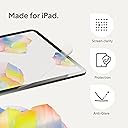
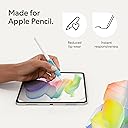
The Paperlike® 2.1 Screen Protector for iPad Pro 12.9” combines cutting-edge Nanodots technology with ultra-thin, durable materials to deliver a premium paper-like writing surface. Designed for Apple Pencil users, it offers scratch and smudge resistance while preserving vibrant screen clarity. The package includes two protectors and tools for a smooth, bubble-free installation, making it the go-to choice for creators seeking precision and protection in one sleek accessory.


| ASIN | B0BJKPQNYH |
| Best Sellers Rank | #78 in Tablet Screen Protectors |
| Brand | Paperlike |
| Brand Name | Paperlike |
| Clarity | 0.95 |
| Color | Transparent |
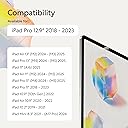
| Compatible Devices | Tablet, iPad Pro 12.9" |
| Compatible Phone Models | iPad Pro 12.9" |
| Customer Reviews | 4.0 out of 5 stars 7,361 Reviews |
| Finish Type | Matte |
| Global Trade Identification Number | 04260470099683 |
| Included Components | Paperlike 2.1 |
| Item Dimensions L x W | 11"L x 2"W |
| Item Hardness | 2H |
| Item Weight | 10 Grams |
| Manufacturer | Paperlike |
| Material | Polyethylene Terephthalate |
| Model Name | Paperlike 2.1 |
| Model Number | PL2A-12-18-2 |
| Number of Items | 2 |
| Part Number | Screen Protector |
| Product Dimensions | 11"L x 2"W |
| Screen Size | 12.9 Inches |
| Screen Surface Description | Matte |
| Special Features | Anti-Fingerprint, Touch Sensitive |
| Unit Count | 2.0 Count |
| Warranty Description | Legal warranty |
R**9
Installation is a bliss (when you order from paperlike)
I was really looking forward to writing on my iPad and feeling like I was writing on paper. The reviews, for those few, who can get it on,are great, so I took the bullet. I wasted 40$ and 2 paperlike protectors. First steps of the installation are easy enough, like any other protector. But once you go to remove "2" aka "paperlike side" you are done, the whole thing comes off, paperlike and "foil" I took my time, was not in a rush, watched the video 3x before attempting it on my own. The paperlike came off both times. It's not worth it if you can't get it installed. You waste money, energy and end up with the same glass screen to started with. I wish I could have gotten it on, but the other reviews are right. Installation is hard, and may be 1/3 of them work out for a great experience. So disappointed UPDATE: I updated from 1 star to 5 stars. This is why... 1. Customer service is amazing, they contacted me after my initial review and sent me a replacement for free. It arrived in 2-3 days, so fast and efficient at no extra cost. 2. I realized it's not paperlike's fault. It comes down to storage/Amazon/heat. I believe the first one I got from Amazon wasn't stored properly and the two films were practically melted together, so they came off together. The paperlike I got from the company itself was a bliss of an installation. I followed the same steps as before, but ran into absolutely zero issues. 3. It really feels like you are writing on paper! And also like you are flipping real pages in a way? It has a different feel when scrolling through pages (left/right) that's similar to paper ..you just have to try it, hard to explain lol Only con is the slight opacity it brings to the screen. About 5-10% opacity, but Ill get used to it cause the trade off it's absolutely worth it. Biggest lesson here, order directly from paperlike, follow the video and you'll have no issues ...and if you do, they got your back ;)
R**L
Updated -- installation tip
My original review is below. I had a hard time with installation due to dust and air bubbles. I complained that there was no tool included to remove air bubbles, so when I was trying to eliminate them by pressing them out with my fingers, the sticky side of the protector was exposed to the air too long and I ended up getting a lot of dust particles. Paperlike read my review and sent me a replacement protector and also advised me to use something like a credit card to press out the bubbles. And they explained that they do not include a tool in order to reduce waste since most people will have a card / ID of some sort. I totally support this. I used a card to install the replacement screen and it worked like a charm. The protector is perfect now. I'm not sure why my first one was scuffing, but so far I'm not seeing that problem with the replacement. --- Original review: The first screen I installed had so many bubbles in it and seemed to draw in lint from the environment, had to discard. I install screen protectors regularly. With these, you have to lay them down really fast or you end up with lint. But installing fast means you don't have the opportunity to press or the air bubbles and no tool is provided for this purpose. I installed the 2nd screen more to my satisfaction but I'm finding that it scuffs easily despite me storing my ipad in a laptop sleeve and the scuffs don't come off with cleaning. They are not scuffs caused by my Apple Pencil. I have no idea what they are, but I store my other iPad the same way and have never experienced this. I have another iPad for work and I installed a cheaper matte screen protector from an "off" brand and it has none of these problems. I went with the "nicer" protector for my personal iPad, but I feel like I wasted my money on this and will just have to buy another set of cheaper matte protectors. Can't seem to get any customer support since I've "used" these by installing them. Not a fan of wasting $45 plus the cost of protectors that I know will work. Goes to show that marketing efforts don't always equal quality.
A**R
READ ME IF YOU’RE INDECISIVE
Okay, so where do I start. I thought people were exaggerating when they said this was difficult to put on. BELIEVE ME, it is. Honestly, I’m usually good at stuff like this, and I’m a pretty particular about the details. First off I wasn’t expecting the top layer “sticker” to be sticker than the actual portion that adheres to the iPad. This is what caused it to peel up, lose its positron and gather some particles under. I tried to reposition it, and in the process the screen protector folded in on itself and caused a kink so I was forced to make the second one work. So, I gave it another go, and this time the underside adhesive that covers the bottom portion of the screen protector was the difficult one to pull off. That again made me lose the positioning of the guide stickers and when I finally got the bottom layer off, I was back at square one putting on the screen protector by eye with my hands. I was kind of forced to do this since I was afraid of another kink and I’d lose my second chance at it. Finally, I went ahead and put it on, but man, there were SO MANY dust particles underneath the screen protector. At this point, I’m just going to live with it, and honestly, I don’t know if it’s worth it. Goofing my hand across the screens “feels” like paper I guess. I want to like it but damn, that application was a pain in the ass. My advice, if you’re not comfortable putting these on, DONT TRY IT. Maybe get something easier to apply. I might try and get a refund idk, lowkey feels annoying at this point. Which is why I left a 1 star. The packaging gets a 5 star tho. It was really put together and neat, but maybe they need to spend a little more time reengineering the adhesive structure. Seems to be off balance somewhere.
M**E
These are the BEST ipad screen protectors!
This is simply the BEST iPad screen protector EVER. Even if you don’t intend to write on your iPad, this Paperlike screen protector is still a must-have. It makes your finger glide smoothly over the screen without leaving fingerprints. It has the perfect amount of frosted/anti-glare texture (very subtle) that is amazing to write on and comfortable to look at under light, while still having a very minimal amount of the rainbow effect (which is inherent to any anti-glare screen protector). I hardly even notice it. With this screen protector, you really get the best of both worlds: functionality and aesthetics. The picture quality virtually remains as if there were no screen protector at all. I have been using iPads for years and have tried many anti-glare screen protectors over the years, ranging from cheap no-name brands to mid-range/popular ones and even high-end options like Moshi, but nothing compares to this one. I was skeptical at first about trying Paperlike, but now I wish I had found them sooner. They are literally making the best product on the market. It’s a bit on the expensive side, but you actualy get what you pay for. In fact, it may even save you money because you won’t have to try numerous low quality products and replace them when they fail to meet your expectations. I rarely write reviews, but I had to give them the credit they deserve. Also, their customer service is excellent. I was having a hard time applying the screen protector to my iPad, but they went out of their way to help.
N**R
Great Product but TERRIBLE Application Process
I have been using paperlike screen protectors for years and on each of my iPads since 2017. I love the screen protector! It is truly great and feels just like paper. The clarity has became better over the years too. The reason I am giving it 4 stars is the application process is truly ridiculous. It sucks and I would say I’m pretty good at applying screen protectors. The fact that I needed to use my second one because the first had way to many bubbles that I couldn’t fix and the guide stickers aren’t strong enough to actually hold the ipad and screen protector in place so the alignment was super off. My second try was better but since they have been working on the design of this product for over 8 years, it is crazy to me that the application process hasn’t been improved on at all. Such a great product but so difficult to get a reliable good finish.
A**.
Good Product, Great Customer Service
We recently upgraded our older iPads which had Paperlike screen protectors on them, and went to get a new set. The product themselves serve their purpose, to create a matte, paper-like surface for your apple pencil/stylus to mimic the feeling of writing on paper as well as protecting the glass. A typical matte screen protector. The aspect that sets Paperlike apart from others is their customer service. You see, even as screen protection application veterans, my partner and I still had issues installing the screen protector on their iPad. Each package comes with 2 protectors. We followed the application instructions, but our first attempt ended up with scuff marks from using a credit card to get rid of the bubbles. Our second attempt didn’t align well because we couldn’t get the guide stickers to stick! I reached out to paperlike, and they responded so quickly! We explained our issue to them, and they happily offered to send a replacement set. It came within 24 hours of us reaching out. I don’t think I’ve ever had such a great customer experience. I’m glad we gave their products a second chance. Turns out we got a lemon package to begin with, but were much more successful with the second package. Unless someone comes out with an airtight, vacuum sealed screen protector application system alongside their protector product, I’ll continue to buy these for my iPads.
R**A
Feels nice, impossible to do without dust
I purchased this item because I hate how slippery my iPad screen is when I try to draw. The Paperlike absolutely improves the screen for a better drawing/writing experience. However, process by which you apply the Paperlike makes it nearly impossible to get it on the iPad without dust and debris underneath. The two-pack is not cheap, and I had hoped it would last me a while. I applied the first screen protector as instructed, meticulously removing every speck of dust. The sticky dust removers leave smears/residue on the screen, which then prompted me to again rub with a microfiber cloth, followed by the dust remover. I even ensured my central air was turned off, but due to the time it takes to peel the inner layer off and apply the protector, there was dust underneath, causing bubbles. I removed this and applied the second, trying to be faster, but ended with the same result. I love the feeling of the Paperlike and have been using it on my iPad, but the application process has to be more streamlined if you want any hope of getting it on without dust. I feel like I wasted money trying to get it on right. I’ll just have to put up with it for now.
L**Y
Turns my iPad into a sketchbook.
The 2.1 is my favorite version! What can I say? I never had any issues with the perfect original application method. Perfect fit with perfect 1mm bezel. Everything p included to apply seamlessly PLUS EXTRAS! Beautiful hand drawn stickers. Note from the founder. Eco-friendly packaging. This Is luxury. You can feel the difference, see the difference, the touch sensitivity is not affected at all! Works wonderfully with the apple pencil pro! It also seems the original lasts longer.
B**C
Excelente
Muy buen producto cumple su función
L**Z
Works a treat.
Love it, easy to follow instructions and was a breeze to put on my iPad. Feels far more like paper and I now use my iPad for writing a lot more than I previously did. Well worth it, highly recommend if you want a more matte/paper like feel for your screen.
M**I
Impossible à installer correctement
Plein de bulles, malgré un suivi d’instructions
D**S
Brilliant product
Not only makes it possible to write using the Apple Pencil, it gets rid of glare, smudges and fingerprints. Very easy to install as well.
A**.
The writing is better now!
Writing on the iPad after installation is better than before. However, I still see my face on it, which I don’t like.
Trustpilot
1 month ago
2 weeks ago