Desertcart purchases this item on your behalf and handles shipping, customs, and support to Argentina.
🔗 Elevate your display game—connect like a pro, see like a visionary!
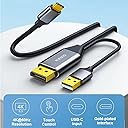
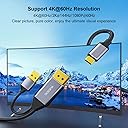
The WJESOG DisplayPort to USB-C Cable (6.6ft) converts DisplayPort 1.2 signals to USB-C, supporting up to 4K@60Hz resolution with stable USB-powered transmission. Designed for one-way use from DisplayPort source to USB-C display, it supports touch functionality and is compatible with leading devices like MacBook Pro/Air, iPad Pro/Air, Dell XPS, and Nreal Air. Plug-and-play convenience ensures quick setup without drivers, making it an essential adapter for professionals seeking high-quality, reliable video connectivity.


| ASIN | B0BNX7MS6N |
| Best Sellers Rank | #20,358 in Electronics ( See Top 100 in Electronics ) #263 in HDMI Cables |
| Brand | WJESOG |
| Color | Grey |
| Colour | Grey |
| Compatible Devices | Projector, Monitor, Laptop, Stationary, Speaker |
| Compatible devices | Projector, Monitor, Laptop, Stationary, Speaker |
| Connector Type | DisplayPort, USB-C |
| Connector type | DisplayPort , USB-C |
| Customer Reviews | 4.5 out of 5 stars 372 Reviews |
| Finish | Matte |
| Finish type | Matte |
| Input Voltage | 20 Volts |
| Item Weight | 68 g |
| Manufacturer | WJESOG |
| Model Number | WJESOG |
| Number of Items | 1 |
| Number of Ports | 1 |
| Package Quantity | 1 |
| Power Plug Type | No Plug |
| Specific Uses For Product | Projector |
| Specific uses for product | Projector |
| UPC | 717994489260 |
| Unit Count | 1 Count |
| Warranty Type | Limited |
A**W
Works perfectly with a USB-C docking monitor
I wanted to connect my desktop PC to my monitor, which has USB-C inputs that act like a dock (receiving Displayport & USB signals over USB-C to connect the display & USB devices attached to it). It's exceedingly rare to come across desktop PC components with the DP over USB-C required to do this (RIP Virtualink). This cable worked perfectly to deliver DP (from the GPU) & USB (from the motherboard) signals over USB-C to the monitor! I no longer have to worry about finding motherboards with Thunderbolt ports to do this.
R**U
Works with Virture Luma Pro Glass
I have been searching and trying many cables to connect my virture luma pro glass to my desktop PC that do not have thunderbold or displayport over usbc. This cable works. The USB-A cable that provide power also allow data to pass thru. Which allow the immerse3d and spacewalk app on my desktop pc running windows11 able to detect and communicate the Virture Luma Pro spectacle. You however need thunderbold USBC female to USBC female to join the USBC of this cable to the Virture Luma Glass.
A**.
It does indeed do exactly as it claims
Why I bought this: I have 3 computers all hooked to 4 monitors. 2 of them use my 4K TV/monitor with HDMI 2.1 for 4K 120Hz. However, my main monitor for my work PC is my 3440x1440 ultrawide. I do not care about the resolution, but the extra real estate so it displaying in 2560x 1080p with a cheap HDMI isn’t a problem. However, as the second monitor or when ultrawide is beneficial in games with my other PC’s, that monitor I want the highest resolution and frame per second I can get. My ultrawide monitor also has a KVM feature The problem: my main gaming computer is the more powerful and as such, utilizes the ultrawide’s only DP port for 3440x1440 144Hz gaming. The HDMI ports only offer 100hz at that resolution but because the HDMI ports on both gaming computers are utilized by the 4K monitor, I tried going DP to HDMI from my backup/second PC but anything that said 2K at 120 or 144Hz would only display the picture in 2560x1080p at those refresh rates. If I change led it to my monitors true resolution, my max refresh rate was 60Hz Why this was the solution: my ultrawide supports USB-C A/V input. Remember I mentioned my monitor also has a KVM switch? That feature that combined with my physical KVM switch I already had, allows me to utilize the same mouse and keyboard with all three computers without adding more wires on my desk from a second manual switch. So, this cable allowed me to utilize my monitors built in KVM function, being able to plug the USB-A into my second computers motherboard to send mouse and keyboard commands and the DP on the video card the other way through the single USB-C into the monitor. I got the resolution (3440x1440p) I wanted as well as the KVM feature. There was a slight performance cost however. This solved my issue of running two cables to have the KVM and A/V, as well as reduced resolution (2560x1080p) when using a 144Hz rated 2K (2560x1440p) cable. In case you don’t know, the extra width of the monitor adds to the pixel count, which increases data for each frame, which lowers the rate at which the cable can transfer more data. To keep the same higher rate, it lowers the pixel count. This cable allowed my to send 3440x1440 A/V through USB-C to my monitor at 95Hz. Its not the full 144Hz my monitor is capable of but it didn’t limit me to 60Hz like DP to HDMI did. So for me, while I will still look for a cable that will meet the KVM and DP to USB-C functionality but support full resolution at the full refresh rate, I will happily use this until I find what I’m looking for or maybe, just maybe the manufacturer will see this and will create or suggest if already available a similar cable with a higher data transfer rate.
D**!
Perfekte Lösung für HDMI zu USB-C Display-Port ALT Mode
Für alle, die wie ich lange gesucht haben: Dieser Adapter ist perfekt, um einen ASUS MB169 Mobilen Monitor (oder andere Geräte mit USB-C Display Port ALT Mode) an einen HDMI-Anschluss zu verbinden. Nach vielen Tests ist dies meine bewährte und zuverlässige Lösung, die ich seit über einem Jahr täglich genutzt habe, bis ich den Monitor getauscht habe. Eine klare Empfehlung für jeden mit diesen Anforderungen!
F**K
Si funcona para conectar monitor portátil con un solo puerto USB-C a una PC con salida Display Port.
Intenté otros cables de otras marcas que no pasan suficiente corriente al monitor. Este cable si funcionó conectando una PC con salid display port a un monitor portatil ASUS. - Hay que conectar los cables en orden. - Hay que conectar el USB A a una fuente de poder que pueda pasar mas de 25 watts, no a un puerto de la PC. - Es unidireccional: De dispositivo Display Port a monitor portatil con puerto USB-C.
Trustpilot
2 weeks ago
2 weeks ago