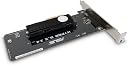
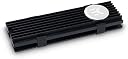
Cool your drive, elevate your game! ❄️
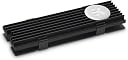
The EK Water Blocks EK-M.2 NVMe Heatsink is a passive cooling solution designed for M.2 NVMe SSDs. Made from durable aluminium and stainless steel, it ensures efficient thermal management while maintaining a sleek black aesthetic. Compatible with all single-sided 2280 M.2 NVMe SSDs, this heatsink includes thermal pads for easy installation, making it a must-have for any performance-driven PC build.
| ASIN | B073RHHYCM |
| Best Sellers Rank | 279,496 in Computers & Accessories ( See Top 100 in Computers & Accessories ) 1,958 in Computer Headsets |
| Brand | EK Water Blocks |
| Cooler Heatsink Compatibility | Aluminum |
| Cooler Heatsink Material | Aluminium |
| Cooler heat sink material | Aluminium |
| Cooler heatsink compatibility | Aluminum |
| Customer Reviews | 4.2 out of 5 stars 1,516 Reviews |
| Global Trade Identification Number | 03830046991737 |
| Item Dimensions L x W x H | 10L x 10W x 2H centimetres |
| Item Weight | 0.01 Kilograms |
| Item weight | 0.01 Kilograms |
| Manufacturer | EK Water Blocks |
| Manufacturer Part Number | 3830046991737 |
| Model Number | 3830046991737 |
| Mounting Type | Chassis Mount |
| Mounting type | Chassis Mount |
| Product dimensions | 10L x 10W x 2H centimetres |
A**B
Does the cooling job well on my 960 EVO SSD. The metal clamps are a pain but i sussed it out!
I have a Samsung EVO 960 SSD that i wanted to make cooler. So i went for this heatsink! Really easy to put together(well sort of!) *There are LOADS of vids out there of how to assemble the heatsink, so there is no point doing a step by step guide. But i will just add that the clear side of the pads are the "stickier" side, which is the side that goes on your SSD first! For me everything was going great until the dreaded metal clips. One side clipped in straight away and i thought this is going to be easy, that was until i had to do the other side. The small curvy part at the top of the clip was just to short for it to slip over and clip in!. This was because on the 960 EVO there is a taller chip that prevents the clip going over. I pushed and pushed it just would not do it What i did was this................. One end of the clip has a longer curvy end than the other!. All i did was with some pliers i gabbed the end of the metal and bent the curvy part out just a bit in my fingers. Now this was a game changer!. Putting it back on the heatsink it clipped straight inn. So before you push and push and push just do what i did, easy! After installing back into my system(as seen in the provided pics) it booted up fine so everything was AOK My idle temps with the heatsink are around 30-34 centigrade depending if i am just browsing the web etc etc I ran Heaven Benchmark 4.0 on ultra to put my system under load and the 960 EVO SSD topped out at just 45 centigrade(pic included showing my system temps!). So all in all the heatsink is doing the job and looks great. So i am happy with it! 5 STARS
K**S
Decent little heatsink
Bought this to place on a Samsung 980 PRO, it took a bit of playing around with to make the heatsink sit in place correctly as the supplied thermal pads weren’t the correct thicknesses for my NVMe, but I was able to overcome that issue by transferring the thermal pads from my motherboard heatsink. The clips that hold everything together were a bit of a pain to get into place, but once everything finally held together the product worked perfectl, I’m getting really decent temperatures with the NVMe inside a Lian Li O11-D
M**E
good but fiddly (Use caution if buying for a 970 EVO)
Bought this for use with a Samsung 970 EVO as I had seen from reviews that it runs very hot under load, which I can confirm, 110c max temp without heatsink. With heatsink applied it dropped down to 60c max so it's an effective cooler. I agree with other reviewers that this product is hard to install, i think it is designed for the 960 not 970. The last clip wont attach by about 1mm (really hurt my fingers trying to get that last bit but it wont go). I fixed this by getting a razor blade and shaving 1mm of the thicker thermal pad away this allowed the clips to attach easily. I knew installing it would be a bit of a pain when I bought it but I really liked the minimalistic design of this heatsink compared to many others available so I took a chance with it. I would only recommend it if you are prepared to deal with the installation issues.
C**R
That was frightening!
Great product and does the job very nicely. Transferring a 45Gb file to and from the device and the temperature only just peaked 44C. It idles at about 34C (I have a warm room). This is not a complaint, just an observation (that may have already been mentioned), This is a b***h to clip together. I had to rest each clip on a flat surface and then apply a scary amount of pressure until the clip clicked into place. Thankfully no harm done. I would knock a star off, but as they say, if it ain't tight, it ain't right ;)
T**Y
Reduces temperatures but not the greatest quality product
Having just purchased a Samsung EVO 970 2 TB NVMe drive I was blown away by the performance but at the same time very alarmed at the temperature the drive ran at, especially under load (73 degrees Celsius). These new Samsung NVMe drives are known to run very hot but in my experience computer components that run very hot have a tendency to not last as long! My ASUS X299-E Strix motherboard has 2 NVMe slots, one that is concealed under a removable heatsink on the board and another one that is (unusually) vertically mounted near the RAM slots. My new Samsung EVO 970 is in the vertically mounted slot which is fairly well exposed but I have a fully watercooled PC so the airflow is not great in that area. I decided to buy this EK heatsink as I'm going to struggle to massively improve airflow without adding an additional fan in that area or turning up my radiator fans much higher and increasing overall system noise. The heatsink arrived in a very small box - it was actually a little underwhelming to be fair, especially considering the price. The box does contain all of the bits you need to attach the heatsink to your NMVe but the instructions are actually some of the worst I've seen in a while and only show you 'where' to place the components but no steps or anything on 'how' to actually do it. Some people suggest that you should just look on YouTube to see how it's done but really it's not unfair to expect to be provided with detailed enough instructions with the device to be able to do it yourself. If you have never used any of EK's stuff before you might not have known you need to cut the thermal pads to size and to remove the blue and clear film from them before sandwiching the whole thing together. The heatsink itself is just a couple of bits of painted aluminium and has a rough finish and doesn't really feel very premium but it does look nicer than an NVMe PCB. I left the Samsung sticker on the drive as removal of this will surely void your warranty but a lot of people seem to remove this first. The clips are incredibly fiddly and I spent a good 10 minutes trying to get one of them on properly. I ended up needing to use some small long-nosed pliers to do the job because I really did not feel comfortable applying excessive pressure trying to force the clip to close on a brand new £400+ NVMe drive! After attaching the heastink and slotting the drive back into my PC I was relieved to see it was still working. The idle temperatures were already showing an improvement at low 30's and under load the highest I've seen is 66 degrees Celsius. It's certainly an improvement but I know the only way I'm really going to lower temperatures further is by improving airflow. On the positive side this drive is not going to be hammered constantly so will rarely get to peak temperatures anyway. It has definitely given me a little piece of mind and has reduced my temperatures slightly so on that basis I recommend it. I do think it is expensive for what you get which a roughly finished heatsink, very poor instructions and fiddly mounting clips. Pros: - Reduces NVMe temperatures slightly - Looks nicer than an exposed NVMe SSD Cons: - Expensive - Terrible instructions supplied - Rough finish on the heatsink - Clips are incredibly fiddly
A**X
Awkward to fit but works well
Lowers temps very well but the cut out on the back plate to fit where the drive screws into the board is very small and was a nightmare getting it to fit so I could actually screw my drive back in
M**E
Broken during install
One of the retention clips broke while trying to install it, no manual so guessed how it should go on but when apply minimal force it broke and is unusable. Using a single side M.2 stick but fitting was still hard. Wouldn’t recommend as minor temp gains are not worth this hassle.
A**R
good to buy
It can fit into the laptop but the lid wont come on after.And it really drops the temperature very much as before I had to keep an eye on the copying procces and put a pause from time to time.Now for 100 gb transfer it had only gonne to 45 c degree wich is very good
J**Z
Hace su trabajo
Compré este disipador porque mi Samsung M.2 970 EVO se calentaba mucho y entraba thermal throttling, alcanzaba mas de 80 grados con algunos juegos y con el CrystalDiskMark al poco de arrancar el benchmark se ponía a 85ºC , siempre hablando de la temperadura del ASIC Driver, la memoria no se calienta tanto. He de decir que no he usado los thermalpads que venian con el disipador y he comprado otros diferentes. He colocado un thermal pad sobre el chip del driver de 0.5mm, otro de 1mm sobre los chips de memoria y otra tira de thermal pad en la parte inferior del modulo. Con esto, he montado el disipador y ha encajado a la perfección con los clips. No podría estar mas contento con los resultados, durante el benchmark, con CDM, no me ha subido de 72º, eso son 13º menos en máximo rendimiento, jugando no paso de los 68ºC y ya no entra en thermal throttling.
R**L
Good cooling and good quality. Clear manual
I needed to cool my 2 SANDISK 500GB Pro NVME drives. I bought 2 of those coolers. The SANDISK are next to each other on a Startech M.2 to PCI-E card. The coolers fit nicely together and the manual was clear. They are cool now with 30c Celsius idle vs the 43c Celsius idle it was before. I'm very happy with the coolers.
A**S
Nice little heats sink that looks great and works decently
Got this for my two Samsung 960 pro drives, and they work ok. To get the hardcore best performance, you'd need to remove the stickers that cover the memory modules on the stick, but I don't want to do that just in case I want to sell the drives in the future. I don't think a 1mm sticker is going to make much of a difference though. EK always makes high quality stuff, and this isn't different. They come with two aluminum pieces, a couple thermal pads, and 2 clip brackets. It can be a bitch to get them on by it once you do it's completely solid and won't move at all. Just cut the thermal pads to length, sandwich the aluminum pieces, and then proceed to squeeze as hard as you can to get the damn clips on lol. It can be a little difficult. I have my two nvme drives mounted in my Asus Rampage VI Extreme in a little M.2 dimm stick that sits right in between the ram and the 24 pin power cable on the upper right side of the board. It's a great way to mount m.2 drives so they aren't sticking straight up. I was worried that these would make the drives too thick to fit, but they just BARELY fit on both sides. The Rampage VI Extreme has 3 m.2 mounting spots, the two in the dimm stick, and one underneath the plastic body horizontal inbetween the pcie slots. I haven't checked to see if it would fit under that, but with the amount of height this adds, I'd be surprised if it fits. I will try, and edit my review if it does. Performance wise, if you're adding heats sinks to your nvme modules you're probably a little ocd and psycho on your computer builds lol, you totally don't need these, they're just fancy bling, but it does reduce temps by a decent little margin. I notice about a 6 degree drop in temps when really stressing the drives in synthetic benchmarks. You probably wouldn't ever have this happen or stress the drives this much in regular usage and I didn't want to stress them too hard with pointless heavy read/write tests that will reduce the life of the drive unnecessarily, but hey it did drop the Temps, & that's all I was looking for. Plus, it makes them look bad ass, which really is the most important thing...right? Cheap enough to be cool (literally and figuratively) if you care about temps THAT much, and make the drives look really cool if you can see them in your case.
C**N
J'ai gagné 40°C
Tout est dans le titre. Je suis passé de 105°C max à 66°C max en bench avec CrystalDiskMark (4x 64Go), voir les deux captures d'écran. J'ai un Samsung 970 Evo Plus en NVMe qui était à nu sur ma carte mère, n'ayant pas un modèle assez récent qui dispose d'office d'un dissipateur thermique. Malgré un ventilateur qui souffle quasiment directement dessus, pas moyen de le maintenir dans une zone confortable une fois qu'il y avait beaucoup de read/writes. J'osais même pas mettre mes jeux sur le SSD de peur qu'il chauffe de trop, alors j'ai acheté ce dissipateur EK car je dispose déjà de plein d'éléments EK dans mon pc et j'ai confiance en cette marque. Visiblement je ne me suis pas trompé sur mon choix ! La seule chose c'est que jamais dans ma vie j'ai pensé que j'allais prendre une heure pour faire un sandwich. C'est tellement serré que j'ai un doute si j'arriverai à libérer le SSD un jour, mais au-moins ça fonctionne super efficacement. Petit conseil, pour le 970 Evo Plus en tout cas, prenez une moitié du thermal pad 1mm et une autre moitié du 0.5mm pour la partie du haut où il y a les puces, car il y a une différence de niveau entre le contrôleur et les puces mémoire. Si on garde le thermal pad de 1mm sur toute la longueur, le sandwich peut même pas être fermé comme c'est légèrement trop épais, et ça ne fait contact que sur la moitié la plus épaisse. De l'autre côté, on peut laisser le 0.5mm sur toute la longueur. Je m'attendais pas à de ci bon résultats. J'ai un peu perdu en Random Reads mais pour 40°C de moins et de la sérénité, je suis prêt à faire l'échange sans problème, puis c'est probablement lié à d'autres facteurs comme Windows tourne sur le disque en même temps.
J**Y
Excellent
The small box come with the sponge support to support and prevent the item from damage during shippment .1 x 0.5mm and 1 x1mm thermal pad 2 piece of the top and bottom heatsink , 2 pcs of clip and the instruction manual .
Trustpilot
4 days ago
1 month ago