🖨️ Elevate your workspace with wireless freedom and crisp prints—because your ideas deserve the best!
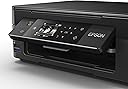
The Epson Expression Home XP-442 is a compact all-in-one Wi-Fi printer designed for seamless mobile and wireless printing. It delivers ultra-high print resolution of 5760 x 1440 dpi with variable-sized droplet technology, supports automatic duplex printing, and accommodates up to 100 sheets. Compatible with Mac and Windows systems, it offers versatile connectivity and a lightweight design perfect for modern home offices.


| ASIN | B01JOYH8D4 |
| Additional Printer Functions | All In One |
| B&W Pages per Minute | 33 ppm |
| Brand | Epson |
| Brand Name | Epson |
| Color Depth | 24 bpp |
| Color Pages per Minute | 15 ppm |
| Colour | Black |
| Compatible Devices | MicroSD (TransFlash), MicroSDHC, MicroSDXC, MiniSD, MiniSDHC, SD, SDHC, SDXC |
| Connectivity technology | USB, Wi-Fi |
| Control Method | App |
| Controller Type | Android, iOS |
| Customer Reviews | 4.1 out of 5 stars 561 Reviews |
| Dual-sided printing | Yes |
| Duplex | Automatic |
| Hardware Interface | USB |
| Ink Colour | black |
| Item Type Name | Epson Expression Home XP-442 All-in-One Wi-Fi Printer |
| Item Weight | 3.9 Kilograms |
| Manufacturer | Epson |
| Maximum Copy Resolution Black and White | 5760 x 1440 |
| Maximum Copy Resolution Color | 5760 x 1440 |
| Maximum Copy Speed Black and White | 33 ppm |
| Maximum Print Resolution Black and White | 5760 x 1440 |
| Maximum Sheet Capacity | 100 |
| Maximum Supported Paper Size | Legal;A4 |
| Maximum print Resolution Color | 5760 x 1440 |
| Model Name | Eression Home XP-442 |
| Model Number | 99999 |
| Model Series | XP |
| Model name | Eression Home XP-442 |
| Network Connectivity Technology | USB, Wi-Fi |
| Number of Trays | 1 |
| Other Special Features of the Product | Card reader integrated^Security algorithms:64-bit WEP, 128-bit WEP, WPA-AES, WPA-PSK, WPA-TKIP^Touch sensitive screen |
| Output sheet capacity | 100 |
| Print media | Envelopes |
| Printer Output Type | Colour |
| Printer Type | Inkjet |
| Printing technology | Inkjet |
| Processor Count | 1 |
| Product Warranty | 12 months Carry in, Optional warranty extension available |
| Resolution | 5760 x 1440 |
| Scanner Type | Flatbed |
| Special feature | Card reader integrated^Security algorithms:64-bit WEP, 128-bit WEP, WPA-AES, WPA-PSK, WPA-TKIP^Touch sensitive screen Special feature Card reader integrated^Security algorithms:64-bit WEP, 128-bit WEP, WPA-AES, WPA-PSK, WPA-TKIP^Touch sensitive screen See more |
| Total USB 2.0 Ports | 1 |
| Total USB Ports | 1 |
| Warranty Type | limited warranty |
A**R
Does what is says on the tin
This is a great little printer/scanner for the money. I have always bought Epson printers and have found them to be great little workhorses for basic printing and posters. I have had a problem connecting Wi Fi with my last one which was the XP 412 but I think that it was due to my slow connection. I connected it up via the USB cable and had no trouble with it. Once set up and you don't have to be a rocket scientist to do it then it is plain sailing. The only reason that I have bought the newer version is because I have invested in a new PC and decided to push the boat out and buy a new Epson printer to go with my new PC. The XP -412 is still going strong and the compatible inks are as cheap as chips. What more could you ask for, maybe some vinegar to go with the chips!
S**E
Good quality.
I cannot fault this printer at all. For someone that has never set up a printer before, it was so straight forward. Setting up the WiFi was easy. Had no complications at all. Took the best part of 20 minutes and it prints really well. Very good quality for the price. Highly recommend.
S**D
Good printer at a good price
So far I've been very pleased with my Epson printer.. which I bought to replace my 10 year old predecessor (as it had become really unreliable) This printer has loads of great features and connectivity options - wifi and cloud printing support mean I can connect phones iPads laptops from anywhere in order to easily print It also has USB cable and ad card connections if wifi isn't good for you As others have said, the only drawback to this (and modern printers in general) is the relatively expensive printer ink costs.. which aren't really avoidable in my opinion). Having said that this printer does come with a range of printing options to help save/reduce ink consumption.. for example "draft" and grey scale printing options - which can really help Overall I am very happy with this printer - its very capable for the price
T**E
Simplicity personified
I've always been a devotee of Epson printers & when my SX2000 model reached the end of its deemed natural life, I wondered if there would be another Epson model that was still compatible with Windows XP (SP3), whilst taking into account that, to all intents and purposes, no one in their right minds should still be using XP! But as I've retained XP on just one of my appliances for non-Internet use, I was so pleased to have located and purchased this one. As usual, it's simplicity, options and versatility of use (compared to my interim experience and use of of a Hewlett Packard one whilst being without a replacement printer), was just like 'coming home' Ahhh. . . and relax! So much so, that I've just ordered another one as a back-up, on a 'just in case' basis, as from a Windows XP (SP3) perspective, printer compatibility might soon become as rare as 'hens teeth'!
P**W
Make sure that you are aware of the limitations regarding inks.
This is a very nice home printer with no problems setting up. It produced very good quality printing, although I only used colour a couple of times. Most of my printing is black so I bought an extra black 29XL in advance. Imagine my surprise when I discovered that my colour inks ran out before black. On investigation (in the Epsom website) I discovered that: 1. the printer will not print using just black/greyscale on its own if any of the colours are empty; 2. the ink colours run out early even if you do not print colour pages. Epson state that the colours are used with black printing all the time to ensure that nozzles are kept cleaned. 3. When the black ink runs out there is a warning but it will continue printing in black. What is not mentioned is that this is achieved by mixing the colours to make black! In other words, the printer is a good price but they intend to make their money on the inks they sell. Most Epson printers in the past used to be able to print in black without being so dependant on the presence of colours. Furthermore. a quick check of the Amazon website reveals many compatible printer cartridges which will fit at half the price and twice the capacity!
M**N
Great Printer for the Money
Very Good it certainly matched my previous Epson no problem to set up (recommend buying u s b cable for Wi Fi connection) does all what I want as a printer Original Cartridges didn't last very long do not change until printer won't print !
N**T
Waste of money
I bought this model around 20 months ago. I only print occasionally so it has not had a lot of use. Because of this I run it every so often just to keep the ink from drying out. Now the black ink nozzle has packed up, although the other colours appear to be OK. I've cleaned the heads about 6 times. I've left it overnight then tried again. I've even tried clearing the nozzle using a small tube and distilled water. No joy at all! The ink I'm currently using is not Epson original but I've used such inks on other printers in the past and I've never had a problem. Furthermore they have worked up until now and are still working as far as the colours are concerned. As far as general quality is concerned, despite the high resolution, the results, while decent enough, are not particularly impressive. As far as being "user friendly" is concerned, it would be a lot easier if it had a touch screen. Instead you have to keep pressing buttons to navigate the menus and change settings. You also need a smart phone/tablet and the appropriate app to update firmware, do a nozzle check, clean heads, etc. Before I bought this printer I got my old Epson R300 out of long-term storage to see if it still had any life in it and to use in the interim. It worked straight away! Looks like I might give the R300 another go...
M**C
EXCELLENT INEXPENSIVE PRINTER
Printer was delivered a day early. This is my 2nd Epson printer - having had my first one the WF5260 for nearly 8 years and I must say I am pretty well pleased with this smaller version. Having read previous reviews they did leave me somewhat sceptical as to problems they had encountered in setting up the printer however, I had no problems at all. I just unwrapped, plugged in, followed the set up instructions and hey presto - printer in full working mode. As I don't have a laptop I did not use the software disc but at this moment I don't see the need for it and if I do then I will search online for anything needed. Very pleased with this product and would definitely recommend.
G**T
Très bien
Très bien bonne imprimante.. le seul petit défaut c'est qu'elle use pas mal d'encre et le scanner il faut impérativement avoir carte memoire pour scanner 1 document.
A**E
Epson Expression HOME XP 442 ...
ha una bella risoluzione fotografica e in più e wifi cioè comandi la stampa a distanza anche con telefonino tablet e altro
C**N
Preciso
Ottimo prodotto consigliata
Trustpilot
4 days ago
2 weeks ago