Buy anything from 5,000+ international stores. One checkout price. No surprise fees. Join 2M+ shoppers on Desertcart.
Desertcart purchases this item on your behalf and handles shipping, customs, and support to Argentina.
๐ Pocket-sized power for unstoppable connectivity
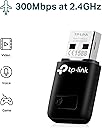
The TP-Link TL-WN823N is a sleek, mini USB wireless adapter delivering up to 300 Mbps speed, perfect for HD streaming, gaming, and voice calls. Its plug-and-play design and one-touch WPS button make setup effortless, while Soft AP mode lets you create a Wi-Fi hotspot from a wired connection. Compatible across Windows, Mac, and Linux, itโs the ideal portable solution for professionals craving reliable, high-speed internet anywhere.


| Asin | B0088TKTY2 |
| Best Sellers Rank | 3,040 in Computers & Accessories (See Top 100 in Computers & Accessories) 22 in USB Computer Network Adapters |
| Box Contents | Quick Installation Guide, Resource CD, Wireless Adapter TL-WN823N |
| Brand Name | TP-Link |
| Color | Black |
| Compatible Devices | PC&Notebook |
| Compatible Operating System Family | Linux, MacOS, Windows |
| Country Of Origin | Netherlands |
| Data Link Protocol | Puerto WLAN 802.11b, Puerto WLAN 802.11g, Puerto WLAN 802.11n |
| Data Transfer Rate | 300 Megabits Per Second |
| Eu Spare Part Availability Duration | 2 Years |
| External Testing Certification | ANATEL: 36481203177 |
| Hardware Interface | USB 2.0 |
| Item Dimensions L X W X H | 18L x 7W x 39H millimetres |
| Item Part Number | TL-WN823N |
| Item Weight | 2.12 Ounces |
| Manufacturer | TP-Link |
| Manufacturer Part Number | TL-WN823N |
| Minimum Required Operating System Version | Windows 7 |
| Model Number | TL-WN823N |
| Product Warranty | 3 year |
| Unit Count | 1.0 count |
| Upc | 013342001307 |
User
Obsolete technology do not buy!
Won't connect to wireless networks. Wasted hours troubleshooting with fresh Windows install, all the driver updates you can imagine. Was bought for brand new, custom built gaming pc, with no onboard WiFi on the motherboard. Lan works fine, mobile phone works fine, laptop works fine. Even tried it on the laptop, after disabling native WiFi, still the same, won't connect to anything. Do not buy this card, after wasting hours trying everything I've established it's obsolete tech and won't work with modern routers at all. Only saving grace is it's on returnless refunds, because they've likely already realised this but are still trying to flog as many as possible and hope for the best!
User
Useless for Linux. Avoid.
This device is listed as Linux-compatible. I'm new to Linux, but I know to take that with a pinch of salt. Nonetheless, it's cheap, so I figured it was worth a go. Unfortunately, it's supplied without Linux drivers: you have to go online to obtain them. This is aggravating if, like me, you've set the Linux PC up in a spare room away from the router (why else would I want to set up a wireless connection?). Hey ho, it's not difficult to download the files to another computer & transfer them. However, the Linux .zip file supplied by TP-LINK from their website is faulty: it can't be unzipped. Even worse, the TP-LINK support forum for this device shows 28 issues reported in the last 3 months; the company has managed 0 replies in that time. In short, this device won't work out of the box; until they fix the download it isn't compatible with any Linux build anyway; and the manufacturer doesn't give a damn about your problems.For the record, TL-WN832N uses a Realtek chipset (RTL8192CU). However, I've had difficulties getting the Realtek driver to install as well, and it turns out that it contains a bug as well. Finding, downloading & installing a working version of the driver is proving far from trivial for someone new to Linux (especially without an Ethernet connection to the PC in question). Unless you know your stuff, give this a wide berth.
User
Very disappointing device
(Medion Akoya i5 Laptop running Win7)Bought it to see if it would boost the connection of my WiFi signal running at 65Mb/sec on my laptop's built-in wireless; 1 brick wall and 1 floor above the router.Installation was initially easy using the supplied disk, this installed an interface which appeared to offer the choice of selecting either WiFi device to use but I discovered that my existing device had disappeared.However, I ran with the TP-LINK device to check if there was an improvement, there was, it increased my connection speed to 130Mb/sec and this went fine for about 2 weeks but suddenly lost connection; it was very warm to the touch so I removed it.I could find no way of getting my internal device working again so I had to return my laptop to the day before the TP-LINK device was installed using one of my back-ups.I requested a replacement TP LINK which arrived quickly but before installing I got the device driver from their web site and installed it - I didn't install the interface from the disk.The second one ran fine for about 3 weeks but I found my internet speed dropping off, it then started loosing connection with error messages that the the IP configuration was wrong. I fixed it using Win7 network trouble shooter but this became increasingly frequent.I removed the TP LINK device and returned to my built-in wireless; since then I've had no disconnections or error messages.So it appears the problem was being caused by the second TP-LINK; this is now being returned for refund.It appears to be very difficult to find a reliable external usb WiFi device, almost all reviews seem to have issues!So I'll just give up and accept my slower connection!It gets 1 star but really should have -5 considering the time it has wasted.
User
The Amazon syndrome
***Update about 4 weeks later***I downloaded the specific driver from the company (by default it had been using whatever driver Windows used). Initially this did seem to have improved things slightly. It was actually quite difficult to get hold of and use this driver: poorly designed user setup.Unfortunately, using the manufacturer's driver does NOT solve the problems. I still get dropped connections, and I still find that whereas my phones, TV, etc., have no problems picking up a full-speed Wifi signal from the router, this thing doesn't: all too often it clocks 2 Mbps, and occasionally drops Wifi connection. I confess that I find this utterly baffling: when you specifically design a Wifi adapter, and you produce your own driver, specifically for W10, how come it works far worse that the tiny device in a phone? There's no excuse for this.*** original review ***This worked OK to begin with. I've had it for about 40 days now and it no longer works properly, although there is a rock-solid Net connection and Wifi system (as regularly attested by my phone tests, for example). Although this is now (just) outside the "return window", I would consider challenging this on the basis that the kit is simply defective. But instead of getting rid of it I intend to a get a better, more expensive piece of kit with a couple of aerials sticking out of it, and keep this as a reserve thing (it is only ยฃ7). This is absolutely typical of Amazon: very cheap and very rubbish, the absolutely classic flaw being a fault that only comes to light after a certain time. For this reason I hardly ever buy anything from Amazon any more. I wonder whether Bezos is clever enough to understand that this business model is not sustainable and that tens of millions have now reached the same conclusion as myself.
User
Updated 27/9/17
Update - 27/9/17:After using this for a few days, I'm wondering if I have a faulty unit or whether this is a flaw in the design. Download speeds are flunctuating greatly, I can be downloading at 1.2mb/s and all of a sudden it will drop to a pathetic 100kb/s and stay there for a few mins. It seems to be looping like this over and over again - fast slow fast slow. It makes downloading anything near impossible and just makes anything internet related pretty much unbearable. I've tried reinstalling drivers, modifying various settings but nothing is working. Speedtest.net will not even give me a reading due to how much the speed is fluctuating. I'm afraid that due to this, I will be changing my initial review of 5 stars to 1 star.Works as it should. Nice and compact so stays very hidden which is exactly what I wanted. The range and speed is decent too considering it's price and size. Would recommend!
User
DO NOT BUY
Brought and broke on the SAME DAY. Pluging it in it lights up with a green light to say its on, putting the disk in and installing it was easy, too easy, in minutes i realised that the wifi connection was bad, like REAL bad, trying to load up google took 5 minutes to load up each page. After half an hour it decided to disconnect from the Wifi every 10 mins, i couldnt get anything done, i tried moving the dongle in different usb slots to see if it would improve. After restarting my pc since the slow connection crashed my pc the green light on the dongle turned off and now it doesnt turn on or work, THIS WAS ALL ON THE SAME DAY I BROUGHT IT, dont buy the cheap stuff, just get the higher quality wifi adapters. Dont waste your time or money.
User
Linux Users Beware
I am a Linux user and wanted this item for a machine I am running Linux Mint 20.3 on. It was advertised as suitable for Linux and was half price so I decided to go for it. Arrived next day and that was when the fun started! Drivers supplied were for Mac and Windows. I headed to the TP Link site and downloaded the Linux drivers which came with a warning that they were beta. I installed them and they didn't work. I went to the Linux Mint Forums and found that other people had difficulty getting it to work on Linux but a couple of solutions had been posted which had worked. I tried both to no avail. Although I have a reasonable level of Linux knowledge I am not at the same level as those who had managed to get this item working. I had to admit defeat and am sending it back. I spent about three hours on it. I am sure this item works just fine with Mac or Windows but TP Link need to sort out the driver issues to make it suitable for Linux users.
User
Completely useless
Completely useless for windows 8.1, unless you're some kind of tech genius there's no chance you will ever get this thing running, I was under the impression it would be relatively easy to install on windows 8 but that is not the case.I've spent hour trying to get this thing to work as I need it for university, I've followed every tutorial under the sun on youtube and on the TP website, downloaded all the necessary files and it still doesn't work, rather it has screwed up my computers wifi and ethernet connection.Considering windows 8 has been out for quite some time now and on the majority of new computers you'd think it would be equally as easy to install, but that is not the case and I cannot say enough if you're computer runs on windows 8.1 DO NOT BUY THIS PRODUCT save yourself the hassle and look elsewhere.
User
Good
GoodWorking for desktop
User
Modern wifi dongle
I had already a wireless dongle, but I wanted to get a better one to check if the speed could be improved. After testing, the speed was the same, so it is just my provider. The dongle is very robust and package is very good too.
User
Had a broken internal wifi card in my laptop, so I used this.
Laptop wifi card was faulty, but out of warranty. Tried to replace the wifi card itself but failed. Then I realised I could just use one of these. As a network engineer myself, we use a lot of TP Link products for their reliability and quality, so naturally I chose this and I chose well. Works like a charm. No downloading drivers required for me.
User
Top!!
Super handig in gebruik.. in mijn computer plug & play. Accepteer het device. Gelijk werkt mijn internet verbinding..streaming is top voor normaal gebruik pc gebruik.. zeer blij mee!
User
Very nice little device. Excellent price/performance point.
This little wireless dongle is performing flawlessly, attached to a 2009 Mac Mini running El Capitan.The mini was built from collected parts but without the WiFi antennae. Those antennae sell, on the used market, for about twice the price of this TP-LINK device and don't provide better performance. Both the TP-LINK and the factory WiFi are "N" spec. so they should give similar throughput.I purchased this model (TP-LINK TL-WN823N) because I needed an adapter for a dead-cheap computer build.This target machine contains most of an actual Apple 2009 model, its not a hackintosh, although I can't imagine why it wouldn't work nicely in the latter.The price/performance was perfect for what I needed.The TP-LINK adapter uses a software utility/driver to function under MacOS. The software is included in the package on an optical disk.There is also some software for Windows and Linux but I can't comment on that because I didn't try any of it.The size of the device makes insertion and removal from a USB port easy, even if the ports around it are occupied, but it's small enough not to stick out and get brushed/broken.Once this device and its app are installed it just does what it is supposed to do. In fact, I tend to forget it is there. To my mind, that is exactly the way a WiFi adapter should work.The app puts an icon on the bar at the top of the screen, much like MacOS does. Through that icon, you can control the TP-LINK device independent of the other Mac network facilities.The idea that it uses a proprietary app to handle it, rather than trying to integrate with MacOS, can be seen in a positive light because it means that TP-LINK has control of both the hardware and the software. That makes it independent of any changes the OS manufacturer might make in the future.I have several TP-LINK devices and their product support is pretty good. In fact, the products are good enough that I've never had to contact TP-LINK other than to look for updates or get product information/specs from their site.As a last thought, Amazon offers a range of these WiFi devices. Some of the higher performance models could be used to improve on the built in hardware in older machines.So, if you have the support for AC/Dual Band from your router or access point, you could buy a pretty significant WiFi boost with one of the more powerful TP-LINK products in the list. The increments in performance are less than ten dollars in price.If your machine has an on-board "G" spec. WiFi adapter then one of these units will give you a very satisfying speed boost for very little money.Keep in mind, if you plan to use one of these adapters on the road (laptop), most public WiFi hot-spots don't offer more than "N" spec. service.I consider the TP-LINK TL-WN823N a good purchase, and I would do it again.
Trustpilot
2 weeks ago
1 month ago