Buy anything from 5,000+ international stores. One checkout price. No surprise fees. Join 2M+ shoppers on Desertcart.
Desertcart purchases this item on your behalf and handles shipping, customs, and support to Argentina.
๐ฎ Elevate your edge with precision, power, and style.
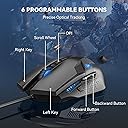
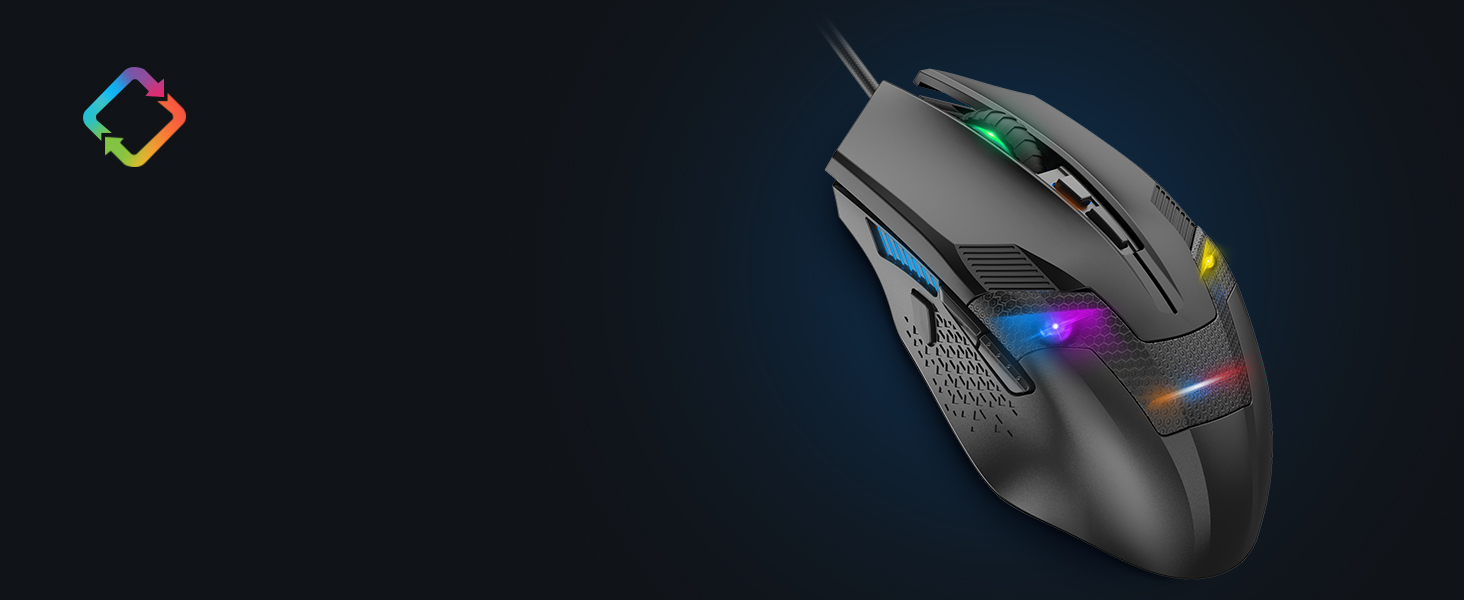
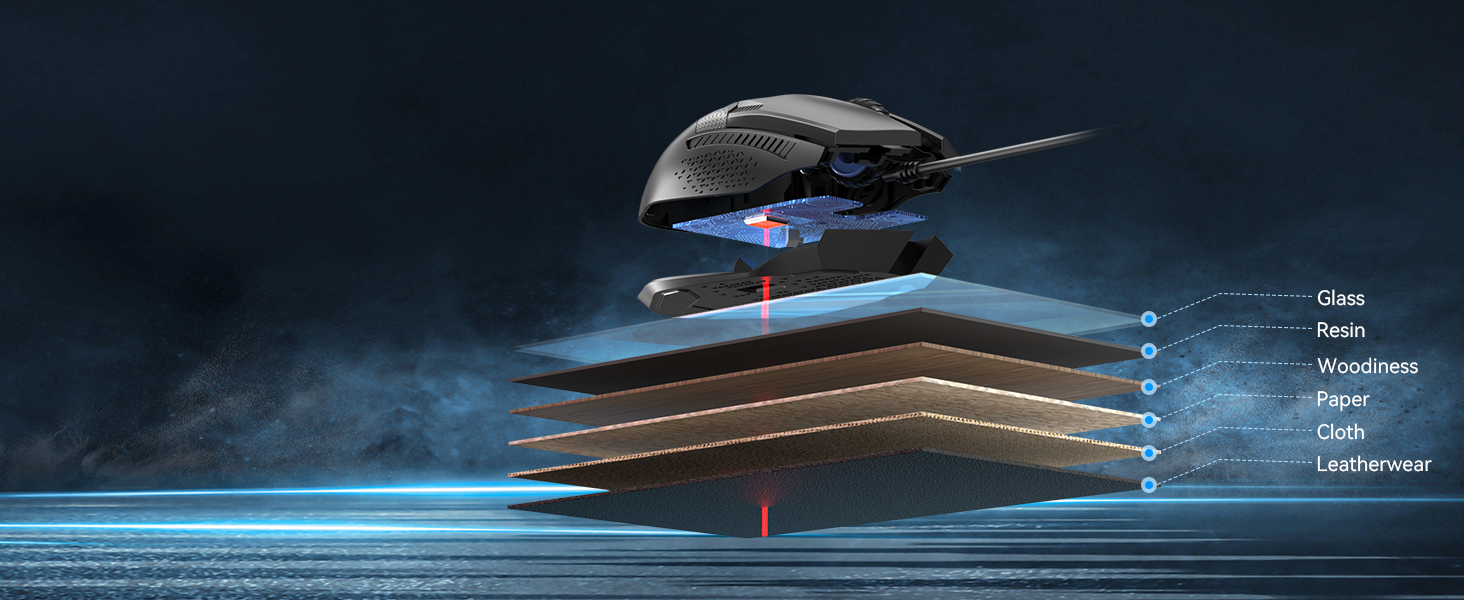
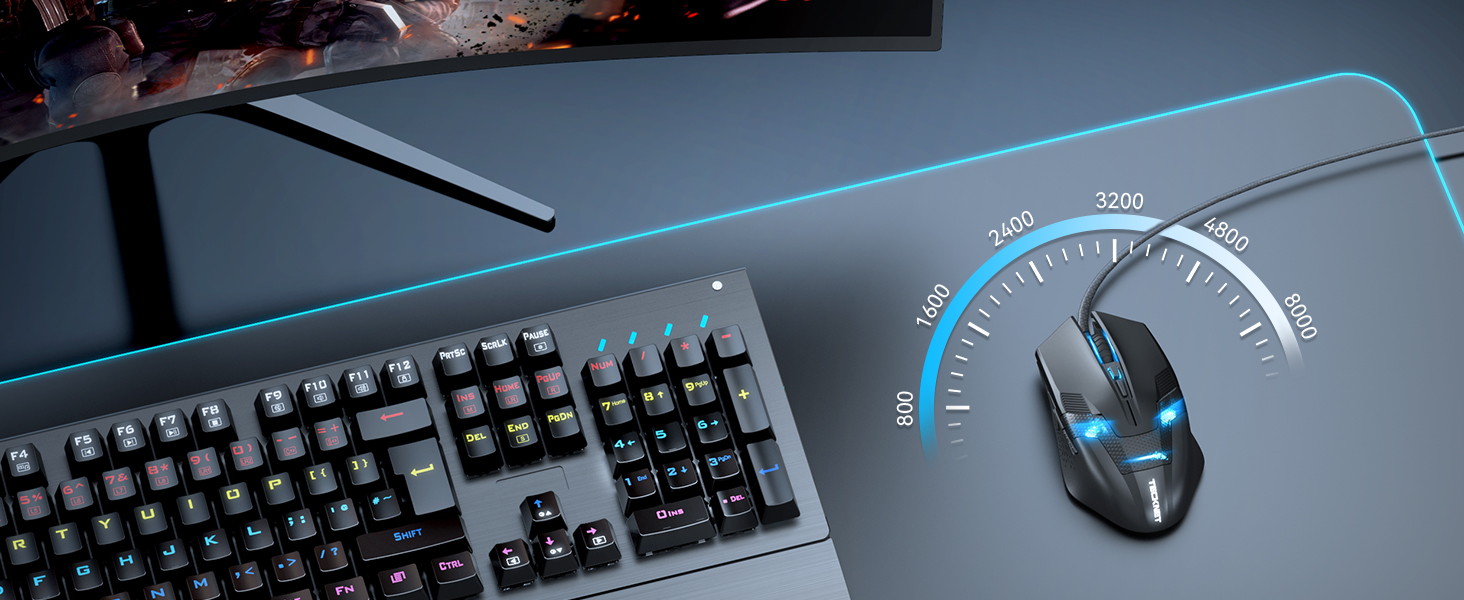
The TECKNET Wired Gaming Mouse combines an 8000 DPI adjustable optical sensor, six programmable buttons, and vibrant 6-zone Chroma RGB lighting to deliver professional-grade performance. Designed with an ergonomic right-handed grip and a flexible braided cable, it ensures comfort and durability for intense gaming or productivity sessions. Compatible across Windows, Mac, and Linux platforms, it offers on-board memory to save your custom settings and is backed by a 36-month warranty for long-term reliability.


| ASIN | B00E290JRE |
| Antenna Location | Gaming |
| Are Batteries Included? | No |
| Are Batteries Required | No |
| Best Sellers Rank | 1,109 in PC & Video Games ( See Top 100 in PC & Video Games ) 48 in PC Gaming Mice |
| Box Contents | TeckNet M268 Mouse+manual |
| Brand | TECKNET |
| Brand Name | TECKNET |
| Button Quantity | 6 |
| Colour | Black |
| Compatible Devices | Personal Computer, Laptop |
| Connectivity technology | USB |
| Country of Origin | China |
| Customer Reviews | 4.4 out of 5 stars 8,201 Reviews |
| Embellishment Feature | LED |
| Enclosure Material | Plastic |
| Global Trade Identification Number | 05060274475558 |
| Hand Orientation | Right |
| Hardware Platform | Linux, Mac, PC |
| Item Dimensions L x W | 12.9L x 7.3W centimetres |
| Item Type Name | PC Gaming Mouse |
| Item Weight | 152 Grams |
| Manufacturer | TECKNET |
| Manufacturer Part Number | FBA_x2680 |
| Model Name | FBA_x2680 |
| Model Number | x2680 |
| Mouse Maximum Sensitivity | 3200 Dots per Inch |
| Movement Detection | Optical |
| Movement detection technology | Optical |
| Network Connectivity Technology | USB |
| Number of buttons | 6 |
| Operating System | Win 11, Win 10, Win 8, Win 7, Windows Vista, Windows XP and Mac systems |
| Power Source | Corded Electric |
| Product Features | 6 Adjustable DPI & 6 Polling Rate, 6 Chroma RGB Lighting Zones, 8000 DPI Gaming Sensor, On-board memory, Programmable Buttons |
| Product Finish Type | Matte |
| Product Warranty | 36 months warranty |
| Range | 10.0 meters |
| Special feature | 6 Adjustable DPI & 6 Polling Rate, 6 Chroma RGB Lighting Zones, 8000 DPI Gaming Sensor, On-board memory, Programmable Buttons Special feature 6 Adjustable DPI & 6 Polling Rate, 6 Chroma RGB Lighting Zones, 8000 DPI Gaming Sensor, On-board memory, Programmable Buttons See more |
| Style Name | Modern |
| Theme | Video Game |
| Unit Count | 1.0 count |
A**.
Great value, stylish, and works very well
I bought this mouse about a month ago when the sensor on my Razer Naga died. The impression I got from the company known as Redragon was that of a more budget-oriented version of the kind of products that Razer put out. Even the box for the Centrophorus looked pretty much like "a Razer box, but in red". But don't let that dissuade you - I've been using the Centrophorus for nearly a month, and I can safely say that it's the best mouse I've bought, both in terms of usability and value (The latter being particularly relevant, given the price of the Naga). So how does the Centrophorus hold up in comparison to my previous experience with the Naga? Really well, as it turns out. The mouse itself moves very smoothly on my desk without the need for a mouse mat, and if it feels too weighty, there are some removable weights inside the mouse that can be accessed through a circular slot on the bottom. In terms of buttons, I got used to the main buttons much faster than the Naga's, with the less upwardly-curved design of the Centrophorus meaning that there's less chance of you accidentally right-clicking through the slightest instinctive twitch of your right middle finger, much like I did with the first few weeks using the Naga. The two side buttons have a "click" to them that feels similar to the main buttons, as opposed to the quieter, more rubbery feel of the Naga's keypad. By default, they serve as "back and forward" buttons on web browsers, but can be customised through software that installs with the drivers that, for me at least, automatically installed when I first plugged the mouse in. The mouse wheel feels great, with the texture giving a nice feel and an appropriate amount of friction when using it. It doesn't feel loose at all, and serves its purpose well. Below the mouse wheel is another button for cycling between three mouse sensitivity settings, meaning that the brighter the light between the buttons, the more sensitive the cursor is to mouse movement. While I haven't needed to use this button much (as the default setting suited me fine), I can easily imagine people more serious about on-the-fly mouse sensitivity would get something out of having this feature. I've also read up on a lot of people saying that the only problem is that the light on the mouse doesn't turn off when a PC turns off, but as someone who defines "turns off" as "fully shutting down" as opposed to something akin to hibernation or sleep modes, I can safely say that I did not experience this. Overall, I would highly recommend this to anyone who has at least a passing interest in budget gaming hardware, or in general wants to get into the gaming hardware side of things without spending tons of money on a well-known brand. I would definitely keep an eye on Redragon and see what they do next, since a lot of their other products look pretty promising!
A**N
Comfortable High Resolution Mouse
For some time I have been using a Microsoft Basic Optical Mouse for everyday use on my desktop machine. It's a simple, reliable no-frills option that I have been very happy with. However, having had the chance to test out this TeckNet Gaming Mouse and using it as my everyday mouse for a few days now, I am actually quite pleased with the change. The big advantage, for me, of the new TeckNet mouse is size and speed. I have largish hands, and the MS mouse always felt just a shade wee - the TeckNet Raptor mouse fits my hand perfectly. This doesn't make a huge difference, but it is that little bit more comfortable in the hand. The other thing is speed - I have two 1920x1080 monitors on my desk, and the higher resolution of the gaming mouse means that the cursor fairly zips around. At first I found this a little disconcerting, and I was planning to change the pointer speed in the settings - but I quickly got used to it. I especially like that I don't have to lift the mouse off my desk nearly as much as I used to. I am a cluttered-desk kind of guy, so this is really a help to me. The biggest downside I've experienced so far has been the two thumb buttons on the left side of the mouse (unlike my old mouse, this Raptor gaming mouse has a definite 'handedness'!). These are mapped to browser back/forward (at least in Ubuntu), and I found myself accidentally pressing them when grabbing the mouse. There is, however, a little 'nub' on the side for your thumb to rest on, where it is clear of the buttons - I am getting into the habit of letting my thumb rest on that, and it helps with the accidental navigation. The mouse itself is rather attractive. The matte black looks smart, and the blue LED 'face' - while not especially to my taste - is understated enough that doesn't bother me too much. The textured feel of the plastic is nice, and as I've mentioned the size is right for me - and the subtle flare out to the base is comfortable, too. In use, the mouse moves easily and with precision - in the end I'm finding the higher resolution to be really helpful - enough that I will be using this mouse as my everyday pointer. As for buttons, there are the usual two top buttons, which 'click' with very little pressure, though there is a definite tactile feedback - no doubt handy for games which require rapid clicking. Nestled between them is the scrollwheel, which is wrapped in a rubber ring - a nice, smooth movement with subtle but clear detentes. The scrollwheel also 'clicks' as a third mouse button, and the action is such that it is easy to click without activating the scroll. Just behind the wheel is a little rectangular button, just about accessible without sliding your hand off the mouse. On the left side of the mouse are two thumb buttons, easily accessible even while the mouse is in use - as long as you're right-handed. The shape of the mouse is symmetrical, and it's easy to use as a leftie - except for these two buttons. The mouse without cable weighs in at 95g, versus 58g for my old Microsoft mouse. You don't notice the extra weight except that it feels a bit more 'solid' - a good thing, in my view. The cable is also wrapped in what appears to by braided nylon, which will presumably help it last, but I don't think I've ever worn out a mouse cable! Overall I am more pleased than I had expected with the mouse, and will be keeping it on my desk. It's a quality item for a budget price. As you would expect, it works without a hitch in both Linux and Windows machines. Note: I received a free mouse in exchange for this unbiased review. Further Note: I figured out that I could use xev and xmodmap to disable those thumb buttons... mouse is now perfection! Also, something I didn't notice before but is handy for 'fiddly' work: the small button just behind the scroll wheel actually cycles the mouse resolution - so you can slow your pointer right down (eg for photo retouching) without having to mess about with settings!
Y**E
Looks better than the photos
This is a great mouse! excellent value.. When I received this item I was impressed with how it felt. there's nothing that feels cheap about it. In fact, I thought it looked way nicer than it did in the photos. Perfect size, feels like quality. The front section of the mouse has a polished steel feeling to it which is nice to the touch. The contours were perfect and felt really fitting in my hand with the buttons in all the right places. The only button that seems awkward to me is the small button next to the scroll wheel on the top centre. I tend not to use it since I feel I have to move my hand away from its natural resting position to activate it. but since I use it for GW2, the 5 quick access buttons are enough. the lights are a bit bright though, which doesn't bother me but it may not be your thing. The weight for me feels perfect, just the right amount so it doesn't feel sluggish but also just enough so it doesn't feel cheap. everything works really well and I'm glad I bought it. I haven't used any other gaming mouses to make a judgement based on comparisons but as a mouse, I feel it works the way it was designed to. Very easy to program the buttons. I just went to 'options' in whatever game and click the mouse button that I wanted to bind. No disk or anything needed just plug and play and no mouse pad needed either. feels good on any smooth surface. Tecknet products seem great and it makes me wonder, If I can get such a great product for a few pennies.. then I wonder what I can get spending a bit more. Do your research!!
S**L
Great Value, great product.
I just got this mouse two days back and have been really enjoying it, no obvious flaws (yet >.>). Size, it's a little on the bulky side though that is likely in part my perception after having used almost exclusively cheap laptop mice for years - it is in fact smaller than some cheap three button mice that ship with certain name brand desktop PCs, also, I have reletively small hands and I have absolutely no issue using it. The scroll wheel is quite nice and is textured to allow for grip - however I would have liked it to resist turning more or have a more mechanical feel, that is not to say that it is overly loose or imprecise it just doesn't have much in the way of tactile feedback when you scroll with it. This is personal taste I'm sure and many will prefer this smoother style. Buttons, well you have five buttons you can use, left, right, middle and two thumb buttons (on the left hand side i.e. designed for right handed users). There is a sixth button but this is a non-programable (I believe) button whose purpose it to cycle through three preset levels of responsiveness for mouse movement. A good little addition I feel - if you are buying the mouse for gaming then you will surely appreciate being able to alter the sensitivity on the fly. The buttons aren't too sensitive which is good because otherwise the thumb buttons would be succeptable to accidental presses. I think they hit a good balance here. I would say that one more button would have been ideal in my view, not too many to get used too but it would certainly be a boon, perhaps that is just greedy though. The mouse itself is quite a hefty weight for its size, but you aren't meant to be picking it up during use so it isn't a bad thing, if anything it gives a greater feeling of control making accidental twitches less likely and giving you a greater sense of what movements you are inputing as you do so. An interesting feature (apparently it is specially weighted) which I must admit I never considered before the product arrived. Another interesting note is that the wire via which you connect is not simply sheathed in plastic as is status quo with mice but instead knitted cord which makes it more resilient. A nice touch which will hopefully increase the lifespan of the item by reducing the risk of split or frayed wiring. Looks are just kind of gorgeous, I wasn't considering looks when I ordered and couldn't remember what it looked like until delivery but it was a nice thing to unbox and even better once plugged in, the back of the mouse is slightly translucent giving out a subdued red and blue glow through a latticework of plastic, the sides are likewise styled. All of the translucent parts are tinted though so the light is not intrusive or distracting, just kind of pretty when you're not holding the mouse. Also, both the left and right button extend slightly further than expected which gives it a vaguely industrial/sci-fi look. All in all pretty gorgeous. The seller clearly dispatched very promptly as it arrived three days after ordering on free delivery - prompt dispatches must always be a plus, no one wants to wait for their new playthings. Price, very good. I don't consider myself much of a gamer but wanted to treat myself, I couldn't justify the high price of most 'gaming mice' but this was a steal comparatively and that definitely helped me make up my mind. Cheap, pretty, feels good to use, gives the appearance it will be sturdy, fast dispatch. It has a lot of pros and no real problems.
A**E
Fantastic mouse
I have been in need of a really decent gaming mouse for a long time now. I've been forced to use a very old model that didn't have the weight and functions that I needed. However, at the same time, I didn't need a mouse that had a billion buttons to control and a DPi that meant my mouse would shoot across the screen if I so much as breathed on it. So steps in the Redragon Centrophorus. Not only dies this mouse look aesthetically pleasing, but it feels great as well. The DPi is adjustable from a small button on the center of the mouse, under the scroll wheel, allowing you to alter the sensitivity in three iterations, which I found much more useful than I originally anticipated. The weight of the mouse is fully adjustable as well, although I have found no real need to remove any of the weights from the mouse, but it is easy to do so, simply by removing the base plate and taking out the small weights located within. And there are enough buttons for me to make use of in most gaming situations, even in MMo's as well. I know a lot of people like to have a million buttons to make use of for MMo's, so they can scroll abilities and such, but simply having to two extra buttons on the side were a delight. Mapping them is easy in most games anyway, and they are situated in a place where I don't accidentally press them over and over, but are there in pinch if needs be. As I said before, the design is nice. Always a fan of black and red anyway, so it's an instant winner for me, and the lights that you see in the pictures are exactly how they appear in real life. Some photos on Amazon paint a picture of the product poorly, and result in disappointment, especially when it comes to backlit items. This mouse? No problems there. The lights looks great. So, overall, this mouse gets a five star rating from me. I've had no bad experiences, and it does exactly what they say it does. If you're in need of a good gaming mouse, but don't want to go overboard on design and function, then this one will suit you perfectly.
M**J
Good, but not as advertised
I'll start by saying, I'm not unhappy with the product, but it's not what I expected. To kick it off, the reviews used are for different flavours of the mouse - So if you're looking to buy the 2000dpi version, you need to check reviews for that mouse as they're mixed in for ones for the wireless version and 8000dpi gaming mouse. It arrived in a fairly basic box, which isn't an issue, however it doesn't really match much of the product details. Negatives: To start, the colours and style are different to the ones advertised. It looks like it should be a black plastic, but mine came as a dark silver instead (I will try to post a picture). It looks like it is made from thin metal, but it is plastic. The dark patch on the grip of the mouse does illuminate, which I could honestly do without. It gets a bit distracting with a blue light shining away. The cable is also a bit stiff and can lead the mouse's direction. It doesn't slide well in a single direction, so accurate work may become a little more difficult. The specification was also inconsistent with what the manual says. It should be a 600/1200/2000dpi mouse, but the manual says it's a 1000/1600/2000dpi. This isn't massively different, but I do prefer a slower mouse. In addition, saying that it has 6 buttons is a bit of an overstatement. One button is for the DPI shifter, so it's really only 5 buttons (one of which is inside the scroll wheel). You also cannot program it, although it is set up so that the side buttons are forwards/backwards, which is what I would've wanted anyway. A really annoying feature is that there is a red light which turns on when you move the mouse - This shines out the pad of the mouse and also out a gap in the scroll wheel. It can be a bit annoying as it shines a red light onto my screen, so I constantly need to cover the scroll wheel so I can't see this. Positives: The scroll wheel is very smooth. It appears to have been de-clicked, so you won't get that nasty grinding sound when going up and down pages. It does fit comfortably and the side buttons are in a good position (the DPI switch is not so easy to access, but you can't program it anyway. My old mouse had a button at the tip where the cable starts and this was good for extra control). It's damn cheap and looks quite good. Conclusion: It's basically a well-dressed basic mouse, although it does have a lot of flashing lights to make it seem like it does more than it actually can do (a bit like a child's Christmas toy). It is plug and play, so no hassle in that department and I'm using it on Windows 7. You can't really complain too much because of its price, but it's nothing special. I needed a mouse just to quickly replace my old one, so it's probably a temporary move. It works fine, but it's not for hardcore gamers or people who need maximum precision.
D**E
Excellent value for the money
I have only ever owned one expensive branded mouse in my home computing history - and it broke after 18 months of run of the mill, not particularly excessive, clicking. I replaced it with a Tecknet mouse - same model and design as this one, but with a blue led only. It has reliably served me well for many years but recently my work laptop mouse fell off the table and broke apart on a hard floor, so I decided to move my old Tecknet mouse over to the laptop and bought this mouse as a replacement. As expected it is just as sturdy as its predecessor, has good dpi options and has the added bonus this time of a range of led colours. I find these mice to be excellent value for the money and just the right size and weight for me too.
L**T
Great mouse but some downfalls
For the money your pay for this mouse it is an amazing product for any sort of gamer that is curious about trying pc gaming and doesn't want to throw loads of money in for a more premium product. The sensor is accurate, the three levels or dpi are a great great feature especially for fps games and the build quality it good enough for ยฃ10. The real problem lies in the shape of the mouse, the mouse is shaped really thin and it can be really uncomfortable to use. If you know what you want in a mouse and you feel like the "palm grip" is for you (having your whole palm in contact with the mouse) then maybe look else wear. But having that said I prefer the palm grip myself and I still was able to use this mouse for almost a year now. Another flaw of this mouse is where your thumb lies, it's very uncomfortable because you always have your thumb resting on the buttons (which are a great addition by the way) this can in a number of times resolve in you hitting a button by accident when gaming. The looks are a definite plus with this mouse, it looks sleek and also futuristic in a way, the blue LED's that shine through the little vents are pleasing to the eye but nothing special. Only problem is, the red light from the sensor overpowers the blue colour nearly 100% of the time. So If your into LED's in your mice, having some sort of weird light show in your room, well this simply isn't the mouse for you. The performance is the main part that blew me away with this mouse. For ยฃ10 you get a great great performing mouse that is capable of performing greatly in any sort of game. Myself I play a lot of counterstrike global offensive (a highly competitive first person shooter) and this mouse gives me no problems at all. Overall I recommend this mouse very strongly, it is an amazing product for the price that it is
Trustpilot
2 weeks ago
1 month ago