Buy anything from 5,000+ international stores. One checkout price. No surprise fees. Join 2M+ shoppers on Desertcart.
Desertcart purchases this item on your behalf and handles shipping, customs, and support to Argentina.
🎯 Master your multi-computer setup with one smart switch!
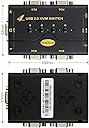
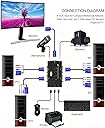
The JideTech 4 Port VGA KVM Switch is a compact, plug-and-play device that lets professionals control four computers using a single keyboard, mouse, and monitor. Supporting high-definition 2048x1536 resolution and integrated audio/mic switching, it enhances productivity with seamless device management. Its broad OS compatibility and included cables make it a cost-effective, reliable solution for streamlined multitasking in any modern workspace.


| ASIN | B071Y6C516 |
| Actuator Type | Push Button |
| Best Sellers Rank | #572 in KVM Switches |
| Brand | JideTech |
| Brand Name | JideTech |
| Circuit Type | 1-way |
| Color | 41UA |
| Compatible Devices | Windows, Unix, Linux, Mac, Computers, Servers |
| Connectivity Protocol | Usb |
| Connector Type | Usb,wireless |
| Contact Material | Metal |
| Contact Type | Normally Open |
| Control Method | Push Button |
| Control Type | Manual |
| Controller Type | Push Button |
| Current Rating | 2 Amps |
| Customer Reviews | 4.4 out of 5 stars 986 Reviews |
| International Protection Rating | IP60 |
| Item Dimensions | 1.96 x 3.15 x 3.15 inches |
| Item Weight | 0.6 Pounds |
| Manufacturer | JideTech |
| Material Type | Plastic |
| Model | 1 |
| Mounting Type | Plug-In Mount |
| Number of Items | 1 |
| Number of Positions | 4 |
| Operating Voltage | 5 Volts |
| Operation Mode | Automatic,Push Button |
| Part Number | JD-41UA |
| Switch Type | Push Button |
| Terminal | Button |
| UPC | 716045930188 |
| Unit Count | 1 Count |
S**N
Fantastic Little 4-Port Divice!
I have been struggling working from home on my work laptop. I have bear paws for hands, and poor eyesight, so using a laptop keyboard and small screen made me uncomfortable, for many hours every day. My home setup has a nice keyboard and a huge screen. If only I could use the same keyboard and screen with my laptop? Enter this handy little gizmo! I just purchased a new desktop, but still have some use left for my old desktop, so needed more than a 2-port KVM. I ordered the 4-Port VGA switch and it arrived quickly and well packaged. The Instruction booklet covered many different models, the 4-Port VGA was just one of them (covered in two pages). Set-up was super easy. Plug in the "One" monitor, keyboard and mouse. Then using the INCLUDED special cables, connect those to the various computer systems. I started with my newest desktop, and my work laptop. Powered up the two computers, and BAM! I was looking at my "formerly tiny" laptop screen on my BIG home monitor. Pressed the little selection button on top and BAM! I was looking at my new Windows 10 desktop. A day later, I got around to connecting my old desktop, and now when I pressed the third selector button, you guessed it ... BAM! I was looking at my old Windows 7 desktop. It is SO easy to switch between them. There is maybe a 2 second lag between pressing the button, and seeing the new desktop appear. Could not be happier! Okay ... upon reflection, I could be a tad happier. The cables that they provide are a little on the short side. Only 4' long. I got them to work with my three computer set-up, but another foot of cable would have made things easier. Only other complaint/issue is just one of design. The box itself is small (smaller than my ordinary cell phone) and that means you will have something plugged into every single side. Makes the cables a bit messy. If the box were longer, so that the main ports were all on the "back" and the single monitor, keyboard and mouse were on one end or the other, I could tuck the box a little further under the monitor, and no big, black cable would be running across the desktop. But for this price, I am not taking a star away from the review. And in fact, I knew this going in, and bought it anyway, because my expectation is that I will soon get everything off the old and onto the new desktop, and then that cable can be removed. I bought the 4-port so that eventually, I would have just two computers plugged in on one side, and NOTHING plugged into the two front ports. Anyway ... to sum it all up. It has only been three days, but working from home, using a nice keyboard, and big monitor, has made my life so much more pleasant. I only wish I had known about KVM switches back in February! EDIT: It's been 45 days now, and this device is still fantastic. No issues. I can switch between the three devices without any issues
G**S
Simple Plug n Play w/good value!
The JideTech 4 port VGA KVM Switch is one of the easiest solutions to linking multiple computers to a single display. The Switch feels well made with a metal casing and does not require an external power source nor any software, a true plug and play device! Pro's: Purchase comes with 4 VGA/Audio/Mic combo cables making it really good value for what you get. The switch has LED light indicator so you know which device is currently connected. No external power supply required No software or drivers required 3 USB 2.0 Output Ports (Keyboard, Mouse, Auxiliary for printer or other device) 3.5mm Output Jacks for MIC & Speaker 2K Video resolution (2048*1536) Con's: Does not support multi-media keyboards Does not support wireless peripherals (but most VGA switches don't) Overall, the switch functions well, and Plug n Play is as easy as it gets. For the price, you get some nice features and the included VGA Cables add value. The wireless peripheral support is a bit of a bummer and there really isn't a work around for it (I was not able to find a way to shut off the emulator). If you're set on using a wireless keyboard and mouse, you will need to go for a HDMI or Display Port KVM switch. The other alternative would be to invest in a Bluetooth Keyboard and Mouse that can pair to multiple devices, but then that would require that all devices hooked up to the switch support Bluetooth as well. Note: In an attempt to get wireless peripherals to function, I did reach out to Customer Service via Amazon's 'Contact the Seller' service. The response time was very quick--within 24 hours (including Sundays!) Unfortunately, I was informed that there is no way to turn the emulator off on this model switch. Perhaps they'll incorporate a emulator switch or button sequence in a updated future model.
R**G
How the sound gets to the hub....
April 2020 ---Just installed this for 3 desktops: win10pro, win7pro, XP. Works fine with all 3 and switches flawlessly. Instructions sheet is why I downgraded to 4 stars. It is the itty bitty typeface smaller than the proverbial print on the back of the aspirin bottle that is a real nuisance and I really did needed a magnifier to read it. IT would have been much more useful at about a cost of about 50 cents per unit to make this instruction folder twice as big with font twice as big in all dimensions.THe doc folder does not explained how to connect the cables or how they work as I will do here. The video/audio cables have just a VGA plug to connect to the KVM hub at one end and the other end has the VGA plug, a keyboard plug, a mouse plug and a usb plug to connect to a desktop. What is not explained is that it is only necessary to connect the usb and the VGA plugs - apparently - and this is not explained anywhere in the impossibly tiny print in the documentaion --- the VGA plug captures the video from the pc, and the usb captures the signals for mouse, sound and keyboard strokes. What is confusing is that these are all melded together at the PC end of the cable and the other end of the cable --- which only has a VGA plug ---- delivers all these signals --- the mouse, KB, sound and video. Once I figured that out everything worked ok. At the hub connection you can plug in your usb plug for headphones or you can pull that out and replug the headphones to only one of the desktops and the sound will go only thru the headphones whichever location it is plugged for that selected desktop. There is very tiny print on the hub labelling the input VGA cables as 1,2,3,4. Also the doc does not clearly explain the 3 OUT plugs on the Video out side of the KVM hub.
D**D
works great! glad i found this switch & vender
I had an issue with a company I am a sub contractor with. They wanted all their contractors to upgrade to win10 system and use latest office. Problem was I have other "nicer more understanding" clients who I needed to keep my win7 desktop due to several programs I needed that would not migrate to win10 (thanks Bill). A few at a major expense could upgrade most couldn't even buy an upgrade due to type of work specific software. Bottom line I needed to keep my win7 functional for my other clients while moving to win10 (the future?) with two desktops and limited space. Well this switch did great. It is VGA ports and so was my older win7 monitor. Also the new win10 computer now received wireless keyboard and mouse. Very easy set up just plug into ports on router the VGA cord from monitor, put in the reader for wireless mouse/keyboard in port labeled as such and then plug in the speakers. Then use ports for output and plug into the computer for each one. Great it all worked. The default is to go to PC1 so hook that to one you will use more often but can turn them both on and switch back and forth to each other on screen. I had a printer hardwired into win7 computer and was moving that back and forth in computer tower USB ports since HP told me not to plug into switch. The vender had sent me a follow up to make sure all was working well for me and I mentioned that and they said just plug into the USB input the printer cable and guess what printer now works on both computers whenever I activate the switch to use them. This is great if you need two systems. Friend of mine had same issue with older non compatible programs and plotter/printers to win10 and told him about this and now he is set up to not deal with all the plugging and unplugging. The seller was great - never had a seller on Amazon follow up asking if system worked ok and when I did ask question on printer responded to me. Can't say enough about product and seller!
A**R
Great KVM switch
My old KVM switch would not work with my logitech K750 solar keyboard and MX Anywhere2 wireless mouse. They both use the Logitech unifying dongle, as a result I had to use an old Logitech BlueTooth mouse and keyboard with my old KVM switch to operate my 4 PC's. From the reviews I was hesitant about whether the JideTech KVM switch would work with my K750 and MX Anywhere, but its working like a charm. Pros: 1) Very compact, use less space than my old KVM 2) Cables are also less intrusive, this is due to the USB design. 3) Works with Logitech Unifying Dongles and Software 4) Very economical, other KVM switches I looked were costlier and larger! Cons: 1) Instruction Manual was vague as to how to connect wireless Keyboard and Mouse. After experimenting, I determined that you had to insert the Logitech dongle into the USB Hub outlet instead of either the keyboard or mouse usb outlets. Once I did this every PC I switched to recognized my Logitech unifying mouse and keyboard. 2) Has 4 buttons to switch up to 4 PC's instead of 1 button, but this is a very minor concern in my opinion. Overall, in summary, this a great little KVM switch for those looking to reduce clutter around their PC area from older oversized kvm switches with their older larger accompanying cables!
A**N
great value for money
Works flawlessly as described. The device itself is pretty small -- not so large as it appears in image, so good. The only "con" I can think of is that the wires are pretty sturdy and so lots of wires will clutter up the space -- so have plenty space behind the monitor to tuck the wires away. Other than that this is very good product and works as advertised. It arrived well in time. Even if you do not need to connect monitor -- still it is a good solution to connect 4 computers to share keyboard/mice and external Hard-disk. or printer. In fact I am planning to use the 3rd USB port (there are 3) to connect a 4 port USB and thus share several hard disks. I just ordered one -- will see how it goes. Bottom line -- with just $30 price tag, and so much functionality, you just can't lose on this deal.
J**L
Functional with issues
I bought this KVM switch almost a year ago. I needed a KVM that would handle three computers. The first thing I noticed is that my monitor would shift into blue (tint) screen mode. I thought the monitor was the issue. Tried a different monitor, and it did the same thing. When monitor is connected directly to PC, there was no blue tint issue. The Mouse sporadically freezes when connected to the KVM, and the keyboard will act like I'm holding down a key for an excessive period of time, even though I'm not.... particularly with the letters e, i, and n.... so then I have to correct what I'm typing after the KVM decides it's had enough fun with those letters repeated a bazillion times. Thankfully this was not a super expensive produce.
F**K
Compact & simple but effective
This little KVM did exactly what was expected, no issues. Shipped quickly and attractive price point. No documentation but easy to set up and use. No power supply required; bus power. Channel switch buttons were a little "clicky." Not sure if there is a hot key to switch channels although I didn't contact tech support to inquire since the buttons suited my needs. Didn't experience any video aberrations when switching channels and didn't suffer switching delays. Cables were adequately long enough and not cramped on the KVM end. The device wasn't picky about which USB port the computers used (some KVMs are a little finicky about this). Didn't try using the USB port for flash media but that would be an unexpected bonus if it works! If 4 ports are enough, you cannot go wrong with this one.
A**N
Very easy to set up
All the cables needed were supplied and tidy. Very easy and straight forward to set up. Worked no problem.
F**N
conmutador
perfecto, ya habia usado este articulo
R**O
Todo en uno
Fácil de usar y reconocer en equipos Windows Mac y Linux. Excelente definición para monitores buena calidad en transferencia de sonido
L**O
Prodotto completo e di qualità
D**N
Bon fonctionnement
Bon fonctionnement pour l'instant.
Trustpilot
1 month ago
3 weeks ago