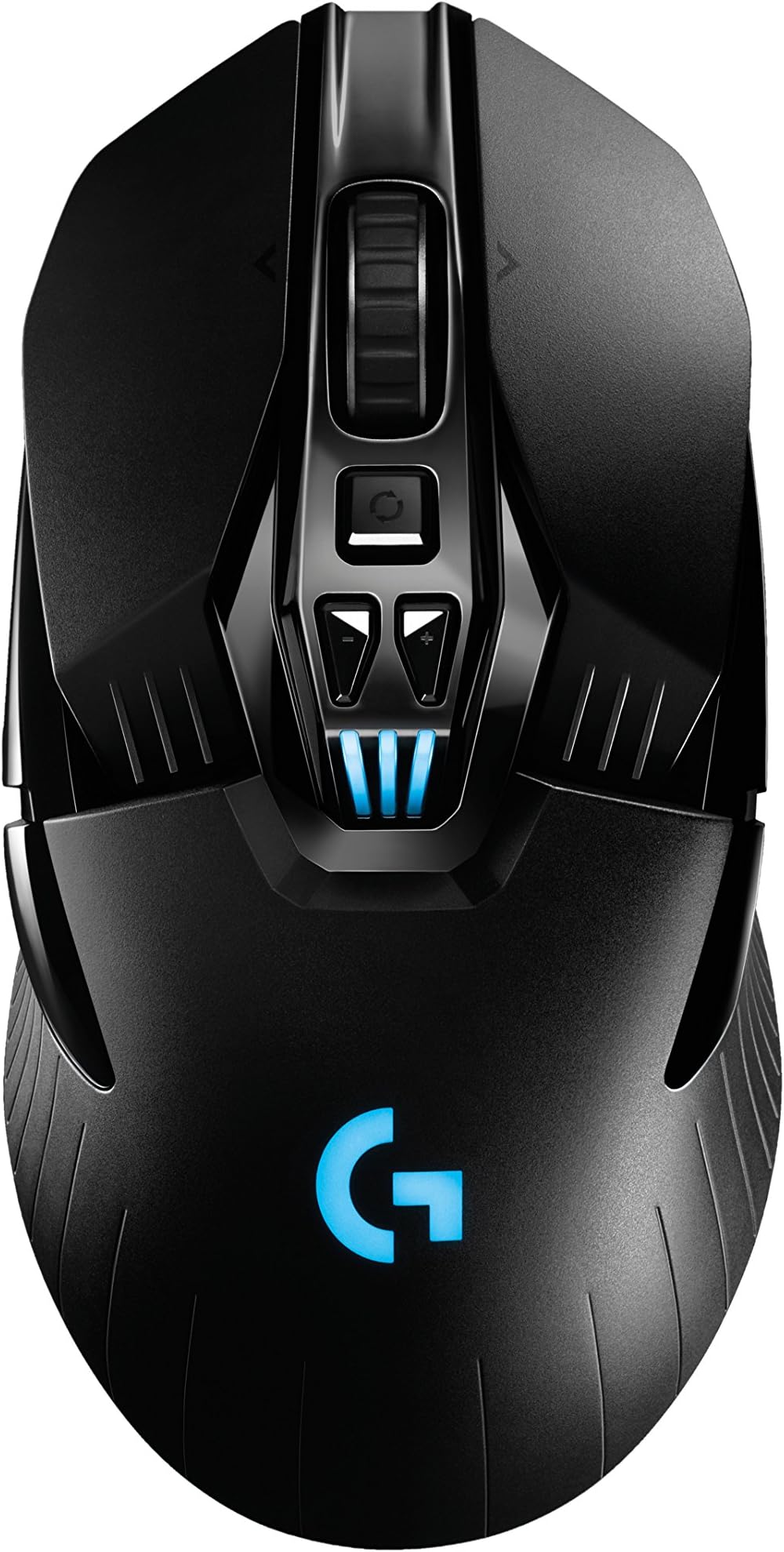
🎮 Dominate wirelessly, charge endlessly, game flawlessly.
The Logitech G903 Lightspeed is a professional-grade wireless gaming mouse featuring a 1 ms LIGHTSPEED wireless connection, the industry-leading PMW3366 optical sensor with up to 12,000 DPI, and an ambidextrous design with customizable buttons. Compatible with Logitech’s POWERPLAY wireless charging system, it offers up to 32 hours of battery life and is engineered for competitive gamers seeking precision, speed, and uninterrupted play.
| ASIN | B0716ZFWWV |
| Additional Features | Wireless |
| Antenna Location | Gaming |
| Are Batteries Included | Yes |
| Are Batteries Required | Yes |
| Battery Average Life | 32 Hours |
| Best Sellers Rank | #25,439 in Video Games ( See Top 100 in Video Games ) #853 in PC Gaming Mice |
| Brand | Logitech |
| Built-In Media | mouse, user guide |
| Button Quantity | 11 |
| Color | black |
| Compatible Devices | Personal Computer, Laptop, Chromebook |
| Connectivity Technology | Wireless |
| Customer Reviews | 4.0 out of 5 stars 2,285 Reviews |
| Enclosure Material | Plastic |
| Global Trade Identification Number | 00097855129994 |
| Hand Orientation | Ambidextrous |
| Hardware Platform | PC |
| Item Dimensions L x W | 5.4"L x 2.5"W |
| Item Type Name | Logitech 910-005083 G903 LIGHTSPEED Gaming Mouse with POWERPLAY Wireless Charging Compatibility |
| Item Weight | 3.77 Ounces |
| Manufacturer | Logitech |
| Model Name | Logitech G903 Lightspeed Wireless Gaming Mouse |
| Model Number | G903 |
| Mouse Maximum Sensitivity | 12000 Dots per Inch |
| Movement Detection | Optical |
| Movement Detection Technology | Optical |
| Number of Batteries | 1 CR2 batteries required. (included) |
| Number of Buttons | 11 |
| Operating System | Chrome OS, Windows 7 |
| Power Source | Battery Powered |
| Range | 1.8 meters |
| Special Feature | Wireless |
| Style Name | LIGHTSPEED & POWERPLAY ready |
| Theme | Gaming |
| UPC | 097855129994 |
| Warranty Description | 2 - year limited warranty |
B**D
A mouse that is perfect in every respect
Everyone is invited to the Wedding. Yes! I do luv this mouse. 1st child will be named, Jerry. And if the second is a boy, it will be named, Mickey. Ever find everything you ever wanted in a mouse? A mouse that is perfect in every aspect? The Logitech G903 is the one and the only mouse for me! After 7 months with the Razor Taipan and 9 months with the Razor Mamba (2015 edition), the Taipan is still my corded mistress mouse and it is working strong. See, it was great before I got the Mamba and filled in great when my Mamba stopped working and I couldn't be happier with its performance. And the (Wireless) Mamba is great too; it’s just not working anymore. My Mamba recently had its laser fail/ stop working; just days after its rubber thumb pad started coming off it. Razor is replacing it fast- I hope; I just called them and started the process of replacing it. And I will use both of those products and I highly recommend them both too. Back to the Logitech G903: I played Tom Clancy's The Division for the 1st time in a week on the day my new G903 arrived and couldn't have been happier. First thing I noticed was that after getting used to just 700 dpi and 900 dpi with the Razor Taipan and the Mamba; I immediately noticed that the Logitech G903 was very comfortable to play with at just 500 dpi and 700 dpi. And on my Windows 7 desktop PC, doing everyday stuff at 900 dpi is bliss. Whereby on the Razor Mamba and on the Taipan, 1100 dpi was the lowest comfortable dpi I could manage for doing desktop PC stuff. So it must be the superior sensor (PWM3366) on the Logitech G903 that makes for a much lower dpi that feels so unbelievably comfortable. The default DPI settings are 400, 600, 800, 1000 and 1200. I configured my DPI switches to 500, 700, 900, 1100 and 1300. The default may be based on Logitech engineers choosing what would be best on 1080p LCDs. But I have a 1440p LCD. Maybe that explains that. Note: The PMW3366 sensor is implemented on Logitech’s G303, G403, G502, G703, G900, G903 and the Pro. So, if you don’t want to spend the extra money- and I am as frugal as they come- a less expensive Logitech mouse with a PMW3366 sensor is an option. (I traded off for years and used inexpensive mice and other things in order to better afford higher priced computer hardware like video cards and CPUs and Motherboards and RAM I wanted. But last year I started making up for it and began purchasing the best mice too.) Maybe there's dumb luck involved in my case. That having 1st used the Razor Taipan and having next used the Mamba resulted in an even more unbelievable Logitech G903 feel in the hand. To me, the G903 is definitely like a combination of the two. As if they were merged into the exact shape of the G903. For Gamers and Tech inclined ppl: As far as the need to charge and how to configure the G903... start with using the Option in the Logitech Gaming Software settings to leave the DPI LED lights on all the time. (Go to Settings/G903 Tab.) Then, in the main window of the Logitech software, make the LEDs solid Red or Green based on your video card. Next, have the Logo LED Breathing the same color and dim it to at least 50%, in order to save battery. And use the breathing Rate of 65%- it looks cool. Next, learn how to make it so your PC does NOT wake-up from Sleep Mode if the mouse is clicked or moved. (Go to Windows Control panel for Mouse/ Hardware Tab and find Power Management Tabs there. And also use Windows Device Manager for the Mice category but also the HID category and the Keyboard category. All of them need checking for Power Management Tabs. But a complete restart must also be applied after all Power Management Tabs are found and set to not waking PC. The Details Tab for each device will help differentiate between generically named devices. Just look for "First Installed Date".) Use your Keyboard to wake your PC. I like using the "Esc" key. It's easy- especially if you’re used to playing and maybe modifying a lot of games- to always quickly tap “Esc”. Once your PC is configure said way, in addition to always knowing what your current DPI is while playing games, having the DPI lights on all the time, is a great reminder to switch off the mouse after the PC is put into sleep mode or when it is turned off. (Just turn the mouse upside down and flick the on-off switch to the left to turn it off.) And always switching off a wireless mouse, when the PC is sleeping, or when it is off, is the best approach for maximizing charges and minimizing frequency of charging and simplifying an all around approach to the battery’s life, optimization and overall game plan. Battery life, after a full charge, is 26+ hours of gaming. All ^^ will be a whole other story when the "Logitech Powerplay Wireless Charging System" (only for the G703 and the G903 Gaming Mice) is available. And DON'T hold your breath. Maybe "twiddle your thumbs a whole lot" is the best recommendation for now. But when it is in full stock, and it can be purchased on a regular basis- LOOK OUT! The G903 will absolutely be so much better. Not that is isn't great without it. Just think of sleeping in a cabin on a dirt floor versus a super luxurious Hotel bed. lol That's what the Powerplay pad (Charging System) is going to do for the G903. I think my current mouse pad only cost $9.99. But it will be worth it ($99.99). It won't matter for my Razor Taipan or Mamba but the G903 deserves a Powerplay Wireless Charging System. Oh, does it ever! :-) Battery charge will never go down with the Powerplay Wireless Charging System, and it is programmed to optimize the battery including the life of the battery. So when it is available- and if my thumbs still work- I will be getting one too. Until then it doesn't matter. This is a mouse for life, as is!
T**.
A Great Mouse
This mouse has a great hand feel and thank goodness does not hurt my hand. The mouse is really accurate and you can adjust the sensitivity and light color in the software that you download off their website. Buttons: The scroll wheel is grooved and is easy to grip with your finger. It is hard to click down. It clicks side to side well. The button below the scroll wheel lets you change it from incremented to free rolling. This is a really nice feature as it lets you either scroll really fast and smoothly or go slowly through a webpage, document, or game feature. I had to adjust the scroll wheel in the Windows menu to get it to work properly. I have mine set to 2 lines at a time. The two buttons below that are to change between DPI so you can move your mouse faster or slower around the screen (this does not change sampling time, you can change that in the software if for some reason you wanted to). I really like how you can change the different available DPI levels through the software. The three lights below that show a lot of things. When you power it on it or wake it up it shows battery level. When you press the two DPI buttons it shows which setting you are on with one light on the left being the lowest DPI, three lights on being the middle DPI, and one light on the right being the highest DPI. When you are switching through profiles it also shows which number profile you are using. The G-light can be customized in the menu to stay on a specific color or range of colors or stay solid a certain color. The brightness and rate of pulse can be changed in the software also. I have mine pulse a low brightness blue slowly. The left click and right click button click easily. A nice middle road, where it isn't too easy as you'd accidentally press it but that if you move your finger with the littlest of effort it will click. It makes a normal but nice clicking noise. The buttons on the side are default forward and back in the browser, but you can change them to do a specific key or a key combination. You can also change the side buttons to be on the right side if you are a left-hander or if you really like buttons have two on both sides for a total of four. They can be a bit annoying because when you are turning the mouse over to turn it off you can easily accidentally press them. the power switch on the bottom is nice as it has green visible when on and red visible when off. The button below the power changes your profiles and the number of the profile can be seen on the three lights and if you change the profiles by the G-light color. You can add weight to the mouse by adding the weight. I added the weight because it is way too light otherwise. I wish that it can with more weights so that you could customize the weight. Plug plugs in really easily to the front of the mouse because it has those prongs that guide it. The battery lasts a good long while in my opinion, but you do have to recharge it I'd say around 24 hours of active play. The mouse goes to sleep when not in use to save battery, but doesn't do that annoying thing where you have to ghost click to wake it. I wish the material wasn't just plastic. It feels nice but I can imagine it being a nicer material and feeling so much nicer and looking so much cooler. The adapter thing didn't work with my long usb cord for some reason. Charges fine without the adapter thing so it doesn't really matter. Overall a great mouse.
S**N
Double click issue! Do not buy this mouse!
Update 2: Been using my new mouse for almost a week now and I am STILL finding myself doing things carefully and differently because I am so used to using this mouse with its extra clicking issues. Don't let a broken mouse change up your computer using behavior, buy a less expensive mouse that won't break in a few months. UPDATE: I was actually able to temporarily solve the double clicking issue. Apparently these mice gather static electricity from the charging pad and this causes the double clicking, the solution is to unplug the mouse pad, turn the mouse off, and click the button repeatedly for about 30 seconds. To my surprise this worked, for a few days at least, then I needed to do it again. However this did NOT solve the other problem I was having with this mouse, which is if you need to click + drag and you're holding down the mouse button but move your finger slightly on the mouse button then this is registered as a click and thus you stop clicking + dragging and have to start the clicking + dragging process all over again. Very aggravating. I could have lived with dissipating the static electricity every few days but having this problem with click + drag was too much for a mouse I spent so much money on. I ended up buying a 30 dollar mouse from a company I had never heard of before but had received a lot of great reviews. Not a single person complained about double clicking with the mouse I bought. This mouse so far has no double clicking issues and no issues with the click + drag, but to be fair I've only had it for a day. It's just sad that Logitech, a big name company I have had faith in and respect for for literally decades, charges 100+ dollars for a mouse and 150+ dollars for the mousepad to go with said mouse for the automatic charging feature, makes a far more inferior product than a little known company that only charges 30 dollars for their mice that has almost the exact same specs and features, other than the wireless and charging mouse pad. I am never buying a Logitech product ever again, unless they get their act together and stop relying on their name recognition to sell products instead of making quality products to begin with. Original review: The mouse + mousepad combo is awesome. A wireless mouse that never needs batteries or charging because the mousepad charges it. It's also a nice mouse in its own right. HOWEVER, after a couple of months you'll notice the mouse starts to "double click" when you just press the button once. I have been using mice for 30 years and have literally never had this problem before. It's so aggravating. You really can't do anything with this mouse because it's always double clicking. Trying to click one on a video on play it? Nope! This mouse double clicks so plays it then immediately pauses it. Trying to just click once in a game to do something? Well too bad, this mouse will click multiple times. Trying to double click a folder to open it? This mouse is going to double click that folder THEN keep clicking to open the next folder or file. At first I didn't even realize there was a problem with the mouse because again after 30 years of using dozens of mice I have never seen this problem before. I honestly thought I was just going crazy and had forgotten how to use a mouse. Then the problem became noticeably worse, just about every single click became a multi-click. Just now I tried to double click a word to highlight it so I could hit "delete" to delete the word, it clicked so much it highlighted the entire paragraph and deleted so I had to alt-z to get it back. Imagine how aggravating this would be for every single thing you do with your mouse. I then thought "Okay, this mouse and pad cost me over 250 bucks, maybe I'll get used to this double clicking nonsense." I then started changing my behavior, actually changing the way I do things to try and avoid the double click issue. Whereas before I would double click to my heart's content because it had always just worked, I now found myself very carefully trying to execute a double click so as not to anger the G903 Mouse Gods. At this point I figured screw the money I'm out, I'm not going to get used to doing things a different way because this damn mouse can't work properly. I now feel like a fool because going through the reviews there were several that mentioned this problem with a date before I bought this mouse, so the warnings were there. But I feel like those reviews were probably pushed down from all of the reviews of people who didn't yet know of this double click issue (or somehow got lucky and never experienced it) or those are just paid reviewers or Logitech employees, because no way can anyone give this mouse a good review unless they have never encountered this problem. Please save your money and more important save your sanity! Do not buy this mouse and let it control you. Only reason I'm using it right now is because just a couple of hours ago after doing more research on this I found out its a hardware problem and apparently a pretty common one and have finally decided to buy a new mouse. Figured I would leave a review for this garbage before looking for a new mouse. This is such a shame too because I love Logitech, I have a Logitech keyboard, and this mouse and charging mousepad combo. But this is just unacceptable. Did they do no testing at all with these mice before selling them? The single most important thing for a mouse to do is to click reliably and this mouse can't do it. Don't they put a few dozen of these through some sort of mass clicking tests to see how well the buttons hold up after repeated usage? Or did they just play around with the finished product for a few minutes then pat themselves on the back for a job well done? The sad truth is they probably knew full well about the problem before selling the mice but had already devoted the time and resources into creating the finished product and pushed the mice out the door to make some money before too many people found out about this issue and warned others away from buying it. And for this reason I don't think I can ever support Logitech again.
A**E
the way it holds is great. I was a little skeptical going in
I've only had it for a few days now, as of writing. The few of the mouse fits my hand, the quality of the texture, the way it holds is great. I was a little skeptical going in,a nd to be honest, I was gambling hard on money I barely have. I really liked this mouse tho. I play a lot of idle games, with clicking components, making the mouse macros do the things they do, without individually programming hotkeys to specific screen regions, and things, and having to fine tune every single one is a breeze. The logitech G903 is a premium product, the charging is nice, the feel of a wireless mouse and its reponsiveness is superb. Not having the pull of the cable feels freeing, and feels really good to have. The weight it came with is sufficient, although I wish it was a tad bit heavier. But nothing i can do about that. For now, its a fantastic addition, my complaints really as they are, mainly come with how scary it is to pop off the buttons on this mouse, being that it costed me $120, I was afraid to break it, when putting on the new buttons, on the right side, since im left handed. And taking the bottom panel off. It may not be obvious when buying ti, or maybe it is. But theres also a power switch to turn the mouse off. Once I realized that existed, the rest was straight forward.
J**R
Works well until you have to dust it.
Pros: Everything is relatively good with the mouse, my favorite part is the auto scroll wheel as it has become a habit to turn it on and do 1 scroll out instead of like 5 seconds of scrolling out on normal scrolling. The lighting on it is pointless because your hand covers up the logo when you're using it. The DPI controls are really easy to use as the buttons on top change the DPI within the profile, and the weird square on the bottom of the mouse switches profiles on the Logitech gaming software. The profiles are saved onto the mouse and not the software, meaning you can take your mouse to a competition or whatever and not worry about setting up a profile. Cons: The only issue I've ever had with it is the buttons not holding a click or double clicking sometimes, I RMAd the first one originally, (which didn't cost me anything besides a small amount of time), and the next one I had it turns out that you can just use some compressed air under the buttons for a few minutes at different angles to get any dust out of them. This seems to work and might not be a permanent fix, but it's working for me currently. Another negative would be that tracking can sometimes be annoying and jumpy/lag like even though you aren't lagging. It will usually resolve itself and idk what causes it. Just note though that when you start use it on your PC, you'll want to use the tracking section on the software to set it do the surface you're using or else the tracking is nonexistent by default. Other Thoughts: The wireless is nice and all, but for how much the mouse costs even on sale, you might want to look into some cheaper wired ones if you're just wanting a good gaming mouse and don't care much about the special features like the on the fly DPI buttons or side buttons. A streamer I've watched and haven't heard complain about it has the Razer Abyssus Elite, which is around $50 if you don't get the D.va model. He's always playing Top 500 overwatch with it and I've never seen any tracking or click issues on his stream. Some people think the G903 doesn't have the best ergonomic feel, but I've had it for a couple years or so with multiple thousands of hours of gaming and haven't had a problem with the grip/shape of it.
A**R
A Perfect Mouse!
The Logitech G903 LIGHTSPEED Gaming Mouse is for gamers who want precision and control. You don’t need to worry about a cord getting in the way of your movements; because it doesn’t have one. Unlike other wireless mice that require batteries to run, the G903 is rechargeable. The battery has a lifetime of 24hrs. It came as a surprise how true this is. Days have passed without the battery remotely getting close to low. This means you don’t need to scour through your home when your mouse dies, looking for any desolate AA battery. The simple design is symmetrical so right-handed and left-handed people can use the same mouse. Even though this mouse is what you are looking for, the price seems steep. I purchased it for $110 knowing there are much cheaper mice out there. Another potential issue that a worry about is remembering the additional cord for the mouse. In an age of every product needing a different charger, keeping track of them all can be a challenge. In the long run, I am happy about my purchase and recommend it to others. Regardless of G903’s weaknesses, it looks amazing lit up next to any computer setup and works satisfactory to my needs. The sensor picks up my movements smoothly and will little to no latency. In addition, the extra buttons have made programs easier to execute. The scroll wheel has worked flawlessly since I got it even though I primarily use it for web browsers. If my mouse were to break, I would get the G903 gaming mouse.
J**M
Let's be serious about a "gaming" mouse. Also, save money with the G900 instead.
I am not really a person who plays many games. I work with a mouse and have certain criteria I find important. These are: 1. A scroll wheel that is both ratcheted and smooth as I choose. 2. Has buttons that are easy to reach with all the fingers. 3. Is rechargeable. 4. Can work with a cord if necessary. 5. Easy to control DPI depending on the work I'm doing. 6. Tracks well so I don't find it creeping toward the edge of the pad during long sessions. 7. Is cordless so that I don't have to tangle with a cord getting in my way. 8. Customizable buttons for certain odd software that requires arcane key combinations. 9. I like that I can press a button on top of the mouse to change the scroll wheel mode. 10. The scroll wheel can move to either side to scroll horizontally, if desired. 11. It is light and easily glides along. Weight can be added, but why? Personal choice, I suppose. 12. I like that the mouse is totally suited for either hand. Not everybody is right handed. This mouse also has things I do not care about: 1. Silly lights that use battery power. Thankfully, they can be turned off wasting whatever extra this "feature" cost me. 2. Ridiculous shape that will only make dusting and cleaning the mouse more difficult. 3. The option to spend lots of money on a charging mouse pad. I'll keep my 3M pads, thank you. 4. "Gaming" software for setting up the mouse that doesn't have all the functions that the windows mouse setup has. For instance, you can't set the number of scroll lines or the left-click speed. 5. Super-sensitive left and right click buttons. OK, gamers really need this so it's a compromise I'll accept because this mouse has so many other features that I like. It took some time to train myself to stop putting weight on the right button and clicking it in error. My problem, not the mouse's. 6. No actual instruction booklet! You just have to piece random bits of info together from the help file and faq pages. It's a very expensive mouse and it does look silly. I wish Logitech would make a mouse with these features with a more conservative appearance. I have tried the MX Master 2S and it is so big and clunky. The Anywhere mouse is nice, but too small for my hands. The Triathlon is the closest to this mouse in useful features. If you don't want to spend all the money, I'd recommend looking at the Triathlon. However, if you don't care at all about the wireless charging gimmick, get the Logitech G900 while it is still available. It's about 30 bucks less and is identical to the G903 except for the wireless charging...
B**N
Five Stars
Great mouse! It's bigger than I expected which is good, and the feel of it is excellent and so is the signal strength! GREAT mouse for quake champions! Update: August 2018: After using this mouse for several months, I still like the mouse, however, the left mouse button doesn't always respond when clicking it. I find myself having to push the very top of the left mouse button in order to get it to click and do what it's suppose to. A lot of the time when I'm gaming, the left mouse button acts as if its not even being pressed. Very disappointed in this. If Logitech is able to fix this under it's warranty I might consider keeping it, otherwise am looking to get the ASUS gladius II origin. Also, I have seen numerous complaints about this left mouse button for the G903 and not the G900.
Trustpilot
2 weeks ago
3 weeks ago